C2G C2G-C - User Manual
C2G C2G-C Adapter – User Manual, read for free online in PDF format. We hope this helps you resolve any issues you may have. If you have further questions, please contact us through the contact form.
DATA SHEET
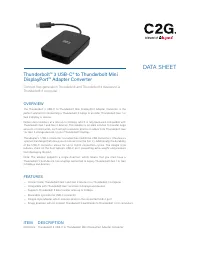
Thunderbolt™ 3 USB-C® to Thunderbolt Mini
DisplayPort™ Adapter Converter
Connect first-generation Thunderbolt and Thunderbolt 2 devices to a
Thunderbolt 3 computer
OVERVIEW
The Thunderbolt 3 USB-C to Thunderbolt Mini DisplayPort Adapter Converter is the
perfect solution for connecting a Thunderbolt 3 laptop to an older Thunderbolt Gen 1 or
Gen 2 display or device.
Deliver data transfers at a rate up to 20Gbps, which is fully backward compatible with
Thunderbolt Gen 1 and Gen 2 devices. This adapter is an ideal solution to transfer large
amounts of information, such as high resolution photos or videos from Thunderbolt Gen
1 or Gen 2 storage devices, to your Thunderbolt 3 laptop.
The adapter ’s USB-C connector is smaller than traditional USB connectors. It features a
symmetrical design that allows you to connect it on the first try. Additionally, the durability
of the USB-C connector allows for up to 10,000 connection cycles. The dongle style
reduces strain on the host laptop’s USB-C port, preventing extra weight and pressure
from damaging the port.
Note: The adapter supports a single direction, which means that you must have a
Thunderbolt 3 host device, like a laptop connected to legacy Thunderbolt Gen 1 or Gen
2 displays and devices.
FEATURES
— Connect older Thunderbolt Gen 1 and Gen 2 devices to a Thunderbolt 3 computer
— Compatible with Thunderbolt Gen 1 and Gen 2 displays and devices
— Supports Thunderbolt 2 data transfer rates up to 20Gbps
— Reversible, symmetrical USB-C connector
— Dongle-style adapter, which reduces strain on the connected USB-C port
— Single direction, will not connect Thunderbolt 3 peripherals to Thunderbolt 1 or 2 computers
ITEM DESCRIPTION
C2G29514 Thunderbolt 3 USB-C to Thunderbolt Mini DisplayPort Adapter Converter
"Loading the manual" means you need to wait until the file loads and becomes available for online reading. Some manuals are very large, and the time they take to appear depends on your internet speed.