Brother PR-600/600C- User Manual
Brother PR-600/600C– User Manual, read for free online in PDF format. We hope this helps you resolve any issues you may have. If you have further questions, please contact us through the contact form.
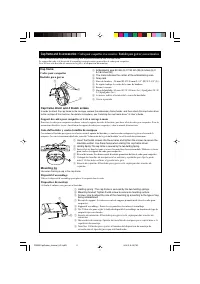
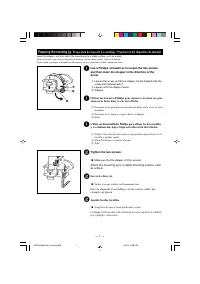
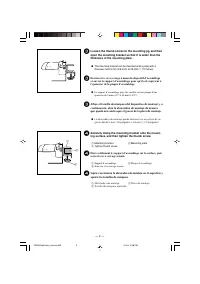
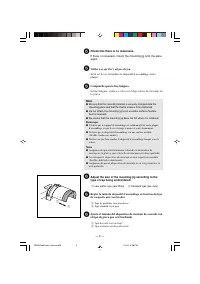
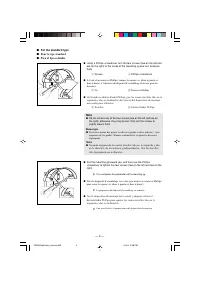
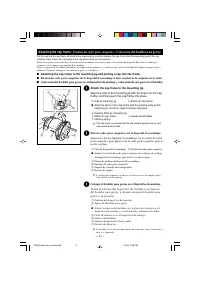
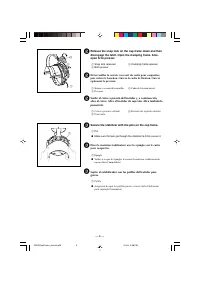
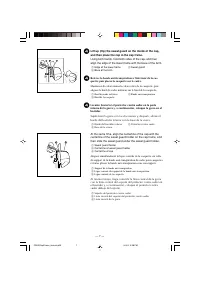
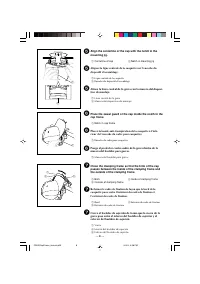
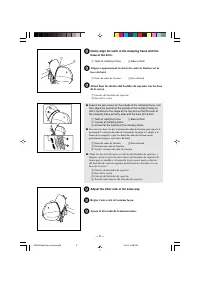
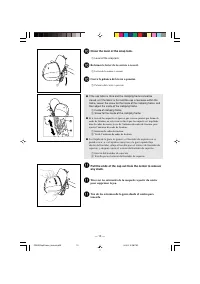
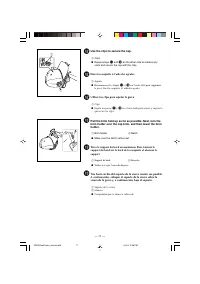
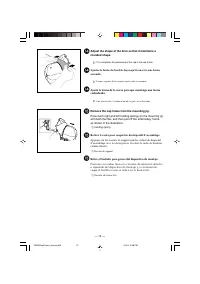
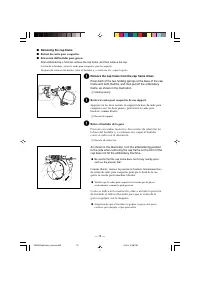
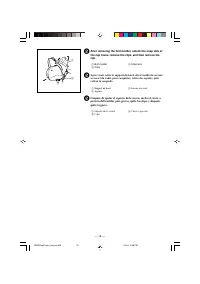


Table of Contents:
- Page 2 – Cap frame; The mark indicates the center of the embroidering area.; Cap frame driver and 4 thumb screws; Holding Spring: The cap frame is secured by the two holding Spring.; Mounting jig; Dispositif d’assemblage; Holding spring : The cap frame is secured by the two holding springs.
- Page 3 – Loosen until the stopper moves.; Tighten the two screws.; Make sure that the stopper is firmly secured.; Apriete los dos tornillos.; Asegúrese de que el tope queda bien sujeto.
- Page 5 – Be careful that the mounting jig does not fall when it is removed.; Remarque
- Page 6 – Screws; Note
- Page 7 – Attaching the cap frame /
- Page 8 – Secure the stabilizer with the pins on the cap frame.; Pin
- Page 12 – Close the lever of the snap lock.; Lever of the snap lock; Refermez le levier de la serrure à ressort.; Levier de la serrure à ressort; Cierre la palanca del cierre a presión.; Palanca del cierre a presión
- Page 14 – Remove the cap frame from the mounting jig.; Holding spring; Retirez le cadre pour casquettes du dispositif d’assemblage.; Ressort de support; Retire el bastidor para gorras del dispositivo de montaje.; Resorte de retención
- Page 17 – Retirez le cadre pour casquettes de son support.; Retire el bastidor de la guía.
Table of Contents
Cap frame and its accessories
Preparing the mounting jig .................................................................. 1
■
For the standard type .................................................................................... 4
Attaching the cap frame ........................................................................ 5
■
Attaching the cap frame to the mounting jig and putting a cap into the
frame. ............................................................................................................ 5
■
Attaching the cap frame to the embroidery machine ................................... 13
■
Removing the cap frame ............................................................................. 15
Table des matières
Cadre pour casquettes et accessoires
Préparation du dispositif d’assemblage ........................................................... 1
■
Pour le type standard .................................................................................................. 4
Fixation du cadre pour casquettes .................................................................... 5
■
Fixation du cadre pour casquettes sur le dispositif d’assemblage et mise en place
de la casquette sur le cadre ......................................................................................... 5
■
Fixation du cadre pour casquettes sur la machine à broder ...................................... 13
■
Retrait du cadre pour casquettes ............................................................................... 15
Contenido
Bastidor para gorras y sus accesorios
Preparación del dispositivo de montaje .................................................... 1
■
Para el tipo estándar ....................................................................................... 4
Colocación del bastidor para gorras ......................................................... 5
■
Colocación del bastidor para gorras en el dispositivo de montaje y
colocación de una gorra en el bastidor ........................................................... 5
■
Colocación del bastidor para gorras en la máquina de bordar ...................... 13
■
Extracción del bastidor para gorras ............................................................... 15
Cap frame User’s Guide
Manuel d’instructions du cadre pour casquettes
Manual de instrucciones del bastidor de gorras
PR600CapFrame_manual_h1-4.p65
04.6.2, 4:59 PM
3
"Loading the manual" means you need to wait until the file loads and becomes available for online reading. Some manuals are very large, and the time they take to appear depends on your internet speed.
Other Manuals for Brother PR-600/600C
Summary
Cap frame and its accessories / Cadre pour casquettes et accessoires / Bastidor para gorras y sus accesorios The cap frame driver and the mounting jig are required in order to use the cap frame. Le support du cadre et le dispositif d’assemblage sont nécessaires pour utiliser le cadre pour casquettes...
— 1 — Preparing the mounting jig / Préparation du dispositif d’assemblage / Preparación del dispositivo de montaje Lower the stopper, and then attach the mounting jig to a stable surface, such as a desk. Abaissez la butée, puis fixez le dispositif de montage sur une surface stable, telle qu’un burea...
— 3 — 5 Check that there is no looseness. If there is looseness, mount the mounting jig onto the plateagain. 5 Veillez à ce qu’il n’y ait pas de jeu. Si tel est le cas, réinstallez le dispositif d’assemblage sur laplaque. 5 Compruebe que no hay holgura. Si hay holgura, vuelva a colocar el dispositiv...


