Page 4 - Carton Components; Setting up the Print Server
3 Carton Components 1 NC-7100w wireless print server 2 Quick Setup Guide 3 CD-ROM (including setup software and NC-7100w Network User’s Guide) What is supplied on the CD-ROM 1 Brother Solutions CenterThe Brother Solutions Center ( http://solutions.brother.com ) is a one-stop resource for all your pr...
Page 5 - English
4 English 5 Put the NC-7100w print server connector firmly into the connector of the main controller board by aligning the two screws to the groove of the printer, and then secure it with the two screws. 6 Close the interface access cover. 7 Put the side cover back on. 8 Plug the printer back in and...
Page 6 - Continue to Step 3; For Windows
5 To communicate with the un-configured NC-7100w change your wireless PC settings to: Communication mode: Ad-hoc (channel 11) Network name (SSID): SETUP (case sensitive) Encryption: None Please refer to your wireless card manufacturer instructions for changing the wireless settings. And then go to S...
Page 7 - For Mac OS
6 English 5 Check the wireless network connection status. It may take a few minutes to change from 0.0.0.0 to 169.254.x.x IP address to be shown on screen (where x.x are numbers between 1 and 254). 1 Click the AirPort status icon and select Open Internet Connect.... 2 Click the Network tab to see th...
Page 8 - Configuring the Print Server
7 Configuring the Print Server 1 Insert the CD-ROM into your CD-ROM drive. (For Windows ® users) The opening screen will appear automatically. (For Mac OS ® X 10.1 to 10.3 users) Double-click the NC7100w icon on your Macintosh ® , and then double-click the Start Here icon. 2 Select your language. 3 ...
Page 13 - Other Information
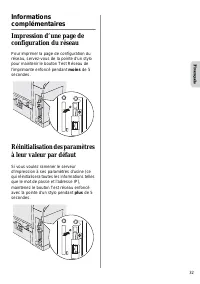
12 English Other Information How to Print a Network Configuration Page To print the Network Configuration Page, use a fine ball point pen to hold down the Network Test Button of the printer for less than 5 seconds. How to Reset to Factory Default Setting If you wish to reset the print server back to...
Page 14 - Lieferumfang; PrintServer einrichten; Schritt 1
13 Lieferumfang 1 NC-7100w Wireless PrintServer 2 Installationsanleitung 3 CD-ROM (einschließlich Setup-Software und NC-7100w Netzwerkhandbuch) Inhalt der CD-ROM 1 Brother Solutions CenterAlles was Sie für Ihren Drucker benötigen finden Sie im Brother Solutions Center ( http://solutions.brother.com ...
Page 15 - Deutsch; Schritt 2
14 Deutsch 5 Schließen Sie den PrintServer-Anschluss an den Anschluss auf der Hauptplatine an, setzen Sie die zwei Schrauben in die Aussparung ein und sichern Sie ihn mit den beiden Schrauben. 6 Schließen Sie die Anschlussabdeckung. 7 Bringen Sie die Seitenabdeckung wieder an. 8 Schließen Sie das Ne...
Page 16 - Für Benutzer von Windows; Fahren Sie mit Schritt 3 fort; Für Windows
15 Ändern Sie die Wireless-Einstellungen Ihres Computers, um mit dem noch nicht konfigurierten NC-7100w Wireless PrintServer zu kommunizieren: Kommunikationsmodus:Ad-hoc (Kanal 11) Netzwerkname (SSID): SETUP (Groß-/Kleinschreibung beachten) Verschlüsselung: Keine Wie Sie die Einstellungen für den dr...
Page 17 - Für Mac OS
16 Deutsch 5 Überprüfen Sie den Status der drahtlosen Netzwerkverbindung. Es kann ein paar Minuten dauern, bis die IP-Adresse von 0.0.0.0 zu 169.254.x.x geändert und angezeigt wird (dabei steht x.x für Zahlen zwischen 1 und 254). 1 Klicken Sie auf das AirPort Statussymbol und wählen Sie „Internet-Ve...
Page 18 - PrintServer konfigurieren; Schritt 3
17 PrintServer konfigurieren 1 Legen Sie die CD in das CD-ROM-Laufwerk ein. (Unter Windows ® ) Das erste Fenster wird automatisch angezeigt. (Unter Mac OS ® X 10.1 bis 10.3) Doppelklicken Sie auf das NC7100w-Symbol auf Ihrem Macintosh ® , doppelklicken Sie anschließend auf das Start Here-Symbol. 2 W...
Page 21 - Schritt 4
20 Deutsch 12 Wenn das Ende der Installation gemeldet wird, klicken Sie bitte auf Weiter. 13 Jetzt können Sie mit Hilfe der im Schritt 2 aufgeschriebenen Daten Ihre ursprünglichen Wireless-Einstellungen wiederherstellen. Klicken Sie anschließend auf Beenden. Druckertreiber und Brother-Software für N...
Page 23 - Weitere Informationen
22 Deutsch Weitere Informationen Netzwerkkonfigurationsseite drucken Zum Ausdruck der Netzwerkkonfiguration drücken Sie die Netzwerk-Testtaste auf der Rückseite des Druckers mit einem spitzen Kugelschreiber höchstens 4 Sekunden lang. PrintServer zu werkseitigen Voreinstellungen zurücksetzen Um den P...
Page 24 - Eléments fournis; Configuration du serveur; Etape 1
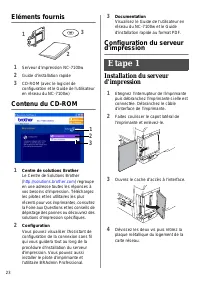
23 Eléments fournis 1 Serveur d’impression NC-7100w 2 Guide d'installation rapide 3 CD-ROM (avec le logiciel de configuration et le Guide de l'utilisateur en réseau du NC-7100w) Contenu du CD-ROM 1 Centre de solutions BrotherLe Centre de Solutions Brother ( http://solutions.brother.com ) regroupe en...
Page 25 - Français; Etape 2
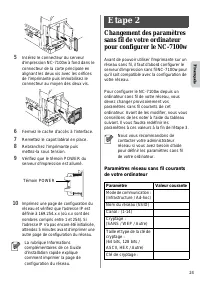
24 Français 5 Insérez le connecteur du serveur d'impression NC-7100w à fond dans le connecteur de la carte principale en alignant les deux vis avec les orifices de l’imprimante puis immobilisez le connecteur au moyen des deux vis. 6 Fermez le cache d’accès à l’interface. 7 Remettez le capot latéral ...
Page 26 - Pour les utilisateurs de Windows
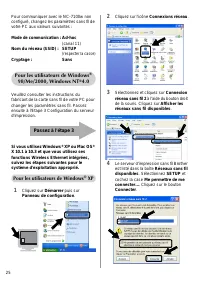
25 Pour communiquer avec le NC-7100w non configuré, changez les paramètres sans fil de votre PC aux valeurs suivantes : Mode de communication : Ad-hoc (canal 11) Nom du réseau (SSID) : SETUP (respecter la casse) Cryptage : Sans Veuillez consulter les instructions du fabricant de la carte sans fil de...
Page 27 - Pour les utilisateurs de
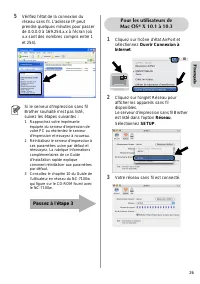
26 Français 5 Vérifiez l’état de la connexion du réseau sans fil. L'adresse IP peut prendre quelques minutes pour passer de 0.0.0.0 à 169.254.x.x à l'écran (où x.x sont des nombres compris entre 1 et 254). 1 Cliquez sur l’icône d’état AirPort et sélectionnez Ouvrir Connexion à Internet. 2 Cliquez su...
Page 28 - Etape 3
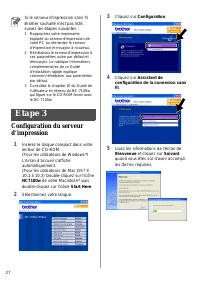
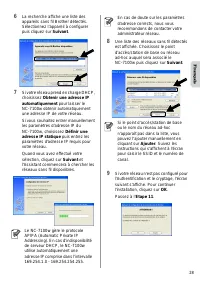
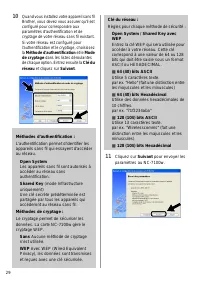
27 Configuration du serveur d’impression 1 Insérez le disque compact dans votre lecteur de CD-ROM. (Pour les utilisateurs de Windows ® ) L’écran d’accueil s’affiche automatiquement. (Pour les utilisateurs de Mac OS ® X 10.1 à 10.3) Double-cliquez sur l'icône NC7100w de votre Macintosh ® puis double-...
Page 31 - Etape 4
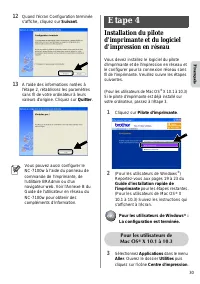
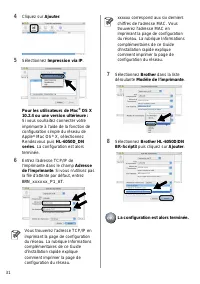
30 Français 12 Quand l'écran Configuration terminée s'affiche, cliquez sur Suivant. 13 A l'aide des informations notées à l'étape 2, rétablissez les paramètres sans fil de votre ordinateur à leurs valeurs d'origine. Cliquez sur Quitter. Installation du pilote d'imprimante et du logiciel d’impression...
Page 34 - Onderdelen in de doos; Wat staat er op de cd-rom
33 Onderdelen in de doos 1 NC-7100w draadloze afdrukserver 2 Installatiehandleiding 3 CD-ROM (inclusief installatiesoftware en netwerkhandleiding voor de NC-7100w) Wat staat er op de cd-rom 1 Brother Solutions CenterOp het Brother Solutions Center ( http://solutions.brother.com ) vindt u alle benodi...
Page 36 - Ga door naar Stap 3; Bij gebruik van Windows
35 Om te kunnen communiceren met de niet-geconfigureerde NC-7100w, dient u de draadloze instellingen op uw pc als volgt te wijzigen: Communicatiemodus: Ad-hoc (kanaal 11) Netwerknaam (SSID): SETUP (er wordt onderscheid gemaakt tussen kleine letters en hoofdletters) Versleuteling: Geen Raadpleeg de i...
Page 37 - Bij gebruik van
36 Nederlands 5 Controleer de status van de draadloze netwerkverbinding. Het kan een paar minuten duren voordat op uw scherm wordt weergegeven dat het IP-adres is veranderd van 0.0.0.0 in 169.254.x.x (waar x.x een nummer tussen de 1 en 254 is). 1 Klik op het statuspictogram AirPort en selecteer Open...
Page 38 - De afdrukserver configureren
37 De afdrukserver configureren 1 Plaats de cd-rom in uw cd-rom-station. (Bij gebruik van Windows ® ) Het eerste scherm wordt automatisch geopend. (Bij gebruik van Mac OS ® X 10.1 t/m 10.3) Dubbelklik op het pictogram NC7100w op uw Macintosh ® , en dubbelklik op het pictogram Start Here. 2 Selecteer...
Page 43 - Overige informatie
42 Nederlands Overige informatie Een netwerkconfiguratiepagina afdrukken Als u de netwerkconfiguratiepagina wilt afdrukken, moet u de netwerktesttoets van de printer met een fijne balpen minder dan 5 seconden ingedrukt houden. De fabrieksinstellingen herstellen Als u de afdrukserver op de standaardi...
Page 44 - Contenuto della confezione; Impostazione del server; Passaggio 1
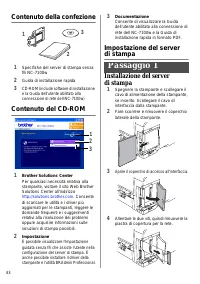
43 Contenuto della confezione 1 Specifiche del server di stampa senza fili NC-7100w 2 Guida di installazione rapida 3 CD-ROM (include software di installazione e la Guida dell'utente abilitato alla connessione di rete dell NC-7100w) Contenuto del CD-ROM 1 Brother Solutions CenterPer qualsiasi necess...
Page 45 - Passaggio 2
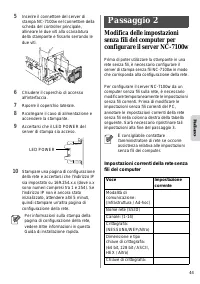
44 Ital iano 5 Inserire il connettore del server di stampa NC-7100w nel connettore della scheda del controller principale, allineare le due viti alla scanalatura della stampante e fissarlo serrando le due viti. 6 Chiudere il coperchio di accesso all'interfaccia. 7 Riporre il coperchio laterale. 8 Ri...
Page 46 - Andare al passaggio 3; Per gli utenti di Windows
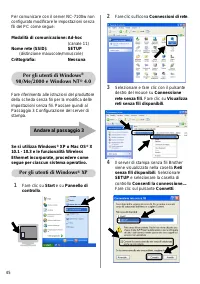
45 Per comunicare con il server NC-7100w non configurato modificare le impostazioni senza fili del PC come segue: Modalità di comunicazione: Ad-hoc (canale 11) Nome rete (SSID): SETUP (distinzione maiuscole/minuscole) Crittografia: Nessuna Fare riferimento alle istruzioni del produttore della scheda...
Page 47 - Per gli utenti di
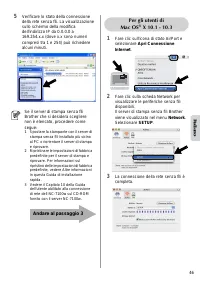
46 Ital iano 5 Verificare lo stato della connessione della rete senza fili. La visualizzazione sullo schermo della modifica dell'indirizzo IP da 0.0.0.0 a 169.254.x.x (dove x.x sono numeri compresi tra 1 e 254) può richiedere alcuni minuti. 1 Fare clic sull'icona di stato AirPort e selezionare Apri ...
Page 48 - Passaggio 3
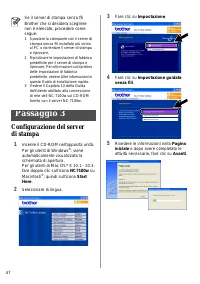
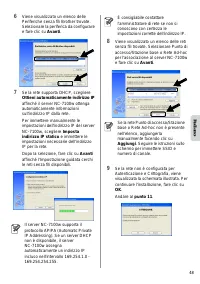
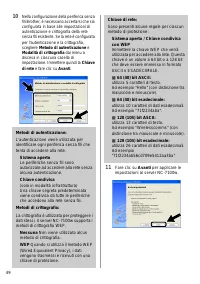
47 Configurazione del serverdi stampa 1 Inserire il CD-ROM nell'apposita unità. Per gli utenti di Windows ® : viene automaticamente visualizzata la schermata di apertura. Per gli utenti di Mac OS ® X 10.1 - 10.3: fare doppio clic sull'icona NC7100w su Macintosh ® , quindi sull'icona Start Here. 2 Se...
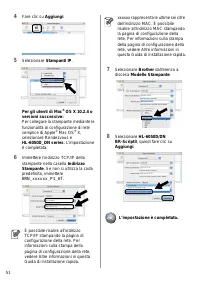
Page 51 - Passaggio 4
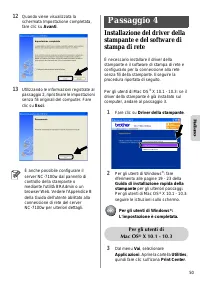
50 Ital iano 12 Quando viene visualizzata la schermata Impostazione completata, fare clic su Avanti. 13 Utilizzando le informazioni registrate al passaggio 2, ripristinare le impostazioni senza fili originali del computer. Fare clic su Esci. Installazione del driver della stampante e del software di...
Page 53 - Ulteriori informazioni
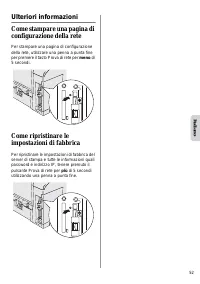
52 Ital iano Ulteriori informazioni Come stampare una pagina di configurazione della rete Per stampare una pagina di configurazione della rete, utilizzare una penna a punta fine per premere il tasto Prova di rete per meno di 5 secondi. Come ripristinare le impostazioni di fabbrica Per ripristinare l...
Page 54 - Componentes en la caja; Configuración del servidor
53 Componentes en la caja 1 Servidor de impresión inalámbrico NC-7100w 2 Guía de configuración rápida 3 CD-ROM (incluyendo el software de instalación y el Manual del usuario de red del servidor de impresión inalámbrico NC-7100w) Contenido del CD-ROM 1 Centro de soluciones de BrotherEl Centro de solu...
Page 55 - Español
54 Español 5 Coloque el conector del servidor de impresión inalámbrico NC-7100w con fuerza en el conector de la placa controladora principal alineando los dos tornillos con la ranura de la impresora; a continuación, fíjela con los dos tornillos. 6 Cierre la cubierta de acceso de la interfaz. 7 Vuelv...
Page 56 - Siga en el paso 3; Para usuarios de Windows
55 Para establecer la comunicación con el servidor de impresión inalámbrico NC-7100w sin configurar, cambie la configuración del PC a: Modo de comunicación:Ad-hoc (canal 11) Nombre de red (SSID): SETUP (sensible a mayúsculas y minúsculas) Encriptación: Ninguna Consulte las instrucciones del fabrican...
Page 57 - Para usuarios de
56 Español 5 Compruebe el estado de la conexión de red inalámbrica. El cambio de dirección IP en pantalla de 0.0.0.0 a 169.254.x.x puede tardar unos minutos (donde x.x son números entre 1 y 254). 1 Haga clic en el icono de estado AirPort y seleccione Abrir Conexión a Internet.... 2 Haga clic en la f...
Page 63 - Otra información
62 Español Otra información Cómo imprimir una página de configuración de red Para imprimir la página de configuración de red, utilice un bolígrafo de punta fina y mantenga pulsado el botón de prueba de red durante menos de 5 segundos. Cómo restablecer la configuración a los valores predeterminados d...
Page 64 - Komponenter; Opprette utskriftsserveren; Trinn 1
63 Komponenter 1 Spesifikasjoner for trådløs utskriftsserver NC-7100w 2 Hurtigoppsettguide 3 CD-ROM (inkludert installasjonsprogramvare og nettverkshåndbok for NC-7100w) Hva som finnes på CD-ROM-en 1 Brother Solutions CenterBrother Solutions Center ( http://solutions.brother.com ) har all programvar...
Page 65 - Norsk; Trinn 2
64 Norsk 5 Sett utskriftsserverkontakten til NC-7100w fast inn i kontakten på hovedkortet ved å sette de to skruene på linje med fordypningen på skriveren, og fest deretter med de to skruene. 6 Lukk grensesnittdekslet. 7 Sett sidedekslet tilbake på plass. 8 Koble skriveren til igjen, og slå deretter...
Page 66 - Fortsett til Trinn 3; For brukere av Windows
65 For å kommunisere med ikke-konfigurert NC-7100w, endre din trådløse datamaskininnstilling til: Kommunikasjonsmodus: Ad-hoc (kanal 11) Nettverksnavn (SSID): SETUP (skiller mellom små og store bokstaver) Kryptering: Ingen Se instruksjonene fra produsenten av det trådløse kortet for hvordan du endre...
Page 67 - For brukere av
66 Norsk 5 Sjekk statusen for det trådløse nettverket. Det kan ta noen minutter å endre fra at 0.0.0.0 til at 169.254.x.x IP-adressen vises på skjermen (hvor x.x er nummer mellom 1 og 254). 1 Klikk på ikonet for AirPort-status og velg Åpne Internet Connect.... 2 Klikk på nettverkskategorien for å se...
Page 68 - Konfigurerer utskriftsserveren; Trinn 3
67 Konfigurerer utskriftsserveren 1 Sett CD-ROM-en inn i CD-ROM-stasjonen. (For Windows ® -brukere) Åpningsskjermen vil vises automatisk. (For Mac OS ® X 10.1 til 0.3-brukere) Dobbeltklikk på ikonet NC7100w på din Macintosh ® , og dobbeltklikk deretter på ikonet Start Here. 2 Velg ditt språk. 3 Klik...
Page 71 - Trinn 4
70 Norsk 12 Når skjermen Installasjonen er fullført vises, klikk Neste. 13 Ved å bruke informasjonen du registrerte i trinn 2, stiller du de trådløse innstillingene på din datamaskin tilbake til deres originale innstillinger. Klikk Exit. Installer skriverdriveren og programvare for nettverksutskrift...
Page 73 - Annen informasjon
72 Norsk Annen informasjon Slik skriver du ut en nettverkskonfigurasjonsside Hvis du vil skrive ut en nettverkskonfigurasjonsside, bruker du en kulepenn til å holde knappen for testing av nettverket på skriveren nede i mindre enn fem sekunder. Slik tilbakestiller du til standardinnstillingene fra fa...
Page 74 - Komponenter i kartongen; Innehållet på cd-romskivan
73 Komponenter i kartongen 1 NC-7100w trådlös skrivarserver 2 Snabbguide 3 Cd-romskiva (inklusive installationsprogram och bruksanvisning för nätverksanvändare till NC-7100w) Innehållet på cd-romskivan 1 Brother Solutions CenterPå Brother Solutions Center ( http://solutions.brother.com ) finns hjälp...
Page 75 - Svenska
74 Svenska 5 Anslut kontakten till skrivarservern NC-7100w ordentligt till uttaget på huvudkontrollerkortet, genom att rikta in de två skruvarna med skåran på skrivaren, och därefter fästa den med de två skruvarna. 6 Stäng gränssnittsluckan. 7 Sätt tillbaka sidoluckan. 8 Koppla in skrivaren igen och...
Page 76 - För användare av Windows; Fortsätt till Steg 3.; För Windows
75 Ändra dina trådlösa datorinställningar till följande, för att kommunicera med den okonfigurerade NC-7100w: Kommunikationsläge: Ad-hoc (kanal 11) Nätverksnamn (SSID): SETUP (skiftlägeskänsligt) Kryptering: Ingen Se instruktionerna från tillverkaren av ditt trådlösa kort om att ändra de trådlösa in...
Page 77 - För användare av
76 Svenska 5 Kontrollera statusen för den trådlösa nätverksanslutningen. Det kan ta några minuter att ändra visningen av IP-adressen från 0.0.0.0 till 169.254.x.x på skärmen (där x.x är siffror mellan 1 och 254). 1 Klicka på symbolen för AirPort-status och välj Öppna Internetanslutning.... 2 Klicka ...
Page 78 - Konfigurera skrivarservern
77 Konfigurera skrivarservern 1 Sätt in cd-romskivan i cd-romenheten. (För användare av Windows ® ) Startbilden visas automatiskt. (För användare av Mac OS ® X 10.1 till 10.3) Dubbelklicka på symbolen NC7100w på din Macintosh ® , och dubbelklicka sedan på symbolen Start Here. 2 Välj ditt språk. 3 Kl...
Page 83 - Övrig information
82 Svenska Övrig information Skriva ut en nätverkskonfigurationssida Om du vill skriva ut en nätverkskonfigurationssida ska du använda en kulspetspenna med tunn spets för att trycka ner nätverkstestknappen på skrivaren i mindre än fem sekunder. Återställa de ursprungliga fabriksinställningarna Om du...
Page 84 - Kassens indhold; Hvad indeholder cd-rom’en
83 Kassens indhold 1 NC-7100w trådløst printernetkort 2 Hurtig installationsanvisning 3 Cd-rom (inklusive installationssoftware og brugsanvisning til netværk, NC-7100w) Hvad indeholder cd-rom’en 1 Brother Solutions CenterBrother Solutions Center ( http://solutions.brother.com ) er stedet, hvor du ka...
Page 85 - Dansk
84 Dansk 5 Sæt NC-7100w-printernetkortets stik ind i hoved-controllerkortet. Sørg for at de to skruer sidder ud for printerens indhak, og fastgør det derefter med de to skruer. 6 Luk adgangslåget til interface. 7 Sæt kabinetsidelåget på igen. 8 Slut strømkablet til stikkontakten igen, og tænd på afb...
Page 86 - Gå videre til Trin 3; Windows
85 For at kunne kommunikere med det ukonfigurerede printernetkort, NC-7100w, skal du ændre din computers trådløse indstillinger til: Kommunikationsmode: Ad hoc (kanal 11) Netværksnavn (SSID): SETUP (Forskel på store og små bogstaver) Kryptering: Ingen Se instruktionerne fra producenten af dit trådlø...
Page 87 - For brugere af
86 Dansk 5 Kontroller statussen for det trådløse netværk. Det kan tage nogle få minutter at ændre IP-adressen fra 0.0.0.0 til 169.254.x.x, som er vist på skærmen (hvor x.x er tal mellem 1 og 254). 1 Klik på ikonet for AirPort status, og vælg Åbn Internetopkald. 2 Klik på netværksfanen for at se de t...
Page 88 - Konfigurerer udskriftsserver
87 Konfigurerer udskriftsserver 1 Indsæt cd-rom’en i cd-rom-drevet. (For Windows ® brugere) Åbningsskærmbil- ledet vises automatisk. (For Mac OS ® X 10.1 to 10.3-brugere) Dobbeltklik på NC7100w -ikonet på din Macintosh ® , og dobbeltklik herefter på Start her -ikonet. 2 Vælg dit sprog. 3 Klik på Ins...
Page 93 - Andre oplysninger
92 Dansk Andre oplysninger Udskrivning af netværkskon-figurationsside Du kan udskrive netværkskonfigurationssiden ved at bruge en tynd kuglepen til at holde netværkstesttasten nede i mindre end 5 sekunder. Nulstilling til fabriksindstillinger Hvis du vil nulstille printernetkortet til dets fabriksin...
Page 94 - Componentes da caixa; Configurar o servidor de; Passo 1
93 Componentes da caixa 1 Servidor de impressão sem fios NC-7100w 2 Guia de configuração rápida 3 CD-ROM (incluindo software de configuração e Manual de utilização da rede da NC-7100w) O que é fornecido com o CD-ROM 1 Brother Solutions CenterO Brother Solutions Center ( http://solutions.brother.com ...
Page 95 - Português; Passo 2
94 Português 5 Ligue o conector do servidor de impressão NC-7100w ao conector da placa controladora principal, alinhando os dois parafusos com a ranhura da impressora e, em seguida, aperte os dois parafusos. 6 Feche a tampa de acesso à interface. 7 Volte a colocar a tampa lateral. 8 Ligue novamente ...
Page 96 - Siga para o Passo 3; Utilizadores de Windows
95 Para comunicar com a NC-7100w não configurada, altere as definições de rede sem fios do PC para: Modo de comunicações: Ad-hoc (canal 11) Nome da rede (SSID): SETUP (sensível a maiúsculas e minúsculas) Encriptação: Nenhum Consulte as instruções do fabricante da sua placa sem fios para alterar as d...
Page 97 - Utilizadores de
96 Português 5 Verifique o estado da ligação à rede sem fios. Poderá demorar alguns minutos até que o ecrã mostre o endereço IP alterado, de 0.0.0.0 para 169.254.x.x (em que x.x corresponde a qualquer número entre 1 e 254). 1 Clique no ícone de estado AirPort e seleccione Open Internet Connect.... 2...
Page 98 - Passo 3
97 Configurar o servidor de impressão 1 Coloque o CD-ROM na unidade do CD-ROM. (Utilizadores de Windows ® ) O ecrã inicial aparecerá automaticamente. (Utilizadores de Mac OS ® X 10.1 a 10.3) Clique duas vezes no ícone NC7100w do ambiente de trabalho do Macintosh ® e, em seguida, clique duas vezes no...
Page 101 - Passo 4
100 Português 12 Quando o ecrã de Configuração concluída aparecer, clique em Seguinte. 13 Utilizando as informações registadas no Passo 2, reponha as definições originais de rede sem fios do seu computador. Clique em Sair. Instalar o controlador de impressora e o software de impressão em rede É nece...
Page 103 - Outras informações
102 Português Outras informações Como imprimir uma página de configuração da rede Para imprimir a página de configuração da rede, utilize uma caneta esferográfica para manter premido o botão de teste de rede da impressora durante menos de 5 segundos. Como repor a predefinição de fábrica de rede Se p...
Page 104 - Important Information: Regulations; Industry Canada Compliance Statement
103 Important Information: Regulations Federal Communications Commission (FCC) Declaration of Conformity (For USA) Responsible Party:Brother International Corporation 100 Somerset Corporate BoulvardBridgewater, NJ 08807-0911, USATelephone: (908) 704-1700 declares, that the products Product Name:Brot...
Page 105 - Declaration of Conformity
English 104 "EC" Declaration of Conformity ManufacturerBrother Industries, Ltd.,15-1, Naeshiro-cho, Mizuho-ku,Nagoya 467-8561, Japan Herewith declare that: Products description:Network CardProduct Name:NC-7100w are in conformity with provisions of the Directives applied: Low Voltage Directiv...
Page 106 - EU Konformitätserklärung; Konformitätserklärung
English 105 EU Konformitätserklärung HerstellerBrother Industries, Ltd.,15-1, Naeshiro-cho, Mizuho-ku,Nagoya 467-8561, Japan erklärt hiermit, dass: Produktbeschreibung:NetzwerkkarteProduktname:NC-7100w die Anforderungen der einschlägigen Richtlinien erfüllen: Niederspannungsrichtlinie 73/23/EWG (gem...
Page 107 - Déclaration de conformité
English 106 Déclaration de conformité pour la CE Le fabricantBrother Industries, Ltd.,15-1, Naeshiro-cho, Mizuho-ku,Nagoya 467-8561, Japon déclare dans la présente que : Descriptif du produit :Carte réseauNom du produit :NC-7100w est conforme aux dispositions des Directives appliquées : Directive en...
Page 108 - Conformiteitsverklaring
English 107 “EG” Conformiteitsverklaring ProducentBrother Industries, Ltd.,15-1, Naeshiro-cho, Mizuho-ku,Nagoya 467-8561, Japan Verklaren hierbij dat: Omschrijving van product: NetwerkkaartProductnaam: NC-7100w voldoet aan de bepalingen in de van toepassing zijnde richtlijnen: de richtlijn inzake la...
Page 109 - Dichiarazione di conformità
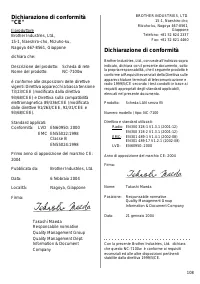
English 108 Dichiarazione di conformità "CE" Il produttoreBrother Industries, Ltd.,15-1, Naeshiro-cho, Mizuho-ku,Nagoya 467-8561, Giappone dichiara che: Descrizione del prodotto: Scheda di reteNome del prodotto: NC-7100w è conforme alle disposizioni delle direttive vigenti: Direttiva apparec...
Page 110 - Declaración de conformidad
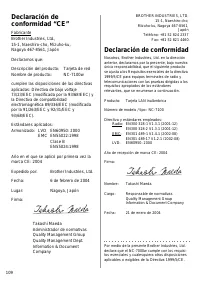
English 109 Declaración de conformidad “CE” FabricanteBrother Industries, Ltd.,15-1, Naeshiro-cho, Mizuho-ku,Nagoya 467-8561, Japón Declaramos que: Descripción del producto: Tarjeta de red Nombre de producto:: NC-7100w cumplen las disposiciones de las directivas aplicadas: Directiva de bajo voltaje ...
Page 111 - Konformitetserklæring
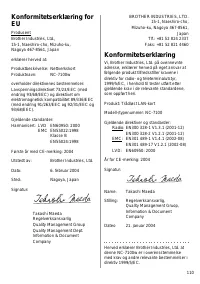
English 110 Konformitetserklæring for EU ProdusentBrother Industries, Ltd.,15-1, Naeshiro-cho, Mizuho-ku,Nagoya 467-8561, Japan erklærer herved at: Produktbeskrivelse: NettverkskortProduktnavn: NC-7100w overholder direktivenes bestemmelser: Lavspenningsdirektivet 73/23/EEC (med endring 93/68/EEC) og...
Page 113 - EU-overensstemmelseserklæring; Overensstemmelseserklæring
English 112 EU-overensstemmelseserklæring ProducentBrother Industries, Ltd.,15-1, Naeshiro-cho, Mizuho-ku,Nagoya 467-8561, Japan Erklærer hermed, at: Produktbeskrivelse: Netværkskort Produktnavn: NC-7100w er i overensstemmelse med bestemmelserne i følgende direktiver: EU-direktiv 73/23/EØF (som ændr...
Page 114 - Declaração de conformidade
English 113 Declaração de conformidade da "CE" FabricanteBrother Industries, Ltd., 15-1, Naeshiro-cho, Mizuho-ku,Nagoya 467-8561, Japão Declara que: Descrição do produto: Placa de redeNome do produto: NC-7100w está em conformidade com as disposições das directivas aplicadas: Directiva de Bai...
Page 115 - Trademarks
English 114 Trademarks Brother is a registered trademark of Brother Industries, Ltd.Windows and Windows NT are registered trademarks of Microsoft Corporation in the US and other countries.Ethernet is trademark of Xerox Corporation.Apple, Macintosh, iMac, LaserWriter and AppleTalk are registered trad...
Page 117 - Varemærker; Marcas comerciais
English 116 Varemærker Brother er et registreret varemærke tilhørende Brother Industries, Ltd.Windows ® og WindowsNT ® er registrerede varemærker tilhørende Microsoft Corporation i USA og andre lande.Ethernet er et varemærke tilhørende Xerox Corporation.Apple, Macintosh, iMac, LaserWriter og AppleTa...
Page 118 - Copyrights; Atheros Copyright
117 Copyrights ©2004 Brother Industries Ltd. All rights reserved.©1998-2004 TROY Group, Inc. All rightsreserved.©1983-2004 PACIFIC SOFTWORKS INC. All rights reserved. Atheros Copyright This product includes object code that is Copyright ©2002-2004 Atheros Communications, Inc. All rights reserved. In...
Page 119 - Urheberrechte; Atheros Urheberrecht
English 118 Urheberrechte ©2004 Brother Industries Ltd. Alle Rechte vorbehalten.©1998-2004 TROY Group, Inc. Alle Rechte vorbehalten.©1983-2004 PACIFIC SOFTWORKS INC. Alle Rechte vorbehalten. Atheros Urheberrecht Dieses Produkt enthält Objektkode, bezüglich dessen Atheros Communications, Inc Eigentüm...
Page 120 - Copyright Atheros
119 Copyrights ©2004 Brother Industries Ltd. Tous droits réservés.©1998-2004 TROY Group, Inc. Tous droits réservés.©1983-2004 PACIFIC SOFTWORKS INC. Tous droits réservés. Copyright Atheros Ce produit comprend du code objet protégé par le copyright ©2002-2004 Atheros Communications, Inc. Tous droits ...
Page 122 - Copyright
121 Copyright ©2004 Brother Industries Ltd. Tutti i diritti riservati.©1998-2004 TROY Group, Inc. Tutti i diritti riservati.©1983-2004 PACIFIC SOFTWORKS INC. Tutti i diritti riservati. Copyright Atheros Questo prodotto include codice oggetto protetto da copyright ©2002-2004 Atheros Communications, I...
Page 123 - Derechos de autor; Derechos de autor de Atheros
English 122 Derechos de autor ©2004 Brother Industries Ltd. Todos los derechos reservados.©1998-2004 TROY Group, Inc. Todos los derechos reservados.©1983-2004 PACIFIC SOFTWORKS INC. Todos los derechos reservados. Derechos de autor de Atheros Este producto incluye código objeto que tiene copyright ©2...
Page 124 - Opphavsrett
123 Opphavsrett ©2004 Brother Industries Ltd. Med enerett.©1998-2004 TROY Group, Inc. Med enerett.©1983-2004 PACIFIC SOFTWORKS INC. Med enerett. Atheros Copyright This product includes object code that is Copyright ©2002-2004 Atheros Communications, Inc. All rights reserved. Intel copyright- og lise...
Page 127 - Copyright da Atheros
English 126 Copyrights ©2004 Brother Industries Ltd. Todos os direitos reservados.©1998-2004 TROY Group, Inc. Todos os direitos reservados.©1983-2004 PACIFIC SOFTWORKS INC. Todos os direitos reservados. Copyright da Atheros Este produto inclui código de objecto cujo copyright ©2002-2004 pertence à A...