Page 2 - Precautions; English; Précautions; Français
2 Precautions English ■ Avoid tempering with objects or hands into the fan while it is in operation to prevent product damage and injuries.■ Do not eat the thermal grease, and avoid its contact with skin and eyes. If contact is made with skin, wash off with water. If irritation persists, seek medica...
Page 3 - Español
3 Precauciones ■ Evite atemperar con objetos o manos en el ventilador mientras esté en funcionamiento para evitar daños y lesiones al producto.■ No ingiera la grasa térmica, y evite su contacto con la piel y los ojos. Si se produce el contacto con piel, retire la grasa lavando la piel con agua. Si l...
Page 4 - 中国
4 预防措施 ■ 避免在风扇运行时将物体或手插入风扇,以防损坏产品和人员受伤。■ 请勿食用导热膏,同时避免其接触皮肤和眼睛。如果与皮肤产生接触,用清水洗净。如果仍感到刺痛, 则应就医。■ 为防止可能发生的伤害,操作本产品时必须佩戴手套。■ 如果风扇受力过大,可能导致风扇和/或系统损坏。■ 使用及存放产品时,将其置于儿童接触不到的地方。■ 安装前,检查部件清单和产品状态。如若发现 任何问题,请联系零售商更换。■ 我们公司对于因本产品用于不当用途和/或用户失误而造成的任何问题,不承担任何责任。■ Zalman Tech Co., Ltd. 对 CPU 及系统组件超频所致的任何损坏概不负责。■ 在系...
Page 5 - Český
5 Środki ostrożności ■ Unikać wkładania przedmiotów lub rąk do wentylatora gdy pracuje, aby uniknąć uszkodzenia produktu lub obrażeń ciała.■ Nie spożywać smaru termicznego i unikać kontaktu smaru ze skórą i oczami. W przypadku kontaktu ze skórą, miejsce kontaktu należy przemyć wodą. W przypadku wyst...
Page 6 - Türk
6 Tedbirler ■ Ürünün hasar görmesini ve yaralanmaları önlemek için fan çalışırken içerisine ellerinizi veya başka cisimleri sokmaktan kaçının.■ Termal yağı yemeyin, cildiniz ve gözünüzle temasından kaçının. Cilde temas etmesi halinde bölgeyi suyla yıkayın. Tahriş devam ederse, tıbbi yardım alın.■ Ol...
Page 8 - Caution
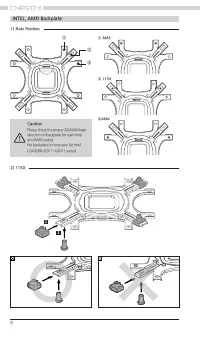
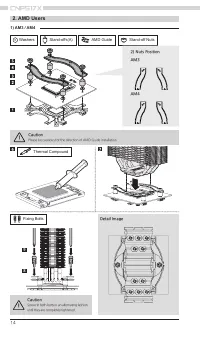
8 INTEL, AMD Backplate 2) 115X 1 2 ① ② ③ 1) Nuts Position Caution Please check the proper ZALMAN logo direction on backplate for each Intel and AMD socket.No backplate is necessary for Intel LGA2066 /2011-V/2011 socket. ① AM3 ② 115X ③AM4
Page 9 - Take note of the orientation of the nuts and the side caps.
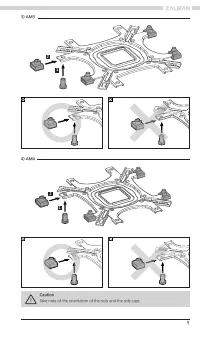
9 3) AM3 4) AM4 1 1 2 2 Caution Take note of the orientation of the nuts and the side caps.
Page 10 - INTEL, AMD Loading Block; Intel Guide
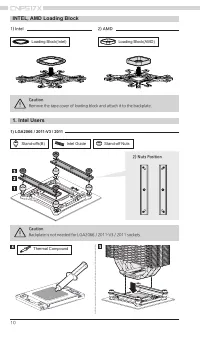
10 1. Intel Users INTEL, AMD Loading Block 1) LGA2066 / 2011-V3 / 2011 Stand-offs(B) Loading Block(Intel) Loading Block(AMD) Intel Guide Stand-off Nuts Thermal Compound Caution Backplate is not needed for LGA2066 / 2011-V3 / 2011 sockets. Caution Remove the tape cover of loading block and attach it ...
Page 11 - Fixing Bolts; Detail Image; Fan Clips
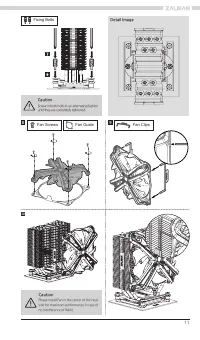
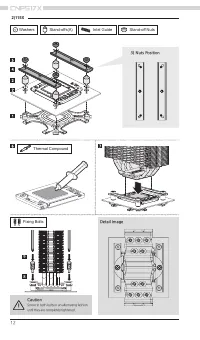
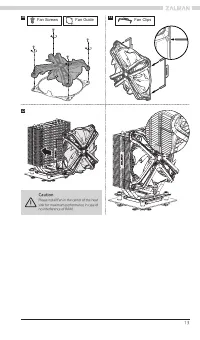
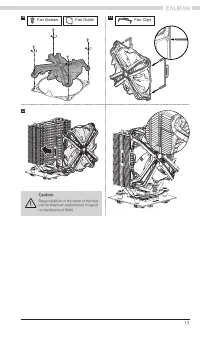
11 Fixing Bolts Detail Image 8 Fan Clips Fan Screws Fan Guide 9 10 Caution Screw-in both bolts in an alternating fashion until they are completely tightened. Caution Please install Fan in the center of the heat sink for maximum performance in case of no interference of RAM.
Page 16 - Fan Specifications; ) Connection to other motherboards; LED Cable; Motherbo; PWM Fan Cable; Gi
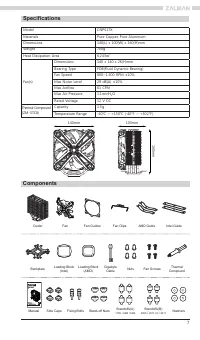
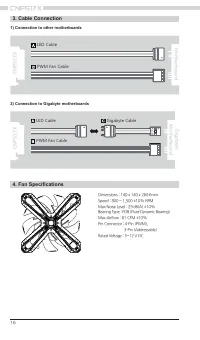
16 4. Fan Specifications Dimensions : 140 x 140 x 26(H)mmSpeed : 800 ~ 1,500 ±10% RPMMax Noise Level : 29 dB(A) ±10%Bearing Type : FDB (Fluid Dynamic Bearing)Max Airflow : 61 CFM ±10%Pin Connector : 4-Pin (PWM), 3-Pin (Addressable)Rated Voltage : 5~12 V DC 3. Cable Connection 1) Connection to other ...
Page 17 - 제품 보증서; Certification
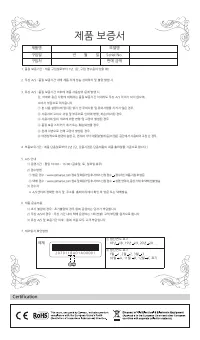
17 제품 보증서 제품명 모델명 구입일 년 월 일 Serial No. 구입처 판매 금액 예제 ① 생산연도 표기 18년 18, 19년 19, 20년 20 .... ② 생산연도 표기 1월 1, 2월 2, 3월 3 .... 10월 A, 11월 B, 12월 C 표기 2 0 7 0 1 1 8 A 0 1 A 0 0 0 0 1 1. 품질 보증기간 : 제품 구입일로부터 1년. (단, 구입 영수증이 있을 때) 2. 무상 A/S : 품질 보증기간 내에 제품 자체 성능 상의하자 및 불량 발생 시. 3. 유상 A/S : 품질 보증기간 이후에 제품 사용상...
Page 18 - Memo