Page 2 - Precautions; English; Précautions; Français
2 Precautions English ■ Avoid tempering with objects or hands into the fan while it is in operation to prevent product damage and injuries.■ Do not eat the thermal grease, and avoid its contact with skin and eyes. If contact is made with skin, wash off with water. If irritation persists, seek medica...
Page 3 - Español
3 Precauciones ■ Evite atemperar con objetos o manos en el ventilador mientras esté en funcionamiento para evitar daños y lesiones al producto.■ No ingiera la grasa térmica, y evite su contacto con la piel y los ojos. Si se produce el contacto con piel, retire la grasa lavando la piel con agua. Si l...
Page 4 - 中国
4 预防措施 ■ 避免在风扇运行时将物体或手插入风扇,以防损坏产品和人员受伤。■ 请勿食用导热膏,同时避免其接触皮肤和眼睛。如果与皮肤产生接触,用清水洗净。如果仍感到刺痛, 则应就医。■ 为防止可能发生的伤害,操作本产品时必须佩戴手套。■ 如果风扇受力过大,可能导致风扇和/或系统损坏。■ 使用及存放产品时,将其置于儿童接触不到的地方。■ 安装前,检查部件清单和产品状态。如若发现 任何问题,请联系零售商更换。■ 我们公司对于因本产品用于不当用途和/或用户失误而造成的任何问题,不承担任何责任。■ Zalman Tech Co., Ltd. 对 CPU 及系统组件超频所致的任何损坏概不负责。■ 在系...
Page 5 - Český
5 Środki ostrożności ■ Unikać wkładania przedmiotów lub rąk do wentylatora gdy pracuje, aby uniknąć uszkodzenia produktu lub obrażeń ciała.■ Nie spożywać smaru termicznego i unikać kontaktu smaru ze skórą i oczami. W przypadku kontaktu ze skórą, miejsce kontaktu należy przemyć wodą. W przypadku wyst...
Page 6 - Türk
6 Tedbirler ■ Ürünün hasar görmesini ve yaralanmaları önlemek için fan çalışırken içerisine ellerinizi veya başka cisimleri sokmaktan kaçının.■ Termal yağı yemeyin, cildiniz ve gözünüzle temasından kaçının. Cilde temas etmesi halinde bölgeyi suyla yıkayın. Tahriş devam ederse, tıbbi yardım alın.■ Ol...
Page 8 - Caution
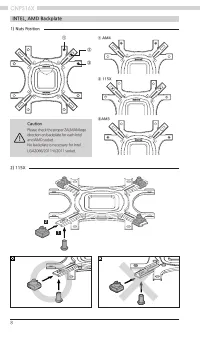
8 INTEL, AMD Backplate 2) 115X 1 2 ① ① AM4 ② 115X ③AM3 ② ③ 1) Nuts Position Caution Please check the proper ZALMAN logo direction on backplate for each Intel and AMD socket.No backplate is necessary for Intel LGA2066/2011-V/2011 socket.
Page 9 - Take note of the orientation of the nuts and the side caps.
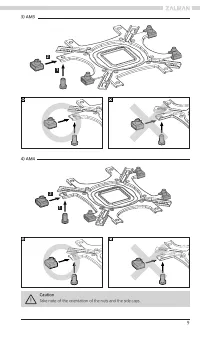
9 3) AM3 4) AM4 1 1 2 2 Caution Take note of the orientation of the nuts and the side caps.
Page 10 - INTEL, AMD Loading Block; Intel Guide
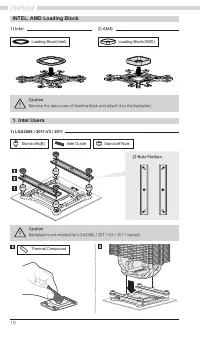
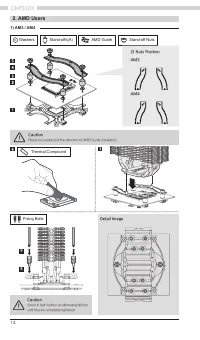
10 1. Intel Users INTEL, AMD Loading Block 1) LGA2066 / 2011-V3 / 2011 Stand-offs(B) Loading Block(Intel) Loading Block(AMD) Intel Guide Stand-off Nuts Thermal Compound Caution Backplate is not needed for LGA2066 / 2011-V3 / 2011 sockets. Caution Remove the tape cover of loading block and attach it ...
Page 11 - Fixing Bolts; Detail Image; Top LED Cover
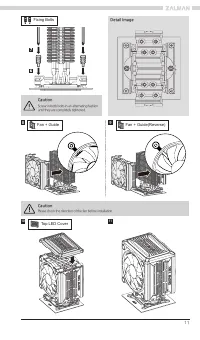
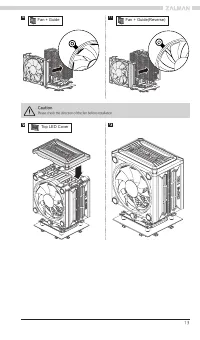
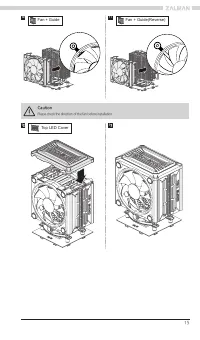
11 Fixing Bolts Detail Image 8 9 10 Caution Screw-in both bolts in an alternating fashion until they are completely tightened. Caution Please check the direction of the fan before installation. Fan + Guide Fan + Guide(Reverse) Top LED Cover 11
Page 16 - ) Connection to other motherboards; Gigabyte
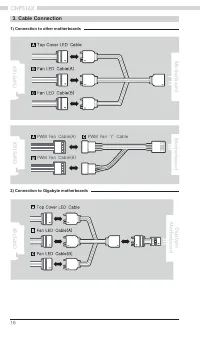
16 3. Cable Connection Motherbo ar d P WM Fan 'Y' Cable P WM Fan Cable(A) P WM Fan Cable(B) CN PS16X Mot h er b oard CN PS16X 1) Connection to other motherboards 2) Connection to Gigabyte motherboards CNPS16X Gigabyte Motherboard
Page 17 - Fan Specifications; Motherbo
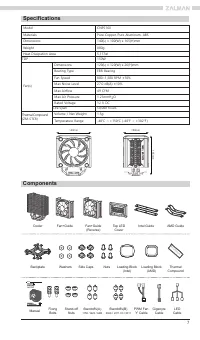
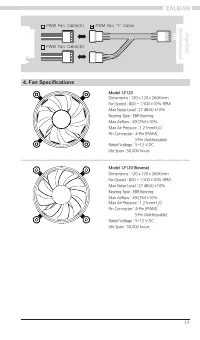
17 4. Fan Specifications Model : LF120 (Reverse) Dimensions : 120 x 120 x 26(H)mmFan Speed : 800 ~ 1,500 ±10% RPMMax Noise Level : 27 dB(A) ±10%Bearing Type : EBR BearingMax Airflow : 49 CFM ±10%Max Air Pressure : 1.21mmH 2 O Pin Connector : 4-Pin (PWM), 3-Pin (Addressable)Rated Voltage : 5~12 V DCL...
Page 18 - 제품 보증서; Certification
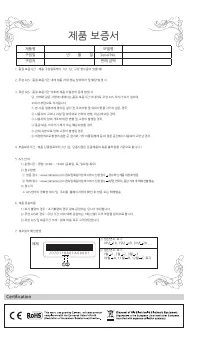
18 제품 보증서 제품명 모델명 구입일 년 월 일 Serial No. 구입처 판매 금액 예제 ① 생산연도 표기 18년 18, 19년 19, 20년 20 .... ② 생산연도 표기 1월 1, 2월 2, 3월 3 .... 10월 A, 11월 B, 12월 C 표기 2 0 7 0 1 1 8 A 0 1 A 0 0 0 0 1 1. 품질 보증기간 : 제품 구입일로부터 1년. (단, 구입 영수증이 있을 때) 2. 무상 A/S : 품질 보증기간 내에 제품 자체 성능 상의하자 및 불량 발생 시. 3. 유상 A/S : 품질 보증기간 이후에 제품 사용상...
Page 19 - Memo