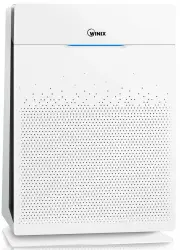
Page 2 - CONTENTS; This product is suitable for 220 - 240 V only.
2 ZERO+ English CONTENTS ▶ This product is suitable for 220 - 240 V only. 5-STAGE AIR PURIFICATION ·············································· 3 CONTROLS ····························································· 4 WHERE TO USE ························································· 5 INSTAL...
Page 3 - -STAGE AIR PURIFICATION; PlasmaWave
3 English ZERO+ 5-STAGE AIR PURIFICATION PlasmaWave Deodorization filter Pre-filter True HEPA filter Pet filter 1 2 3 4 5 Product User Manual Pre-filter/ Deodorization filter/ True HEPA filter Pet filter
Page 4 - CONTROLS; Air Outlet Vent
4 English ZERO+ CONTROLS Air Outlet Vent PLASMAWAVE Light Sensor Detects the amount of ambient light within the environment, to adjust the brightness of the LED indicators. Mode / Fan Speed Button Every time the Mode button is pressed, the Mode LED light will cycle through the settings. (Auto, Sleep...
Page 5 - WHERE TO USE; WARNING; Follow these instructions to reduce the risk of serious injury
5 English ZERO+ WHERE TO USE Allow 30 ~ 45 cm of space between TVs, radios, and other electronic productselectromagnetic interference from certain electronics may cause product malfunction. Place indoors away from direct sun lightdirect exposure may cause product malfunction or failure. Only place o...
Page 6 - removed from the filters before use.; NOTE; INSTALLING THE FILTERS
6 English ZERO+ This product comes with all of the required filters. The protective plastic wrap must be removed from the filters before use. ※ Operating the unit without removing the plastic wrap may result in product failure. ※ Unplug and make sure the unit is turned off before installing filters....
Page 7 - To install the pre-filter, insert bottom tabs; Filter
7 English ZERO+ INSTALLING THE FILTERS ④ Install the filters until they fit securely in place. Filters must be installed in this order: 3 True HEPA filter (rear) 2 Deodorization filter (middle) 1 Pre-filter (front) ˍ To install the pre-filter, insert bottom tabs into the slots on either side of the ...
Page 8 - SAFETY AND CAUTIONS; instructions to avoid damage and ensure safe use.; Ensure filters are inserted before running unit; the high voltage may cause electric shock.; Ensure unit intake and outlet vents do not become blocked; personal injury may occur or product failure and deformation.; Follow these instructions to reduce the risk of serious
8 English ZERO+ SAFETY AND CAUTIONS Before operating this equipment, carefully read and follow these safety cautions and instructions to avoid damage and ensure safe use. Ensure filters are inserted before running unit running unit without filters can shorten the units life and cause electric shock ...
Page 9 - INITIAL OPERATION; Insert the unit plug into an electrical outlet.
9 English ZERO+ INITIAL OPERATION ① Insert the unit plug into an electrical outlet. ˍ The Control Panel lights will turn on and off. ② Press the 'Power' button. NOTE ˍ During the first 4 minutes of power up, the Air Quality light will flash as the Smart Sensors measure the air quality in the environ...
Page 10 - AUTO AND SLEEP; Press the Mode button to select Auto mode.; Press the Mode button to select Sleep mode.
10 English ZERO+ AUTO AND SLEEP Every time the Mode button is pressed, the Mode LED light will cycle through the settings. (Auto, Sleep, Low, Medium, High, Turbo) 1. Auto Mode Enables Auto operation based on the unit's air quality Smart Sensors. ① Press the Mode button to select Auto mode. ˍ The mod...
Page 11 - MANUAL MODE, TIMER AND PLASMAWAVE; By default, PlasmaWave
11 English ZERO+ MANUAL MODE, TIMER AND PLASMAWAVE ® Every time the Mode button is pressed, the Mode LED light will cycle through the settings. (Auto, Sleep, Low, Medium, High, Turbo) 3. Manual Mode (setting fan speed) Users can opt to manually set the fan speed to Low, Medium, High, or Turbo. ① Pre...
Page 12 - CHILD LOCK, AIR QUALITY LED LIGHT; Air Quality LED Light; The Air Quality LED light may be turned on or off.; Air Quality Indicator
12 English ZERO+ CHILD LOCK, AIR QUALITY LED LIGHT 6. Child Lock This feature prevents children from tampering with the control panel. ① Press and hold the Child Lock button for 3 seconds to enable or disable the feature. ˍ When the Child Lock indicator is lit, the feature is enabled. ˍ When Child L...
Page 13 - FILTER CARE
13 English ZERO+ FILTER CARE 1. Changing Filters When the Check Filter indicator LED is on, it is time to replace both the True HEPA and Deodorization filter. Filter Indicator Light When to service When to replace 1 Pre-filter none Clean once every 14 days Permanent 2 Deodorization filter Can NOT be...
Page 14 - To remove the front panel, the latch at; NOTICE; For optimal performance, only genuine Winix filters should
14 English ZERO+ FILTER CARE 2. Removing Filters Ensure the unit is turned off and unplugged before removing filters. ※ The unit will automatically power off when front panel is opened. ① Remove the front panel by grasping its upper edge and gently pulling towards yourself. ˍ To remove the front pan...
Page 15 - Filter Assembly and Replacement
15 English ZERO+ FILTER CARE 3. Filter Assembly and Replacement Filters should be re-installed in the reverse order of their removal. ① Insert the replacement 3 True HEPA filter (rear) 2 Deodorization filter (middle) ˍ Remove the protective plastic wrap from new filters. Operating the unit without r...
Page 16 - with room temperature water.; Please contact your local dealer
16 English ZERO+ FILTER CARE 4. Cleaning the Pre-filter Intervals between filter cleanings may vary depending on the air quality. ① Use a vacuum cleaner or soft brush to clean the Pre-filter. If it is excessively dirty, wash with room temperature water. ˍ Use only water, do not use volatile substanc...
Page 17 - CLEANING THE DUST SENSOR; Cleaning the Dust Sensor; in a place with high dust levels.
17 English ZERO+ CLEANING THE DUST SENSOR Cleaning the Dust Sensor For optimal performance of the Dust Sensor, which detects airborne dust and ultrafine particles, clean it every two months. Clean it more frequently when the unit is running in a place with high dust levels. ① Open the Dust Sensor co...
Page 18 - CLEANING CARE; Cleaning the exterior and interior; Cleaning the exterior; Wipe with a soft damp cloth using room; Cleaning the interior; Open the front panel and clean the interior with
18 English ZERO+ CLEANING CARE Cleaning the exterior and interior Cleaning the exterior Wipe with a soft damp cloth using room temperature water. Afterwards, wipe it down with a clean dry cloth. ˍ For optimal performance, clean the front panel 1-2 times a month. Cleaning the interior Open the front ...
Page 19 - FREQUENTLY ASKED QUESTIONS; Problem
19 English ZERO+ FREQUENTLY ASKED QUESTIONS Problem Check / Actions to take It does not turn on at all. ˍ Is there a power outage? - Check to see if other lights and electrical equipment are working and try again. It doesn’t work in Auto mode. ˍ Has Auto mode been selected? - Press the Mode button u...
Page 21 - UNIT SPECIFICATIONS; prior notice to improve product performance.
21 English ZERO+ UNIT SPECIFICATIONS Model Name AUS-1250AZPU Power Voltage 220 - 240 V, 50 / 60 Hz Power Rate 50 W Recommended room capacity 49.5 m 2 Weight 8.5 kg Dimensions 415 mm(W) x 245 mm(D) x 600 mm(H) Replacement Filter FILTER GU, item : 1712-0095-01 FILTER GJ, item : 1712-0092-01 ※ The exte...
Page 22 - SAFETY INSTRUCTIONS; IMPORTANT CAUTIONS FOR; IMPORTANT PRECAUTIONS FOR
22 English ZERO+ SAFETY INSTRUCTIONS Thank you for purchasing a Winix air purifier. This product is for household use only. IMPORTANT CAUTIONS FOR USING YOUR AIR PURIFIER WARNING : Follow the instructions in this manual to reduce the risk of electric shock, short circuit, and/or fire. ˍ Do not repai...
Page 23 - PRODUCT WARRANTY; Air Purifier
23 English ZERO+ PRODUCT WARRANTY Product Name Air Purifier Model Name AUS-1250AZPU Purchase Date Warranty period Two (2) years Place of purchase Place of purchase Tel. Customer Address Name Tel. ※ After purchase, be sure to complete all of the above information.