Page 3 - SAFETY INTRODUCTION; SAFETY ALERT SYMBOL:; Indicates danger, warning, or caution. The safety symbols and the
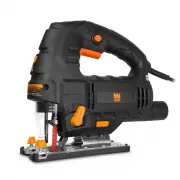
SAFETY INTRODUCTION Thanks for purchasing the WEN Jig Saw. If you like a portable tool that can create both straight and curved cuts on different materials, then this is the right product for you. This manual provides information regarding potential safety concerns, as well as helpful assembly and o...
Page 4 - GENERAL SAFETY RULES
WARNING: Dust generated from certain materials can be hazardous to your health. Always operate the tool in a well-ventilated area and wear a dust mask. Use dust collection systems when processing wood and plastics. Dust extractors or dust bags must not be connected when processing metals. PERSONAL S...
Page 5 - Arsenic and chromium from chemically treated lumber.
POWER TOOL USE AND CARE 1. Avoid accidental start-ups. Make sure the power switch is in the OFF position before connecting the plug to a power source or carrying the tool. 2. Check power tool for damaged parts. Check for misalignment of moving parts, jamming, breakage, improper mounting, or any othe...
Page 6 - SPECIFIC RULES FOR YOUR JIG SAW
WARNING: Do not let comfort or familiarity with the product replace strict adherence to product safety rules. Read and understand all warnings, cautions and operating instructions before using this equipment. Failure to follow all instructions listed below may result in personal injury and tool dama...
Page 7 - LASER SAFETY; ATTENTION: LASER RADIATION. CLASS 2 LASER. DO NOT STARE INTO THE BEAM
SPECIFIC RULES FOR YOUR JIG SAW 7 11. MAKING ADJUSTMENTS. Always turn off and unplug the jig saw before making adjustments or changing attachments. Accidental start-ups may occur if the jig saw is plugged in during an accessory change. Do not touch the attachment immediately after operation. Allow t...
Page 8 - ELECTRICAL INFORMATION; DOUBLE INSULATION; AMPERAGE
8 ELECTRICAL INFORMATION DOUBLE INSULATION Double insulation is a concept in concept in electrical power tool safety, where two systems of insula-tion are provided. This eliminates the need for the usual three-wire grounded power cord. All exposed metal parts are isolated from the internal metal mot...
Page 9 - KNOW YOUR JIG SAW
KNOW YOUR JIG SAW Carefully unpack the tool from the packaging. Check all components and compare against the graph below. If any part is damaged or missing, please contact our customer service at (800) 232-1195, M-F 8-5 CST or email us at [email protected]. Lock-On Button Dust Port Base Plate Air Bl...
Page 10 - ASSEMBLY AND ADJUSTMENTS
10 WARNING: Wear safety gloves when handling saw blades. The jig saw blade is sharp and fragile and must be handled carefully to avoid injury to the user and damage to the blade. 1. Make sure the tool is switched off and disconnected from the power sup-ply. Wear safety gloves to protect your hands. ...
Page 11 - Suits hard materials such as metals or thin sheet metals.
ASSEMBLY AND ADJUSTMENTS SETTING THE CUTTING SPEED (Fig. 5) Your jig saw is equipped with a variable speed dial (Fig. 5 - 1) to set the appropriate blade stroke rate for your operation. Speed setting 1 is the low-est speed, and setting 6 is the highest speed (3300 RPM). To increase the speed, turn t...
Page 12 - ADJUSTING THE BEVEL ANGLE; Pull back the base plate to disengage the angle lock pin.
12 ASSEMBLY AND ADJUSTMENTS Fig. 8 1 Fig. 12 Fig. 11 Fig. 10 1 1 ADJUSTING THE BEVEL ANGLE (Fig. 8 & 9) The base plate of your jig saw is pre-adjusted to 0° for making straight cuts. You can create bevel cuts by setting the base plate up to 45° to the left or right. To adjust the angle of the ba...
Page 13 - OPERATION; SAWING OPERATION
OPERATION SAWING OPERATION 1. Prepare the work space and position power cords away from the cutting area. 2. Install the suitable blade and set up your saw according to the instructions in “Assembly and Adjustments” on pages 10 to 12. Connect the tool to a dust extraction system if the air blow swit...
Page 14 - WARNING; performing any maintenance.; CLEANING; Remove the saw blade after use and wipe it clean with a dry cloth.; MAINTENANCE; Replacement carbon brushes (Part No.; PRODUCT DISPOSAL
14 WARNING : To avoid accidents, always disconnect the tool from the power supply before cleaning or performing any maintenance. CLEANING 1. Clean the tool after every use with a soft cloth. Keep the ventilation openings free from dust and debris. Avoid using solvents when cleaning plastic parts. Mo...
Page 15 - LIMITED TWO YEAR WARRANTY
15 LIMITED TWO YEAR WARRANTY WEN Products is committed to build tools that are dependable for years. Our warranties are consistent with this commitment and our dedication to quality. LIMITED WARRANTY OF WEN CONSUMER POWER TOOLS PRODUCTS FOR HOME USE GREAT LAKES TECHNOLOGIES, LLC (“Seller”) warrants ...
Page 16 - EXPLODED VIEW & PARTS LIST
Page 17 - Description; are not covered by the two-year warranty.
EXPLODED VIEW & PARTS LIST No. Part No. Description Qty. 1 33606-001 Laser Button 1 2 33606-002 Laser Assembly 1 3 33606-003 Steel Wire Protection 1 4 33606-004 Reciprocating Screw Positioning Plate 1 5 33606-005 Ball Slide 1 6 33606-006 Tool Reset Spring 1 7 33606-007 Reciprocating Lever Assemb...