Page 2 - CONTENTS; Eλληνικά
6 23 CONTENTS EnglishDeutschEspañolCatalà Eλληνικά ItalianoPortuguês РусскийҚазақша Polski Українська 13579 111315171921
Page 3 - First glance; Press and hold the power button to turn your
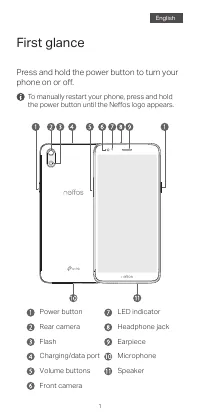
1 2 First glance Press and hold the power button to turn your phone on or off. To manually restart your phone, press and hold the power button until the Neffos logo appears. LED indicatorHeadphone jack Speaker Microphone Earpiece Power buttonRear camera Volume buttons Charging/data port Front camera...
Page 4 - Getting started; Insert the cards: your phone supports one
1 2 Getting started Your phone supports only dual card dual standby single pass, which means you cannot use both SIM cards for calls or data services simultaneously. For User Guide and GPL source code, please visit http://www.neffos.com/en/support. 3 Insert the battery.Replace the back cover. Insert...
Page 5 - Auf einen Blick; Drücken Sie die Power-Taste, um Ihr Telefon
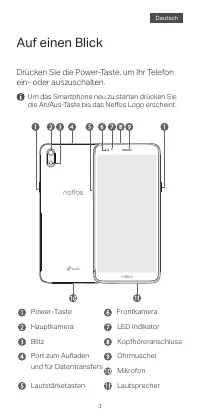
2 3 4 Auf einen Blick Drücken Sie die Power-Taste, um Ihr Telefon ein- oder auszuschalten. Kopfhöreranschluss Lautsprecher Mikrofon LED Indikator Ohrmuschel Power-TasteHauptkamera Lautstärketasten Port zum Aufladen und für Datentransfers Frontkamera Blitz Um das Smartphone neu zu starten drücken Sie...
Page 6 - Erste Schritte; Karten einsetzen: Ihr Telefon unterstützt
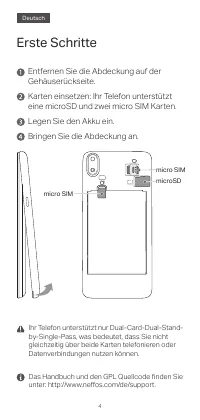
3 4 Erste Schritte Legen Sie den Akku ein.Bringen Sie die Abdeckung an. Karten einsetzen: Ihr Telefon unterstützt eine microSD und zwei micro SIM Karten. Entfernen Sie die Abdeckung auf der Gehäuserückseite. Ihr Telefon unterstützt nur Dual-Card-Dual-Stand- by-Single-Pass, was bedeutet, dass Sie nic...
Page 7 - Primer vistazo; Pulsa y manten presionado el botón de
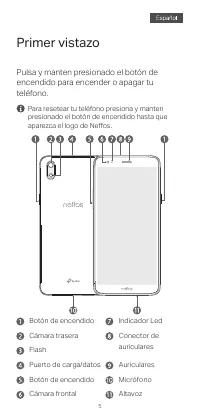
4 5 6 Primer vistazo Pulsa y manten presionado el botón de encendido para encender o apagar tu teléfono. Indicador LedConector de auriculares Altavoz Micrófono Auriculares Botón de encendidoCámara trasera Botón de encendido Puerto de carga/datos Cámara frontal Flash Para resetear tu teléfono presion...
Page 8 - Primeros pasos; Inserta las tarjetas: tu teléfono soporta una
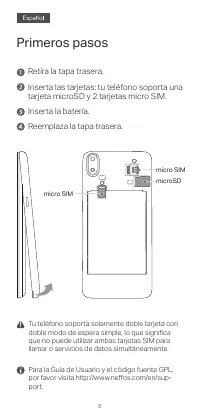
5 6 Primeros pasos Inserta la batería.Reemplaza la tapa trasera. Inserta las tarjetas: tu teléfono soporta una tarjeta microSD y 2 tarjetas micro SIM. Retira la tapa trasera. Tu teléfono soporta solamente doble tarjeta con doble modo de espera simple, lo que significa que no puede utilizar ambas tar...
Page 9 - Primer cop d’ull; Manteniu premut el botó d'engegada per
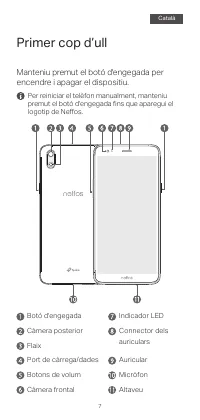
7 8 Primer cop d’ull Manteniu premut el botó d'engegada per encendre i apagar el dispositiu. Indicador LEDConnector delsauriculars Altaveu Micròfon Auricular Botó d'engegadaCàmera posterior Botons de volum Port de càrrega/dades Càmera frontal Flaix Per reiniciar el telèfon manualment, manteniu premu...
Page 10 - Per començar; Introduïu les targetes: el vostre telèfon
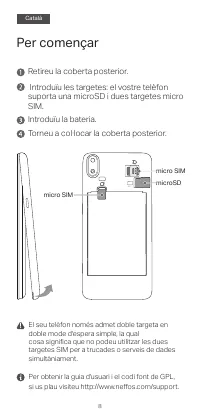
7 8 Per començar Introduïu la bateria.Torneu a col·locar la coberta posterior. Introduïu les targetes: el vostre telèfon suporta una microSD i dues targetes micro SIM. Retireu la coberta posterior. El seu telèfon només admet doble targeta en doble mode d'espera simple, la qual cosa significa que no ...
Page 11 - Με μια ματιά; Πιέστε και κρατήστε πατημένο το πλήκτρο
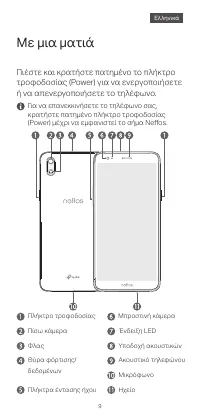
8 9 10 Με μια ματιά Πιέστε και κρατήστε πατημένο το πλήκτρο τροφοδοσίας (Power) για να ενεργοποιήσετε ή να απενεργοποιήσετε το τηλέφωνο. Θύρα φόρτισης/δεδομένων Πλήκτρο τροφοδοσίας Πίσω κάμερα Πλήκτρα έντασης ήχου Μπροστινή κάμερα Φλας Υποδοχή ακουστικών Ηχείο Μικρόφωνο Ακουστικό τηλεφώνου Ένδειξη L...
Page 12 - Για να ξεκινήσετε; Τοποθετήστε τις κάρτες: το τηλέφωνο
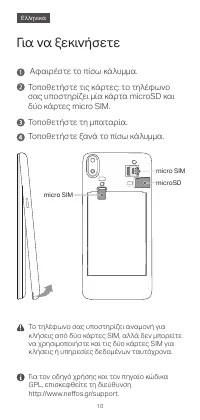
9 10 Για να ξεκινήσετε Τοποθετήστε τη μπαταρία.Τοποθετήστε ξανά το πίσω κάλυμμα. Τοποθετήστε τις κάρτες: το τηλέφωνο σας υποστηρίζει μία κάρτα microSD και δύο κάρτες micro SIM. Αφαιρέστε το πίσω κάλυμμα. Το τηλέφωνο σας υποστηρίζει αναμονή για κλήσεις από δύο κάρτες SIM, αλλά δεν μπορείτε να χρησιμο...
Page 13 - Accensione; Premete il pulsante Power fino all'accensione
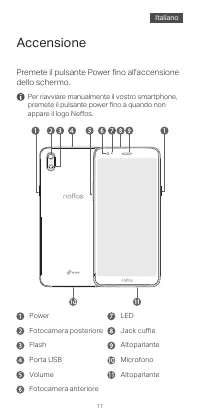
10 11 12 Accensione Premete il pulsante Power fino all'accensione dello schermo. LEDJack cuffie Altoparlante Microfono Altoparlante PowerFotocamera posteriore Volume Porta USB Fotocamera anteriore Flash Per riavviare manualmente il vostro smartphone, premete il pulsante power fino a quando non appar...
Page 14 - Iniziamo; Inserite le schede: il vostro smartphone
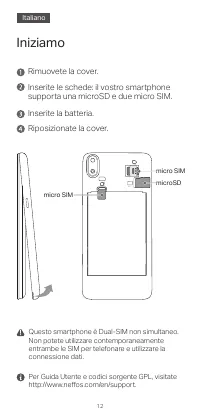
11 12 Iniziamo Inserite la batteria.Riposizionate la cover. Inserite le schede: il vostro smartphone supporta una microSD e due micro SIM. Rimuovete la cover. Questo smartphone è Dual-SIM non simultaneo. Non potete utilizzare contemporaneamente entrambe le SIM per telefonare e utilizzare la connessi...
Page 15 - Descrição do Dispositivo; Para ligar ou desligar o telefone pressione
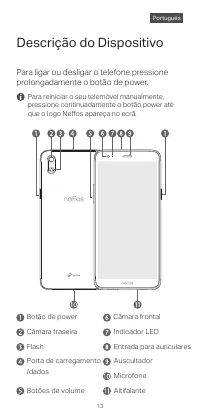
13 14 Descrição do Dispositivo Para ligar ou desligar o telefone pressione prolongadamente o botão de power. Entrada para auriculares Altifalante Microfone Indicador LED Auscultador Botão de powerCâmara traseira Botões de volume Porta de carregamento/dados Câmara frontal Flash Para reiniciar o seu t...
Page 16 - Iniciar a configuração; Insira os cartões: o seu telemóvel suporta
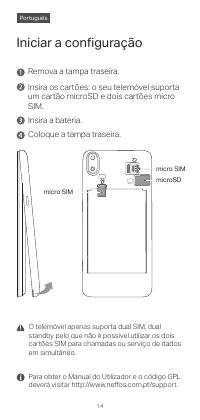
13 14 Iniciar a configuração Insira a bateria.Coloque a tampa traseira. Insira os cartões: o seu telemóvel suporta um cartão microSD e dois cartões micro SIM. Remova a tampa traseira. O telemóvel apenas suporta dual SIM, dual standby pelo que não é possível utilizar os dois cartões SIM para chamadas...
Page 17 - Общий вид; Нажмите и удерживайте кнопку питания
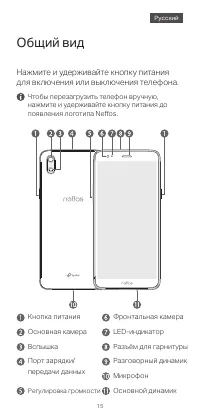
14 15 16 Общий вид Нажмите и удерживайте кнопку питания для включения или выключения телефона. Разъём для гарнитуры Основной динамик Микрофон LED-индикатор Разговорный динамик Кнопка питанияОсновная камера Регулировка громкости Порт зарядки/передачи данных Фронтальная камера Вспышка Чтобы перезагруз...
Page 18 - Начало работы; Вставьте карты: ваш телефон
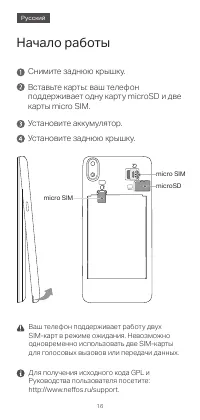
15 16 Начало работы Установите аккумулятор.Установите заднюю крышку. Вставьте карты: ваш телефон поддерживает одну карту microSD и две карты micro SIM. Снимите заднюю крышку. Ваш телефон поддерживает работу двух SIM-карт в режиме ожидания. Невозможно одновременно использовать две SIM-карты для голос...
Page 19 - Сыртқы көрінісі; Телефонды қосу немесе өшіру үшін қуат
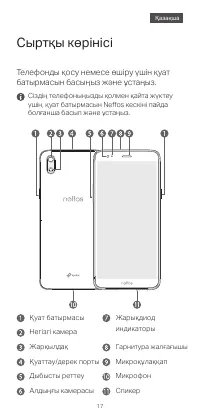
16 17 18 Сыртқы көрінісі Телефонды қосу немесе өшіру үшін қуат батырмасын басыңыз және ұстаңыз. Жарықдиод индикаторы Гарнитура жалғағышы Спикер Микрофон Микроқұлаққап Қуат батырмасыНегізгі камера Дыбысты реттеу Қуаттау/дерек порты Алдыңғы камерасы Жарқылдақ Сіздің телефоныңызды қолмен қайта жүктеу ү...
Page 20 - Жұмыс басы; Карталарды енгізу: сіздің телефоныңыз
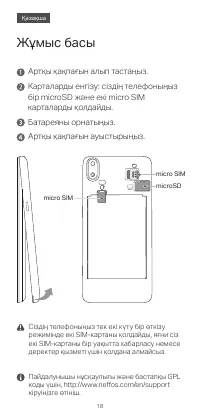
17 18 Жұмыс басы Батареяны орнатыңыз.Артқы қақпағын ауыстырыңыз. Карталарды енгізу: сіздің телефоныңыз бір microSD және екі micro SIM карталарды қолдайды. Артқы қақпағын алып тастаңыз. Сіздің телефоныңыз тек екі күту бір өткізу режимінде екі SIM-картаны қолдайды, яғни сіз екі SIM-картаны бір уақытта...
Page 21 - Wygląd urządzenia; Naciśnij i przytrzymaj przycisk zasilania, aby
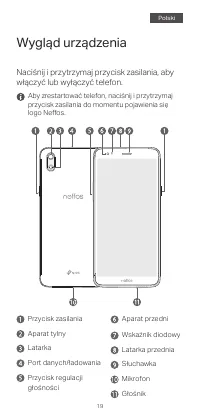
19 20 Wygląd urządzenia Naciśnij i przytrzymaj przycisk zasilania, aby włączyć lub wyłączyć telefon. Wskaźnik diodowy Latarka przednia Głośnik Mikrofon Słuchawka Przycisk zasilaniaAparat tylny Przycisk regulacji głośności Port danych/ładowania Aparat przedni Latarka Aby zrestartować telefon, naciśni...
Page 22 - Wprowadzenie; Włóż karty: telefon obsługuje jedną kartę
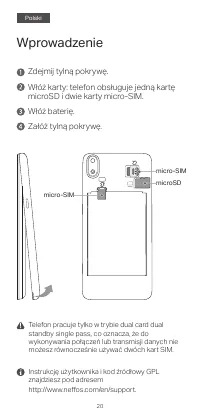
19 20 Wprowadzenie Włóż baterię.Załóż tylną pokrywę. Włóż karty: telefon obsługuje jedną kartę microSD i dwie karty micro-SIM. Zdejmij tylną pokrywę. Telefon pracuje tylko w trybie dual card dual standby single pass, co oznacza, że do wykonywania połączeń lub transmisji danych nie możesz równocześni...
Page 23 - Перше знайомство; Натисніть та утримуйте кнопку живлення,
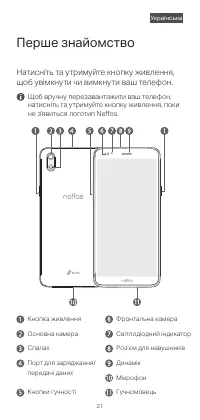
20 21 22 Перше знайомство Натисніть та утримуйте кнопку живлення, щоб увімкнути чи вимкнути ваш телефон. Світлодіодний індикатор Роз'єм для навушників Порт для заряджання/передачі даних Гучномовець Мікрофон Динамік Кнопка живлення Основна камера Кнопки гучності Фронтальна камера Спалах Щоб вручну пе...
Page 24 - Початок роботи; Вставте картки: ваш телефон підтримує
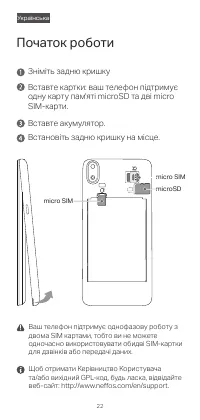
21 22 Початок роботи Вставте акумулятор.Встановіть задню кришку на місце. Вставте картки: ваш телефон підтримує одну карту пам'яті microSD та дві micro SIM-карти. Зніміть задню кришку Ваш телефон підтримує однофазову роботу з двома SIM картами, тобто ви не можете одночасно використовувати обидві SIM...
Page 26 - Frequency bands and power; Συχνότητες και Ισχύς
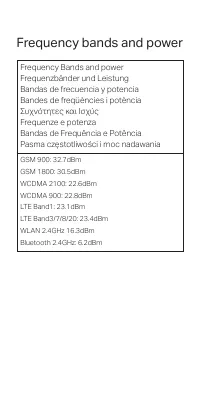
22 Frequency bands and power Frequency Bands and power Frequenzbänder und Leistung Bandas de frecuencia y potencia Bandes de freqüències i potència Συχνότητες και Ισχύς Frequenze e potenza Bandas de Frequência e Potência Pasma częstotliwości i moc nadawania GSM 900: 32.7dBmGSM 1800: 30.5dBmWCDMA 210...