Page 2 - CONTENTS; 1 / English
CONTENTS 01 / English 03 / Български 05 / Čeština 07 / Hrvatski09 / Latviešu 11 / Lietuvių 13 / Magyar 15 / Polski 17 / Română 19 / Slovenčina 21 / Slovenski23 / Srpski jezik/Српски језик 25 / Қазақша 27 / Русский язык 29 / Українська мова 31 / Eesti
Page 3 - English; Connect to a Computer; PCIE X1
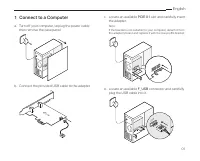
01 English 1 Connect to a Computer a. Turn off your computer, unplug the power cable then remove the case panel. b. Connect the provided USB cable to the adapter. c. Locate an available PCIE X1 slot and carefully insert the adapter. Note:If the bracket is not suitable for your computer, detach i...
Page 4 - Install Drivers; Bluetooth; Join a Wireless Network; or; Pair With Bluetooth Devices; Add a Bluetooth Device
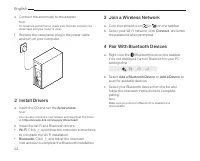
English 02 e. Connect the antenna(s) to the adapter. Note:To maximize performance, make sure the path between the antenna(s) and your router is clear. f. Replace the case panel, plug in the power cable and turn on your computer. 2 Install Drivers a. Insert the CD and run the Autorun.exe . Note:Y...
Page 5 - Български; Свързване към компютър
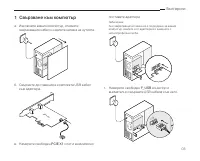
03 Български 1 Свързване към компютър а. Изключете вашия компютър, откачете захранващия кабел и свалете капака на кутията. б. Свържете доставения в комплекта USB кабел към адаптера. в. Намерете свободен PCIE X1 слот и внимателно поставете адаптера. Забележка:Ако закрепващата планка не е подходяща за...
Page 6 - Инсталиране на драйвери; Свързване към безжична мрежа
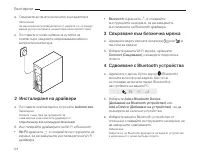
Български 04 д. Свържете антената (антените) към адаптера. Забележка:За максимална производителност, уверете се, че между вашия рутер и антената на адаптера няма препятствия. е. Поставете отново капака на кутията на компютъра, свържете захранващия кабел и включете компютъра. 2 Инсталиране на драйвер...
Page 7 - Čeština; Připojení k počítači
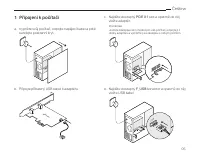
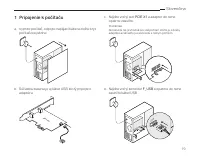
05 Čeština 1 Připojení k počítači a. Vypněte svůj počítač, odpojte napájecí kabel a poté sundejte postranní kryt. b. Připojte přibalený USB kabel k adaptéru. c. Najděte dostupný PCIE X1 slot a opatrně do něj vložte adaptér. Poznámka: Jestliže záslepka není vhodná pro váš počítač, odpojte ji z des...
Page 8 - Instalace ovladačů; Připojení k bezdrátové síti; Připojit; Spárování se zařízeními Bluetooth; Přidat Bluetooth zařízení
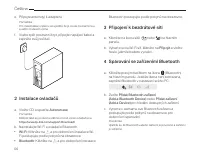
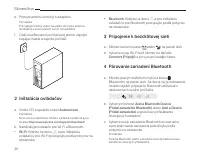
Čeština 06 e. Připojte anténu(y) k adaptéru. Poznámka:Pro maximalizaci výkonu se ujistěte, že je cesta mezi anténou a vaším routerem volná. f. Vraťte zpět postranní kryt, připojte napájecí kabel a zapněte svůj počítač. 2 Instalace ovladačů a. Vložte CD a spusťte Autorun.exe . Poznámka:Můžete také...
Page 9 - Hrvatski; Spajanje na računalo
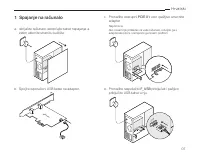
07 Hrvatski 1 Spajanje na računalo a. Isključite računalo, iskopčajte kabel napajanja, a zatim uklonite stranicu kućišta. b. Spojite isporučeni USB kabel na adapter. c. Pronađite dostupni PCIE X1 utor i pažljivo umetnite adapter. Napomena:Ako nosač nije prikladan za vaše računalo, odvojite ga s a...
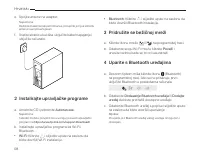
Page 10 - Instalirajte upravljačke programe; Pridružite se bežičnoj mreži; ili; Uparite s Bluetooth uređajima; Dodavanje Bluetooth uređaja
Hrvatski 08 e. Spojite antene na adapter. Napomena:Da biste maksimizirali performanse, provjerite je li put između antena i usmjerivača jasan. f. Vratite stranicu kućišta, uključite kabel napajanja i uključite računalo. 2 Instalirajte upravljačke programe a. Umetnite CD i pokrenite Autorun.exe . ...
Page 11 - Latviešu; Pievienojiet datoram; b. Pievienojiet iekļauto USB kabeli adapterim.; d. Atrodiet pieejamu
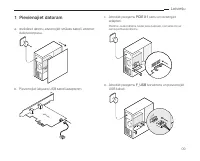
09 Latviešu 1 Pievienojiet datoram a. Izslēdziet datoru, atvienojiet strāvas kabeli, atveriet datora korpusu. b. Pievienojiet iekļauto USB kabeli adapterim. c. Atrodiet pieejamu PCIE X1 slotu un ievietojiet adapteri. Piezīme: Ja kronšteins neder jūsu datoram, nomainiet to uz zemā profila kronštei...
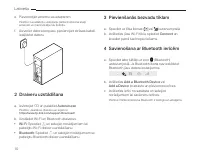
Page 12 - Draiveru uzstādīšana; Pievienšanās bezvadu tīklam; Connect; Savienošana ar Bluetooth ierīcēm
Latviešu 10 e. Pievienotjiet atnetnu-as adapterim. Piezīme: Lai uzlabotu veikstpēju pārliecinieties lai starp antenām un maršrutētāju nav šķēršļu. f. Aizveriet datora korpusu, pievienojiet strāvas kabeli, ieslēdziet datoru. 2 Draiveru uzstādīšana a. Ievietojiet CD un palaidiet Autorun.exe . Piezī...
Page 13 - Lietuvių; Prijunkite prie kompiuterio
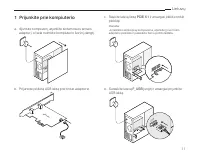
11 Lietuvių 1 Prijunkite prie kompiuterio a. Išjunkite kompiuterį, atjunkite kintamosios srovės adapterį, o tada nuimkite kompiuterio šoninį dangtį. b. Prijunkite pridėtą USB laidą prie tinklo adapterio. c. Raskite laisvą lizdą PCIE X1 ir atsargiai įdėkite tinklo plokštę. Pastaba: Jei laikiklis n...
Page 14 - Įdiekite tvarkykles; Prisijunkite prie belaidžio tinklo; Prisijungti; Suporuokite su Bluetooth įrenginiais; Pridėti Bluetooth įrenginį
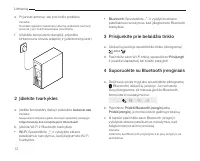
Lietuvių 12 e. Prijunkite anteną (-as) prie tinklo plokštės. Pastaba:Norėdami pasiekti maksimalų našumą, įsitikinkite, kad tarp antenos (-ų) ir maršrutizatoriaus nėra kliūčių. f. Uždėkite kompiuterio dangtelį, prijunkite kintamosios srovės adapterį ir įjunkite kompiuterį. 2 Įdiekite tvarkykles a. ...
Page 15 - Magyar; Csatlakoztassa a számítógéphez; majd távolítsa el a panelt.; d. Keresse meg a rendelkezésre álló
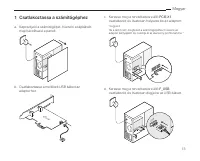
13 Magyar 1 Csatlakoztassa a számítógéphez a. Kapcsolja ki a számítógépet, húzza ki a tápkábelt, majd távolítsa el a panelt. b. Csatlakoztassa a mellékelt USB kábelt az adapterhez. c. Keresse meg a rendelkezésre álló PCIE X1 csatlakozót, és óvatosan helyezze be az adaptert. "Jegyzet:Ha a tart...
Page 16 - Telepítse az illesztőprogramokat; Csatlakozzon a vezeték nélküli; Párosítás Bluetooth-eszközökkel; Bluetooth eszköz hozzáadása
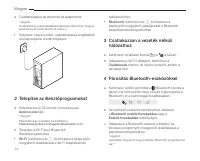
Magyar 14 e. Csatlakoztassa az antennát az adapterhez. "Jegyzet:A teljesítmény maximalizálása érdekében ellenőrizze, hogy az antenna és az router közötti út tiszta-e. " f. Helyezze vissza a tokot, csatlakoztassa a tápkábelt, és kapcsolja be a számítógépet. 2 Telepítse az illesztőprogramoka...
Page 17 - Polski; Podłącz do komputera
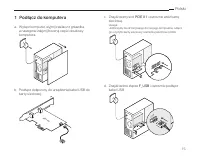
15 Polski 1 Podłącz do komputera a. Wyłącz komputer, wyjmij zasilacz z gniazdka, a następnie zdejmij boczną część obudowy komputera. b. Podłącz dołączony do urządzenia kabel USB do karty sieciowej. c. Znajdź wolny slot PCIE X1 i ostrożnie włóż kartę sieciową. Uwaga: Jeśli zwykły śledź nie pasuje ...
Page 18 - Zainstaluj sterowniki; Dołącz do sieci bezprzewodowej; Połącz; Sparuj z urządzeniami Bluetooth; Dodaj urządzenie Bluetooth
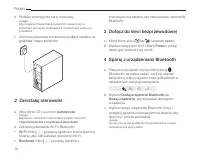
Polski 16 e. Podłącz antenę(y) do karty sieciowej. Uwaga: Aby osiągnąć maksymalną wydajność, upewnij się, że przestrzeń pomiędzy anteną(ami) a routerem jest wolna od przeszkód. f. Zamontuj obudowę komputera, podłącz zasilacz do gniazdka i włącz komputer. 2 Zainstaluj sterowniki a. Włóż płytę CD i...
Page 19 - Română; Conectare la un computer
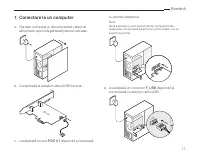
17 Română 1 Conectare la un computer a. Oprește computerul, deconectează cablul de alimentare, apoi îndepărtează panoul carcasei. b. Conectează la adaptor cablul USB furnizat. c. Localizează un slot PCIE X1 disponibil și inserează cu atenție adaptorul. Notă:Dacă suportul nu este potrivit pentru ...
Page 20 - Instalează driverele; Conectează-te la o rețea wireless; sau; Asociere cu dispozitive Bluetooth
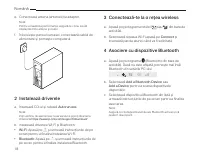
Română 18 e. Conectează antena (antenele) la adaptor. Notă:Pentru a maximiza performanța, asigură-te că nu există obstacole între antene și router. f. Înlocuiește panoul carcasei, conectează cablul de alimentare și pornește computerul. 2 Instalează driverele a. Inserează CD-ul și rulează Autorun....
Page 21 - Slovenčina; Pripojenie k počítaču
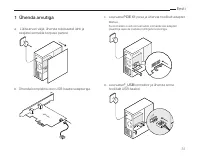
19 Slovenčina 1 Pripojenie k počítaču a. Vypnite počítač, odpojte napájací kábel a zložte kryt počítačovej skrine. b. Súčasťou balenia je aj kábel USB, ktorý pripojte k adaptéru. c. Nájdite voľ ný slot PCIE X1 a adaptér do neho opatrne zasuňte. Poznámka:Ak konzola nie je vhodná pre váš počítač, z...
Page 22 - Inštalácia ovládačov; Pripojenie k bezdrôtovej sieti
Slovenčina 20 e. Pripojte anténu (antény) k adaptéru. Poznámka:Pre najlepší možný výkon sa uistite, že medzi anténou (anténami) a smerovačom sa nič nenachádza. f. Opäť osaďte panel počítačovej skrine, zapojte napájací kábel a zapnite počítač. 2 Inštalácia ovládačov a. Vložte CD a spustite súbor A...
Page 23 - Slovenski; Vgradnja v računalnik; a. Ugasnite računalnik, izklopite napajanje in
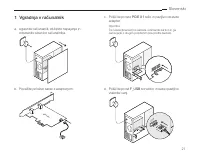
21 Slovenski 1 Vgradnja v računalnik a. Ugasnite računalnik, izklopite napajanje in odstranite stranico računalnika. b. Povežite priložen kabel z adapterjem. c. Poiščite prosto PCIE X1 režo in pazljivo vstavite adapter. Opomba:Če nosilec(bracket) ne ustreza, odstranite kartico in ga zamenjajte z ...
Page 24 - Namestitev gonilnikov; Povezava z brezžičnim omrežjem; ali; Povezovanje z Bluetooth napravami; Dodaj Bluetooth napravo
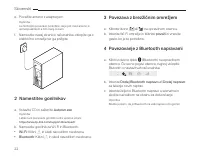
Slovenski 22 e. Povežite anteno z adapterjem. Opomba:za čimboljšo povezavo poskrbite, da je pot med anteno in usmerjevalnikom s čim manj ovirami. f. Namestite nazaj stranico računalnika, vklopite ga v električno omrežje ter ga prižgite. 2 Namestitev gonilnikov a. Vstavite CD in zaženite Autorun.e...
Page 25 - Srpski jezik/Српски језик; Povežite se sa računarom
23 Srpski jezik/Српски језик 1 Povežite se sa računarom a. Isključite računar, izvadite naponski kabl, a zatim uklonite poklopac kućišta. b. Spojite isporučeni USB kabl na adapter. c. Pronađite slobodni PCIE X1 slot, i pažljivo umetnite adapter. Napomena:Ako nosač nije adekvatan za vaš računar, o...
Page 26 - Instalirajte drajvere,odnosno; Pristupite se bežičnoj mreži; Uparite sa Bluetooth uređajima
Srpski jezik/Српски језик 24 e. Spojite antene na adapter. Napomena:Da biste povećali performanse, proverite da li je prostor, između antena i rutera bez prepreka. f. Vratite poklopac kućišta, uključite naponski kabl, i uključite računar. 2 Instalirajte drajvere,odnosno upravljačke programe a. U...
Page 27 - Қазақша; Компьютерге қосыңыз
25 Қазақша 1 Компьютерге қосыңыз a. Компьютерді өшіріңіз, қуат сымын өшіріңіз және компьютер корпусын ашыңыз. b. Берілген USB кабелін адаптерге қосыңыз. c. PCIE X1 бос ұяшығын табыңыз және оған адаптерді ұқыпты салыңыз. Ескерту: Егер стандартты тақтайша сіздің компьютеріңізге сәйкес келмесе, оны ...
Page 28 - Драйверді орнатыңыз; Сымсыз желіге қосылыңыз; Қосу; Bluetooth құрылғыларымен; Bluetooth Құрылғысын Қосу
Қазақша 26 e. Антеннаны адаптерге қосыңыз. Ескерту: Өнімділікті арттыру үшін антенна(лар) мен маршрутизатор арасындағы жол анық екенін тексеріңіз. f. Компьютер корпусын жабыңыз, қуат сымын жалғап, компьютерді қосыңыз. 2 Драйверді орнатыңыз a. CD енгізіңіз және Autorun.exe ашыңыз. Ескерту: Сонымен...
Page 29 - Русский язык; Подключение к компьютеру
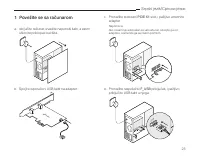
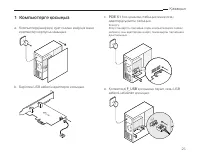
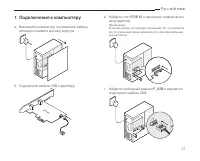
27 Русский язык 1 Подключение к компьютеру a. Выключите компьютер, отсоедините кабель питания и снимите крышку корпуса. б. Подключите кабель USB к адаптеру. в. Найдите слот PCIE X1 и аккуратно подключите к нему адаптер. Примечание: Если кронштейн не подходит для вашего ПК, отсоедините его от платы а...
Page 30 - Установка драйверов; Подключение к беспроводной; Подключиться; Подключение Bluetooth-устройств; Добавить Bluetooth-устройство
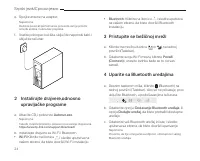
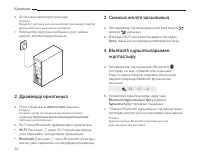
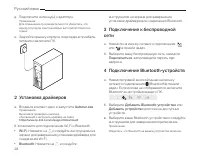
Русский язык 28 д. Подключите антенну(ы) к адаптеру. Примечание: Для повышения производительности убедитесь, что между роутером и антенной(ами )нет препятствий или помех. е. Закройте крышку корпуса, подсоедините кабель питания и включите ПК. 2 Установка драйверов a. Вставьте компакт-диск и запустите...
Page 31 - Українська мова; Підключіться до комп'ютера; та зніміть панель корпусу.; d. Знайдіть вільний
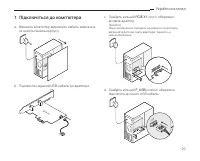
29 Українська мова 1 Підключіться до комп'ютера a. Вимкніть комп'ютер, відключіть кабель живлення та зніміть панель корпусу. b. Підключіть наданий USB-кабель до адаптера. c. Знайдіть вільний PCIE X1 слот і обережно вставте адаптер. Примітка: Якщо кріплення не підходить для вашого комп'ютера, від'...
Page 32 - Встановіть драйвери; Підключіться до бездротової; Підключитися; Створіть пару з пристроями; Додати пристрій Bluetooth
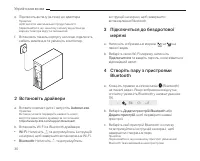
Українська мова 30 e. Підключіть антену (антени) до адаптера. Примітка: Щоб досягти максимальної продуктивності, переконайтеся, що на шляху сигналу від антени до маршрутизатора відсутні перешкоди. f. Встановіть панель корпусу на місце, підключіть кабель живлення та увімкніть комп'ютер. 2 Встановіт...
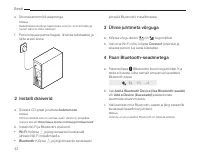
Page 33 - Eesti; Ühenda arvutiga; a. Lülita arvuti välja, ühenda toitekaabel lahti ja; konnektor ja ühenda sinna
31 Eesti 1 Ühenda arvutiga a. Lülita arvuti välja, ühenda toitekaabel lahti ja seejärel eemalda korpuse paneel. b. Ühenda komplektis olev USB-kaabel adapteriga. c. Leia vaba PCIE X1 pesa ja ühenda hoolikalt adapter. Märkus.Kui kronstein ei sobi sinu arvutile, eemalda see adapteri plaadilt ja asen...
Page 34 - Installi draiverid; Ühine juhtmeta võrguga; Paari Bluetooth-seadmetega; Vali
Eesti 32 e. Ühenda antenn(id) adapteriga. Märkus.Maksimaalse jõudluse tagamiseks veendu, et antenni(de) ja ruuteri vahel ei oleks takistusi. f. Pane korpuse paneel tagasi, ühenda toitekaabel ja lülita arvuti sisse. 2 Installi draiverid a. Sisesta CD-plaat ja käivita Autorun.exe . Märkus.Võid kon...
Page 35 - EU declaration of conformity
33 EU declaration of conformity English TP-Link hereby declares that the device is in compliance with the essential requirements and other relevant provisions of directives 2014/53/EU, 2011/65/EU and (EU)2015/863.The original EU declaration of conformity may be found at https//www.tp-link.com/en/ceБ...
Page 36 - Safety Information
34 (UE)2015/863.Declarația de conformitate UE originală poate fi găsită la adresa https://www.tp-link.com/en/ce Slovenčina TP-Link týmto vyhlasuje, že toto zariadenie je v zhode so základnými požiadavkami a ďalšími príslušnými ustanoveniami smerníc 2014/53/EÚ, 2011/65/EÚ a (EÚ)2015/863 .Originál EU ...