Page 2 - Child Safety; The Issue; NOTE TO CATV INSTALLERS IN THE USA; This type of; WARNING
2 Child Safety It Makes A DifferenceWhere Your TV Stands Congratulations on your purchase! As you enjoyyour new TV, keep these safety tips in mind: The Issue If you are like most consumers, you have a TV in your home.Many homes, in fact, have more than one TV.The home theater entertainment experienc...
Page 3 - Installation; Important Safety Instructions
3 Installation, Care, and Service Installation Follow these recommendations and precautions and heed allwarnings when installing your TV: 16) Never modify this equipment. Changes or modifications may void: a) the warranty, and b) the user’s authority tooperate this equipment under the rules of the F...
Page 4 - Care; Service
4 Ground clamp Antenna discharge unit(NEC Section 810-20) Grounding conductors(NEC Section 810-21) Power service groundingelectrode system (NEC Art 250 Part H) Ground clamps Antenna lead-in wire Electric service equipment QUALIFIED SERVICE TECHNICIAN 24) Always operate this equipment from a 120 VAC,...
Page 5 - FEATURES; • 181 Channel Tuner -; FRONT
5 ANT IN VIDEO AUDIO L R FEATURES LOCATION OF CONTROLS • 181 Channel Tuner - The tuning system is capable of receiving all 68 VHF/UHF standard broadcast channels that are available in your area. When operating on a cable system, it can tune to the standard VHF channel frequenciesplus up to 113 cable...
Page 6 - REMOTE CONTROL; HOW TO INSTALL BATTERIES; Replace the battery compartment cover.
6 4. SLEEP Button - To set the TV to turn off after a preset amount of time, press the SLEEP button on the remotecontrol. The clock will count down 10 minutes each timethe button is pressed in the order of 120, 110, 100, ······ 20,10, 0. After the sleep time is programmed, the display willdisappear ...
Page 7 - Combination VHF/UHF antenna; Cable TV service; ANTENNA/CATV CONNECTIONS; CONNECTION TO OTHER EQUIPMENT; To connect the TV to a VCR
7 A B Combination VHF/UHF antenna Single 75 ohm cable (or) Single 300 ohm twin-lead wire* TRANSFORMER (not supplied) * For best performance, if you have a splitter connected, remove the splitter and connect the single wire to the transformer, and then to the TV’s antenna input (as illustrated here)....
Page 8 - SETTING THE LANGUAGE; TO MEMORIZE CHANNELS; TO ADD/DELETE CHANNELS; AUTOMATIC CHANNEL MEMORY
8 SETTING THE LANGUAGE This TV can display the on-screen displays and adjustment menus in English, Spanish, or French.On-screen language selection (step 3) will automatically appear on the screen when you press the MENU button initially.Select the language you prefer first, then proceed with the oth...
Page 9 - TV OPERATION; CLOSED CAPTION
9 DIRECT CHANNEL SELECTION buttons (0-9) - Press these buttons to select a channel. The channel number will appear onthe upper right corner of the TV screen. If an invalid channelnumber is selected, the display will revert to the previouschannel. TV MODE DIRECT CHANNEL SELECTION - When the TV/ CABLE...
Page 10 - SOUND ADJUSTMENTS; ADJUSTING THE PICTURE; MENU
10 You can adjust the setting for bass, treble, balance, surroundand stable sound. Press MENU . Press SET + or – button until the indicator next to “AUDIO” begins toflash, then press ENTER . Press ENTER repeatedly to select the item you want to adjust. 1 2 3 STABLE SOUND TREBLE BALANCE BASS SURROUND...
Page 11 - TV RATING; TO SELECT THE DESIRED MTS SETTING:; SELECTING STEREO/SAP BROADCASTS
11 NOTES: • V-Chip function is based on specifications for the United States and therefore may not work properly in Canada.• If you want to change your password, follow steps 1 and 2 and select “CHANGE PASSWORD” option. Then enter your new password. • The V-Chip function is activated only on program...
Page 12 - LOCKING VIDEO INPUT; USING THE LOCK MENU; LOCKING CHANNELS; TO SET THE ON TIMER; SETTING THE GAME TIMER
12 VIDEO LOCK 〈 + / – / ENTER / MENU 〉 OFFVIDEOVIDEO+ LOCKING VIDEO INPUT With the VIDEO LOCK feature, you can lock out the inputsource and (VIDEO1, VIDEO2) channel 3 and 4.You will not be able to select the input sources with the TV/ VIDEO button or Channel buttons unless you clear the setting. 1 2...
Page 13 - TROUBLESHOOTING GUIDE; SPECIFICATIONS; ACCESSORY; Design and specifications are subject to change without notice.
13 TROUBLESHOOTING GUIDE Before requesting service, please refer to the following chart for the symptom and possible solution. SYMPTOMS POSSIBLE SOLUTIONS SYMPTOMS POSSIBLE SOLUTIONS TV does notoperate Poor soundor no sound Poor pictureor no picture Picturewobbles ordrifts Poor color orno color Poor...
Page 14 - Limited United States Warranty; For 24” FST PURE
14 Limited United States Warranty For 24” FST PURE ® and All Smaller Television Models Toshiba America Consumer Products, Inc. (“TACP”) and Toshiba Hawaii, Inc. (“THI”) make the following limited warrantiesto original consumers in the United States. THESE LIMITED WARRANTIES EXTEND TO THE ORIGINAL CO...
Page 15 - Your Responsibility; THE ABOVE WARRANTIES ARE SUBJECT TO THE FOLLOWING CONDITIONS:; How to Obtain Warranty Services; FST PURE
15 Your Responsibility THE ABOVE WARRANTIES ARE SUBJECT TO THE FOLLOWING CONDITIONS: (1) You must provide your bill of sale or other proof of purchase. (2) All warranty servicing of this television must be made by an Authorized TACP/THI Service Station. (3) The warranties from TACP and THI are effec...
Page 16 - Limited Canada Warranty
16 Limited Canada Warranty For 24” FST PURE ® and All Smaller Television Models Toshiba of Canada Limited (“TCL”) makes the following limited warranties to original consumers in Canada. THESELIMITED WARRANTIES EXTEND TO THE ORIGINAL CONSUMER PURCHASER OR ANY PERSON RECEIVINGTHIS TELEVISION AS A GIFT...
Page 17 - and operated in Canada.
17 (3) The warranties from TCL are effective only if the television is purchased in Canada from an authorized TCL dealer and operated in Canada. (4) Labor service charges for set installation, set up, adjustment of customer controls and installation or repair of antenna systems are not covered by th...
Page 18 - PRINTED IN THAILAND
J3M90101A03/04 PRINTED IN THAILAND U 3M90101A-E P12-BACK 20-3-03, 15:01 18
Page 20 - Sécurité des enfants; Le problème; Consignes de sécurité; AVERTISSEMENT; Avant d’allumer; AVIS AUX INSTALLATEURS DE; Ce genre de dommage N’EST PAS COUVE RT; AVIS SUR LA POSSIBILITÉ D’INSTABILITÉ
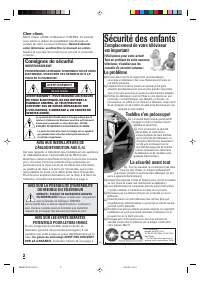
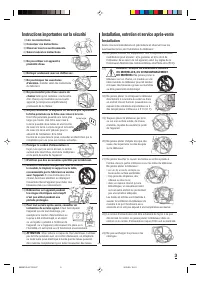
2 Sécurité des enfants L’emplacement de votre téléviseurest important Félicitations pour votre achat!Tout en profitant de votre nouveautéléviseur, n’oubliez pas lesconseils de sécurité suivants : Le problème ¾ Si vous êtes comme la plupart des consommateurs,vous avez un téléviseur chez vous. Beaucou...
Page 21 - Installation, entretien et service après-vente; Instructions importantes sur la sécurité
3 Installation, entretien et service après-vente Installation Suivre ces recommandations et précautions et observer tous lesavertissements lors de l’installation du téléviseur: 16) Ne jamais modifier cet équipement. Tout changement ou toute modification peut annuler : a) la garantie, et b) le droit ...
Page 22 - Entretien
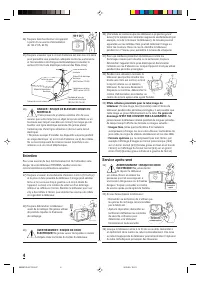
4 24) Toujours faire fonctionner cet appareil à partir d’une source d’alimentationde 120 V CA, 60 Hz. 25) Toujours s’assurer que le circuit d’antenne est bien mis à la terre pour permettre une protection adéquate contre les surtensionset l’accumulation de charges électrostatiques (consulter lasectio...
Page 23 - • Possibilité de syntonisation de 181 canaux -; • Option verrouillage -; Minuterie de mise sous tension -; VUE AVANT
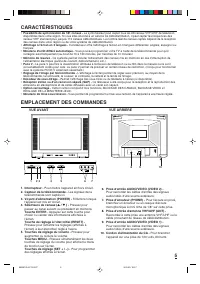
5 CARACTÉRISTIQUES EMPLACEMENT DES COMMANDES • Possibilité de syntonisation de 181 canaux - Le syntonisateur peut capter tous les 68 canaux VHF/UHF de télévision disponibles dans votre région. Si vous êtes abonné à un service de câblodistribution, il peut capter les fréquences descanaux VHF standard...
Page 24 - TÉLÉCOMMANDE
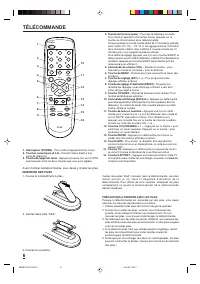
6 TÉLÉCOMMANDE 1. Interrupteur (POWER) - Pour mettre l'appareil en/hors circuit. 2. Touches numériques (0 à 9) - Permet l'accès direct à tout canal de télévision. 3. Touche de rappel de canal - Appuyez plusieurs fois sur CH RTN pour basculer entre les deux chaînes que vous avez réglées. 4. Touche du...
Page 25 - RACCORDEMENT DES ANTENNES; RACCORDEMENT À D'AUTRES APPAREILS
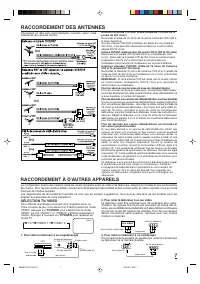
7 Antenne combinée VHF/UHF (câble unique de 75 ohms ou filjumelé de 300 ohms) Raccordez le câble de 75 ohms de l'antenne combinée VHF/UHF àla prise d'antenne.Si votre antenne VHF/UHF combinée est dotée d'un fil jumelé de300 ohms, il est peut-être nécessaire d'utiliser un transformateuradapté 300/75 ...
Page 26 - CHOIX DE LA LANGUE; MISE EN MÉMOIRE DES CANAUX; MÉMORISATION AUTOMATIQUE DES CANAUX
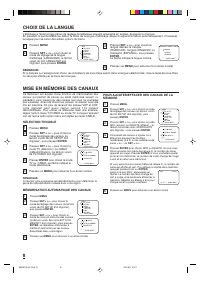
8 L’affichage à l’écran et les menus de réglage du téléviseur peuvent apparaître en anglais, espagnol ou français.En pressant la touche MENU au début, le choix de la langue d'affichage (étape 3) apparaît à l'écran automatiquement. Choisissezla langue pour se servir des autres options du menu. REMARQ...
Page 27 - FONCTIONNEMENT DU TÉLÉVISEUR
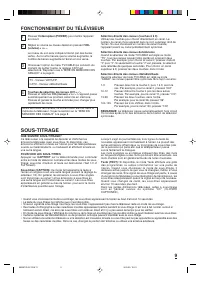
9 Touches de sélection de canaux (CH) + / – Pressez et relâchez CH (canaux) + ou – . L'appareil passe automatiquement au prochain canal mis en mémoire.Pressez et gardez la touche enfoncée pour changer plusrapidement de canal. Pressez l'interrupteur (POWER) pour mettre l'appareil en circuit. Réglez l...
Page 28 - RÉGLAGES SONORES
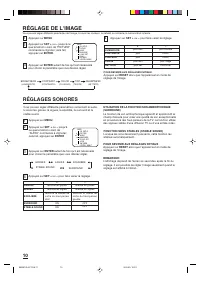
10 RÉGLAGES SONORES Vous pouvez regler différente paramètres concernant le audio,à savoir les graves, le aigues, la equilible, la surround et lastable sound. Appuyez sur MENU . Appuyez sur SET + ou – jusqu’à ce que le témoin voisin de“AUDIO” commence à clignoter;cela fait, appuyez sur ENTER . Appuye...
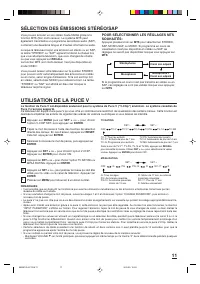
Page 29 - UTILISATION DE LA PUCE V; SÉLECTION DES ÉMISSIONS STÉRÉO/SAP
11 UTILISATION DE LA PUCE V La fonction de Puce V est disponible seulement pour le système de Puce V (“V-Chip”) américain. Le système canadien dePuce V n’est pas supporté. Ce téléviseur est équipé d’une puce V qui vous offre un contrôle et une restriction de visualisation des certains canaux. Cette ...
Page 30 - POUR UTILISER LE MENU LOCK; POUR RÉGLER L’HEURE DE MISE SOUS TENSION
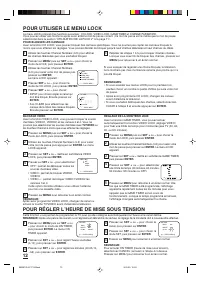
12 Utilisez les touches Channel Numbers (0-9) pour afficherles chaînes télévisées que vous souhaitez bloquer. Pressez sur MENU puis sur SET + ou – pour choisir le modo de LOCK, puis pressez ENTER . Utilisez les touches Channel Numbers(0-9) pour saisir votre mot de passe puispressez sur ENTER . Le me...
Page 31 - GUIDE DE DÉPANNAGE; FICHE TECHNIQUE; ACCESSOIRE; Les caractéristiques peuvent changer sans préavis.
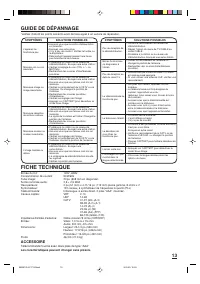
13 GUIDE DE DÉPANNAGE Vérifiez d'abord les points suivants avant de faire appel à un service de réparation. SYMPTÔMES SOLUTIONS POSSIBLES SYMPTÔMES SOLUTIONS POSSIBLES FICHE TECHNIQUE Entrée du CA:Consommation de courant:Tube image:Sortie nominale audio:Haut-parleurs:Syntonisateur:Télécommande:Canau...
Page 32 - Garantie limitée destinée aux Etats-Unis; Pour tous les modèles FST PURE
14 Garantie limitée destinée aux Etats-Unis Pour tous les modèles FST PURE ® 24 po. et moins Toshiba America Consumer Products, Inc. (“TACP”) et Toshiba Hawaii, Inc. (“THI”) donnent les garanties limitées suivantes.CES GARANTIES LIMITÉES SONT ACCORDÉES À L’ACHETEUR INITIAL DE CE PRODUIT OU À TOUTE P...
Page 33 - Vos responsabilités; LES GARANTIES CI-AVANT SONT SUJETTES AUX CONDITIONS SUIVANTES:; Pour obtenir les services sous garantie
15 Vos responsabilités LES GARANTIES CI-AVANT SONT SUJETTES AUX CONDITIONS SUIVANTES: (1) Vous devez fournir votre reécu d’achat ou toute autre preuve de l’acquisition. (2) Tous les services sous garantie pour ce téléviseur doivent être effectués par une Centre de Service TACP/THI agréé. (3) Les gar...
Page 34 - Garantie limitée destinée au Canada; LES GARANTIES CI-AVANT SONT SUJETTES AUX CONDITIONS SUIVANTES :
16 Garantie limitée destinée au Canada Pour tous les modèles FST PURE ® 24 po. et moins Toshiba du Canada Limitée (TCL) donne les garanties limitées suivantes. CES GARANTIES LIMITÉES SONTACCORDÉES À L’ACHETEUR INITIAL DE CE PRODUIT OU À TOUTE PERSONNE L’AYANT REÇU EN CADEAUDE L’ACHETEUR INITIAL OU D...
Page 36 - Imprimé en Thaïlande
18 J3M90101A03/04 Imprimé en Thaïlande U 3M90101A-F P12-Back 3/28/03, 12:02 PM 18