Page 2 - Chapter 1. Product Introduction; C o n t e n t s; Chapter 2. Installation Guide; 騎 馬 釘; CHECK; Poki; 藍 色 線 條 為 尺 寸 標 示 , 請 勿 印 刷 上 去 !; 刀 模 線
J o i n T t C o m m u n i t y To Re c e i v e B e n e f i t s T t L C S - L i q u i d C o o l i n g S u p p o r t C e r t i f i c a t i o n TT P r e m i u m Dear Valued Customer,Thank you for choosing Thermaltake.As a new user we value your thoughts and opinions and your feedback is important to us....
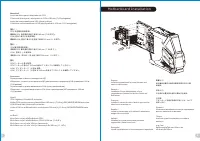
Page 4 - M o t h e r b o a r d I n s t a l l a t i o n
3 4 A t e n ç ã o ! ! L i m i t e d e a l t u r a p a r a o d i s s i p a d o r d o C P U : O l i m i t e d e a l t u r a p a r a o d i s s i p a d o r d o C P U é 1 9 5 m m ( 7 , 6 8 p o l e g a d a s ) . L i m i t e d e c o m p r i m e n t o p a r a V G A ( p l a c a g r á f i c a ) : O l i m i t ...
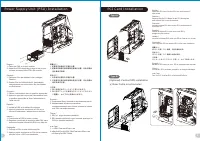
Page 5 - Po w e r S u p p l y U n i t ( P S U ) I n s t a l l a t i o n; P C I C a r d I n s t a l l a t i o n; R i s e r C a b l e i s n o t i n c l u d e d; Ty p e A; O p t i o n a l ) V e r t i c a l G P U i n s t a l l a t i o n
5 6 English / 1. Place the PSU in proper location. 2. Adjust the PSU supporting bridge to the proper location and secure the PSU with screws. Deutsch / 1. Platzieren Sie das Netzteil in der richtigen Position. 2. Richten Sie die Stützbrücke für das Netzteil entsprechend aus und sichern Sie das Netzt...
Page 6 - o r
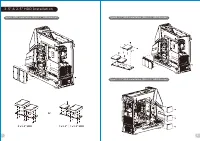
7 8 3 . 5 " & 2 . 5 " H D D I n s t a l l a t i o n Ty p e A : H D D I n s t a l l a t i o n ( Wi t h 3 . 5 ” H D D B r a c k e t ) 2 x 3 . 5 " H D D Ty p e B : 2 . 5 " H D D I n s t a l l a t i o n ( Wi t h 2 . 5 ” H D D B r a c k e t ) 1 x 2 . 5 " ; 1 x 3 . 5 ” H D D o r Ty...
Page 7 - P R 2 2 - D 5 P l u s; R a d i a t o r B r a c k e t I n s t a l l a t i o n
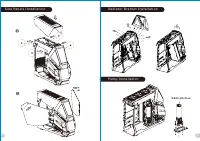
9 S i d e Pa n e l s I n s t a l l a t i o n P u m p I n s t a l l a t i o n P R 2 2 - D 5 P l u s R a d i a t o r B r a c k e t I n s t a l l a t i o n 10 產 品 料 號 C A - 1 Q 4 - 0 0 M 1 W N - 0 0 / C A - 1 Q 4 - 0 0 M 6 W N - 0 0 A H T 6 0 0 / A H T 6 0 0 S n o w 說 明 書 1 9 / 1 2 / 2 6 A 產 品 名 稱 印 刷 ...
Page 8 - L i q u i d C o o l i n g I n s t a l l a t i o n; T h e R a d i a t o r s a r e r e c o m m e n d e d t o m o u n t i n s i d e t h e c h a s s i s .; A i r C o o l i n g I n s t a l l a t i o n
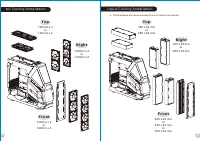
11 12 L i q u i d C o o l i n g I n s t a l l a t i o n T o p 3 6 0 x 6 4 m m o r 2 8 0 x 6 4 m m F r o n t 4 8 0 x 4 0 m m o r 4 2 0 x 6 4 m m o r 3 6 0 x 6 4 m m R i g h t 3 6 0 x 6 4 m m o r 2 8 0 x 6 4 m m ※ T h e R a d i a t o r s a r e r e c o m m e n d e d t o m o u n t i n s i d e t h e c h ...
Page 9 - F r a n ç a i s; L e a d s I n s t a l l a t i o n; E n g l i s h
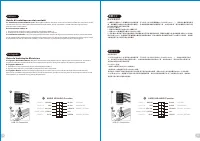
13 14 U S B 3 . 0 C o n n e c t i o n PRESENCE# BLACK SENSE1_RETURN AUD GND SENSE2_RETURN YELLOW BROWN RED PORT1 R PORT2 R PORT1 L BLUE PORT2 L SENSE_SEND KEY PURPLE GREEN ORANGE BLACK AUDIO HD AUDIO Function G u i d e d ' i n s t a l l at i o n d e s f i l s A . C o n n ex i o n d e s voya n t s d ...
Page 10 - 繁 體 中 文; I t a l i a n o
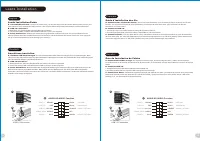
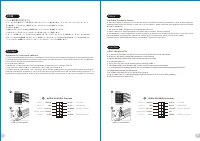
15 16 線 材 安 裝 說 明 A . 機 殼 L E D 連 接 方 式 / 在 機 殼 前 方 的 面 板 後 面 , 可 以 找 到 一 些 L E D 與 開 關 線 材 ( P O W E R S w i t c h … . ) , 請 參 考 主 機 板 使 用 說 明 書 , 並 將 機 殼 上 的 線 材 正 確 地 連 接 到 主 機 板 上 , 這 些 線 材 通 常 都 會 印 有 標 籤 在 上 面 , 如 果 沒 有 的 話 , 請 找 出 機 殼 前 方 面 板 上 線 材 原 本 的 位 置 以 知 道 正 確 的 來 源 。 B . U S B 3 . 0 ...
Page 11 - T ü r k ç e; 日 本 語
18 17 Ara Kablo Kurulum K ı lavuzu A. Kasa ı şık bağlantısı / Kasanın ön kısmında bazı ışıklar ve anahtar ara kabloları görebilirsiniz. Lütfen anakart üreticinizin sağladığı kullanım kılavuzuna bakın ve daha sonra, bu ara kabloları, anakart üzerindeki panel bağlantı noktalarına bağlayın. B . USB 3.0...