Page 2 - Obtaining warranty service; Table of Contents
1 2 Note: This is a user manual for 6165H.There may be certain differences between the user manual description and the phone’s operation, depending on the software release of your phone or specific operator services. Help Refer to the following resources to get more FAQ, software, and service inform...
Page 3 - Basics
3 4 4.5 Home screen & lock screen ................................................................. 50 4.6 Display ................................................................................................. 504.7 Sound & vibration ..........................................................
Page 5 - Setting up; Inserting or removing the SIM/microSD card; Charging the battery; Powering on your phone; Powering off your phone; Power
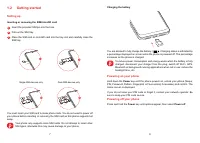
7 8 1.2 Getting started Setting up Inserting or removing the SIM/microSD card 1 Insert the provided SIM pin into the hole. 2 Pull out the SIM tray. 3 Place the SIM card or microSD card into the tray slot and carefully close the SIM tray. Single-SIM devices only Dual-SIM devices only You must...
Page 6 - Using the touchscreen
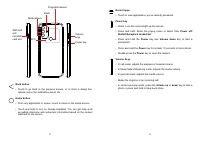
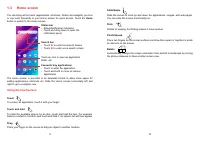
9 10 1.3 Home screen You can bring all the items (applications, shortcuts, folders and widgets) you love or use most frequently to your Home screen for quick access. Touch the Home button to switch to the Home screen. Status bar • Status/Notification indicators • Touch and drag down to open the noti...
Page 8 - Personalising your Home screen
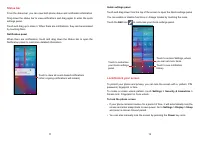
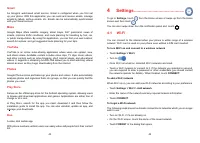
13 14 To unlock the phone screen Press the Power key once to light up the screen, swipe up and unlock the screen with the method you have set. Swipe right to enter Phone Swipe left to enter Camera Swipe up to unlock the screen Enter a password to unlock the screen Once the screen is turned on, swipe...
Page 9 - Widgets and recently used applications; Consult widgets; Volume adjustment; Volume
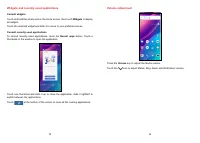
15 16 Widgets and recently used applications Consult widgets Touch and hold the empty area in the Home screen, then touch Widgets to display all widgets.Touch the selected widget and slide it to move to your preferred screen. Consult recently used applications To consult recently used applications, ...
Page 11 - Multimedia applications; Launch Camera
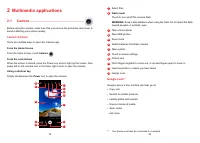
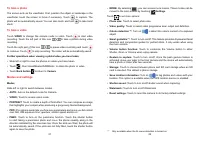
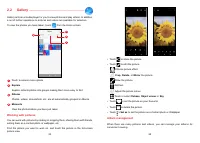
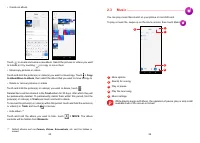
19 20 2 Multimedia applications 2.1 Camera .......................................................... Before using the camera, make sure that you remove the protective lens cover to avoid it affecting your picture quality. Launch Camera There are multiple ways to open the Camera app. From the Home S...
Page 15 - Apps and features; Making a call
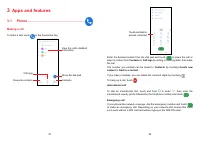
27 28 3 Apps and features 3.1 Phone ............................................................ Making a call To make a call, touch in the Favourites tray. Contacts View the call's detailed information Call logs Favourite contacts Show the dial pad Touch and hold to access voicemail Enter the desir...
Page 16 - Answering or rejecting a call; ANSWER; Calling your voicemail; New voicemail; During a call
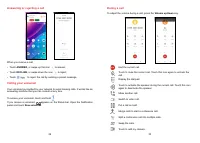
29 30 Answering or rejecting a call When you receive a call: • Touch ANSWER , or swipe up the icon to answer; • Touch DECLINE , or swipe down the icon to reject; • Touch to reject the call by sending a preset message. Calling your voicemail Your voicemail is provided by your network to avoid missing...
Page 17 - Consult your Contacts
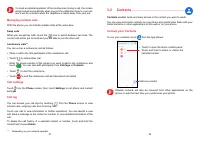
31 32 To avoid accidental operation of the touchscreen during a call, the screen will be locked automatically when you put the cellphone close to your ear; and it will be unlocked when the cellphone is taken away from your ear. Managing multiple calls With this phone you can handle multiple calls at...
Page 18 - Adding a contact; Add to/remove from Favourites; Editing your contacts; Save; Using the Quick contact panel
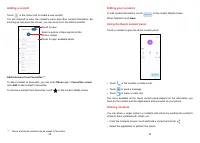
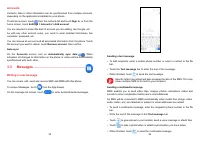
33 34 Adding a contact Touch in the contact list to create a new contact. You are required to enter the contact's name and other contact information. By scrolling up and down the screen, you can move from one field to another. Select a picture or take a photo for the Phone contact Touch to save Touc...
Page 22 - Other applications; Chrome
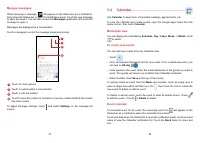
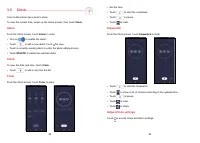
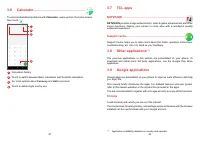
41 42 3.6 Calculator ...................................................... To solve mathematical problems with Calculator , swipe up from the home screen, then touch . 1 23 4 1 Calculation history 2 Touch to switch between Basic calculation and Scientific calculation 3 For more options about Curren...
Page 24 - Bluetooth; SIM cards
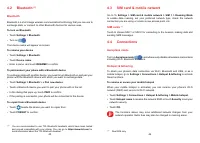
45 46 4.2 Bluetooth (1) Bluetooth Bluetooth is a short-range wireless communication technology that you can use to exchange data, or connect to other Bluetooth devices for various uses. To turn on Bluetooth • Touch Settings > Bluetooth . • Turn on . Your device name will appear on screen. To rena...
Page 28 - Advanced features
53 54 4.10 Advanced features Edge Bar Edge Bar helps you quickly access to your favourite apps or features. Smart App Recommend After connecting headset or speakers, recommend suitable applications on the launcher according to your habits. One-handed mode Reduce the display area of the screen and op...
Page 29 - Digital Wellbeing & parental controls; About phone
55 56 4.13 Location Touch to set whether to allow an app to access your device's location. You can set to allow continual access, or only while the app is in use. 4.14 Privacy To protect your privacy, you can set an app to be allowed or forbidden access to your location, SMS, phone, etc. Also whethe...
Page 30 - Making the most of your phone
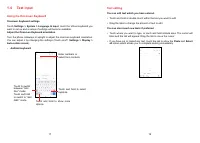
57 58 Update Apps Check app update information. Languages & input Touch to configure language settings, the on-screen keyboard, voice input settings, pointer speed, etc. Date & time Use Date & time settings to customise your preferences for how date and time are displayed. Backup Turn on...
Page 31 - Troubleshooting
59 60 6 Troubleshooting Before contacting the service centre, here are some instructions to help you troubleshoot your device: • For optimal operation, fully charge the battery. • To improve the phone’s performance, remove unnecessary files or apps on your phone. • Update your phone's software via S...
Page 34 - How to back up my device data; Switch Phone; Specifications
65 66 How to back up my device data • Go to Settings > System > Backup (refer to “4.22 System > Backup” ) • You can also back up your data to another phone via the Switch Phone app. Swipe up the home screen to find the search bar and enter Switch Phone , transfer data by following the instr...
Page 35 - Battery; Accessories
67 68 • Type-C Camera: • Rear Camera: 50MP+2MP(D)+2MP(M) • Front camera: 8MP Audio & Video supported formats: • AAC, AMR, AWB, MP3, AAC+, Vorbis, FLAC, APE, eAAC+, PCM playback • 1080P @ 30fps, H.263, H.264 AVC, H.265 HEVC, VP8, VP9, MPEG-4 Battery (1) : • Capacity: 5000 mAh Expansion Slot: • mi...