Page 3 - CONTENTS
3 English Important Safety Instructions .....................................................................................................................................4 Product Information ............................................................................................................
Page 4 - READ ALL INSTRUCTIONS; IMPORTANT SAFETY
4 English READ ALL INSTRUCTIONS BEFORE USING IMPORTANT SAFETY INSTRUCTIONS This owner’s guide and any additional inserts are considered part of the product. They contain important information about safety, use, and disposal. Before using the product, please familiarize yourself with all operating an...
Page 8 - READ AND SAVE THESE
8 English SERVICING WARNING – To reduce risk of fire, electrical shock and injury to persons, observe the following: - If Steam Status Light does not illuminate when unit is plugged in and Button is set to “ON” position, unit is not operating normally. Immediately disconnect cord from power supply, ...
Page 9 - PRODUCT INFORMATION
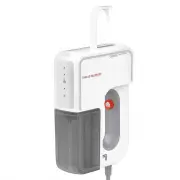
9 English Steam Nozzle Handle Water Tank On / Off Button Steam Status Light Steam Button Storage Hook Auto Shut-off (not shown) 1 The following features are included with your Handheld Garment Steamer. Carefully inspect the packing material for all parts listed below. To obtain possible missing part...
Page 11 - FILLING WATER TANK
11 English FILLING WATER TANK 1. Turn OFF ( ) and unplug unit from power source. 2. Place steamer on a flat, heat resistant, level surface. CAUTION: If unit has been in use, allow to cool (5 minutes for minimum cooling before removing Water Tank and adding water). 3. Remove Water Tank by pulling the...
Page 13 - FABRIC STEAMING
13 English FABRIC STEAMING CAUTION: When steaming any material for the first time, it is recommended that you test on a small inconspicuous area before proceeding. Do not use on synthetic fabrics such as 100% nylon or polyester, or other steam-sensitive materials. NOTE: Be sure the Water Tank has al...
Page 18 - TROUBLESHOOTING
18 English TROUBLESHOOTING P R O B L E M P OS S I B L E CA S E & S O LU T I O N Unit fails to heat up. Steam Status Light DOES NOT illuminate. Unit is not plugged in. Plug power cord into electrical outlet.The ON / OFF Button is pressed Off. Make sure the ON / OFF Button is pressed to turn the u...
Page 20 - WARRANTY
20 English Sharper Image, a division of Vornado Air, LLC. Sharper Image warrants to the original consumer or purchaser this Sharper Image® (“Product”) is free from defects in material or workmanship for a period of one (1) year from the date of purchase. If any such defect is discovered within the w...