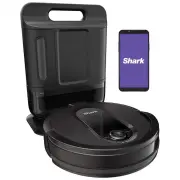
Page 2 - QUICK; WARNING; IMPORTANT SAFETY INSTRUCTIONS; PLEASE READ CAREFULLY BEFORE USE • FOR HOUSEHOLD USE ONLY; SAVE THESE INSTRUCTIONS
s h a r k c l e a n . c o m s h a r k c l e a n . c o m QUICK START GUIDE WARNING To reduce the risk of fire, electric shock, injury, or property damage: IMPORTANT SAFETY INSTRUCTIONS PLEASE READ CAREFULLY BEFORE USE • FOR HOUSEHOLD USE ONLY SAVE THESE INSTRUCTIONS If the charging cable plug does no...
Page 3 - GETTING TO KNOW YOUR SHARK IQ ROBOTTM
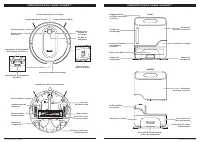
s h a r k c l e a n . c o m s h a r k c l e a n . c o m GETTING TO KNOW YOUR SHARK IQ ROBOT™ GETTING TO KNOW YOUR SHARK IQ ROBOT™ ! Clean Button Charging Contact Pre-Motor Filter Housing Charging Base Charging Contact Charging Base Fill Window Dust Bin Empty Button Debris Intake Base Dust Bin Releas...
Page 4 - BASE SETUP; hard floor; INSTALLING THE SIDE BRUSHES; Side Brushes; CHARGING; Power
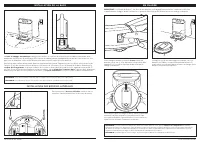
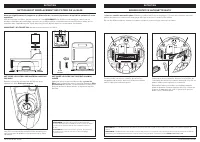
s h a r k c l e a n . c o m s h a r k c l e a n . c o m BASE SETUP The Self-Empty Base charges your robot and holds dirt and debris from up to 30 days of cleaning. Select a permanent location for the base, because every time you relocate it, your robot will have to completely re-map your house. Choo...
Page 5 - CHARGE INDICATOR LIGHTS; BUTTONS AND INDICATOR LIGHTS
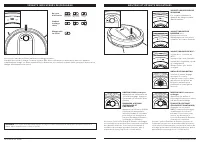
s h a r k c l e a n . c o m s h a r k c l e a n . c o m CHARGE INDICATOR LIGHTS NOTE: If the low charge light is blinking red, there is not enough charge for the robot to return to the base. Manually place the robot on the base. The blue indicator lights on the robot show how much charge is remainin...
Page 6 - PREP YOUR HOME; Shar
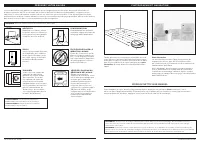
s h a r k c l e a n . c o m s h a r k c l e a n . c o m PREP YOUR HOME MAPPING AND NAVIGATION MANUAL CLEANING MODE To manually start a cleaning cycle, press the Clean button on the robot or on the mobile app. To stop the robot before it finishes cleaning and automatically returns to the base, press ...
Page 7 - MAINTENANCE; THE SHARK IQ ROBOTTM; WI-FI TROUBLESHOOTING; ERROR CODE; USING THE SHARK CLEANTM APP AND VOICE CONTROLS
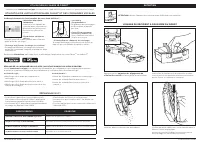
s h a r k c l e a n . c o m s h a r k c l e a n . c o m MAINTENANCE EMPTYING THE ROBOT DUST BIN Press the Dust Bin Release Tabs and slide out the dust bin. CAUTION: Turn off power before performing any maintenance. To avoid spills, be sure to hold the dust bin in an upright position. Pinch and lift ...
Page 8 - Base Dust Bin; CLEANING AND REPLACING THE ROBOT FILTER
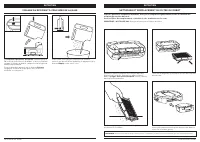
s h a r k c l e a n . c o m s h a r k c l e a n . c o m MAINTENANCE MAINTENANCE EMPTYING THE BASE DUST BIN The Base Dust Bin holds up to 30 days' worth of dust and debris. Empty the bin when the debris level approaches the max fill line. To detach it, press the Release button on top of the handle, t...
Page 9 - CLEANING AND REPLACING THE BASE FILTERS
s h a r k c l e a n . c o m s h a r k c l e a n . c o m MAINTENANCE SELF-CLEANING BRUSHROLL MAINTENANCE To access the brushroll, push up on the tabs on the brushroll access door, then lift off the door. Lift out the brushroll. Remove the cap on the end of the brushroll. Clean off any debris, then re...
Page 10 - CLEANING SENSORS AND CHARGING PADS; CLEAN SENSORS AND CHARGING PADS AS NEEDED.; CLEAN SIDE BRUSHES AS NEEDED.; CLEANING THE WHEELS; Front Caster Wheel
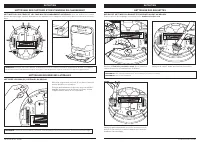
s h a r k c l e a n . c o m s h a r k c l e a n . c o m CLEANING SENSORS AND CHARGING PADS CLEANING SIDE BRUSHES MAINTENANCE Carefully unwind and remove any string or hair wrapped around brushes.Gently wipe brushes with a dry cloth. To reinstall, snap the brushes over the pegs. Spin the brushes manu...
Page 11 - REPLACEMENT PARTS: ROBOT; XSKAEDOCK; TROUBLESHOOTING
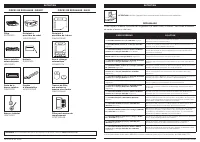
s h a r k c l e a n . c o m s h a r k c l e a n . c o m REPLACEMENT PARTS: ROBOT REPLACEMENT PARTS: BASE REPLACEMENT PARTS Filter RVFFK950 Self-Cleaning Brushroll 103KY1000 Side Brushes 102KY1000 Robot Dust Bin 101KY1000AE Base Dust Bin 104KY1000AE Brushroll Door 109KY1000 Battery RVBAT850 Power Cor...
Page 12 - DESCRIPTION OF OTHER RIGHTS AND LIMITATIONS.; END-USER LICENSE AGREEMENT FOR SHARKNINJA SOFTWARE
s h a r k c l e a n . c o m s h a r k c l e a n . c o m END-USER LICENSE AGREEMENT FOR SHARKNINJA SOFTWARE IMPORTANT: PLEASE READ THE TERMS AND CONDITIONS OF THIS LICENSE AGREEMENT CAREFULLY BEFORE CONTINUING WITH THIS PROGRAM INSTALL OR USE OF THIS PRODUCT: SharkNinja Operating LLC’s (“SharkNinja”)...
Page 13 - NOTES
s h a r k c l e a n . c o m s h a r k c l e a n . c o m ONE (1) YEAR LIMITED WARRANTY The One (1) Year Limited Warranty applies to purchases made from authorized retailers of SharkNinja Operating LLC. Warranty coverage applies to the original owner and to the original product only and is not transfe...
Page 14 - EXPECTED PERFORMANCE; Expected runtime: 60 minutes; RECORD THIS INFORMATION; registeryourshark.com
s h a r k c l e a n . c o m s h a r k c l e a n . c o m EXPECTED PERFORMANCE Expected runtime: 60 minutes Expected charging time: 6 hours TIP: You can find the model and serial numbers on the QR code label on the bottom of the robot. RECORD THIS INFORMATION Model Number: ������������������������Date...
Page 15 - de dommage matériel :; IMPORTANTES CONSIGNES DE SÉCURITÉ; USAGE DOMESTIQUE SEULEMENT; CONSERVEZ CES INSTRUCTIONS
s h a r k c l e a n . c o m s h a r k c l e a n . c o m AVERTISSEMENT : Afin de réduire les risques d’incendie, de décharges électriques, de blessure ou de dommage matériel : IMPORTANTES CONSIGNES DE SÉCURITÉ VEUILLEZ LES LIRE ATTENTIVEMENT AVANT D’UTILISER L’APPAREIL • POUR UN USAGE DOMESTIQUE SEUL...
Page 16 - PRÉSENTATION DU SHARK IQ ROBOTTM
s h a r k c l e a n . c o m s h a r k c l e a n . c o m PRÉSENTATION DU SHARK IQ ROBOT™ PRÉSENTATION DU SHARK IQ ROBOT™ ! Bouton Clean (nettoyer) Tampon de chargement Boîtier du filtre pré-moteur Station de recharge Tampon de chargement Station de recharge Fenêtre de remplissage Bouton de vidange du...
Page 17 - INSTALLATION DE LA BASE; INSTALLATION DES BROSSES LATÉRALES; EN CHARGE
s h a r k c l e a n . c o m s h a r k c l e a n . c o m INSTALLATION DE LA BASE La base à vidange automatique charge votre robot, et contient la poussière et les débris provenant d’un maximum de 30 jours de nettoyage. Choisissez un emplacement permanent pour la base, car toutes les fois que vous la ...
Page 18 - VOYANTS INDICATEURS DE RECHARGE; BOUTONS ET VOYANTS INDICATEURS
s h a r k c l e a n . c o m s h a r k c l e a n . c o m VOYANTS INDICATEURS DE RECHARGE REMARQUE : si le voyant de charge faible clignote en rouge, le robot n’a pas assez de charge pour qu’il puisse revenir à la station. Placez manuellement le robot sur la base. Les voyants indicateurs bleus indique...
Page 19 - PRÉPAREZ VOTRE MAISON; MODE DE NETTOYAGE MANUEL
s h a r k c l e a n . c o m s h a r k c l e a n . c o m PRÉPAREZ VOTRE MAISON CARTOGRAPHIE ET NAVIGATION REMARQUE : On peut seulement effectuer la planification dans l’appli. Votre robot utilise une gamme de capteurs pour naviguer autours des murs, des pieds de meuble et d’autres obstacles au fur et...
Page 20 - ENTRETIEN; SHARK IQ ROBOTTM; PROBLÈME
s h a r k c l e a n . c o m s h a r k c l e a n . c o m ENTRETIEN VIDANGE DU RÉCIPIENT À POUSSIÈRE DU ROBOT Appuyez sur les languettes de dégagement du récipient à poussière et faites glisser pour le retirer. ATTENTION : Mettez l’appareil hors tension avant d’effectuer tout entretien. Pour éviter de...
Page 21 - NETTOYAGE ET REMPLACEMENT DU FILTRE DU ROBOT
s h a r k c l e a n . c o m s h a r k c l e a n . c o m ENTRETIEN ENTRETIEN VIDANGE DU RÉCIPIENT À POUSSIÈRE DE LA BASE Le récipient à poussière de la base contient jusqu’à 30 jours de poussière et de débris. Videz le récipient lorsque le niveau de débris s’approche de la ligne de remplissage maxima...
Page 22 - NETTOYAGE ET REMPLACEMENT DES FILTRES DE LA BASE
s h a r k c l e a n . c o m s h a r k c l e a n . c o m ENTRETIEN BROSSE ROTATIVE AUTONETTOYANTE ENTRETIEN Pour accéder à la brosse rotative, poussez les languettes de la porte d’accès à la brosse rotative vers le haut, puis retirez la porte. Soulevez la brosse rotative. Retirez le couvercle de l’ex...
Page 23 - NETTOYAGE DES CAPTEURS ET DES TAMPONS DE CHARGEMENT; NETTOYEZ LES CAPTEURS ET LES TAMPONS DE CHARGEMENT AU BESOIN.; NETTOYAGE DES ROULETTES; Roulette pivotante avant
s h a r k c l e a n . c o m s h a r k c l e a n . c o m NETTOYAGE DES CAPTEURS ET DES TAMPONS DE CHARGEMENT NETTOYAGE DES BROSSES LATÉRALES ENTRETIEN Déroulez soigneusement tout fil ou cheveu enroulé autour des brosses rotatives.Essuyez délicatement les brosses avec un chiffon humide. Assurez-vous d...
Page 24 - PIÈCES DE RECHANGE : ROBOT; CODE D’ERREUR
s h a r k c l e a n . c o m s h a r k c l e a n . c o m ENTRETIEN Filtre RVFFK950 Brosse rotative autonettoyante 103KY1000 Brosses latérales 102KY1000 Récipient à poussière du robot 101KY1000AE Récipient à poussière de la base 104KY1000AE Porte de la brosse rotative 109KY1000 Batterie RVBAT850 Cordo...
Page 25 - DESCRIPTION DES AUTRES DROITS ET LIMITATIONS.
s h a r k c l e a n . c o m s h a r k c l e a n . c o m CONTRAT DE LICENCE D’UTILISATEUR FINAL POUR LE LOGICIEL SHARKNINJA IMPORTANT : VEUILLEZ LIRE ATTENTIVEMENT LES CONDITIONS DE CE CONTRAT DE LICENCE AVANT DE CONTINUER L’INSTALLATION DE CE PROGRAMME OU L’UTILISATION DE CE PRODUIT : Le contrat de ...
Page 26 - RENDEMENT PRÉVU
s h a r k c l e a n . c o m s h a r k c l e a n . c o m GARANTIE LIMITÉE D’UN (1) AN La garantie limitée d’un (1) an s’applique aux achats effectués auprès de détaillants autorisés de SharkNinja Operating LLC. La garantie s’applique uniquement au premier propriétaire et au produit original et n’est ...
Page 27 - PLEASE READ CAREFULLY AND KEEP FOR FUTURE REFERENCE.
PLEASE READ CAREFULLY AND KEEP FOR FUTURE REFERENCE. This Owner's Guide is designed to help you keep your Shark IQ Robot™ running at peak performance. SharkNinja Operating LLC US: Needham, MA 02494 CAN: Ville St-Laurent, QC H4S 1A71-888-228-5531 sharkclean.comIllustrations may differ from actual pro...