Page 3 - CAUTION; legislation before use.; BATTERY WARNING; of your vehicle’s rear view mirror.; DISCLAIMER
3 CAUTION • Ensure you are using your MCPK-43DVR within your countries’ road laws. Please make sure you are familiar with your local road legislation before use. • Avoid leaving your MCPK-43DVR in direct sunlight for extended periods of time in an unventilated space.• Please set time and date before...
Page 6 - PRODUCT OVERVIEW
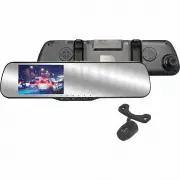
6 1. INTRODUCTION Thank you for purchasing a Parkmate Mirror DVR with Integrated 1080P Dash Cam DVR & Reverse Camera. We are certain that our product will give you trouble free operation while providing you with a safety feature that enhances your driving experience. Our products, like most afte...
Page 7 - Loop the rubber fasteners over the top fastener clips.
7 2. GETTING STARTED 2.1 INSERTING/REMOVING A MICRO SD CARD With the Mirror DVR turned off and the screen facing towards you insert the memory card with the text on the Micro SD card facing away from you. Push the memory card in until a click is heard. To remove the memory card, ensure that the Mirr...
Page 8 - CONNECTING THE REVERSE CAMERA; Fix the second screw and securely tighten both screws.
8 2.3 CONNECTING THE REVERSE CAMERA 2.3.1 INSTALLATION GUIIDE 1. Select a flat and centred location near the number plate lamp at the rear of the vehicle to mount camera. 2. Attach tape to the bracket of the camera to hold the camera in position while installing, and drill two small holes, one for t...
Page 9 - RESETTING THE DEVICE
2.4 POWERING THE MIRROR DVR ON/OFF 2.4.1 AUTO POWER ON/OFF When the MCPK-43DVR is correctly installed and connected to your vehicles’ 12V DC power supply, the Mirror DVR will automatically power on and start recording when the car’s accessories are activated. The Mirror DVR will automatically stop r...
Page 10 - Formatting your Micro SD Card
10 2.7 INITIAL SETTINGS Before using the MCPK-43DVR we recommend Formatting the Inserted Micro SD Card and Setting the Time and Date . 2.7.1 FORMATTING THE INSERTED MICRO SD CARD Formatting the Micro SD card will delete all information on the inserted Micro SD Card and prepare the card for use with ...
Page 11 - Locked Recording; follow the instructions below.; REVERSE CAMERA
11 2.8 USING THE MCPK-43DVR 2.8.1 RECORDING VIDEO When the Mirror DVR is connected to your vehicles 12v power supply, the Mirror DVR will automatically power up and begin recording when you start your vehicle. During the start up the buttons will be unresponsive and the camera will take a moment to ...
Page 15 - date stamp
15 3.1.6 MOTION DETECTION Motion Detection is used to pause recording when no motion is detected in front of the camera, and to start recording when motion is detected again. To activate the Motion Detection setting follow the instructions below. 1. Press the Button to stop the Mirror DVR from recor...
Page 21 - Date Stamp
21 4.2.2 DATE STAMP Date stamp is used to stamp your photos with the time and date that they are taken. To select your preferred time and date format follow the instructions below. 1. Enter the Photo screen. 2. Press the Button to enter the Photo Menu . 3. Use the and Buttons to navigate the Photo M...
Page 24 - Press the
24 5.6 FREQUENCY The Frequency setting is used to set the cameras frequency. To adjust the frequency, follow the instructions below. 1. Press the Button to stop the Mirror DVR from recording. 2. Press the Button to enter the Video or Menu. 3. Press the Button again to enter the Settings Menu. 4. Use...
Page 25 - G Sensor
25 5.8 DEFAULT SETTINGS Default Settings is used to revert the Mirror DVRs settings to their default settings. To reset the camera to restore the default settings, please follow the instructions below. 1. Ensure the Mirror DVR is not recording. 2. Press the Button to enter the Video or Menu. 3. Pres...
Page 27 - Video
27 Video Resolution 1080FHD 1920x1080 720P 1280x720 WVGA 848x480 VGA 640x480 Loop recording Off 3 Minutes 1 Minute 5 Minutes 2 Minutes 10 Minutes WDR Off On Exposure +2.0 -1/3 +5/3 -2/3 +4/3 -1.0 +1.0 -4/3 +2/3 -5/3 +1/3 -2.0 +0.0 Motion Detection Off On Micropohone Off On Date Stamp Off On G Sensor...
Page 29 - Setup
29 Setup Date / Time Set Time & Date Key Beeps Off On Language English Chinese S French Chinese T Spanish Russian Portuguese Japanese Dutch Korean Italian TV Mode NTSC PAL Screen Saver 1 Minute 5 Minutes 3 Minutes Off Frequency 50 Hz 60Hz Format Cancel OK Default Setting Cancel OK Version Displa...
Page 30 - WARRANTY TERMS & CONDITIONS; Directed Electronics:
30 WARRANTY TERMS & CONDITIONS Our goods come with guarantees that cannot be excluded under the Australian & New Zealand Consumer Law. You are entitled to a replacement or refund for a major failure and for compensation for any other reasonably foreseeable loss or damage. You are also entitl...