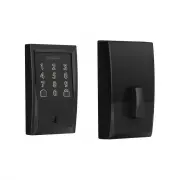
Page 2 - Parts
Backup Key Touchscreen Assembly Battery Cover Inside Assembly Backplate Reinforcement Plate Bolt Strike Reinforcement Screws Inside Assembly Screws Backplate Screws Bolt/Strike Screws Parts
Page 4 - Touchscreen
Communication Icon • Flashes when lock is connecting to WiFi to check for updates. Low Battery Icon • Flashes after code is entered when battery is low. • Solid when battery is critical. The lock will not work without new batteries. Programming and Input LED • Flashes white on every digit that is en...
Page 5 - Remove existing lock.; Tools
1 step Remove existing lock. Remove the entire deadbolt, including the bolt. You may also want to remove the strike. A standard Schlage deadbolt is shown. Check with your specific deadbolt manufacturer if you need help. Tools Don’t use a power drill! Phillips screwdriver 1 2 3 4 5
Page 7 - Install the strike into the door frame.
Install the strike into the door frame. 3 step Actual Size Actual Size Install this strike reinforcer for enhanced security. Need Help? Trouble installing the strike reinforcer? Visit schlage.com/faqs-encode and follow interactive instructions. If you have a window next to your door, you may not be ...
Page 8 - Install the touchscreen.
4 step Install the touchscreen. Route the cable through the door BELOW the bolt. Align the tailpiece as shown and push the touchscreen onto the door. Is it hard to install the touchscreen? Is the tailpiece not installing correctly? If your through hole seems too small, you may need to remove the spa...
Page 9 - Install the backplate.
5 step Install the backplate. Route the cable under the bolt and through the hole on the bottom of the backplate. Secure the backplate with screws. Make sure the outside touchscreen is straight before tightening screws all the way. Don’t use a power drill! You may damage your lock! Phillips screwdri...
Page 11 - Secure the lock to the door.
Secure the lock to the door. 7 step The bump on the tailpiece aligns with the slot in the back of the inside assembly. If the bump on the tailpiece doesn’t align with the slot in the back of the inside assembly, make sure your thumbturn is vertical (up and down). Don’t use a power drill! You may dam...
Page 12 - Install batteries and slide the cover on.
Install batteries and slide the cover on. 8 step Pull out battery holder. Install batteries. Reinstall battery holder. Turn the battery holder around so the batteries face the door.
Page 14 - Now that your lock is
Visit schlage.com/encode-workswith for a list of compatible smart home apps that allow you to control your with your smartphone. Now that your lock is installed you can use a smart home system to lock and unlock your door from anywhere and add user codes for guests and household members. schlage.com...
Page 15 - Lock and unlock
Lock and unlock To lock your door just tap the lock icon. You can also lock your door from inside by turning the thumbturn toward the door edge. To unlock your door enter a user code. You can also unlock your door from inside by turning the thumbturn away from the door edge.
Page 16 - Please don’t return it to the store!
© Allegion 2018Printed in U.S.A.P518-415 Rev. 08/18-d *P518-415* P518-415 Questions about your new Smart WiFi Deadbolt? Please don’t return it to the store! Let us help you first! www.schlage.com/faqs-encode