Page 2 - safety information; SAFETY INFORMATION; • Before operating the; severe; minor
2_ safety information safety information SAFETY INFORMATION • Before operating the appliance, please read this manual thoroughly and retain it at a safe place near the appliance for your future reference. • Use this appliance only for its intended purpose as described in this instruction manual. Thi...
Page 3 - CE Notice
safety information _3 Unplug the power plug from the wall socket.Make sure the machine is grounded to prevent electric shock.Call the contact center for help.Note. These warning signs are here to prevent injury to you and others.Please follow them carefully.After reading this section, keep it in a s...
Page 10 - • If the appliance contains iso-
10_ safety information When this product contains flammable gas (Refrigerant R600a), contact your local authority in regard to safe disposal of this product. Cyclopentane is used as a insulation blowing gas. The gases in insulation material require special disposal procedure. Please contact your loc...
Page 11 - Saving Energy Tips
safety information _11 - Should the power failure last more than 2 hours, remove all ice in the Ice Bucket. - Should the power failure last more than 24 hours, remove all frozen food. • If keys are provided with the refrigerator, the keys should be kept out of the reach of children and not in vicini...
Page 12 - - Clean the rear of the
12_ safety information long when putting food in or taking food out. The shorter time for which the door is open, the less ice will form in the freezer. - Clean the rear of the refrigerator regularly. Dust increases energy consumption. - Do not set temperature colder than necessary. - Ensure suffici...
Page 13 - contents; SETTING UP YOUR SIDE-BY-SIDE REFRIGERATOR ···································
safety information _13 contents SETTING UP YOUR SIDE-BY-SIDE REFRIGERATOR ··································· 14 OPERATING THE SAMSUNG SIDE-BY-SIDE REFRIGERATOR ···················· 23 TROUBLESHOOTING ····················································································· 29
Page 14 - Selecting the best location for the; refrigerator
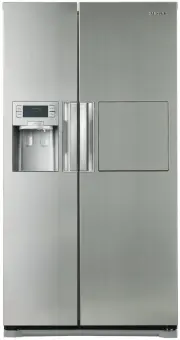
14_ setting up GETTING READY TO INSTALL THE REFRIGERATOR Congratulations on the purchase of your Samsung Side-By-Side Refrigerator. We hope you will enjoy the many state-of-the-art features and efficiencies that this new appliance has to offer. Selecting the best location for the refrigerator • Sele...
Page 15 - Removing the Front Leg Cover
setting up _15 01 SETTING UP REMOVING THE REFRIGERATOR DOORS If your entrance won’t allow the refrigerator to pass easily through it, you can remove the doors. 1. Removing the Front Leg Cover First, open both the freezer and refrigerator doors, and then take off the front leg cover by removing the t...
Page 16 - Removing the Fridge Door
16_ setting up Removing the Fridge Door 1. With the door closed, remove the upper hinge cover 1 using a screwdriver. 2. Remove hinge screws 2 and the ground screw 3 by turning counter-clockwise, and take off the upper hinge 4 . Be careful that the door does not fall on you as you are removing it 3. ...
Page 17 - Reattaching the Fridge Door
setting up _17 01 SETTING UP Reattaching the Fridge Door 1. Insert the lower hinge 1 back into the lower hinge bracket 2 . 2. Fit the hole in the corner of the fridge door 3 over the lower hinge 4 . 3. Insert the upper hinge shaft 5 into the hole on the hinge 6 . Make sure the hinge is level between...
Page 18 - LEVELLING THE REFRIGERATOR; When the Freezer door is lower than
18_ setting up LEVELLING THE REFRIGERATOR Now that the doors are back on the refrigerator, you will want to make sure the refrigerator is level so you can then make final adjustments. If the refrigerator is not level, it will not be possible to get the doors perfectly even. The front of the refriger...
Page 19 - USING THE ICE MAKER; To Remove the Ice Bucket; INSTALLING THE WATER; Connecting to the water supply line
setting up _19 01 SETTING UP CHECKING THE WATER DISPENSER LINE A water dispenser is just one of the helpful features on your new Samsung refrigerator. To help promote better health, the Samsung water filter removes unwanted particles from your water. However, it does not sterilize or destroy microor...
Page 20 - Connecting the water line to the
20_ setting up 4. After connecting the water supply to the water filter, turn your main water supply back on and dispense about 1l to clear and prime the water filter. Connecting the water line to the refrigerator 1. Remove the dust cap from the water line on the rear of the unit and fit a compressi...
Page 21 - Replacement Instructions
setting up _21 01 SETTING UP select the location where the purifier is to install. (Model with the purifier) - If you wish to reassemble the water inlet and outlet sides of the purifier during purifier installation, see the reference illustration. - Cut the water line attached to the purifier to the...
Page 22 - Connect the water line to the
22_ setting up Connect the water line to the refrigerator. - Remove the compressor cover of the refrigerator.- Connect the water line to the valve, as shown in the figure. - When connected, check if there is any leakage. If any, repeat the connection.- Reattach the compressor cover of the refrigerat...
Page 23 - operating the SAMSUNG; OPERATING THE REFRIGERATOR
operating _23 02 OPERA TING operating the SAMSUNG side-by-side refrigerator OPERATING THE REFRIGERATOR USING THE CONTROL PANEL / DIGITAL DISPLAY POWER FREEZE BUTTON Speeds up the time needed to freeze products in the freezer. This can be helpful if you need to quickly freeze items that spoil easily ...
Page 24 - Dispensing ice
24_ operating CONTROLLING THE TEMPERATURE CONTROLLING THE FREEZER TEMPERATURE The freezer temperature can be set between -14°C (8°F) and -25ºC (-14°F) to suit your particular needs. Press the Freezer button repeatedly until the desired temperature is shown in the temperature display. Keep in mind th...
Page 25 - Quick Cool
operating _25 02 OPERA TING • Do not put your fingers, hands or any other unsuitable objects in the chute or ice-maker bucket. - It may result in personal injury or material damage. • Never put finger or any other objects in the dispenser opening. - It may cause injury.• Use only the ice maker provi...
Page 26 - Cool
26_ operating Zero Zone (0ºC) • When “Zero Zone” is chosen, the temperature of the CoolSelect Zone TM Drawer is kept at 0 ºC regardless of the set refrigerator temperature. • “Zero Zone” temperature helps keep meat or fish fresh longer. Cool • When “Cool” is chosen, the temperature will be the same ...
Page 27 - CLEANING THE REFRIGERATOR
operating _27 02 OPERA TING CAUTION REMOVING THE FRIDGE ACCESSORIES 1. Remove the spill Proof Glass Shelf by pulling the shelf out as far as it will go. Then, gently lift it up and gently remove it. 2. Remove the Vegetable & Fruit Drawer by pressing on the indentations found on the inside left a...
Page 28 - CHANGING THE WATER FILTER; Ordering replacement filters
28_ operating CHANGING THE WATER FILTER To reduce risk of water damage to your property DO NOT use generic brands of water filers in your SAMSUNG Refrigerator. USE ONLY SAMSUNG BRAND WATER FILTERS. SAMSUNG will not be legally responsible for any damage, including, but not limited to property damage ...
Page 29 - troubleshooting
troubleshooting _29 03 TROUBLESHOOTING troubleshooting PROBLEM SOLUTION The refrigerator does not work at all or it does not chill sufficiently. • Check that the power plug is properly connected.• Is the temperature control on the display panel set to the correct temperature? Try setting it to a low...
Page 30 - circuit diagram
Page 31 - memo
Page 32 - Ambient Room Temperature Limits; English
Ambient Room Temperature Limits This refrigerator is designed to operate in ambient temperatures specified by its temperature class marked on the rating plate. Class Symbol Ambient Temperature range (°C) Extended Temperate SN +10 to +32 Temperate N +16 to +32 Subtropical ST +16 to +38 Tropical T +16...