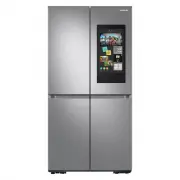
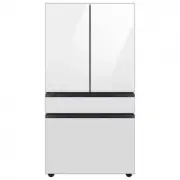
Page 2 - Safety information; SAFETY INFORMATION; • Before operating the; Contents
English - 2 Safety information SAFETY INFORMATION • Before operating the appliance, please read this manual thoroughly and retain it for your reference. • Use this appliance only for its intended purpose as described in this instruction manual. This appliance is not intended for use by persons (incl...
Page 3 - • Because these following; severe personal; minor personal
English - 3 SAFETY INFORMA TION possible conditions and situations that may occur. It is your responsibility to use common sense, caution, and care when installing, maintaining, and operating your appliance. • Because these following operating instructions cover various models, the characteristics o...
Page 4 - • Do not install this
English - 4 These warning signs are here to prevent injury to you and others. Please follow them explicitly. After reading this section, keep it in a safe place for future reference. SEVERE WARNING SIGNS FOR TRANSPORTATION AND SITE • When transporting and installing the appliance,care should be take...
Page 15 - This appliance is intended
English - 15 SAFETY INFORMA TION - Ensure sufficient air exhaust at the refrigerator base and at the back wall of the refrigerator. Do not cover air vent openings. - It is recommended to install the refrigerator with clearance to the back and sides. This will help reduce power consumption and keep y...
Page 16 - Depth “A”
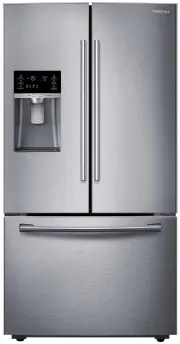
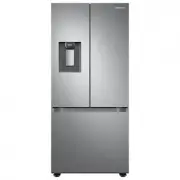
English - 16 GETTING READY TO INSTALL THE REFRIGERATOR Congratulations on your purchase of this Samsung French Door Refrigerator. We hope you enjoy the state-of-art features and efficiencies that this new appliance offers. Selecting the best location for the refrigerator Choose: • A location with ea...
Page 17 - When moving your refrigerator; Flooring; Disassembling the refrigerator doors
English - 17 SETTING UP When moving your refrigerator To prevent floor damage, be sure the front adjusting legs are in the up position (above the floor). Refer to “Leveling the Refrigerator” on page 20. Flat-blade screw driver (-) Control Lever Flooring For proper installation, you must place this r...
Page 18 - With the door opened
English - 18 Required Tools (Not provided) You need the following tools to complete the installation of your refrigerator: Philips screwdriver (+) Flat-blade screw driver (-) Socket wrench (13/32”) (10 mm) Pliers Allen wrench (3/16”) (5 mm) With the door opened 1. Remove 3 screws holding down the TO...
Page 20 - LEVELING THE REFRIGERATOR; How to adjust the level
English - 20 Putting too much food into the freezer drawers can prevent the freezer from closing completely and can cause frost build-up. RE-ASSEMBLE THE FREEZER DRAWER To reattach the drawer after you have moved the fridge to its final location, assemble the parts in reverse order. CAUTION LEVELING...
Page 21 - Parts for water line Installation
English - 21 SETTING UP MAKING MINOR ADJUSTMENTS BETWEEN DOORS Remember, a leveled refrigerator is necessary for getting the doors perfectly even. If you need help, review the previous section on leveling the refrigerator. Adjustment part Fixed part The left door is fixed. To make minor adjustments ...
Page 23 - COMPLETING THE SET UP
English - 23 SETTING UP COMPLETING THE SET UP Now that you have your new refrigerator installed in place, you are ready to set up and enjoy the features and functions of the appliance. By completing the following steps, your refrigerator should be fully operational. 1. Make sure your refrigerator is...
Page 24 - USING THE CONTROL PANEL
English - 24 Operating your French Door Refrigerator USING THE CONTROL PANEL (1) (2) (3) (4) (5) (6) (7) (8) (9) (10) ( 1 ) Freezer / Power Freeze (3 sec) The Freezer button serves two purposes: - To set the Freezer to your desired temperature. - To turn the Power Freeze function on and off. 1. To s...
Page 26 - Cooling Off Mode
English - 26 ( 7 ) Water Touch this button to dispense water. This mode can not be used with the Ice Type mode simultaneously. Water mode shuts off when you touch the Cubed / Crushed Ice button. To save electricity, the Panel Display turns off automatically under the following conditions: When no bu...
Page 27 - CHANGING THE WATER FILTER
English - 27 OPERA TING CHANGING THE WATER FILTER To reduce risk of water damage to your property DO NOT use generic brands of water filters in your SAMSUNG Refrigerator. USE ONLY SAMSUNG BRAND WATER FILTERS. SAMSUNG is not legally responsible for any damage, including, but not limited to, property ...
Page 29 - Controlling the Freezer temperature
English - 29 OPERA TING CONTROLLING THE TEMPERATURE Basic temperature of Freezer and fridge compartments The basic and recommended temperatures of the Freezer and Fridge compartments are 0 °F and 37 °F (or -18 °C and 3 °C) respectively. If the temperature of the Freezer and Fridge compartments are t...
Page 30 - Using the ice Dispenser
English - 30 • The temperature of the Freezer or Fridge may rise when you open the doors too frequently, or if a large amount of warm or hot food is placed inside. • A rise in temperature may cause the digital display to blink. Once the Freezer and Fridge temperature return to their normal set tempe...
Page 31 - Ice Making; If There is a Power Failure; Using the ice off Function
English - 31 OPERA TING Ice Making To fill the ice bucket to maximum capacity after installation, follow these steps: 1. Allow your refrigerator to operate and cool down for 24 hours (or 1 full day). - Waiting 24 hours will allow your ice maker to cool properly. 2. Dispense 4 to 6 ice cubes into a g...
Page 32 - Ice Maker Do’s and Don’ts; Water clouding phenomenon
English - 32 Going on vacation... If you are going on a long vacation or business trip and won’t use the water or ice dispensers for a long time: • Close the water valve. Otherwise, water leakage may occur. • Remove all food and ice in the ice bucket.• Unplug the refrigerator.• Wipe excess moisture ...
Page 33 - PARTS AND FEATURES
English - 33 OPERA TING PARTS AND FEATURES Review the illustration below to become more familiar with the parts and features of your refrigerator. Light FF Ice-Maker Foldable-Shelf Fixed Shelf Vertical Hinged Section Vegetable & Fruit Drawers Light FZ Ice-Maker Ice Bucket Guard Door Closer Slide...
Page 34 - The Pantry Selection Button; Deli
English - 34 USING THE COOL SELECT PANTRY™ The Cool Select Pantry™ is a full-width drawer with adjustable temperature control. This pantry can be used for large party trays, deli items, pizza, beverages, or miscellaneous items. There is a temperature control which can adjust the amount of cold air a...
Page 36 - To remove; Using the doors
English - 36 To remove • Simply lift the bin up and pull straight out. • Tilt up the front of the drawer and pull straight out, and pull out the drawer after moving slightly in the direction of the arrow. To re-install • Insert the drawer into the frame rails and push back into place. • Slide bin in...
Page 38 - CLEANING THE REFRIGERATOR; Cleaning the Interior; Cleaning the Ice / Water Dispenser
English - 38 CLEANING THE REFRIGERATOR Caring for your Samsung French Door Refrigerator prolongs the life of your appliance and helps keep the refrigerator free of odor and germs. Cleaning the Interior Clean the inside walls and accessories with a mild detergent and then wipe dry with a soft cloth. ...
Page 39 - Cleaning the Rubber door seals
English - 39 OPERA TING Cleaning the Rubber door seals If the rubber door seals are dirty, the doors may not close properly, and the refrigerator will not operate efficiently. Keep the door seals free of dust or stains by cleaning the doors with a mild detergent and damp cloth. Wipe dry with a clean...
Page 40 - Troubleshooting
English - 40 Troubleshooting PROBLEM SOLUTION The refrigerator does not work at all or it does not chill sufficiently. • Check if the power plug is properly connected.• Check if the set temperature on the digital display is warmer than the freezer or fridge inner temperature. If it is, set the freez...
Page 42 - Memo
Memo DA68-02954H (EN)-00-���.indd 42 2016. 3. 14. �� 10:44
Page 44 - Ambient Room Temperature Limits; English; Contact SAMSUNG WORLD WIDE
Ambient Room Temperature Limits This refrigerator is designed to operate in ambient temperatures specified by its temperature class marked on the rating plate. Class Symbol Ambient Temperature range (°C) IEC 62552 (ISO 15502) ISO 8561 Extended Temperate SN +10 to +32 +10 to +32 Temperate N +16 to +3...