Page 2 - Contents; Safety information
2 Contents / Contents Safety information 3 What you need to know about the safety instructions 3Important safety symbols and precautions: 4 Important safety precautions 5 How to minimize the energy consumption 7 This appliance is intended to be used in household and similar applications such as 8 Ad...
Page 5 - Important safety precautions
5 Safety information / NOTE Useful information that helps users understand or benefit from the refrigerator. These warning signs are here to prevent injury to you and others.Please follow them carefully.After reading this section, keep it in a safe place for future reference. Important safety precau...
Page 10 - Instructions about the WEEE
10 Safety information / Instructions about the WEEE Correct Disposal of This Product (Waste Electrical & Electronic Equipment)(Applicable in countries with separate collection systems) This marking on the product, accessories or literature indicates that the product and its electronic accessorie...
Page 11 - Severe warnings
11 Safety information / Severe warnings WARNING • Connect the power plug in the proper position with the cord hanging down. • Do not insert the power plug into a wall socket with wet hands. • If the wall socket is loose, do not insert the power plug. Plug the power plug into the wall socket firmly. ...
Page 17 - Installation and Usage cautions
17 Safety information / Installation and Usage cautions CAUTION • Allow sufficient space around the refrigerator and install it on a flat surface.- Keep the ventilation space in the appliance enclosure or mounting structure clear of obstructions. • It is strongly recommended you have a qualified tec...
Page 20 - Installation
20 Installation / Installation Follow these instructions carefully to ensure a proper installation of this refrigerator and to prevent accidents before using it. WARNING • Use the refrigerator only for its intended purpose as described in this manual. • Any servicing must be performed by a qualified...
Page 21 - Refrigerator at a glance
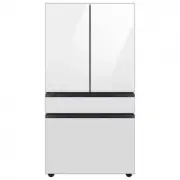
21 Installation / Refrigerator at a glance 01 03 02 04 05 07 06 08 09 10 12 11 13 14 01 Full Cool-Pack * 02 Ice Maker (Free Standing) * 03 Fresh Room * 04 Curd Maestro™ * 05 Easy Slide Shelf * 06 Shelf Ref. / 2nd Veg Box * 07 Big Veg Box 08 Freezer bin 09 Fridge bin 10 Cool Wall * 11 Variety bin * 1...
Page 22 - STEP 1; Select a site
22 Installation / To secure more room for storage in the freezer compartment Remove one or more optional accessories such as cool pack(s), shelf or shelves, twist ice maker(s), ice storage bins and their supports, all of which can be removed manually without a tool.• These optional accessories do no...
Page 27 - STEP 2; Flooring
27 Installation / STEP 2 Flooring • The surface to install the refrigerator must support a fully loaded refrigerator. • To protect the floor, put a large piece of cardboard on each leg of the refrigerator. • Once the refrigerator is in its final position, do not move it unless necessary to protect t...
Page 28 - STEP 3; Adjust the levelling feet
28 Installation / STEP 3 Adjust the levelling feet Level the refrigerator by manually adjusting the levelling feet.Turn the levelling feet clockwise to lower the position, or turn counter clockwise to raise.For safety reasons, adjust the front side a little higher than the rear side. RT3000TH_DA68-0...
Page 29 - STEP 4; Initial settings; STEP 5; Final check
29 Installation / STEP 4 Initial settings By completing the following steps, the refrigerator should be fully functioning. 1. Plug the power cord into the wall socket to turn the refrigerator on. 2. Open the door, and check if the interior light lights up. 3. Set the temperature to the coldest, and ...
Page 30 - Operations; Feature panel; Type A
30 Operations / Operations Feature panel Type A 01 02 03 01 Freezer / Freezer Convert 02 Curd / Curd Off 03 Fridge 01 Freezer / Freezer Convert Freezer You can use the Freezer button to set the freezer temperature or to activate Power Freeze . • Press Freezer repeatedly to select a desired temperatu...
Page 34 - Type B
34 Operations / Type B 01 02 03 01 Freezer / Freezer Convert 02 Curd / Curd Off 03 Fridge / Vacation 01 Freezer / Freezer Convert Freezer You can use the Freezer button to set the freezer temperature.• Press Freezer repeatedly to select a desired temperature between –15 °C and –23 °C.- The temperatu...
Page 37 - Type C
37 Operations / Type C 01 02 01 Fridge / Power Cool 02 Curd / Curd Off 01 Fridge / Power Cool Fridge You can use the Fridge button to set the fridge temperature or to activate Power Cool . • Press Fridge repeatedly to select a desired temperature between 1 °C and 7 °C.- The temperature indicator dis...
Page 39 - Special features
39 Operations / Special features The actual image and special functions of your refrigerator may differ, depending on the model and the country. Ice making (applicable models only) Twist ice maker A 1. Open the freezer door, and slide open the ice tray. 2. Fill the tray with water up to the maximum ...
Page 43 - Maintenance; Handle and care; Freezer and fridge shelves
43 Maintenance / Maintenance Handle and care Freezer and fridge shelves • To remove a shelf, first open the door completely. Pull the shelf forward, lift up, and then pull out. • When reinserting the shelf, make sure the “Front” label of the shelf faces forward. • Do not attempt to tilt the shelf in...
Page 44 - Door bins; Cleaning
44 Maintenance / Door bins Slightly lift up and pull out the door bin. CAUTION To prevent accidents, empty the door bins before removing. Cleaning Regularly use a dry cloth to remove all foreign substances such as dust or water from the power plug terminals and contact points. 1. Unplug the power co...
Page 45 - Replacing the LED lamp; Lamps
45 Maintenance / WARNING • Do not use benzene, thinner, or home/ car detergent such as Clorox™ for cleaning purposes. They may damage the surface of the refrigerator and cause a fire. • Do not spray water onto the refrigerator. This may cause electric shock. • Do not put fingers or other objects int...
Page 46 - Troubleshooting; General; Temperature
46 Troubleshooting / Troubleshooting Before calling for service, review the checkpoints below. Any service calls regarding normal situations (No Defect Cases) will be charged to users. General Temperature Symptom Possible causes Solution Fridge/freezer does not operate.Fridge/freezer temperature is ...
Page 47 - Odors
47 Troubleshooting / Odors Symptom Possible causes Solution Refrigerator has odors. • Spoiled food. • Clean the refrigerator and remove any spoiled food. • Food with strong odors. • Make sure strong smelling food is wrapped airtight. Frost Symptom Possible causes Solution Frost around the vents. • F...
Page 48 - Do you hear abnormal sounds from the refrigerator?; These sounds are normal.
48 Troubleshooting / Do you hear abnormal sounds from the refrigerator? Before calling for service, review the checkpoints below. Any service calls related to normal sounds will be charged to the user. These sounds are normal. • When starting or ending an operation, the refrigerator may make sounds ...
Page 51 - मेमो
Memo / मेमो RT3000TH_DA68-03374F-00_EN+HI.indd 55 2019-12-05 3:31:58