Page 2 - Contents; Safety information
English 2 Contents Contents Safety information 3 Important safety symbols and precautions: 5 Severe warning signs for transportation and site 6 Critical installation warnings 7 Installation cautions 10 Critical usage warnings 11 Usage cautions 16 Cleaning cautions 19 Critical disposal warnings 21 Ad...
Page 4 - • In order to avoid the creation of a flammable gas-air mixture
Safety information English 4 Safety information • In order to avoid the creation of a flammable gas-air mixture if a leak in the refrigerating circuit occurs, the size of the room in which the appliance may be sited depends on the amount of refrigerant used. • Never start up an appliance showing any...
Page 5 - Important safety symbols and precautions:; CAUTION; Hazards or unsafe practices that may result in; NOTE; These warning signs are here to prevent injury to you and others.
English 5 Safety information Important safety symbols and precautions: Please follow all safety instructions in this manual. This manual uses the following safety symbols. WARNING Hazards or unsafe practices that may result in severe personal injury, property damage, and/or death . CAUTION Hazards o...
Page 6 - Severe warning signs for transportation and site; • When transporting and installing the appliance, care should be
Safety information English 6 Safety information Severe warning signs for transportation and site WARNING • When transporting and installing the appliance, care should be taken to ensure that no parts of the refrigerating circuit are damaged.- Refrigerant leaking from the pipe work could ignite or ca...
Page 7 - Critical installation warnings
English 7 Safety information Critical installation warnings WARNING • Do not install the refrigerator in a damp location or place where it may come in contact with water.- Deteriorated insulation on electrical parts may cause an electric shock or fire. • Do not place this refrigerator in direct sunl...
Page 10 - Installation cautions
Safety information English 10 Safety information • Plug the power plug into the wall socket firmly. Do not use a damaged power plug, damaged power cord, or loose wall socket.- This may result in an electric shock or fire. • If the power cord is damaged, have it replaced immediately by the manufactur...
Page 11 - Critical usage warnings
English 11 Safety information Critical usage warnings WARNING • Do not insert the power plug into a wall socket with wet hands. - This may result in an electric shock. • Do not store articles on the top of the appliance. - When you open or close the door, the articles may fall and cause personal inj...
Page 16 - Usage cautions
Safety information English 16 Safety information Usage cautions CAUTION • Do not refreeze thawed food. - Frozen and thawed food will develop harmful bacteria faster than fresh. - The second thaw will break down even more cells, leaching out moisture and changing the integrity of the product. • Do no...
Page 18 - • Fill the water tank and ice cube trays with potable water only (tap
Safety information English 18 Safety information • Fill the water tank and ice cube trays with potable water only (tap water, mineral water, or purified water).- Do not fill the tank with tea or a sports drink. This may damage the refrigerator. • Be careful that your fingers are not caught in.• If t...
Page 19 - Cleaning cautions
English 19 Safety information Cleaning cautions CAUTION • Do not spray water directly on the inside or outside the refrigerator.- There is a risk of fire or electric shock. • Do not use a hair dryer to dry the inside of the refrigerator.• Do not place a lighted candle in the refrigerator to remove b...
Page 20 - • Do not use abrasive or harsh cleansers such as window sprays,
Safety information English 20 Safety information • Do not use abrasive or harsh cleansers such as window sprays, scouring cleansers, flammable fluids, muriatic acid, cleaning waxes, concentrated detergents, bleaches, or cleansers containing petroleum products on exterior surfaces (doors and cabinet)...
Page 21 - Critical disposal warnings
English 21 Safety information Critical disposal warnings WARNING • Please dispose of the packaging material from this product in an environmentally friendly manner. • Ensure that none of the pipes on the back of the refrigerator are damaged prior to disposal. • R-600a or R-134a is used as a refriger...
Page 22 - Additional tips for proper usage; - Should the power failure last more than 24 hours, remove and
Safety information English 22 Safety information Additional tips for proper usage • In the event of a power failure, call the local office of your electric company and ask how long the failure is going to last.- Most power failures that are corrected in an hour or two will not affect your refrigerat...
Page 23 - Saving Energy Tips; • Not to block any vents and grilles is recommended for energy
English 23 Safety information Saving Energy Tips • Install the appliance in a cool, dry room with adequate ventilation. Ensure that it is not exposed to direct sunlight and never put it near a direct source of heat (a radiator, for example). • Not to block any vents and grilles is recommended for en...
Page 24 - Instructions about the WEEE; (For products sold in European countries only)
Safety information English 24 Safety information Instructions about the WEEE Correct Disposal of This Product (Waste Electrical & Electronic Equipment) (Applicable in countries with separate collection systems) This marking on the product, accessories or literature indicates that the product and...
Page 25 - Refrigerator at a glance; Normal models
English 25 Installation Follow these instructions carefully to ensure a proper installation of this refrigerator and to prevent accidents before using it. WARNING • Use the refrigerator only for its intended purpose as described in this manual.• Any servicing must be performed by a qualified technic...
Page 26 - Dispenser-featured models
Installation English 26 Installation Dispenser-featured models 08 02 12 01 03 06 09 07 05 10 04 13 11 01 Freezer shelves 02 Multipurpose freezer bin 03 Dried food and meat storage drawer 04 Refrigerator bin 05 Refrigerator shelves 06 Vegetable drawer 07 Multipurpose drawer 08 Ice maker bucket ** 09 ...
Page 28 - STEP 1; Select a site
Installation English 28 Installation Step-by-step installation STEP 1 Select a site Site requirements: • Solid, level surface without carpeting or flooring that may obstruct ventilation• Away from direct sunlight• Adequate room for opening and closing the door• Away from a heat source• Room for main...
Page 30 - STEP 2
Installation English 30 Installation STEP 2 Wi-Fi connection You can control the refrigerator remotely using the Smart Home Adapter that is sold separately. To purchase the Smart Home Adapter, visit www.samsung.com and follow the product information about the adapter. NOTE You may not be able to pur...
Page 31 - STEP 3
English 31 Installation 4. Insert the upper area of the adapter cover first, and then close to lock as shown. NOTE The marked area is the cover of the optional adapter, not a crack or defect. STEP 3 Spacing (applicable models only) 1. Open the door and locate the provided spacer. 2. Unpack the space...
Page 32 - STEP 4; Flooring
Installation English 32 Installation STEP 4 Flooring • The surface to install the refrigerator must support a fully loaded refrigerator. • To protect the floor, put a large piece of cardboard on each leg of the refrigerator. • Once the refrigerator is in its final position, do not move it unless nec...
Page 33 - STEP 5; Adjust the levelling feet
English 33 Installation STEP 5 Adjust the levelling feet CAUTION • The refrigerator must be levelled on a flat, solid floor. Failing to do so can cause damage to the refrigerator or physical injury. • Levelling must be performed with an empty refrigerator. Make sure no food items remain inside the r...
Page 34 - STEP 6; Adjust the door height as well as the door gap
Installation English 34 Installation STEP 6 Adjust the door height as well as the door gap To adjust the height of a door The height of a door can be adjusted using the clamp nut and the height nut on the front bottom of each door. B A 1. Open the door to adjust, and locate the two nuts (A) and (B) ...
Page 35 - STEP 7; Connect the water dispenser line (applicable models only)
English 35 Installation STEP 7 Connect the water dispenser line (applicable models only) Parts and tools required Water line fixer and screws Coupler Water line Water filter lock-clip Water filter Check valve Installation (external dispenser line) 1. Assemble the water pipe line using couplers. 2. C...
Page 36 - STEP 8; Connect to a water source (applicable models only)
Installation English 36 Installation STEP 8 Connect to a water source (applicable models only) CAUTION • The water line must be connected by a qualified technician.• The warranty for your refrigerator does not cover the water line installation. The water line installation will be performed at your o...
Page 41 - STEP 9; To attach the handles (applicable models only)
English 41 Installation STEP 9 To attach the handles (applicable models only) 1. Locate the 4 holes on the doors. 2. Use the Phillips screwdriver to assemble the fixers to the holes by tightening them clockwise. CAUTION Make sure the rubber washers on the fixers are not missing. Without the rubber w...
Page 43 - Initial settings; Final check
English 43 Installation STEP 10 Initial settings By completing the following steps, the refrigerator should be fully functioning. 1. Plug the power cord into the wall socket to turn the refrigerator on. 2. Open the door, and check if the interior light lights up. 3. Set the temperature to the coldes...
Page 44 - Door removal for entrance; Disconnect the water line
Installation English 44 Installation Door removal for entrance If the refrigerator cannot pass through the entrance due to its size, follow these instructions: Tools required (not provided) These tools are used for removing the doors. Phillips screwdriver Flat-head screwdriver Socket spanner (10 mm)...
Page 45 - Detach the doors
English 45 Installation Detach the doors CAUTION The door may fall off or over and damage itself during any of these steps. To prevent an accident, use extreme caution when performing these steps. A A 1. Use a Phillips screwdriver to unscrew the hinge covers (A) on the top of each door. 2. Open the ...
Page 46 - Reconnect the water hoses
Installation English 46 Installation 5. Pull the clamp to remove. 6. Open the door by 90 degrees. While holding the door, remove the hinge. CAUTION If you remove the hinge without holding the door, the door may fall and cause injury. Reconnect the water hoses Once the refrigerator has passed through...
Page 47 - Reattach the doors
English 47 Installation Reattach the doors CAUTION • Before reattaching the doors, make sure all the electrical connectors are properly connected. • The freezer door must be reattached before the fridge door. 1. Hold the freezer door and hook to the hinge at the bottom of the refrigerator. 2. Put th...
Page 49 - Operations; Feature panel
English 49 Operations Feature panel Type 1 01 02 06 03 04 05 Type 2 01 02 03 06 05 Type 3 01 02 06 05 01 Freezer / Power Freeze 02 Fridge / Power Cool 03 Ice Maker * 04 Filter Reset * 05 Door Alarm / Vacation 06 Network connection * Applicable models only Operations Untitled-38 49 2018-06-08 2:16:55
Page 54 - SmartThings (available only with the optional adapter); Refrigerator app
Operations English 54 Operations SmartThings (available only with the optional adapter) Installation Visit the Google Play Store, Galaxy Apps, or Apple App Store and search for “SmartThings”. Download and install the SmartThings app provided by Samsung Electronics to your smart device. NOTE • The Sm...
Page 57 - Special features
English 57 Operations Special features The refrigerator features user-oriented devices that you can use to benefit from. Water/Ice dispenser (applicable models only) Using the dispenser, you can dispense water with or without ice.The water dispenser offers 3 options: chilled water, cubed ice, and cr...
Page 61 - To secure more storage space (applicable models only)
English 61 Operations To secure more storage space (applicable models only) A B If you do not use the ice maker and need more storage space, remove the icemaker bucket (A) . Then, insert the Freezer guide (Optional) (B) into the icemaker bucket’s place. C D F E To secure more space, remove the upper...
Page 62 - Icemaker bucket
Operations English 62 Operations Icemaker bucket If you do not dispense ice for an extended period, ice may form clumps inside the bucket. If this happens, remove and empty the icemaker bucket. 1. To remove the icemaker bucket, gently lift it up and pull out slowly while holding the handgrips with b...
Page 63 - Water pressure
English 63 Operations • While the door is open, neither the ice maker nor the water dispenser operates. Water pressure If you want to check how much water flows into the ice tray, follow these steps. A 1. Remove the ice bucket. 2. Press the button (A) on the bottom of the ice maker. Normally, the ic...
Page 64 - Handle and care; Door bins
English 64 Maintenance Handle and care Shelves (fridge/freezer) Rear 1 • To remove a shelf, fully open the corresponding door. Hold the front of the shelf and gently lift up and slide out. • If the door cannot fully open, slide out the shelf half way to the front and turn it over to remove. 2 3 CAUT...
Page 65 - Drawers
English 65 Maintenance Drawers Gently lift up the front of the drawer and slide out. Vegetable / Dry drawers To remove the vegetable drawer from the fridge or the dry drawer from the freezer. 1. First, remove surrounding multipurpose drawers if necessary. A 2. If your refrigerator is provided with a...
Page 66 - Cleaning; Interior and exterior; Rubber seals
Maintenance English 66 Maintenance Cleaning Interior and exterior WARNING • Do not use benzene, thinner, or home/car detergent such as Clorox™ for cleaning purposes. They may damage the surface of the refrigerator and cause a fire. • Do not spray water onto the refrigerator. This may cause electric ...
Page 67 - Rear panel; Replacement; Lamps
English 67 Maintenance Rear panel To keep cords and exposed parts of the rear panel free of dirt, vacuum the panel once or twice a year. CAUTION Do not remove the rear panel cover . Electric shock may occur. Replacement Lamps The lamps are not user-serviceable. To replace the lamps of the refrigerat...
Page 68 - Troubleshooting; General; Temperature
English 68 Troubleshooting Before calling for service, review the checkpoints below. Any service calls regarding normal situations (No Defect Cases) will be charged to users. General Temperature Symptom Possible causes Solution Fridge/freezer does not operate.Fridge/freezer temperature is warm. • Po...
Page 69 - Odour
English 69 Troubleshooting Odour Symptom Possible causes Solution Refrigerator has odours. • Spoiled food. • Clean the refrigerator and remove any spoiled food. • Food with strong odours. • Make sure strong smelling food is wrapped airtight. Frost Symptom Possible causes Solution Frost around the ve...
Page 72 - Do you hear abnormal sounds from the refrigerator?; These sounds are normal.
Troubleshooting English 72 Troubleshooting Do you hear abnormal sounds from the refrigerator? Before calling for service, review the checkpoints below. Any service calls related to normal sounds will be charged to the user. These sounds are normal. • When starting or ending an operation, the refrige...
Page 74 - SmartThings
Troubleshooting English 74 Troubleshooting SmartThings Symptom Action Could not find “SmartThings” in the app market. • The SmartThings app is designed for Android 6.0 (Marshmallow) or later, iOS 10.0 or later, iPhone 6 or later, and is optimized for Samsung smartphones (Galaxy S and Galaxy Note ser...
Page 75 - Memo


 Samsung RB37A5
User Manual
Samsung RB37A5
User Manual
 Samsung RB37A50N0WW
User Manual
Samsung RB37A50N0WW
User Manual
 Samsung RB37A5290EL
User Manual
Samsung RB37A5290EL
User Manual
 Samsung RB37A5290SA
User Manual
Samsung RB37A5290SA
User Manual
 Samsung RF18A5101SG
User Manual
Samsung RF18A5101SG
User Manual
 Samsung RF18A5101SG/AA
User Manual
Samsung RF18A5101SG/AA
User Manual
 Samsung RF18A5101SR
User Manual
Samsung RF18A5101SR
User Manual
 Samsung RF20A5101SR/AA
User Manual
Samsung RF20A5101SR/AA
User Manual
 Samsung RF20A5101WW
User Manual
Samsung RF20A5101WW
User Manual
 Samsung RF22A4121SR
User Manual
Samsung RF22A4121SR
User Manual
 Samsung RF22A4121SR/AA
User Manual
Samsung RF22A4121SR/AA
User Manual
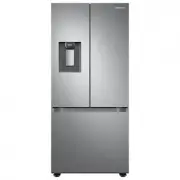 Samsung RF22A4221SR
User Manual
Samsung RF22A4221SR
User Manual
 Samsung RF22A4221SR/AA
User Manual
Samsung RF22A4221SR/AA
User Manual
 Samsung RF23A9671SR/AA
User Manual
Samsung RF23A9671SR/AA
User Manual
 Samsung RF23A9675
User Manual
Samsung RF23A9675
User Manual
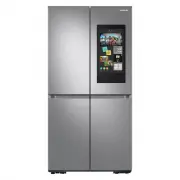 Samsung RF23A9771SR
User Manual
Samsung RF23A9771SR
User Manual
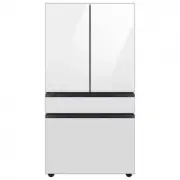
 Samsung RF23BB8200QL
User Manual
Samsung RF23BB8200QL
User Manual
 Samsung RF23BB860012
User Manual
Samsung RF23BB860012
User Manual