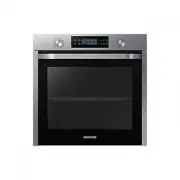
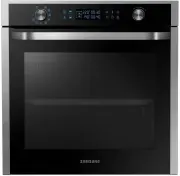
Page 2 - Contents
2 English C ontents Contents Using this manual 3 The following symbols are used in this User Manual: 3 Safety instructions 3 Important safety precautions 3 Correct Disposal of This Product (Waste Electrical & Electronic Equipment) 6 Auto energy saving function 6 Installation 6 What’s included 6 ...
Page 3 - Using this manual; The following symbols are used in this User Manual:; or property damage; personal injury and/or property; Safety instructions; Important safety precautions
English 3 Using this manual Using this manual Thank you for choosing SAMSUNG Built-In Oven. This User Manual contains important information on safety and instructions intended to assist you in the operation and maintenance of your appliance. Please take the time to read this User Manual before using...
Page 6 - Auto energy saving function; Installation; What’s included
6 English Installation Correct Disposal of This Product (Waste Electrical & Electronic Equipment) (Applicable in countries with separate collection systems) This marking on the product, accessories or literature indicates that the product and its electronic accessories (e.g. charger, headset, US...
Page 7 - Power connection
English 7 Installation Accessories The oven comes with different accessories that help you prepare different types of food. Wire rack Wire rack insert * Baking tray * Universal tray * Extra-deep tray * Rotisserie spit * Rotisserie spit and Shashlik * Telescopic rail * Divider NOTE Availability of ac...
Page 8 - Cabinet mount
8 English Installation Installation Cabinet mount If installing the oven in a built-in cabinet, the cabinet must have its plastic surfaces and adhesive parts resistant up to 90 °C, and adjacent furniture must be resistant up to 75 °C. Samsung is not responsible for damage to furniture from the oven’...
Page 10 - Before you start; Initial settings; OK; New oven smell
10 English Befor e you s tar t Before you start Initial settings When you power on the oven for the first time, the default time of “12:00” appears on the display where the hour element (“12”) blinks. Follow the steps below to set the current time. 1. With the hour element blinking, turn the value d...
Page 12 - Dual cook mode; Operations; Control panel
12 English Oper ations Dual cook mode You can use both the upper and lower compartments to cook two different recipes, or simply choose one compartment to cook with. Insert the divider in level 3 to separate the cooking chamber in two compartments. The oven senses the divider and activates the upper...
Page 13 - Common settings
English 13 Oper ations Common settings It is common to change the default temperature and/or cooking time across all cooking modes. Follow the steps below to adjust the temperature and/or cooking time for the selected cooking mode. Temperature 1. Turn the mode selector to choose a mode or function. ...
Page 19 - Dual cook mode temperature setting range
English 19 Oper ations Dual cook mode Grilling with Dual cook mode is useful for small serving sizes to save power. By default, only the Large grill option in the upper compartment is available because the oven uses only the top heating element. 1. Insert the divider in level 3 to activate Dual cook...
Page 20 - To stop cooking
20 English Oper ations Operations If Lower is set to (°C) Upper compartment is limited to (°C) Minimum Maximum 40 40 45 60 50 75 80 65 105 100 80 135 120 90 160 140 105 190 160 120 220 180 135 250 200 145 250 220 160 250 250 170 250 To stop cooking While cooking is in process, turn the mode selector...
Page 21 - Special function; Auto cook
English 21 Oper ations Special function Add special or additional functions to improve your cooking experience. Special functions are not enabled in Dual cook mode. 1. Turn the mode selector to select . 2. Turn the value dial to select a function, and then press OK . The default temperature appears....
Page 22 - Cleaning
22 English Oper ations Operations Dual cook mode 1. Insert the divider in level 3 to activate Dual cook mode. 2. Turn the mode selector to select . 3. Press to select the upper compartment, or press to select the lower compartment. icon will appear on the selected compartment. 4. Turn the value dial...
Page 24 - Timer; Cooking smart; Manual cooking; Accessory tips
24 English C ooking smar t Timer Timer helps you check the time or operating duration while cooking. 1. Press . 2. Turn the value dial to set the time, and then press OK . You can set the time to a max of 23 hours and 59 minutes. NOTE • When the time has elapsed, the oven beeps with a blinking messa...
Page 25 - Roasting
English 25 C ooking smar t Food Accessory Level Type of heating Temp. (°C) Time (min.) Apple pie Wire rack, Ø 20 cm tin 2 160-170 65-75 Chilled pizza Universal tray 3 180-200 5-10 Roasting Food Accessory Level Type of heating Temp. (°C) Time (min.) Meat(Beef/Pork/Lamb) Sirloin of beef, 1 kg Wire rac...
Page 26 - Grilling
26 English C ooking smar t Cooking smart Food Accessory Level Type of heating Temp. (°C) Time (min.) Poultry(Chicken/Duck/Turkey) Chicken, Whole, 1.2 kg* Wire rack + Universal tray (to catch drippings) 31 205 80-100* Chicken pieces Wire rack + Universal tray 31 200-220 25-35 Duck breast Wire rack + ...
Page 28 - ECO convection
28 English C ooking smar t Cooking smart ECO convection This mode uses the optimized heating system so that you save the energy during cooking your dishes. The times of this category are suggested to not be preheated before cooking for saving more energy.You can increase or decrease the cooking time...
Page 29 - Auto cook programmes; Single cook
English 29 C ooking smar t You can also use upper or lower compartment only to save power. The cooking time can be extended when you use separated compartment. We recommend preheat the oven for best results. Upper Food Accessory Level Type of heating Temp. (°C) Time (min.) Small cakes Universal tray...
Page 33 - Dual cook
English 33 C ooking smar t Dual cook The following table presents 10 auto programmes for cooking, roasting and baking. You can use only upper cavity or lower cavity and use the upper and lower cavity at the same time.The programme contains its quantities, weight ranges and appropriate recommendation...
Page 34 - Test Dishes
34 English C ooking smar t Cooking smart Test Dishes According to standard EN 60350-1 1. Baking The recommendations for baking refer to a preheated oven. Do not use the fast preheat function. Always put trays the slanted side to the door front. Type of food Accessory Level Type of heating Temp. (°C)...
Page 35 - Collection of frequent Auto cook recipes
English 35 C ooking smar t Collection of frequent Auto cook recipes Potato gratin Ingredients 800 g potatoes, 100 ml milk, 100 ml cream, 50 g beaten whole egg, 1 tbsp each of salt, pepper, nutmeg, 150 g grated cheese, butter, thyme Directions Peel potatoes and slice them to 3 mm thickness. Rub the b...
Page 38 - Maintenance
38 English Maint enanc e Door Do not remove the oven door unless for cleaning purposes. To remove the door for cleaning, follow these instructions. WARNING The oven door is heavy. 1. Open the door and flip open the clips at both hinges. 2. Close the door approximately 70°. Hold the oven door by the ...
Page 40 - Replacement
40 English Maint enanc e Maintenance Water collector 01 01 Water collector The water collector collects not only excess moisture from cooking but also food residue. Regularly empty and clean the water collector. WARNING If you encounter a water leak from the water collector, contact us at a local Sa...
Page 41 - Troubleshooting; Checkpoints
English 41 Tr ouble shoo ting Troubleshooting Checkpoints If you encounter a problem with the oven, first check the table below and try the suggestions. If the problem continues, contact a local Samsung service centre. Problem Cause Action The buttons cannot be pressed properly. • If there is foreig...
Page 43 - Information codes
English 43 Tr ouble shoo ting Information codes If the oven fails to operate, you may see an information code on the display. Check the table below and try the suggestions. Code Meaning Action C-d1 Door lock malfunctions Turn off the oven and then restart. If the problem continues, turn off all powe...
Page 44 - Appendix; Product data sheet
44 English Appendix Appendix Product data sheet SAMSUNG SAMSUNG Model identification NV75K5571RS / NV75K5571BS Cavity type Single Upper Lower Energy Efficiency Index per cavity (EEI cavity) 95.4 100.0 101.5 Energy Efficiency Class per cavity A A A Energy consumption required to heat a standardised l...
Page 45 - Memo
Memo NV75K5571RS_EU_DG68-00738A-01_EN.indd 45 2016-12-12 6:29:08