Page 2 - Contents
2 English C ontents Contents Safety instructions 3 Important safety instructions 3 General safety 7 Microwave operation precautions 8 Limited warranty 9 Product group definition 9 Correct Disposal of This Product (Waste Electrical & Electronic Equipment) 9 Installation 10 What’s included 10 Inst...
Page 3 - Safety instructions; IMPORTANT SAFETY INSTRUCTIONS
English 3 Safety ins truc tions Safety instructions IMPORTANT SAFETY INSTRUCTIONS READ CAREFULLY AND KEEP FOR FUTURE REFERENCE. WARNING : If the door or door seals are damaged, the oven must not be operated until it has been repaired by a competent person. WARNING : It is hazardous for anyone other ...
Page 5 - WARNING
English 5 Safety ins truc tions If the supply cord is damaged, it must be replaced by the manufacturer, its service agent or similarly qualified persons in order to avoid a hazard.The method of fixing stated is not to depend on the use of adhesives since they are not considered to be a reliable fixi...
Page 7 - General safety
English 7 Safety ins truc tions General safety Any modifications or repairs must be performed by qualified personnel only.Do not heat food or liquids sealed in containers for the microwave function.Do not use benzene, thinner, alcohol, or steam or high-pressure cleaners to clean the oven.Do not inst...
Page 8 - Microwave operation precautions
8 English Safety ins truc tions Safety instructions Microwave oven precautions Only use microwave-safe utensils. Do not use metallic containers, gold or silver trimmed dinnerware, skewers, etc. Remove wire twist ties. Electric arcing may occur.Do not use the oven to dry papers or clothes.Use shorter...
Page 9 - Limited warranty
English 9 Safety ins truc tions Limited warranty Samsung will charge a repair fee for replacing an accessory or repairing a cosmetic defect if the damage to the unit or accessory was caused by the customer. Items this stipulation covers include: • Door, handles, out-panel, or control panel that are ...
Page 10 - Installation; What’s included
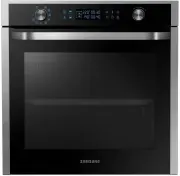
10 English Installation Installation What’s included Make sure all parts and accessories are included in the product package. If you have a problem with the oven or accessories, contact a local Samsung customer centre or the retailer. Oven at a glance 01 02 03 04 05 01 Control panel 02 Side racks 03...
Page 11 - Installation instructions
English 11 Installation Install in the Cabinet Kitchen Cabinets in contact with the oven must be heatresistant up to 100 °C. Samsung will take no responsibility for damage of cabinets from the heat. Required Dimensions for installation (This product is dedicated to built-in products.) A B C D E F G ...
Page 14 - Care against an extended period of disuse; Maintenance; Cleaning
14 English Maint enanc e Replacement (repair) WARNING This oven has no user-removable parts inside. Do not try to replace or repair the oven yourself. • If you encounter a problem with hinges, sealing, and/or the door, contact a qualified technician or a local Samsung service centre for technical as...
Page 15 - Before you start; Control panel; Clock
English 15 Befor e you s tar t Before you start There are a couple of components that you should know before going directly to a recipe. Control panel The front panel comes in a wide range of materials and colours. For improved quality, the actual appearance of the oven is subject to change without ...
Page 16 - About microwave energy; Side racks
16 English Befor e you s tar t Before you start About microwave energy Microwaves are high-frequency electromagnetic waves. The oven uses the prebuilt magnetron to generate microwaves which are used to cook or reheat food without deforming or discolouring the food. 1. The microwaves generated by the...
Page 17 - Cookware for microwave
English 17 Befor e you s tar t Material Microwave- safe Description Fast-food packaging Polystyrene cups or containers Overheating may cause these to melt. Paper bags or newspaper These may catch fire. Recycled paper or metal trims These may cause arcing. Glassware Oven-to-table ware Microwave-safe ...
Page 18 - Operations; Feature overview
18 English Oper ations Material Microwave- safe Description Plastic Containers Use thermoplastic containers only. Some plastics may warp or discolour at high temperatures. Cling film Use to maintain moisture after cooking. Freezer bags Use boilable or ovenproof bags only. Wax or grease-proof paper U...
Page 19 - Manual mode
English 19 Oper ations Feature Temperature (Power level) range Default temperature (Power level) Manual Mode Large Grill 150-230 °C 220 °C The large-area grill emits heat. Use this mode for browning the tops of food (for example, meat, lasagne, or gratin). Fan Grill 40-230 °C 180 °C Two top heating ...
Page 23 - Auto mode
English 23 Oper ations Large Grill The heating elements generate heat. Make sure they are in the horizontal position. Step 1 > Step 2 > Step 3 > Step 4 Grill Temperature Cooking time Preheating 1. Put food in suitable cookware, put the cookware on the recommended accessory, and then close t...
Page 24 - Auto cooking
24 English Oper ations Operations Auto Cook For cooking beginners, the oven offers a total of 20 auto cooking programmes. Take advantage of this feature to save you time or shorten your learning curve. The cooking time and temperature will be adjusted according to the selected recipe. Step 1 > St...
Page 27 - Special functions
English 27 Oper ations Special functions Keep Warm The Keep Warm feature keeps food hot until it’s served. Use this function to keep food warm until ready to serve. When cooking is complete, 1. Tap to use Keep Warm function. 2. Set the operating time by using or . 3. Tap START button to start Keep W...
Page 28 - More Functions
28 English Oper ations Operations NOTE • Use this feature only when the oven has cooled completely to room temperature. • DO NOT use distilled water. • DO NOT use high-pressure water cleaners or steam jet cleaners to clean the microwave oven. • If the oven is hot inside, auto cleaning will not activ...
Page 29 - Smart Control; Cooking Smart; Manual cooking
English 29 C ooking Smar t Smart Control To use the oven’s Smart Control, you must download the SmartThings app to a mobile device. Functions operated by the SmartThings app may not work smoothly if communication conditions are poor or the oven is installed in a place with a weak Wi-Fi signal. How t...
Page 37 - Troubleshooting; Checkpoints
English 37 Tr ouble shoo ting Troubleshooting You may encounter a problem using the oven. In that case, first check the table below and try the suggestions. If a problem persists, or if any information code keeps appearing on the display, contact a local Samsung service centre. Checkpoints If you en...
Page 41 - Information codes
English 41 Tr ouble shoo ting Information codes If the oven fails to operate, you may see an information code on the display. Check the table below and try the suggestions. Code Description Action C-20 The temperature sensor is open. Unplug the power cord of the oven, and contact a local Samsung ser...
Page 42 - Technical specifications; Appendix
42 English Technic al speci fications Technical specifications Samsung strives to improve its products at all times. Both the design specifications and these user instructions are thus subject to change without notice. Power Source 230 V ~ 50 Hz Power Consumption Maximum power 2700 W Microwave 1600 ...
Page 43 - Open Source Announcement; Memo
English 43 Appendix Open Source Announcement The software included in this product contains open source software. The following URL http://opensource.samsung.com/opensource/SMART_TP1_0/seq/0 leads to open source license information as related to this product. Security updates information Security up...