Page 2 - TABLE OF CONTENTS; LIMITED TWO YEAR WARRANTY AND 90 DAY EXCHANGE POLICY
2 – English Introduction ..................................................................................................................................................................... 2 Warranty .................................................................................................
Page 3 - IMPORTANT SAFETY INSTRUCTIONS; SAVE THESE INSTRUCTIONS
3 – English IMPORTANT SAFETY INSTRUCTIONS WARNING: - Read all instructions. To reduce the risk of injury, user must read instruction manual. Failure to follow all instructions listed below may result in electric shock, fire and/or serious injury. SAVE THESE INSTRUCTIONS Keep work area clean and we...
Page 5 - SYMBOLS
5 – English SYMBOLS Some of the following symbols may be used on this product. Please study them and learn their meaning. Proper inter-pretation of these symbols will allow you to operate the product better and safer. SYMBOL NAME DESIGNATION/EXPLANATION Safety Alert Indicates a potential personal in...
Page 6 - FEATURES; PRODUCT SPECIFICATIONS; ASSEMBLY; UNPACKING
6 – English FEATURES KNOW YOUR DIGITAL KEY LOCK BOX See Figure 1, page 10. The safe use of this product requires an understanding of the information on the product and in this operator’s manual. Before use of this product, familiarize yourself with all oper-ating features and safety rules.NOTE: The ...
Page 7 - OPERATION; INSTALLING THE MOUNTING BRACKET; TO OPEN/CLOSE THE DOOR KNOB LOOP; TO INSTALL/REMOVE THE BATTERY PACK; SETTING TIME AND DATE
7 – English OPERATION WARNING: Do not allow familiarity with products to make you care-less. Remember that a careless fraction of a second is sufficient to inflict serious injury. WARNING: Always remove battery pack from the product when you are assembling parts, making adjustments, cleaning, or whe...
Page 9 - DELETING ALL STORED CODES; ENTRY TIME RETRIEVAL; LOW BATTERY INDICATOR; MAINTENANCE; GENERAL MAINTENANCE; NOTE: FIGURES (ILLUSTRATIONS) START ON PAGE 10 AFTER FRENCH AND
9 – English OPERATION wish to delete or change. Press and hold [ # ] until the existing code blinks and the word [ DELETE ] appears. Wait two seconds and dashes will appear. Enter and store a new code, if desired, or leave the code slot blank. DELETING ALL STORED CODES See Figure 16, page ...
Page 10 - PROPOSITION 65 DE LA CALIFORNIE
2 - Français Introduction .......................................................................................................................................................................... 2 Garantie ...........................................................................................
Page 11 - INSTRUCCIONES DE SEGURIDAD IMPORTANTES; CONSERVER CES INSTRUCTIONS
3 - Français INSTRUCCIONES DE SEGURIDAD IMPORTANTES AVERTISSEMENT: - Lire toutes les instructions. Pour réduire les risques de blessures, l’utilisateur doit lire le manuel d’utilisation. Le non-respect de toutes les instructions ci-dessous peut entraîner un choc électrique, un incendie et/ou des ble...
Page 12 - SYMBOLES
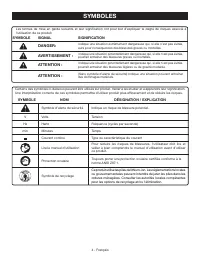
4 - Français SYMBOLES Les termes de mise en garde suivants et leur signification ont pour but d’expliquer le degré de risques associé à l’utilisation de ce produit. SYMBOLE SIGNAL SIGNIFICATION DANGER: Indique une situation extrêmement dangereuse qui, si elle n’est pas évitée, aura pour conséquences...
Page 13 - CARACTÉRISTIQUES; ASSEMBLAGE
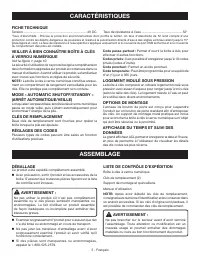
5 - Français CARACTÉRISTIQUES VEILLER À BIEN CONNAÎTRE BOÎTE À CLÉS À VERROU NUMÉRIQUE Voir la figure 1, page 10. La sécurité d’utilisation de ce produit exige la compréhension des informations apposées sur produit et contenues dans ce manuel d’utilisation. Avant d’utiliser ce produit, se familiaris...
Page 14 - UTILISATION; INSTALLATION DU SUPPORT DE MONTAGE; POUR INSTALLER ET RETIRER LE BLOC-PILES
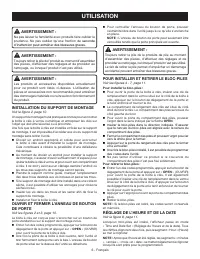
6 - Français UTILISATION AVERTISSEMENT : Ne pas laisser la familiarité avec produits faire oublier la prudence. Ne pas oublier qu’une fraction de seconde d’inattention peut entraîner des blessures graves. AVERTISSEMENT : Toujours retirer la pile de l’produit au moment d’assembler des pièces, d’effec...
Page 15 - POUR MODIFIER LE CODE PASSE-PARTOUT
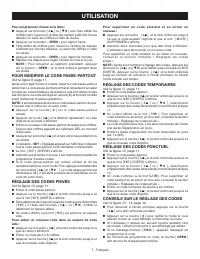
7 - Français UTILISATION Pour programmer l’heure et la date : Appuyer sur la touche [ # ] ou [ ] pour faire défiler les chiffres (vers l’avant ou l’arrière) de manière à afficher l’heure désirée, ou saisir les chiffres à l’aide du clavier. Appuyer sur le bouton « OPEN » pour régler l’h...
Page 16 - RÉCUPÉRATION DE LA PÉRIODE D’ENTRÉE; INDICATEUR DE FAIBLE NIVEAU DES PILES; COMMENÇANT SUR 10 DE PAGE; ENTRETIEN; ENTRETIEN GÉNÉRAL
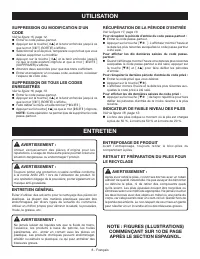
8 - Français UTILISATION SUPPRESSION OU MODIFICATION D’UN CODE Voir la figure 15, page 12. Entrer le code passe-partout. Appuyer sur la touche [ # ] et la tenir enfoncée jusqu’à ce que le mot [ EXIT ] (SORTIE) s’affiche. Sélectionner le code privé, temporaire ou ponctuel que vous désirez...
Page 17 - ÍNDICE DE CONTENIDO
2 - Español CALIFORNIA - PROPUESTA DE LEY NÚM. 65 ADVERTENCIA: Este producto puede contener sustancias químicas (por ejemplo, plomo) reconocidas por el estado de California como causantes de cáncer, defectos congénitos y otras afecciones del aparato reproductor. Lávese las manos después de utilazar ...
Page 18 - GUARDE ESTAS INSTRUCCIONES
3 - Español INSTRUCCIONES DE SEGURIDAD IMPORTANTES ADVERTENCIA - Lea todas las instrucciones. Para reducir el riesgo de lesiones, el usuario debe leer el manual de instrucciones. El incumplimiento de las instrucciones señaladas abajo puede causar descargas baterías, incendios y lesiones serias. GUAR...
Page 20 - SÍMBOLOS
5 - Español SÍMBOLOS Es posible que se empleen en este producto algunos de los siguientes símbolos. Le suplicamos estudiarlos y aprender su significado. Una correcta interpretación de estos símbolos le permitirá utilizar mejor y de manera más segura el producto. SÍMBOLO NOMBRE DENOMINACIÓN/EXPLICACI...
Page 21 - CARACTERÍSTICAS; APAGADO AUTOMÁTICO/MODO DE ESPERA; ARMADO
6 - Español CARACTERÍSTICAS FAMILIARÍCESE CON CAJA CON CERRADURA DIGITAL PARA LLAVES Vea la figura 1, página 10. Para usar este producto con la debida seguridad se debe comprender la información indicada en la producto misma y en este manual. Antes de usar este producto, familiarícese con todas las ...
Page 22 - FUNCIONAMIENTO; INSTALACIÓN DEL SOPORTE DE MONTAJE; PARA INSTALAR/RETIRAR LA BATERÍA; CONFIGURACIÓN DE LA HORA Y LA FECHA
7 - Español FUNCIONAMIENTO ADVERTENCIA: No permita que su familarización con los productos lo vuelva descuidado. Tenga presente que un descuido de un instante es suficiente para causar una lesión grave. ADVERTENCIA: Retire siempre el paquete de baterías de la producto antes de instalar las piezas, r...
Page 23 - PARA CAMBIAR EL CÓDIGO MAESTRO; CÓMO CONFIGURAR CÓDIGOS PRIVADOS; PARA CONFIGURAR UN CÓDIGO TEMPORAL; CÓMO BORRAR O CAMBIAR UN CÓDIGO
8 - Español FUNCIONAMIENTO Para configurar la hora y la fecha: Oprima la tecla [ # ] o [ ] para desplazarse hacia atrás o hacia adelante hasta llegar a la hora que desea configurar. O ingrese los números usando el teclado. Oprima OPEN (abrir) para configurar la hora. Desplácese hacia atr...
Page 24 - RECUPERACIÓN DE LA HORA DE INGRESO; INDICADOR DE BATERÍA BAJA; MANTENIMIENTO; MANTENIMIENTO GENERAL
9 - Español FUNCIONAMIENTO Seleccione el código Privado, Temporal, o Por única vez que desea borrar o cambiar. Presione y sostenga [ # ] hasta que parpadee el código existente y aparezca la palabra [ DELETE ] (BORRAR). Espere dos segundos y volverá a ver los guiones. Ingrese y guar...
Page 25 - ACCESS; OPEN
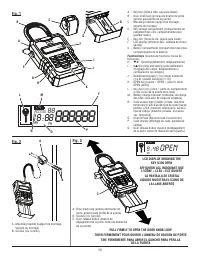
10 AM PM 18:88 ACCESS 88 888888 Fig. 1 A B F D L G I H O Fig. 2 A - Key box (boîte à clés, caja para llaves) B - Door knob loop (anneau de bouton de porte, gancho para perilla de la puerta) C - Mounting bracket (support de montage, soporte de montaje) D - Key storage compartment (compartiment de ran...
Page 26 - CLOSED; PRIV; TEMP; DAY; TIME
11 Fig. 8 Fig. 9 Fig. 7 Fig. 5 Fig. 6 Fig. 10 A - Key door (porte du compartiment à clés, puerta de la llave) B - Battery compartment (compartiment des piles, compartimiento de la batería) C - Battery pack (bloc-piles, paquete de baterías) D - Cap (capuchon, tapa) E - Door release button (bouton de ...
Page 27 - ERROR
12 Fig. 18 Fig. 15 Fig. 16 Fig. 17 EXAMPLE: PRIVATE CODE #1 WAS LAST ENTERED AT 3:18 PM ON MAY 14, 2009 EXEMPLE : LE CODE PRIVÉ NO 1 A ÉTÉ SAISI POUR LA DERNIÈRE FOIS LE 14 MAI, À 15 H 18 EJEMPLO: EL CÓDIGO PRIVADO #1 FUE INGRESADO POR ÚLTIMA VEZ A LAS 3:18 PM, EL 14 DE MAYO DE 2009 LOW BATTERY INDI...
Page 28 - OPERATOR’S MANUAL; DIGITAL KEY LOCK BOX
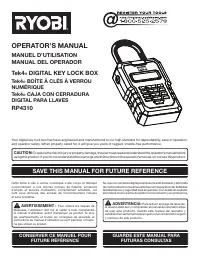
13 987000-662 9-23-11 (REV:05) OPERATOR’S MANUAL MANUEL D’UTILISATION/MANUAL DEL OPERADORTek4 ® DIGITAL KEY LOCK BOX Tek4 ® BOÎTE À CLÉS À VERROU NUMÉRIQUE Tek4 ® CAJA CON CERRADURA DIGITAL PARA LLAVES RP4310 • MODEL NUMBER ______________________________________ • SERIAL NUMBER _____________________...