Page 2 - This page is intentionally blank
Rinnai i Split AC OM This page is intentionally blank
Page 3 - TABLE OF CONTENTS; Warnings and Important Information; Advanced Operation ������������������������������������������������������������������������������������������������������������������������������������������� 7; Installation Record
Rinnai ii Split AC OM TABLE OF CONTENTS Warnings and Important Information 1 Operation 4 Appliance Components �������������������������������������������������������������������������������������������������������������������������������������� 4Remote Control Layout ��������������������������������...
Page 4 - only using genuine replacement parts.; may result in electric shock or product failure.; WARNINGS AND IMPORTANT INFORMATION
Rinnai 1 Split AC OM IMPORTANT READ ALL INSTRUCTIONS BEFORE USING THE APPLIANCE. Always comply with the following precautions to avoid dangerous situations and ensure peak performance of your product. WARNING WARNINGS: WHEN IGNORED, CAN RESULT IN SERIOUS INJURY OR DEATH. CAUTION CAUTIONS: WHEN IGNOR...
Page 5 - fire or electric shock.
Rinnai 2 Split AC OM WARNING OPERATIONDO NOT let the air conditioner run for a long time when the humidity is very high or when a door or window has been left open. Failure to do so may result in product failure.Make sure that the power cord is not pulled or damaged while the air conditioner is oper...
Page 6 - ADJUSTABLE INSIDE TEMP
Rinnai 3 Split AC OM CAUTION INSTALLATION Make sure to check if there is a refrigerant leak after you install or repair the air conditioner. Failure to do so may result in product failure.Install the drain hose properly for smooth drainage of condensed water. Failure to do so may result in product f...
Page 7 - APPLIANCE COMPONENTS; INDOOR; OPERATION
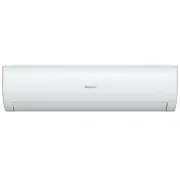
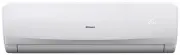
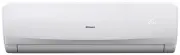
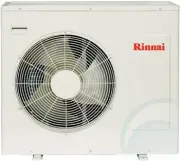
Rinnai 4 Split AC OM APPLIANCE COMPONENTS 1. Internal unit air return inlet2. Filter (located behind front access panel) 3. Manual ON/OFF override button and set temperature indicator* (located behind front access panel)4. Internal unit outlet (with louvres and vanes for setting air flow direction) ...
Page 8 - REMOTE CONTROL LAYOUT; Adjusts the air flow direction horizontally.; ON OFF; SWING; FAN TURBO TIMER
Rinnai 5 Split AC OM REMOTE CONTROL LAYOUT Main operation of the air conditioner is achieved conveniently with the remote control. 1. On / Off button Turns the power on/off. 2. Operation mode selection button Selects the operation mode: AUTO / COOLING / DRY (dehumidifying) / HEATING / FAN (fan only)...
Page 9 - INSERTING REMOTE CONTROL BATTERIES; REMOTE CONTROL CRADLE; CONTROLLER OPERATING BASICS; BASIC OPERATION; speed to maintain the optimal level of humidity.; HIGH; HEAT; DRY
Rinnai 6 Split AC OM INSERTING REMOTE CONTROL BATTERIES Insert batteries before using the remote control. The battery type used is AAA (1.5 V).1. Remove the battery cover at the rear of the remote control.2. Insert the new batteries and make sure that the + and - terminals of the batteries are insta...
Page 10 - ADVANCED OPERATION; louvre, when cycling “SWING↕” is shown on the LCD display screen.
Rinnai 7 Split AC OM FAN ONLY This mode uses the appliances fan to circulates the indoor air without changing the room temperature.1. Press to turn on the power.2. Press the “MODE” button until “FAN” is shown on the LCD display screen.3. Press the “FAN” button to adjust the fan speed (the available ...
Page 11 - the vanes, when cycling “SWING↔” is shown on the LCD display screen.; Fixed Direction; of the vanes, “SWING↔” is no longer shown on the LCD display screen.; louvre movement mechanisms.; are shown on the LCD display screen.; DELAY OFF TIMER; CANCELLING TIMERS
Rinnai 8 Split AC OM ADJUSTING THE HORIZONTAL AIR FLOW DIRECTIONContinuous Circulation 1. To adjust the direction of the air flow horizontally for an even air circulation, press the “SWING↔” button once to enable a continuous cyclic movement of the vanes, when cycling “SWING↔” is shown on the LCD di...
Page 12 - SLEEP MODE; in conjunction with SLEEP mode.; This function will not run in case of timer off or sleep mode.
Rinnai 9 Split AC OM SLEEP MODE 1. Press to turn on the power.2. Set the desired mode, temperature and fan setting as per basic operations3. Press the “SLEEP” button once, “SLEEP” is shown on the LCD display screen: For Cooling: In cooling operation the “SLEEP” mode allows the set temperature to inc...
Page 13 - shown on the LCD display screen.; You can turn on/off the set temperature display of the indoor unit.; Cover
Rinnai 10 Split AC OM CLEANING OPERATION Cooling and dehumidifying operations, can generate moisture inside the appliance. If the appliance is not going to be used for a long period (in excess of one month), it is suggested to run the cleaning operation to remove dust and moisture and avoiding the o...
Page 14 - GENERAL MAINTENANCE; CLEANING THE AIR FILTER; If you need more filters, please contact Rinnai service centre.
Rinnai 11 Split AC OM GENERAL MAINTENANCE Component Description Interval Indoor unit Clean the Indoor unit outer surface by using a soft, dry cloth. Regularly Replace the remote control batteries. As needed or once per year Professional service Once per year Outdoor unit Professional service Once pe...
Page 15 - SAVE A SERVICE CALL
Rinnai 12 Split AC OM SAVE A SERVICE CALL The air conditioner stops running. Check power supply or call Rinnai.If a power failure has occurred. Turn off the air conditioner when a power failure occurs. When the power is restored, wait 3 minutes, and then turn on the air conditioner. Check the air co...
Page 16 - WHAT IS COVERED BY THIS WARRANTY?; WARRANTY
Rinnai Air Conditioning Product Warranty NOTICE TO CONSUMERS UNDER AUSTRALIAN CONSUMER LAW Notice to consumers under the Australian Consumer Law:Our goods come with guarantees that cannot be excluded under the Australian Consumer Law. You are entitled to a replacement or refund for a major failure a...
Page 19 - INSTALLER DETAILS; Company Contact Details; SYSTEM DETAILS; INSTALLATION RECORD
INSTALLER DETAILS Installers Name: _______________________________________________________________________ Company Name: _______________________________________________________________________ Company Address: ________________________________________________________________________ _________________...
Page 20 - CONTACTS; Head Office
Rinnai 17 Split AC OM Issue 1 - Jan 2014 CONTACTS Australia Pty. Ltd. ABN 74 005 138 769 Rinnai has a Service and Spare Parts network with personnel who are fully trained and equipped to give the best service on your Rinnai appliance. If your appliance requires service, please call our National Help...