Page 3 - TABLE OF CONTENTS
Rinnai 1 Operation Manual ABOUT YOUR NEW AVENGER/CAPELLA PLUS .................................................... 2 CONTROL PANEL LAYOUT ...................................................................................... 3 REMOTE CONTROL .............................................................
Page 4 - ABOUT YOUR NEW AVENGER/CAPELLA PLUS
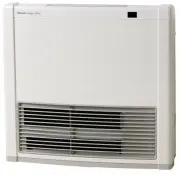
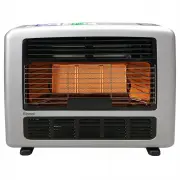
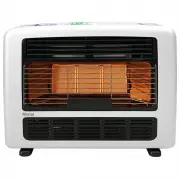
Rinnai 2 Operation Manual STANDBY/ON BUTTON ABOUT YOUR NEW AVENGER/CAPELLA PLUS
Page 5 - CONTROL PANEL LAYOUT
Rinnai 3 Operation Manual S T AND BY /O N ST AN D B Y / O N b u tt o n CONTROL PANEL LAYOUT
Page 6 - REMOTE CONTROL
Rinnai 4 Operation Manual STANDBY BUTTON Timer mode. STANDBY button will cancel any future timer operations, these will have to be reset manually. REMOTE CONTROL
Page 7 - FEATURES
Rinnai 5 Operation Manual PUSH BUTTON IGNITION Only one touch of the STANDBY/ON switch is requiredto operate the heater. CHILD LOCK When the Child Lock is activated all controls other thanthe STANDBY switch will be locked. Deactivating thelock releases the controls. If the lock is activated whenthe ...
Page 8 - IMPORTANT POINTS
Rinnai 6 Operation Manual Unpacking Appliance: Check for damage. If the heater is damaged, contact your supplier for advice. Before installing theappliance, check it is labelled for the correct gas type (see label on rear of heater). Refer to local gasauthority for confirmation of gas type if you ar...
Page 13 - CUSTOMER OPERATING INSTRUCTIONS
Rinnai 11 Operation Manual INSTALLATION Check room size and ventilation This heater must not be installed in a room smaller than:The AVENGER 25Plus must not be in a roomsmaller than 62.5 m 3 . The CAPELLA 18Plus must not be in a roomsmaller than 45.0 m 3 . Fixed ventilation must conform to local reg...
Page 14 - HOW TO OPERATE THE HEATER
Rinnai 12 Operation Manual S T A N D B Y / O N S T A N D B Y / O N S T A N D B Y / O N STANDBY/ON Button ''STANDBY/ON'' button once. ''STANDBY/ON'' To return the heater to STANDBY To return the heater to STANDBY while it is inoperation press the ''STANDBY/ON'' button once. ''STANDBY/ON'' button twic...
Page 15 - ADJUSTING TEMPERATURES
Rinnai 13 Operation Manual ADJUSTING TEMPERATURES S TA N D B Y / O N S TA N D B Y / O N S TA N D B Y / O N S TA N D B Y / O N STANDBY/ON Button ''STANDBY/ON'' button ''STANDBY/ON'' button once.
Page 16 - HEATER MODES & FUNCTIONS
Rinnai 14 Operation Manual HEATER MODES & FUNCTIONS Your appliance has several "MODE" settings to choose from. The factory default setting is "GAS". For yourconvenience in normal operation the appliance’s memory will select the “MODE” that was last used. COMFORT AND ECONOMY As a ...
Page 17 - SETTING HEATER MODES
Page 18 - SETTING CLOCK
Rinnai 16 Operation Manual SETTING CLOCK S TA N D B Y / O N S TA N D B Y / O N S TA N D B Y / O N S TA N D B Y / O N S TA N D B Y / O N S TA N D B Y / O N S TA N D B Y / O N STANDBY/ON Button STANDBY condition. ''STANDBY/ON'' Button STANDBY
Page 19 - PROGRAMMING THE ON/OFF TIMERS
Rinnai 17 Operation Manual PROGRAMMING THE ON/OFF TIMERS Here we will learn how to set the Timer (s) function by following the steps below. S TA N D B Y / O N S TA N D B Y / O N S TA N D B Y / O N S TA N D B Y / O N S TA N D B Y / O N S TA N D B Y / O N S TA N D B Y / O N STANDBY/ON Button With the ...
Page 20 - OPERATING THE ON/OFF TIMERS
Rinnai 18 Operation Manual S TA N D B Y / O N S TA N D B Y / O N S TA N D B Y / O N S TA N D B Y / O N S TA N D B Y / O N STANDBY/ON Button Now that the timer (s) functions have been programmed they can operated as follows. This function operates automatically in conjunction with the Timers. When a ...
Page 21 - OVERRIDE FUNCTION
Rinnai 19 Operation Manual S TA N D B Y / O N S TA N D B Y / O N S TA N D B Y / O N This function is used to manually override the current operation of the heater. For example: if the heater is between the finnishing and starting times of a timer program and the Override button is selected, then the...
Page 22 - CHILD LOCK
Rinnai 20 Operation Manual S TA N D B Y / O N S TA N D B Y / O N S TA N D B Y / O N STANDBY/ON Button to ''STANDBY'' ''STANDBY'' to ''TIMER'' ''STANDBY'' OVER HEAT SWITCH When the heater gets too hot during operation (for example when the filters or air outlet louvers are blocked) thisdevice turns t...
Page 23 - CARE OF HEATER
Rinnai 21 Operation Manual Your heater needs very little maintenance, but the following information will help you to keep it looking good, andworking efficiently. Unplug before cleaning.All parts of the heater can be cleaned using a soft, damp cloth.Do not use solvents to clean any parts.Do not spra...
Page 24 - TROUBLE SHOOTING
Rinnai 22 Operation Manual Please note: Service calls for general cleaning, maintenance and wear and tear are not necessarily covered underthe guarantee. Service calls of this nature may be chargeable. SERVICE Rinnai recommend that this appliance be serviced every 2 years.If the power supply cord, g...
Page 25 - ERROR CODES
Rinnai 23 Operation Manual Your appliance has the ability to check its own operation continuously. If a fault occurs an Error Code will flash onthe digital display of the control panel. This assists with diagnosing the fault and may enable you to overcome aproblem without a service call. Please quot...
Page 26 - SPECIFICATIONS
Rinnai 24 Operation Manual DIMENSIONS GENERAL SPECIFICATIONS Refer to appliance data plate for Gas Type, Gas Rates and Burner Pressures. General Description Portable Gas Convector Heaters Gas Control Electronic Control Burner Surface Combustion Burner Gas Connection 3/8” MI BSP into 1.5mflexible hos...
Page 27 - CPU
Rinnai 25 Operation Manual F [ 3A] F [ 20A] 6 8 7 9 10 1 2 3 4 5 r bl bl bl bl bl bl bl bl bl CONTROLDISPLAY UNIT THERMOCOUPLEOUTPUT CHECKTERMINAL 123 12 r ww RCR TH OH.TH OH.TH TF POV SW1 6 12345 or br gy y bk w 6 8 7 9 10 12 12 34 1234 1234 5 6 8 7 9 12345 1 3 2 1 23 bkbk bk y y y w ww ww r r bk b...
Page 28 - CONTACT INFORMATION
E&TG 12-014 26 RA RCE_470_670 TRE Issue 8 - 01/10/14 Head Office 100 Atlantic DriveKeysborough, Victoria 3173P.O. Box 460BRAESIDE VIC. 3195Tel: (03) 9271 6625Fax: (03) 9271 6622 National Help Line Tel: 1300 555 545* Fax: 1300 555 655* *Cost of a local call Higher from mobile or public phones. Au...