Page 2 - The; Razer Base Station Chroma; provides versatility and organization to your
F O R G A M E R S . B Y G A M E R S . ™ 1 The Razer Base Station Chroma provides versatility and organization to your gaming setup. Designed for convenience, the set includes a headphone stand, a 3-port USB hub and Razer Chroma lighting for notifications.
Page 3 - CONTENTS
F O R G A M E R S . B Y G A M E R S . ™ 2 CONTENTS 1. PACKAGE CONTENTS / SYSTEM REQUIREMENTS .................................................................................. 3 2. REGISTRATION / TECHNICAL SUPPORT .........................................................................................
Page 4 - PACKAGE CONTENTS / SYSTEM REQUIREMENTS; PACKAGE CONTENTS; *May vary for specific regions; SYSTEM REQUIREMENTS
F O R G A M E R S . B Y G A M E R S . ™ 3 1. PACKAGE CONTENTS / SYSTEM REQUIREMENTS PACKAGE CONTENTS ▪ Razer USB Hub ▪ USB 3.0 Standard-A to USB Type-C cable ▪ USB 3.0 Standard-A to USB Type-C adapter ▪ Power Adapter ▪ Interchangeable plugs* ▪ Important Product Information Guide *May vary for specif...
Page 5 - REGISTRATION; Register your product online at; TECHNICAL SUPPORT; years
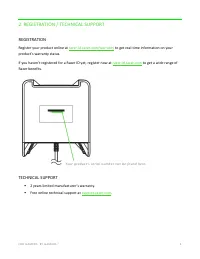
F O R G A M E R S . B Y G A M E R S . ™ 4 2. REGISTRATION / TECHNICAL SUPPORT REGISTRATION Register your product online at razer-id.razer.com/warranty to get real-time information on your product’s warranty status. If you haven’t registered for a Razer ID yet, register now at razer-id.razer.com to g...
Page 6 - TECHNICAL SPECIFICATIONS
F O R G A M E R S . B Y G A M E R S . ™ 5 3. TECHNICAL SPECIFICATIONS TECHNICAL SPECIFICATIONS ▪ Made from lightweight high-grade plastic ▪ Access to Chroma lighting effects and Notifications via Synapse ▪ Anti-slip feet ▪ Detachable headphone stand ▪ Chroma SDK compatibility ▪ 3 USB 3.0 SuperSpeed ...
Page 7 - Headset stand
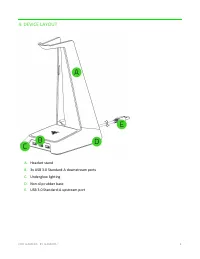
F O R G A M E R S . B Y G A M E R S . ™ 6 4. DEVICE LAYOUT A. Headset stand B. 3x USB 3.0 Standard-A downstream ports C. Underglow lighting D. Non-slip rubber base E. USB 3.0 Standard-A upstream port
Page 8 - INSTALLING RAZER SYNAPSE FOR YOUR RAZER BASE STATION CHROMA; Step 1: Connect your Razer device to the USB port of your computer.
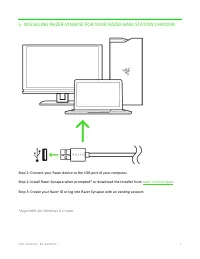
F O R G A M E R S . B Y G A M E R S . ™ 7 5. INSTALLING RAZER SYNAPSE FOR YOUR RAZER BASE STATION CHROMA Step 1: Connect your Razer device to the USB port of your computer. Step 2: Install Razer Synapse when prompted* or download the installer from razer.com/synapse . Step 3: Create your Razer ID or...
Page 9 - CONFIGURING YOUR RAZER BASE STATION CHROMA; SYNAPSE TAB; Dashboard
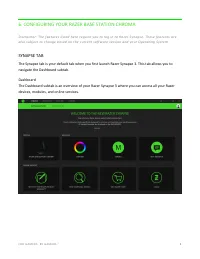
F O R G A M E R S . B Y G A M E R S . ™ 8 6. CONFIGURING YOUR RAZER BASE STATION CHROMA D i s c l a i m e r : T h e f e a t u r e s l i s t e d h e r e r e q u i r e y o u t o l o g i n t o R a z e r S y n a p s e . T h e s e f e a t u r e s a r e a l s o s u b j e c t t o c h a n g e b a s e d o n ...
Page 10 - ACCESSORY TAB; device’s settings to unleash its full potential.
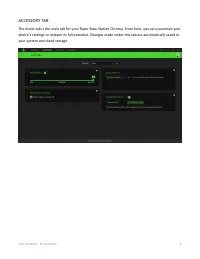
F O R G A M E R S . B Y G A M E R S . ™ 9 ACCESSORY TAB The Audio tab is the main tab for your Razer Base Station Chroma. From here, you can customize your device’s settings to unleash its full potential. Changes made under this tab are automatically saved to your system and cloud storage.
Page 11 - Brightness
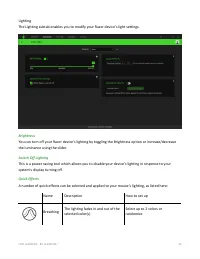
F O R G A M E R S . B Y G A M E R S . ™ 10 Lighting The Lighting subtab enables you to modify your Razer device’s light settings. Brightness You can turn off your Razer device’s lighting by toggling the Brightness option or increase/decrease the luminance using the slider. Switch Off Lighting This i...
Page 12 - Starlight
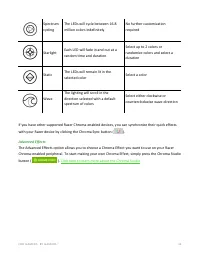
F O R G A M E R S . B Y G A M E R S . ™ 11 Spectrum cycling The LEDs will cycle between 16.8 million colors indefinitely No further customization required Starlight Each LED will fade in and out at a random time and duration Select up to 2 colors or randomize colors and select a duration Static The ...
Page 13 - PROFILES TAB; Devices
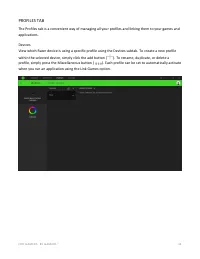
F O R G A M E R S . B Y G A M E R S . ™ 12 PROFILES TAB The Profiles tab is a convenient way of managing all your profiles and linking them to your games and applications. Devices View which Razer device is using a specific profile using the Devices subtab. To create a new profile within the selecte...
Page 14 - Linked Games
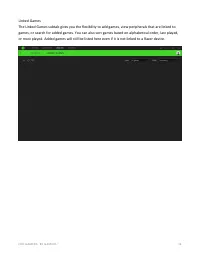
F O R G A M E R S . B Y G A M E R S . ™ 13 Linked Games The Linked Games subtab gives you the flexibility to add games, view peripherals that are linked to games, or search for added games. You can also sort games based on alphabetical order, last played, or most played. Added games will still be li...
Page 15 - CHROMA TAB; Studio
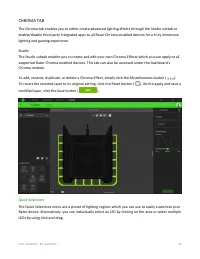
F O R G A M E R S . B Y G A M E R S . ™ 14 CHROMA TAB The Chroma tab enables you to either create advanced lighting effects through the Studio subtab or enable/disable third party integrated apps to all Razer Chroma-enabled devices for a truly immersive lighting and gaming experience. Studio The Stu...
Page 16 - Effect Layer
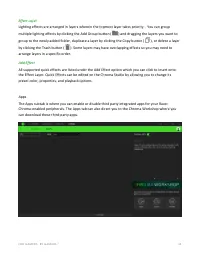
F O R G A M E R S . B Y G A M E R S . ™ 15 Effect Layer Lighting effects are arranged in layers wherein the topmost layer takes priority. . You can group multiple lighting effects by clicking the Add Group button ( ) and dragging the layers you want to group to the newly added folder, duplicate a la...
Page 17 - SETTINGS WINDOW; memory. All profiles stored on the selected device’s on
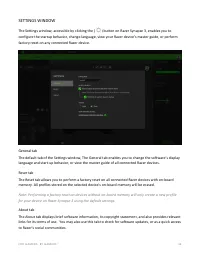
F O R G A M E R S . B Y G A M E R S . ™ 16 SETTINGS WINDOW The Settings window, accessible by clicking the ( ) button on Razer Synapse 3, enables you to configure the startup behavior, change language, view your Razer device’s master guide, or perform factory reset on any connected Razer device. Gen...
Page 18 - SAFETY AND MAINTENANCE; SAFETY GUIDELINES
F O R G A M E R S . B Y G A M E R S . ™ 17 7. SAFETY AND MAINTENANCE SAFETY GUIDELINES In order to achieve maximum safety while using your Razer Base Station Chroma, we suggest that you adopt the following guidelines: Should you have trouble operating the device properly and troubleshooting does not...
Page 19 - COPYRIGHT AND INTELLECTUAL PROPERTY INFORMATION
F O R G A M E R S . B Y G A M E R S . ™ 18 8. LEGALESE COPYRIGHT AND INTELLECTUAL PROPERTY INFORMATION ©2018 Razer Inc. All rights reserved. Razer, the triple-headed snake logo, Razer logo , “ For Gamers. By Gamers .”, and “ Powered by Razer Chroma ” logo are trademarks or registered trademarks of R...
Page 20 - GENERAL
F O R G A M E R S . B Y G A M E R S . ™ 19 GENERAL These terms shall be governed by and construed under the laws of the jurisdiction in which the Product was purchased. If any term herein is held to be invalid or unenforceable, then such term (in so far as it is invalid or unenforceable) shall be gi...