Page 2 - CONTENTS; LET’S GET YOU COVERED
F O R G A M E R S . B Y G A M E R S . ™ 1 CONTENTS 1. WHAT’S INSIDE / WHAT’S NEEDED ........................................................................................................ 2 2. LET’S GET YOU COVERED .......................................................................................
Page 3 - WHAT’S INSIDE; Bendable RazerTM HyperClear cardioid mic
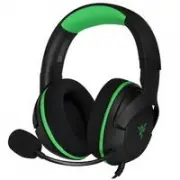
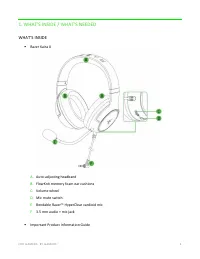
F O R G A M E R S . B Y G A M E R S . ™ 2 1. WHAT’S INSIDE / WHAT’S NEEDED WHAT’S INSIDE ▪ Razer Kaira X A. Auto-adjusting headband B. FlowKnit memory foam ear cushions C. Volume wheel D. Mic mute switch E. Bendable Razer™ HyperClear cardioid mic F. 3.5 mm audio + mic jack ▪ Important Product Inform...
Page 4 - WHAT’S NEEDED; Audio usage; Devices with 3.5 mm audio port; Audio + microphone usage
F O R G A M E R S . B Y G A M E R S . ™ 3 WHAT’S NEEDED Audio usage ▪ Devices with 3.5 mm audio port Audio + microphone usage ▪ Devices with 3.5 mm audio + mic combined port* *Compatible with PC / Mac / Consoles.
Page 5 - LET’S GET YOU COVERED; You’ve got a great device in your hands, complete with a
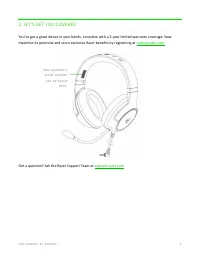
F O R G A M E R S . B Y G A M E R S . ™ 4 2. LET’S GET YOU COVERED You’ve got a great device in your hands, complete with a 2-year limited warranty coverage. Now maximize its potential and score exclusive Razer benefits by registering at razerid.razer.com Got a question? Ask the Razer Support Team a...
Page 6 - TECHNICAL SPECIFICATIONS; HEADPHONES; Frequency response: 20 Hz; MICROPHONE; Frequency response: 100 Hz
F O R G A M E R S . B Y G A M E R S . ™ 5 3. TECHNICAL SPECIFICATIONS HEADPHONES ▪ Frequency response: 20 Hz – 20 kHz ▪ Impedance: 32Ω ▪ Sensitivity (@1 kHz): 96 dB SPL / mW ▪ Drivers: 50 mm, with Neodymium magnets ▪ Inner ear cup diameter: Width 45 mm / Length 65 mm ▪ Oval ear cushions: Designed fo...
Page 7 - USING YOUR RAZER KAIRA X; VOLUME WHEEL; Rotate the volume wheel to increase or decrease the volume.; RAZERTM HYPERCLEAR CARDIOID MICROPHONE; vent is facing away from your mouth.
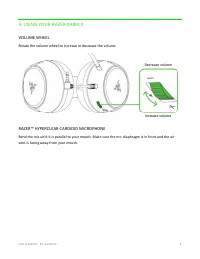
F O R G A M E R S . B Y G A M E R S . ™ 6 4. USING YOUR RAZER KAIRA X VOLUME WHEEL Rotate the volume wheel to increase or decrease the volume. RAZER™ HYPERCLEAR CARDIOID MICROPHONE Bend the mic until it is parallel to your mouth. Make sure the mic diaphragm is in front and the air vent is facing awa...
Page 8 - Slide the mic mute switch to mute or unmute the microphone.; EXTENDING YOUR HEADSET’S LIFESPAN; Air vent
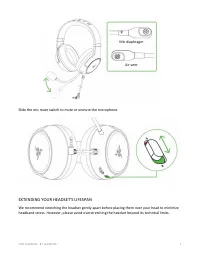
F O R G A M E R S . B Y G A M E R S . ™ 7 Slide the mic mute switch to mute or unmute the microphone. EXTENDING YOUR HEADSET’S LIFESPAN We recommend stretching the headset gently apart before placing them over your head to minimize headband stress. However, please avoid overstretching the headset be...
Page 9 - Download the 7.1 Surround Sound software from
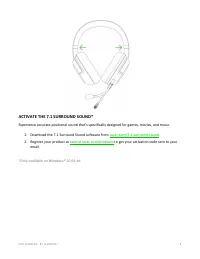
F O R G A M E R S . B Y G A M E R S . ™ 8 ACTIVATE THE 7.1 SURROUND SOUND* Experience accurate positional sound that’s specifically designed for games, movies, and music. 1. Download the 7.1 Surround Sound software from razer.com/7.1-surround-sound . 2. Register your product at razerid.razer.com/pro...
Page 10 - SAFETY AND MAINTENANCE; SAFETY GUIDELINES; following guidelines:
F O R G A M E R S . B Y G A M E R S . ™ 9 5. SAFETY AND MAINTENANCE SAFETY GUIDELINES In order to achieve maximum safety while using your Razer Kaira X, we suggest that you adopt the following guidelines: Should you have trouble operating the device properly and troubleshooting does not work, unplug...
Page 11 - MAINTENANCE AND USE; buildup. Do not use soap or harsh cleaning agents.; COPYRIGHT AND INTELLECTUAL PROPERTY INFORMATION; “For; LIMITED PRODUCT WARRANTY
F O R G A M E R S . B Y G A M E R S . ™ 10 MAINTENANCE AND USE The Razer Kaira X requires minimum maintenance to keep it in optimum condition. Once a month we recommend you unplug the device and clean it using a soft cloth or cotton swab to prevent dirt buildup. Do not use soap or harsh cleaning age...
Page 12 - retail purchase price of the Product.; GENERAL
F O R G A M E R S . B Y G A M E R S . ™ 11 sale of, resale of, use of, or inability to use the Product. In no event shall Razer’s liability exceed the retail purchase price of the Product. GENERAL These terms shall be governed by and construed under the laws of the jurisdiction in which t he Product...