Page 2 - TABLE OF CONTENTS
1 Introduction 3 Intended Use 4 Important Safety Warnings and Precautions 4 Package Contents 5 Requirements 5 Using QardioBase For The First Time 6 How To Turn QardioBase On/Off 8 Activating Special Modes 9 Detailed Instructions for Correct and 12 Reliable Measurements Using QardioBase with Multiple...
Page 4 - QARDIOBASE SMART SCALE: START YOUR DAY WITH A SMILE
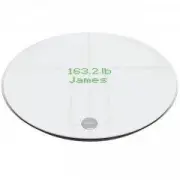
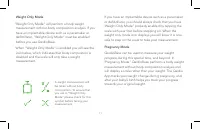
3 Step up to a happier, healthier you. QardioBase is the wireless smart scale and body analyzer that combines intelligent features, ease of use, and sleek design to make weight and health management an integral part of your everyday life. QardioBase gives you a broader view of your fitness and welln...
Page 7 - download; USING QARDIOBASE FOR THE FIRST TIME
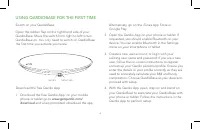
6 Switch on your QardioBase Open the rubber flap on the right hand side of your QardioBase. Move the switch from right to left to turn QardioBase on. You only need to switch on QardioBase the first time you activate your scale. Download the free Qardio App 1. Download the free Qardio App: on your mo...
Page 8 - IMPORTANT; Wireless Smart Scale and Body Analyzer; Wireless Smart Scale and Body Analyzer; Open the
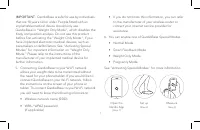
7 IMPORTANT : QardioBase is safe for use by individuals that are 10 years old or older. People fitted with an implantable medical device should only use QardioBase in “Weight Only Mode”, which disables the body composition analysis. Do not use this product before first activating the “Weight Only Mo...
Page 9 - HOW TO TURN QARDIOBASE ON/OFF; To turn on QardioBase step on it, or tap it with your
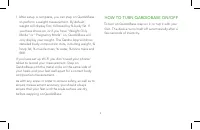
8 7. After setup is complete, you can step on QardioBase to perform a weight measurement. By default, weight will display first, followed by % body fat. If you have shoes on, or if you have “Weight Only Mode” or “Pregnancy Mode” on, QardioBase will only display your weight. The Qardio App will show ...
Page 10 - ACTIVATING SPECIAL MODES; You select the mode of measurement upon
9 ACTIVATING SPECIAL MODES You select the mode of measurement upon configuration, and you can also change the mode selection by choosing the “Mode” button in the upper right hand corner. Alternatively, you can go into the Settings section of the Qardio App and scroll down to QardioBase, select “Mode...
Page 11 - Smart Feedback
10 ATTENTION: QardioBase is safe for use by individuals that are 10 years old or older. People fitted with an implantable medical device must only use QardioBase in “Weight Only Mode”, which disables the body composition analysis. Do not use this product before first activating the “Weight Only Mode...
Page 17 - SETTING GOALS
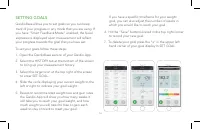
16 SETTING GOALS QardioBase allows you to set goals so you can keep track of your progress in any mode that you are using. If you have “Smart Feedback Mode” enabled, the facial expressions displayed upon measurement will reflect your progress towards the goal that you have set. To set your goals fol...
Page 18 - RE-ASSIGNING A MEASUREMENT
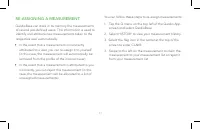
17 RE-ASSIGNING A MEASUREMENT QardioBase can store in its memory the measurements of several pre-defined users. This information is used to identify and attribute new measurements taken to the respective user automatically: • In the event that a measurement is incorrectly attributed to a user, you c...
Page 21 - BODY COMPOSITION MEASUREMENT
20 The term “body composition” is used to describe the percentage of body fat, muscle, water and bone in human bodies. It is a key metric for overall health and wellness and provides a more accurate assessment than weight alone. QardioBase measures % body fat, % muscle mass, % water composition and ...
Page 22 - CHANGING YOUR WI-FI NETWORK
21 If you have a new Wi-Fi name or password, you will need to reconnect your QardioBase to the new network. You can follow these steps to change your Wi-Fi configuration: 1. Ensure your phone or tablet is already paired to your QardioBase. If your phone or tablet and your QardioBase are not already ...
Page 24 - RESETTING QARDIOBASE ON IOS; To reset your QardioBase, go into the settings on your Qardio App,
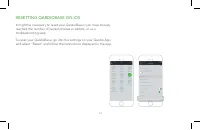
23 RESETTING QARDIOBASE ON IOS It might be necessary to reset your QardioBase if you have already reached the number of paired phones or tablets, or as a troubleshooting step. To reset your QardioBase, go into the settings on your Qardio App, and select “Reset” and follow the instructions displayed ...
Page 25 - To reset your QardioBase, go into the settings
24 RESETTING QARDIOBASE ON ANDROID It might be necessary to reset your QardioBase if you have already reached the number of paired phones or tablets, or as a troubleshooting step. To reset your QardioBase, go into the settings on your Qardio App, and select “Reset” and follow the instructions displa...
Page 28 - TROUBLESHOOTING; REMEDY; ) Ensure that you are entering the correct password
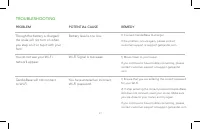
27 TROUBLESHOOTING REMEDY POTENTIAL CAUSE PROBLEM Though the battery is charged, the scale will not turn on when you step on it or tap it with your foot. You do not see your Wi-Fi network appear. QardioBase will not connect to Wi-Fi. Wi-Fi Signal is too weak. You have entered an incorrect Wi-Fi pass...
Page 29 - To allow QardioBase to perform body anlaysis; You do not have “Normal Mode”; “Normal Mode” enabled. If the problem occurs
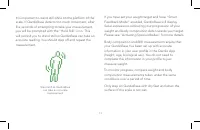
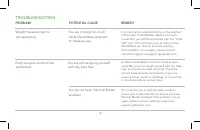
28 TROUBLESHOOTING REMEDY POTENTIAL CAUSE PROBLEM Weight measurement is not appearing. Body analysis could not be performed. You are moving too much while QardioBase attempts to measure you. You are not weighing yourself with dry, bare feet. It is important to stand still while on the platform of th...
Page 30 - Thanks to its design, QardioBase works well on most; You are not standing on the
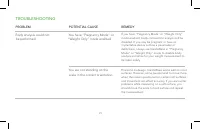
29 TROUBLESHOOTING REMEDY POTENTIAL CAUSE PROBLEM Body analysis could not be performed. Thanks to its design, QardioBase works well on most surfaces. However, some people tend to move more when the scale is positioned on certain soft surfaces and movement can effect accuracy. If you encounter proble...
Page 31 - The round circle should be aligned with your heels.; Weight measurement; Ensure that you are completely dry.
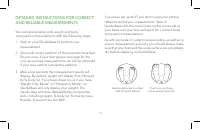
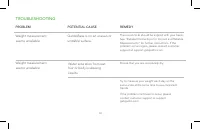
30 TROUBLESHOOTING REMEDY POTENTIAL CAUSE PROBLEM Weight measurement seems unreliable. QardioBase is on an uneven or unstable surface. The round circle should be aligned with your heels. See “Detailed Instructions for Correct and Reliable Measurements” for further instructions. If the problem occurs...
Page 32 - Avoid measuring after intake of alcohol, caffeine
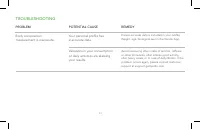
31 TROUBLESHOOTING REMEDY POTENTIAL CAUSE PROBLEM Body composition measurement is inaccurate. Variations in your consumption or daily activities are skewing your results. Your personal profile has inaccurate data. Avoid measuring after intake of alcohol, caffeine or other stimulants, after intense s...
Page 33 - QARDIOBASE 2 TECHNICAL SPECIFICATIONS; Materials
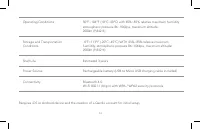
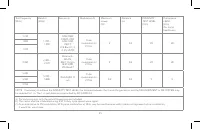
32 QARDIOBASE 2 TECHNICAL SPECIFICATIONS Materials Tempered Glass ABS Bottom Housing Device Dimensions 13.4 in (34cm) diameter Weight 6.7 lbs (3.04 kg) Display & Controls LED Display Displays Weight and % body composition, User selection, Smart Feedback, Haptic Feedback Units: Kg, lbs, St Measur...
Page 35 - DISPOSAL; FCC STATEMENT
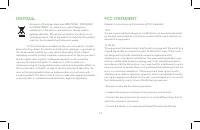
34 DISPOSAL Actuation of European directives 2002/95/EC, 2002/96/EC and 2003/108/EC, for reduction in use of dangerous substances in the electric and electronic device and for garbage disposal. The symbol applied on the device or its packaging means that at the end of its useful life the product mus...
Page 37 - RF STATEMENT
36 Cet équipement est conforme aux limites d’exposition aux rayonnements ISED établies pour un environnement non contrôlé. L’utilisateur final doit suivre les instructions spécifiques pour satisfaire les normes. Cet émetteur ne doit pas être co-implanté ou fonctionner en conjonction avec toute autre...
Page 38 - Manufacturer; EXPLANATION OF SYMBOLS; SN
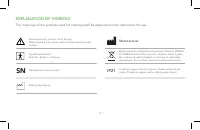
37 Waste electrical and Electronic Equipment Directive 2002/96/ EC (WEEE Directive) after over the valid term within 3 years, the machine should be treated on local law or regulatiâon requirement. To avoid hurt users and pollute environment. Type BF Applied PartNote: B = Body; F = Floating Manufactu...