Page 2 - Safety instructions
© Pro-Ject Audio Systems · Pro-Ject SIGNATURE 10 · Revision 2015.07.14 2 Dear Music Lover, Thank you for purchasing a Pro-Ject Audio System’s record player. In order to achieve maximum performance and reliability with this record player you should study these instructions for use carefully. Warning ...
Page 3 - Contents; Operating and calibration
© Pro-Ject Audio Systems · Pro-Ject SIGNATURE 10 · Revision 2015.07.14 3 Contents Product illustrations 4 Control, features, connections 5 Turntable accessories 5 Set-up 1. Platter installation 6 2. Drive belt installation 7 3. Tonearm assembly 8 a. Assembly of the main tonearm part on the uni-pivot...
Page 5 - Pro-Ject SIGNATURE 10; Controls, features and connections
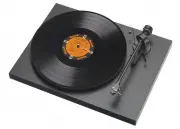
© Pro-Ject Audio Systems · Pro-Ject SIGNATURE 10 · Revision 2015.07.14 5 Pro-Ject SIGNATURE 10 Controls, features and connections 1 Power supply socket 2 Motor pulley 3 Drive belt* 4 Sandwich platter* 5 Signature Record Clamp* 6 ON/OFF switch, speed selector 7 Tonearm counterweight* 8 Anti-skating m...
Page 6 - Platter installation
© Pro-Ject Audio Systems · Pro-Ject SIGNATURE 10 · Revision 2015.07.14 6 Set-up 1. Platter installation Unscrew the three transport screws (14) from the aluminium sub-chassis before installing the sandwich platter (4). Remove the protective covers from the bearing shaft and from the platter housing....
Page 7 - Drive belt installation
© Pro-Ject Audio Systems · Pro-Ject SIGNATURE 10 · Revision 2015.07.14 7 2. Drive belt installation Fit the drive belt (3) around the platter (4) and the motor pulley (2). Avoid getting sweat or grease on the belt as these will deteriorate the performance and reduce the belt's lifespan. Use absorben...
Page 10 - Cartridge setting
© Pro-Ject Audio Systems · Pro-Ject SIGNATURE 10 · Revision 2015.07.14 10 Operating and calibration 1. Cartridge setting Install the cartridge into the aluminium headshell, using the appropriate hardware included with your cartridge. Connect the cartridge as indicated below: White left channel L+ ...
Page 12 - Vertical tracking force adjustment (VTF)
© Pro-Ject Audio Systems · Pro-Ject SIGNATURE 10 · Revision 2015.07.14 12 2. Vertical tracking force adjustment (VTF) Place counterweight halfway along the counterweight support rod, being sure to have the locking screw uppermost. With the power off, platter static, place the stylus pressure gauge o...
Page 13 - Setting range of the counterweight
© Pro-Ject Audio Systems · Pro-Ject SIGNATURE 10 · Revision 2015.07.14 13 3. Setting range of the counterweight 1. Counterweight without additional weight (103g) This setting balances cartridges with weight from 4,5 to 8 grams. 2. Counterweight with additional weight. Dimensions of additional counte...
Page 14 - Vertical tracking angle adjustment (VTA)
© Pro-Ject Audio Systems · Pro-Ject SIGNATURE 10 · Revision 2015.07.14 14 4. Vertical tracking angle adjustment (VTA) Put a record on the platter. When the needle is lowered into the record groove and the tonearm is not resting on the tonearm rest, the tube of the tonearm should be parallel to the s...
Page 15 - Anti-skating assembly and adjustment
© Pro-Ject Audio Systems · Pro-Ject SIGNATURE 10 · Revision 2015.07.14 15 5. Anti-skating assembly and adjustment The anti-skating mechanism is shipped partially disassembled to avoid damage during transport. For correct installation, please follow the steps below. Step 1: Prepare anti-skating slidi...
Page 18 - Mounting distance adjustment
© Pro-Ject Audio Systems · Pro-Ject SIGNATURE 10 · Revision 2015.07.14 18 7. Mounting distance adjustment Loosen the locking nut allows a linear move of the tonearm. Adjust correct distance by using the scale. The correct mounting distance of 238 mm on the scale is valid only if the cartridge is in ...
Page 19 - Levelling the turntable
© Pro-Ject Audio Systems · Pro-Ject SIGNATURE 10 · Revision 2015.07.14 19 8. Levelling the turntable Three precision adjustable damped feet are mounted under the turntable for levelling the turntable. Once the turntable is in final position, put the supplied spirit level on the chassis, and then lev...
Page 20 - Connecting the turntable, starting the motor, changing the speed
© Pro-Ject Audio Systems · Pro-Ject SIGNATURE 10 · Revision 2015.07.14 20 9. Connecting the turntable, starting the motor, changing the speed The turntable is supplied with the universal power supply (90-246V AC) with 3 exchangeable sockets adapters suitable for all countries. Select the correct ada...
Page 21 - Technical specifications
© Pro-Ject Audio Systems · Pro-Ject SIGNATURE 10 · Revision 2015.07.14 21 Technical specifications Model SIGNATURE 10 Nominal speed 33/45 rpm , driven by microprocessor, lighted control buttons Speed variance 33rpm: ± < 0.1%, 45rpm: ± < 0.09% Wow and flutter 33rpm: ± < 0.01%, 45rpm: ± < ...
Page 22 - Potential incorrect use and fault conditions; Service
© Pro-Ject Audio Systems · Pro-Ject SIGNATURE 10 · Revision 2015.07.14 22 Potential incorrect use and fault conditions Pro-Ject turntables are manufactured to the highest standards and undergo strict quality controls before leaving the factory. Faults that may possibly occur are not necessarily due ...