Page 2 - beginner version; SilverFast Archive Suite SE; professional version; SilverFast Archive Suite; SilverFast
2 The unusual beauty of this Archive Suite is its very efficient batch scancapability that includes the infrared iSRD data in a 64bit raw scanner file. David Brooks (Photographer and Senior Editor of Shutterbug Magazine) « » beginner version SilverFast Archive Suite SE professional version SilverFas...
Page 3 - Español
3 Deutsch 4-15 • Software-Lizenz 4 • Vorwort, Support & Kontakt-Informationen 5 • Installation, Serialisierung & Registrierung 6-7 • Der SilverFast 8 WorkflowPilot - Arbeiten mit SilverFast 8-15 English 16-27 • Software License 16 • Preface, Support & Contact Information 17 • Installatio...
Page 5 - Vorwort; LaserSoft Imaging entschieden haben. Bereits seit über 15 Jahren; Support und Kontaktinformationen; DEUTSCH
5 Vorwort Sehr geehrte Kundin, sehr geehrter Kunde,wir freuen uns, dass Sie sich für ein Qualitätsprodukt aus dem Hause LaserSoft Imaging entschieden haben. Bereits seit über 15 Jahren entwickeln und vertreiben wir unsere Bildverarbeitungs-Software SilverFast, die besonders im Bereich der Scanner-So...
Page 6 - SilverFast 8 unterstützt Windows 7, Vista und XP; Bitte installieren Sie die Scanner-Treiber des
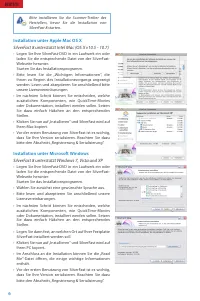
6 Installation unter Apple Mac OS X SilverFast 8 unterstützt Intel Mac (OS X v10.5 - 10.7) • Legen Sie Ihre SilverFast-DVD in ein Laufwerk ein oder laden Sie die entsprechende Datei von der SilverFast- Webseite herunter. Starten Sie das Installationsprogramm. • Bitte lesen Sie die „Wichtigen Informa...
Page 8 - Den WorkflowPilot aktivieren / deaktivieren; • Der WorkflowPilot kann jederzeit mit einem Mausklick; Das neue SilverFast 8 Konzept: Der WorkflowPilot; Beim Wechsel vom manuellen Modus in den
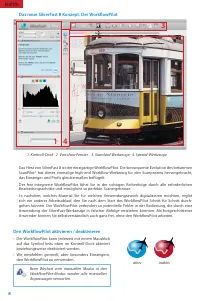
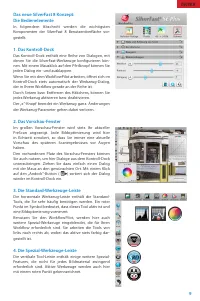
8 Den WorkflowPilot aktivieren / deaktivieren • Der WorkflowPilot kann jederzeit mit einem Mausklick auf das Symbol links oben im Kontroll-Dock aktiviert beziehungsweise deaktiviert werden. • Wir empfehlen generell, aber besonders Einsteigern, den WorkflowPilot zu verwenden. Das neue SilverFast 8 Ko...
Page 14 - Kratzerentfernung); aktiv
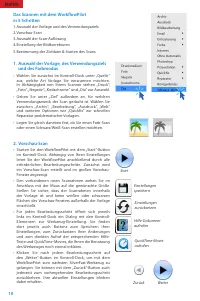
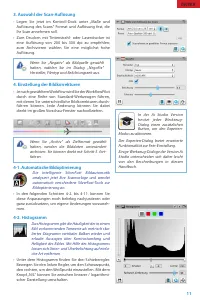
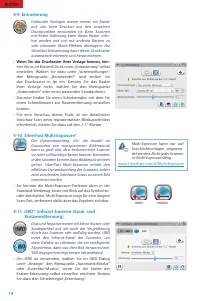
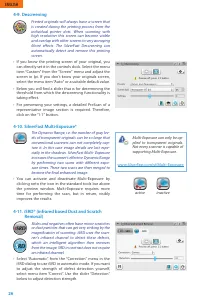
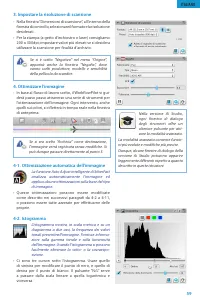
14 4-9. Entrasterung Gedruckte Vorlagen weisen immer ein Raster auf, das beim Drucken aus den einzelnen Druckpunkten entstanden ist. Beim Scannen mit hoher Auflösung kann dieses Raster sicht- bar werden und sich mit anderen Rastern zu sehr störenden Moiré-Effekten überlagern. Die SilverFast Entraste...
Page 15 - Bestimmung der Zieldatei & Starten des Scans; iSRD kann nur auf Durchlichtvorlagen
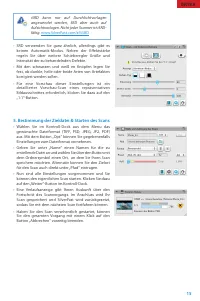
15 • SRD verwenden Sie ganz ähnlich, allerdings gibt es keinen Automatik-Modus. Neben der Effektstärke regeln Sie über weitere Schieberegler Größe und Intensität der zu behandelnden Defekte. • Mit den schwarzen und weiß en Knöpfen legen Sie fest, ob dunkle, helle oder beide Arten von Artefakten korr...
Page 17 - « SilverFast - Pioneer in Digital Imaging »; Support and Contact Information
17 ENGLISH Preface Dear Customer,We are pleased that you have chosen a quality product from LaserSoft Imaging. Meanwhile for over 15 years, we are developing and distribut- ing our imaging software SilverFast, which is long considered as the world- wide standard especially in the field of scanner so...
Page 18 - SilverFast 8 supports Windows 7, Vista and XP; Please install the manufacturers scanner drivers; ENGLISH
18 Installation on Apple Mac OS X SilverFast 8 supports Intel Mac (OS X v10.5 - 10.7) • Insert your SilverFast DVD into a drive or download the accordant file from the SilverFast website. Start the installation program. • Please read the „Important Information“ that will be displayed at the start of...
Page 19 - Please switch on your scanner before you start
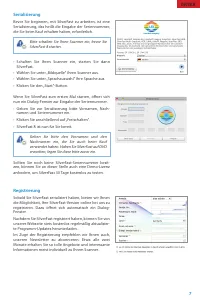
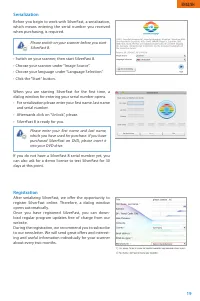
19 Serialization Before you begin to work with SilverFast, a serialization, which means entering the serial number you received when purchasing, is required. • Switch on your scanner, then start SilverFast 8.• Choose your scanner under “Image Source“.• Choose your language under “Language Selection“...
Page 20 - Activating / Deactivating the WorkflowPilot; • A mouse-click on the symbol in the upper left con-; SilverFast 8 Concept: New WorkflowPilot; When switching from manual mode to the; Special Toolbar; active
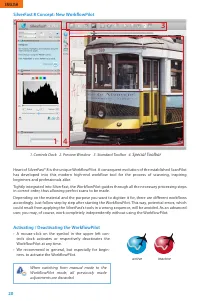
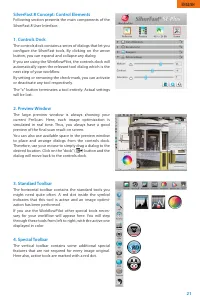
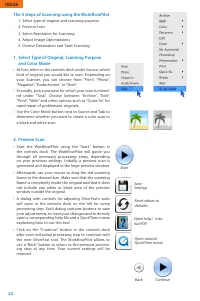
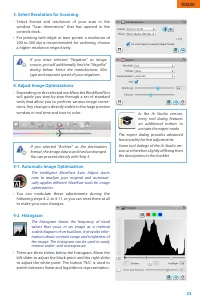
20 Activating / Deactivating the WorkflowPilot • A mouse-click on the symbol in the upper left con- trols dock activates or respectively deactivates the WorkflowPilot at any time. • We recommend in general, but especially for begin- ners, to activate the WorkflowPilot. SilverFast 8 Concept: New Work...
Page 27 - Choose Destination and Start Scanning; iSRD can only be applied to transparent
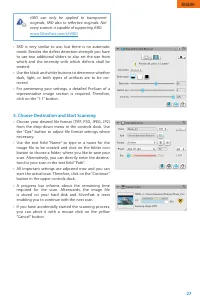
27 • SRD is very similar to use, but there is no automatic mode. Besides the defect detection strength you have to use two additional sliders to also set the size from which and the intensity with which defects shall be treated. • Use the black and white buttons to determine whether dark, light, or ...
Page 28 - Contrat de licence du logiciel SilverFast®; FRANÇAIS
28 Contrat de licence du logiciel SilverFast® Veuillez n’ouvrir et utiliser le progiciel (ensemble de logiciels) de SilverFast qu’après avoir lu le présent contrat de licence et en avoir accepté les termes et conditions stipulés. En cas de non acceptation des présentes conditions, veuillez immédiate...
Page 29 - Préface; Support et contacts
29 Préface Chère client, cher client,Nous vous remercions d'avoir porté votre choix sur un produit de qualité de LaserSoft Imaging. Depuis plus de 15 ans, nous développons et commercialisons notre logiciel de traitement d'images SilverFast qui est aujourd'hui considéré comme une référence mondiale d...
Page 30 - SilverFast 8 prend en charge Windows 7, Vista et XP; S‘il vous plaît, installez le pilote du fabricant
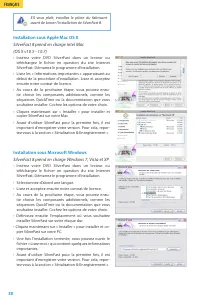
30 Installation sous Apple Mac OS X SilverFast 8 prend en charge Intel Mac(OS X v10.5 - 10.7) • Insérez votre DVD SilverFast dans un lecteur ou téléchargez le fichier en question du site Internet SilverFast. Démarrez le programme d'installation. • Lisez les « Informations importantes » apparaissant ...
Page 31 - Mettez votre scanner en marche avant de
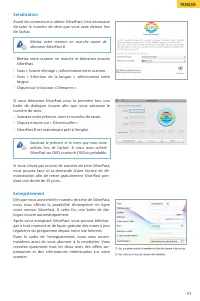
31 Sérialisation Avant de commencer à utiliser SilverFast, il est nécessaire de saisir le numéro de série que vous avez obtenu lors de l’achat. • Mettez votre scanner en marche et démarrez ensuite SilverFast. • Sous « Source d’image », sélectionnez votre scanner.• Sous « Sélection de la langue », sé...
Page 32 - Activer / Désactiver le WorkflowPilot; • Le WorkflowPilot peut être à tout moment activé ou; Le nouveau concept de SilverFast 8: le WorkflowPilot; travailler en toute liberté sans le WorkflowPilot.
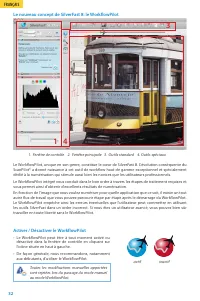
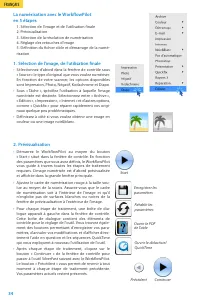
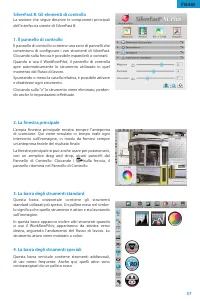
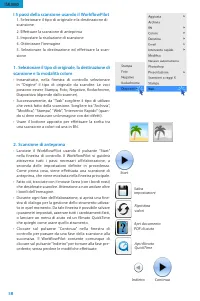
32 1. Fenêtre de contrôle 2. Fenêtre principale 3. Outils standard 4. Outils spéciaux Activer / Désactiver le WorkflowPilot • Le WorkflowPilot peut être à tout moment activé ou désactivé dans la fenêtre de contrôle en cliquant sur l'icône située en haut à gauche. • De façon générale, nous recommando...
Page 38 - sières et des rayures); que sur les originaux trans-
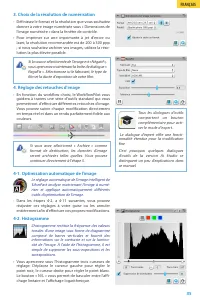
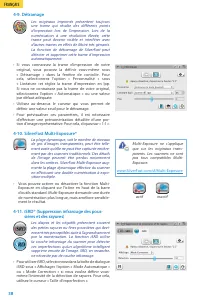
38 4-9. Détramage Les originaux imprimés présentent toujours une trame qui résulte des différents points d'impression lors de l'impression. Lors de la numérisation à une résolution élevée, cette trame peut devenir visible et interférer avec d'autres trames en effets de Moiré très gênants. La fonctio...
Page 39 - iSRD ne s'applique que sur les originaux trans-
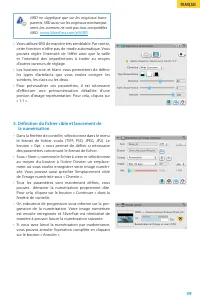
39 • Vous utilisez SRD de manière très semblable. Par contre, cette fonction n‘offre pas de mode automatique. Vous pouvez régler l‘intensité de l‘effet ainsi que la taille et l‘intensité des imperfections à traiter au moyen d‘autres curseurs de réglage. • Les boutons noir et blanc vous permettent de...
Page 40 - Contrato de licencia de SilverFast®; ESPAÑOL
40 Contrato de licencia de SilverFast® ¡No abra el embalaje ni use este software hasta que haya leído y aceptado los términos de esta licencia! ¡Si no acepta estos términos, por favor, devuelva el software inmediatamente en su embalaje sin abrir a LaserSoft Imaging AG! SilverFast® es un paquete de s...
Page 41 - de nuestra casa LaserSoft Imaging. Desde hace más que 15 años; Soporte e informaciones de contacto
41 ESPAÑOL Prefacio Estimado cliente,Le agradecemos que se haya decidido usted por un producto de calidad de nuestra casa LaserSoft Imaging. Desde hace más que 15 años creamos y vendemos nuestro software de edición de imágenes SilverFast que es visto particularmente en el ámbito del software de escá...
Page 42 - SilverFast 8 es soportado por Windows 7, Vista y XP; Por favor instale el software de controlador del
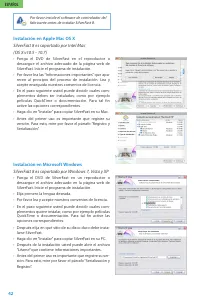
42 Instalación en Apple Mac OS X SilverFast 8 es soportado por Intel Mac(OS X v10.5 - 10.7) • Ponga el DVD de SilverFast en el reproductor o descargue el archivo adecuado de la página web de SilverFast. Inicie el programa de instalación. • Por favor lea las “Informaciones importantes” que apa- recen...
Page 43 - Por favor, en primer lugar conecte y encienda
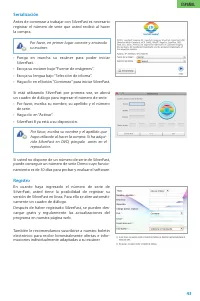
43 Serialización Antes de comenzar a trabajar con SilverFast es necesario registrar el número de serie que usted recibió al hacer la compra. • Ponga en marcha su escáner para poder iniciar SilverFast. • Escoja su escáner bajo “Fuente de imágenes“.• Escoja su lengua bajo “Selección de idioma“.• Haga ...
Page 44 - Activar/desactivar el WorkflowPilot; • Se activa/desactiva el WorkflowPilot con un clic del; El nuevo concepto de SilverFast 8: el WorkflowPilot; Al cambiar del modo manual al modo activo
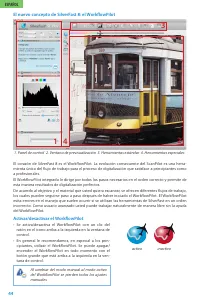
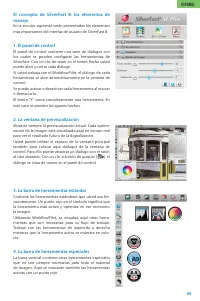
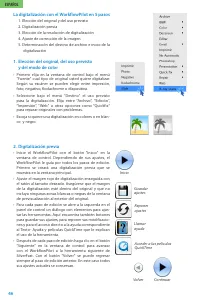
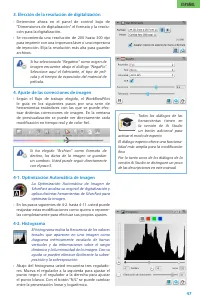
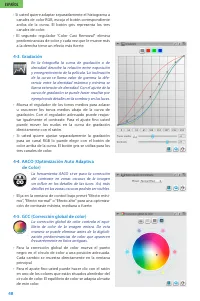
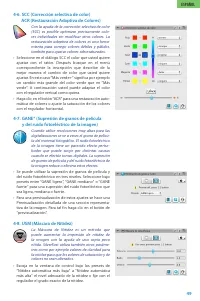
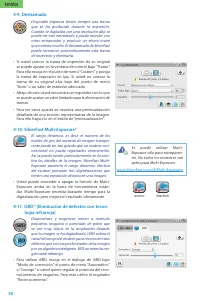
44 Activar/desactivar el WorkflowPilot • Se activa/desactiva el WorkflowPilot con un clic del ratón en el icono arriba a la izquierda en la ventana de control. • En general le recomendamos, en especial a los prin- cipiantes, utilizar el WorkflowPilot. Se puede apagar/ encender el WorkflowPilot en to...
Page 51 - Se puede utilizar iSRD sólo para transparentes,
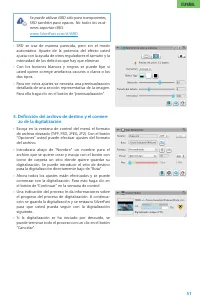
51 • SRD se usa de manera parecida, pero sin el modo automático. Aparte de la potencia del efecto usted ajusta con la ayuda de otros reguladores el tamaño y la intensidad de los defectos que hay que eliminar. • Con los botones blancos y negros se puede fijar si usted quiere corregir artefactos oscur...
Page 53 - Sono ormai più di 15 anni che sviluppiamo e distribuiamo il nostro; Supporto ed informazioni di contatto
53 ITALIANO Prefazione Gentile Cliente,complimenti per l’ottima scelta di questo prodotto LaserSoft Imaging. Sono ormai più di 15 anni che sviluppiamo e distribuiamo il nostro software di imaging SilverFast, da tempo considerato lo standard a livello mondiale per la scansione. Il WorkflowPilot che è...
Page 54 - SilverFast 8 supporta Windows 7, Vista, XP; Si prega di installare i driver dello scanner forni-; ITALIANO
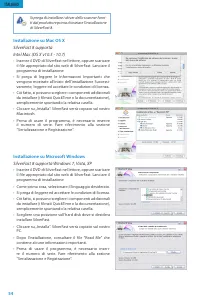
54 Installazione su Mac OS X SilverFast 8 supportaIntel Mac (OS X v10.5 - 10.7) • Inserire il DVD di SilverFast nel lettore, oppure scaricare il file appropriato dal sito web di SilverFast. Lanciare il programma di installazione. • Si prega di leggere le Informazioni Importanti che vengono mostrate ...
Page 55 - Si prega di accendere lo scanner prima di lanciare
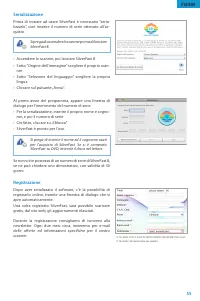
55 Serializzazione Prima di iniziare ad usare SilverFast è necessario “seria- lizzarlo”, cioè inserire il numero di serie ottenuto all’ac-quisto. • Accendere lo scanner, poi lanciare SilverFast 8• Sotto “Origine dell‘immagine” scegliere il proprio scan- ner • Sotto “Selezione del linguaggio” sceglie...
Page 56 - Attivare / disattivare il WorkflowPilot; • Per attivare e disattivare il WorkflowPilot in ogni; SilverFast 8: Il nuovo WorkflowPilot; autonoma senza mai utilizzare il WorkflowPilot.
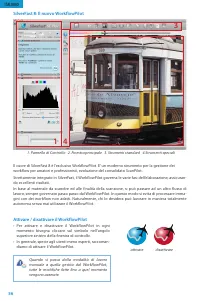
56 Attivare / disattivare il WorkflowPilot • Per attivare e disattivare il WorkflowPilot in ogni momento bisogna cliccare sul simbolo nell’angolo superiore sinistro della finestra di controllo. • In generale, specie agli utenti meno esperti, raccoman- diamo di attivare il WorkflowPilot. SilverFast 8...
Page 63 - Lo iSRD si può applicare solo agli origina-
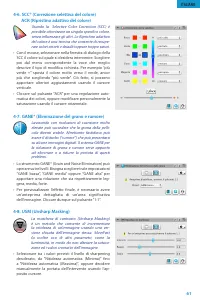
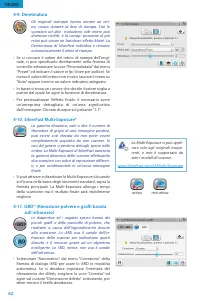
63 • SRD funziona in maniera molto simile, ma non offre alcuna modalità automatica. Oltre alla sensibilità nel rilevamento dei difetti vanno utilizzati altri due cursori, per determinare la dimensione minima dei difetti e l’intensità dell’intervento su di essi. • Usare i bottoni bianchi o neri per d...
Page 65 - « SilverFast - Pioneiro em tratamento e criação de imagens digitais »; Informações de Contato e Suporte
65 PORTUGUÊS Introdução Caro Cliente,Estamos contentes por você ter escolhido um produto de qualidade da LaserSoft Imaging. Há mais de 15 anos, estamos desenvolvendo e distribuindo nosso software de tratamento e criação de imagens SilverFast, que há muito tempo é considerado padrão mundial, especial...
Page 66 - SilverFast 8 suporta Windows 7, Vista e XP; Antes de instalar SilverFast 8, instale os dri-; PORTUGUÊS
66 Instalação sob Apple Mac OS X SilverFast 8 suporta Intel Mac (OS X v10.5 - 10.7) • Coloque o DVD SilverFast na unidade de DVD ou baixe o respectivo arquivo do site SilverFast. Inicie o progra- ma de instalação. • Leia as „Informações importantes“, que são mostradas no início do processo de instal...
Page 67 - Ligue o scanner antes de iniciar SilverFast 8.
67 Serialização Antes de começar a trabalhar com SilverFast, é neces- sário „serializar“, ou seja, inserir o número de série fornecido com sua compra. • Ligue o scanner e inicie SilverFast.• Selecione em „Fonte de imagem“ o seu scanner.• Selecione em „Seleção de idioma“ o seu idioma.• Clique no botã...
Page 68 - Ativando / desativando o WorkflowPilot; • Um clique com o mouse no símbolo da janela de contro-; Conceito SilverFast 8: O novo WorkflowPilot; Ao passar do modo manual ao modo
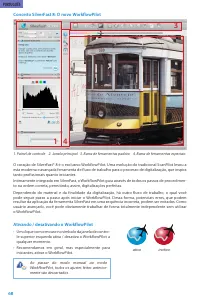
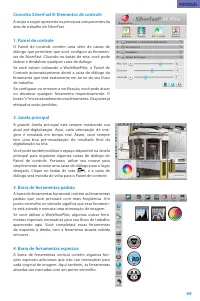
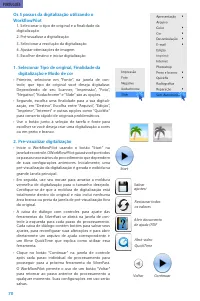
68 Ativando / desativando o WorkflowPilot • Um clique com o mouse no símbolo da janela de contro- le superior esquerda ativa / desativa o WorkflowPilot a qualquer momento. • Recomendamos em geral, mas especialmente para iniciantes, ativar o WorkflowPilot. Conceito SilverFast 8: O novo WorkflowPilot ...
Page 75 - Escolher destino e iniciar digitalização; A iSRD pode ser aplicada apenas a originais
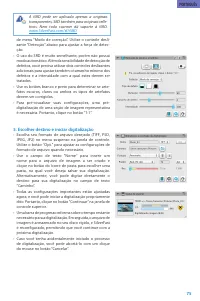
75 de menu “Modo de correção”. Utilize o controle desli- zante “Detecção” abaixo para ajustar a força de detec- ção. • O uso do SRD é muito semelhante, porém não possui modo automático. Além da sensibilidade de detecção de defeitos, você precisa utilizar dois controles deslizantes adicionais para aj...
Page 77 - Поддержка и контактная информация
77 РУССКИЕ Предисловие Уважаемые клиенты и покупатели,мы рады, что Вы остановили свой выбор на высококачественном продукте Дома LaserSoft Imaging. Уже более 15-и лет мы разра- батываем и продаём наш пакет программного обеспечения для обработки изображений SilverFast, который давно признан во всем ми...
Page 78 - SilverFast 8 поддерживает Windows 7, Vista и XP
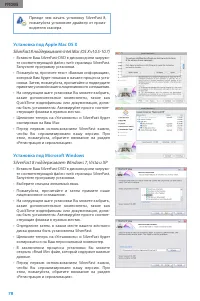
78 РУССКИЕ Установка под Apple Mac OS X SilverFast 8 поддерживает Intel Mac (OS X v10.5-10.7) • Вставьте Ваш SilverFast-DVD в дисковод или загрузи- те соответствующий файл с web страницы SilverFast. Запустите программу установки. • Пожалуйста, прочтите текст «Важная информация», который Вам будет по...
Page 84 - РУССКИЕ
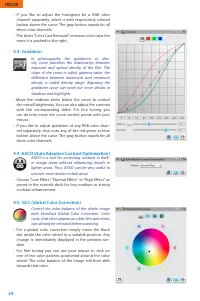
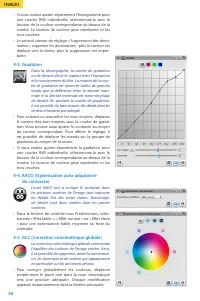
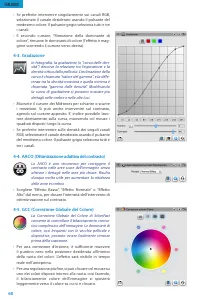
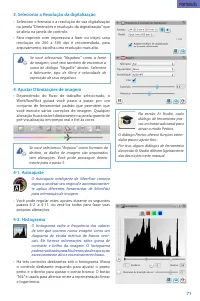
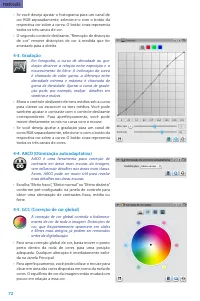
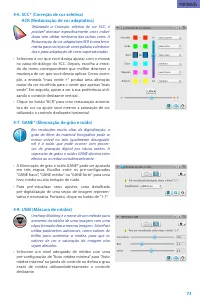
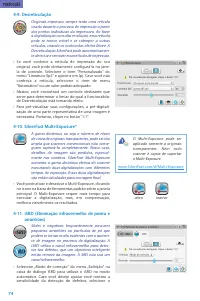
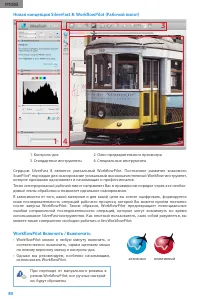
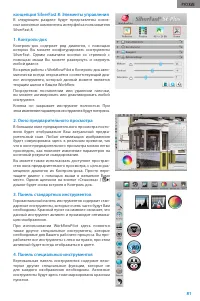
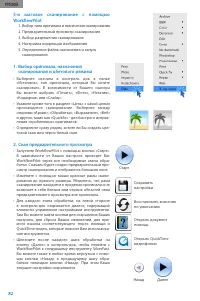
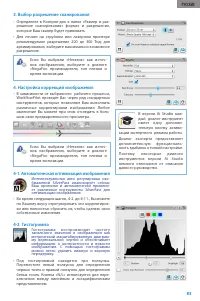
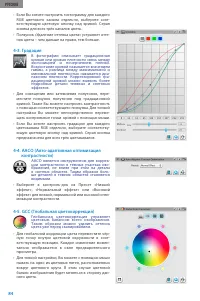
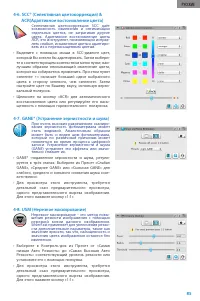
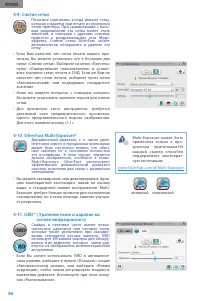
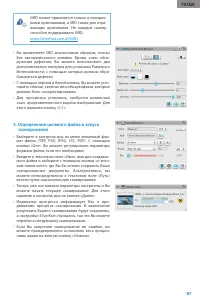
84 РУССКИЕ • Если Вы хотите настроить гистограмму для каждого RGB цветового канала отдельно, выберите соот- ветствующую цветовую кнопку над кривой. Серая кнопка для всех трёх каналов цвета. • Ползунок «Удаление оттенка цвета» устраняет отте- нок цвета – чем дальше на право, тем больше. 4-3. Градация...
Page 88 - SilverFast - Pioneer in Digital Imaging
SilverFast - Pioneer in Digital Imaging LaserSoft Imaging, Inc. PO Box 15949 • Sarasota • 34277 Florida • USA Phone: (+1) 941-312-0690 Fax: (+1) 941-312-0608 Support: www.SilverFast.com/support Info: www.SilverFast.com System Requirements: Mac OS: • Intel®-Processor • Mac OS X v10.5 through 10.7 Win...