Page 3 - Table of contents; Inserting the Batteries; Your remote control; Press the cover inwards and slide it in the direction of the arrow.
Table of contents 1 Your Remote Control 3 2 Installing the Remote Control 3-5 2.1 Inserting the Batteries 3 2.2 Testing the Remote Control 4 2.3 Setting the Remote Control 4-5 3 Keys and Functions 6-7 4 Advanced Functionalities 7-8 5 Frequently Asked Questions 9-10 DVD setup by model 102 Information...
Page 4 - Testing the remote control; Press the TV key to select TV.; Tip; command keys of your remote control. If that is the case, the example
2.2 Testing the remote control The SRP5002 is programmed to operate the most of the functions usedon Philips TV and DVD. Because the available functions are not the samefor all the Philips TV and DVD models, it is advisable to test whetheryour device fully responds to the SRP 5002 . Example of TV: T...
Page 5 - • If the LED of the TV Mode key flashes twice just once for an extended
5 EN GL ISH Installing the remote control Press and hold the OK key and digit key 1 until the LEDs under theTV Mode key flashes twice • If the LED of the TV Mode key flashes twice just once for an extended period, the code has not been entered properly. Start again by pressingthe OK key and the digi...
Page 6 - TV text Colour keys
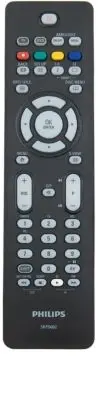
3 Keys and functions 1 TV/DVD Device mode selection keys: • Select TV or DVD mode • Blink when the remote is setup • Light when a remote control is sent to the selected device 2 TV text Colour keys ( TV) text red ( DVD) Pressed with SHIFT key - record ( TV) text green ( DVD) Pressed with SHIFT key -...
Page 7 - Note; Restoring the original functions of your remote control
12 (TV/DVD) Selects external: Audio/Video inputsconnected to your equipment (A/V function).(DVD) pause 13 PROG + / K J • Selects a previous or following channel (TV and DVD´s with recording funcionality). • Selects a previous or following track (DVD). 14 (TV) Text; Text Cancel (pressed with SHIFT ke...
Page 9 - Frequently asked questions; How can I get the play key working on my Philips Ambilight TV?; Replace the old batteries with two new AAA batteries.; The SRP5002 does not respond properly to commands.; • Find out whether your TV is equipped with; Text TV
Frequently asked questions 9 EN GL ISH 5 Frequently asked questions In this chapter you find answers to the most frequently asked questionsabout your remote control. How can I get the standby key working on my Philips AmbilightTV? While setting the remote control, on chapter ‘2.3 Setting the remotec...
Page 11 - Table des matières; Mise en place des piles; Votre télécommande
Table des matières 1 Votre télécommande 11 2 Installation de la télécommande 11-13 2.1 Mise en place des piles 11 2.2 Test de la télécommande 12 2.3 Configuration de la télécommande 12-13 3 Touches et fonctions 14-15 4 Fonctionnalités avancées 16-17 5 Foire aux questions 18-19 Configuration du lecte...
Page 12 - Appuyez sur la touche TV pour sélectionner TV.; Astuce
2.2 Test de la télécommande La télécommande SRP5002 est programmée pour commander la plupart desfonctions des téléviseurs et lecteurs/enregistreurs de DVD Philips. Lesfonctions disponibles varient en fonction des modèles de téléviseurs et delecteurs/enregistreurs de DVD Philips. C'est pourquoi il es...
Page 13 - OK aux touches numériques allant de 1à 7; Astuces pour la configuration des lecteurs/enregistreurs de DVD:
Maintenez la touche OK et la touche numérique 1 enfoncées jusqu'à ceque le voyant situé sous la touche Mode TV clignotent deux fois. • Si le voyant situé sous la touche Mode TV clignote deux fois juste une seule fois pendant une période prolongée, le code n'a pas été saisi correctement. Recommencez ...
Page 15 - K J; Remarque
11 5 • Retour (Lecteur/enregistreur de DVD). Active Control (TV) 9 • Arrêt (Lecteur/enregistreur de DVD). Veille (TV). 2 • Lecture (Lecteur/enregistreur de DVD). Horloge (TV). 6 • Avance rapide (Lecteur/enregistreur de DVD). Précédent (Téléviseur). 5 + 9 • Installation 2 + 6 /Memory out • Pour quitt...
Page 16 - Restauration des fonctions initiales de votre télécommande
4 Fonctionnalités avancées Restauration des fonctions initiales de votre télécommande Maintenez la touche OK et la touche numérique 0 enfoncées jusqu'àce que les voyants situés sous les touches de sélection du modeclignotent deux fois. • Si les voyants situés sous les touches de sélection du mode cl...
Page 18 - Remplacez les anciennes piles par deux piles neuves AAA.
5 Foire aux questions Ce chapitre contient les réponses aux questions les plus fréquentes sur latélécommande. Comment faire fonctionner la touche de mise en veille sur montéléviseur Philips Ambilight ? Lors de la configuration de la télécommande, à l'étape 2 du chapitre « 2.3Configuration de la télé...
Page 19 - Les touches télétexte ne fonctionnent pas.
La télécommande SRP5002 ne répond pas correctement auxtouches. Essayez de programmer de nouveau la SRP5002.Si l'appareil ne répond toujours pas, appelez l'assistance téléphonique. Les touches télétexte ne fonctionnent pas. • Vérifiez que votre téléviseur est équipé du mode Télétexte.• S'il est équip...
Page 20 - Fernbedienung; Einlegen der Batterien; Einrichten des DVD-Players; Die Fernbedienung; Einlegen der Batterien
Fernbedienung 1 Die Fernbedienung 20 2 Installieren der Fernbedienung 20-22 2.1 Einlegen der Batterien 20 2.2 Testen der Fernbedienung 21 2.3 Einrichten der Fernbedienung 21-22 3 Tasten und Funktionen 23-24 4 Erweiterte Funktionen 25-26 5 Häufig gestellte Fragen (FAQ) 27-28 Einrichten des DVD-Player...
Page 21 - Testen der Fernbedienung; • Die Taste leuchtet auf.
2.2 Testen der Fernbedienung Die Fernbedienung SRP5002 ist für das Ausführen der meisten Funktionenprogrammiert, die bei Philips Fernsehgeräten und DVD-Playern verwendetwerden. Da sich die verfügbaren Funktionen bei einigen Modellen von PhilipsFernsehgeräten und DVD-Playern unterscheiden, sollten Si...
Page 24 - Hinweis
2 • Wiedergabe (DVD). Uhr (TV). 6 • Schneller Vorlauf (DVD). Zurück (TV). 5 + 9 • Installieren 2 + 6 /Memory out • Für Teletext-Menü oder Installationsmenü bei älteren Philips TV-Geräten 12 (TV/DVD) Externe Auswahl:Audio-/Videoeingänge, die an Ihrem Gerät angeschlossen sind (A/V-Funktion)(DVD) Pause...
Page 25 - Wiederherstellen der Ausgangsfunktionen Ihrer Fernbedienung; • Falls die LEDs unter den Mode-Tasten nur einmal blinken, wurde der; Funktion der SHIFT-Taste; wenn sie zusammen mit der Shift-Taste gedrückt werden.
4 Erweiter te Funktionen Wiederherstellen der Ausgangsfunktionen Ihrer Fernbedienung Drücken Sie die Taste "OK", und halten Sie diese gedrückt, DrückenSie dann die Zifferntaste 0, bis die LEDs unter den Mode-Tastenzweimal blinken. • Falls die LEDs unter den Mode-Tasten nur einmal blinken, wu...
Page 27 - Wie kann ich die Standby-Taste für mein Fernsehgerät nutzen?; Tauschen Sie die alten Batterien gegen neue AAA-Batterien aus.; Die Fernbedienung SRP5002 reagiert nicht korrekt auf Befehle.
5 Häufig gestellte Fragen (FAQ) Dieses Kapitel bietet Antworten auf die am häufigsten gestellten Fragenzu Ihrer Fernbedienung. Wie kann ich die Standby-Taste für mein Philips Ambilight-Fernsehgerät nutzen? Drücken Sie beim Einrichten der Fernbedienung gemäß Kapitel "2.3Einrichten der Fernbedienu...
Page 28 - keine der oben angeführten Schritte gelöst werden kann.
Die Text TV-Taste funktioniert nicht. • Finden Sie heraus, ob Ihr Fernsehgerät Text TV besitzt.• Wenn es Text TV besitzt, versuchten Sie, Ihre Fernbedienung anders einzurichten (siehe Kapitel 2.3). • Setzen Sie sich mit unserer Helpline in Verbindung, wenn Ihr Problem durch keine der oben angeführte...
Page 29 - Inhoudsopgave; Batterijen plaatsen; Uw afstandsbediening; Duw het klepje omlaag en schuif het in de richting van de pijl.
Inhoudsopgave 1 Uw afstandsbediening 29 2 De afstandsbediening instellen 29-31 2.1 Batterijen plaatsen 29 2.2 De afstandsbediening testen 30 2.3 De afstandsbediening instellen 30-31 3 Toetsen en functies 32-33 4 Geavanceerde functies 34-35 5 Veelgestelde vragen 36-37 DVD-instelling per model 102 Inf...
Page 30 - De afstandsbediening testen; Druk op de toets TV om TV te selecteren.; Dit is alleen noodzakelijk als uw apparaat niet volledig op alle
2.2 De afstandsbediening testen De SRP5002 is zo geprogrammeerd dat u er de meeste functies van TV's enDVD-spelers/recorders van Philips mee kunt bedienen. Omdat de beschikbarefuncties niet voor alle TV's en DVD-spelers/recorders van Philips hetzelfdezijn, raden wij u aan te testen of uw apparaat vo...
Page 33 - Opmerking
6 • Vooruitspoelen (DVD). klok (TV). 5 + 9 • Installeren 2 + 6 Memory out • Hiermee sluit u het teletekst - of installatiemenu op oudere Philips-TV's 12 (TV/DVD) Hiermee selecteert u extern: audio/video-ingangen, aangesloten op uw apparatuur (A/V-functie)(DVD) Onderbreken 13 PROG + / K J • Hiermee s...
Page 34 - Oorspronkelijke functies van de afstandsbediening herstellen
4 Geavanceerde functies Oorspronkelijke functies van de afstandsbediening herstellen Houd OK en cijfertoets 0 ingedrukt totdat de LED's onder demodustoetsen tweemaal knipperen. • Als de LED's onder de modustoets slechts één keer knipperen gedurende een langere tijd, dan is de code niet goed ingevoer...
Page 36 - Hoe kan ik ervoor zorgen dat de stand-bytoets werkt voor mijn TV?; Vervang de oude batterijen door twee nieuwe AAA-batterijen.; De SRP5002 reageert niet goed op de opdrachten.
5 Veelgestelde vragen In dit hoofdstuk vindt u antwoorden op veelgestelde vragen over uwafstandsbediening. Hoe kan ik ervoor zorgen dat de stand-bytoets werkt voor mijnPhilips Ambilight-TV? Druk tijdens stap 2 in hoofdstuk '2.3 De afstandsbediening instellen'tegelijkertijd op OK en cijfertoets 2. Ho...
Page 38 - Indholdsfor tegnelse; Isætning af batterier; Din fjernbetjening; Tryk dækslet indad, og skyd det i pilens retning.; Afprøvning af fjernbetjeningen
Indholdsfor tegnelse 1 Din fjernbetjening 38 2 Installation af fjernbetjeningen 38-40 2.1 Isætning af batterier 38 2.2 Afprøvning af fjernbetjeningen 39 2.3 Indstilling af fjernbetjeningen 39-40 3 Taster og funktioner 40-41 4 Avancerede funktioner 42-43 5 Ofte stillede spørgsmål 44-45 DVD-opsætning ...
Page 39 - • Hvis fjernsynet reagerer som ønsket på alle tastkommandoerne, er
Eksempel for TV: Tænd fjernsynet manuelt, eller brug den originale fjernbetjening Vælgkanal 1. Tryk på TV-tasten for at vælge TV. • Tasten lyser op. • Hvis tasten ikke lyser op, skal du kontrollere, om batterierne er sat rigtigt i (se "2.1 Isætning af batterier"). Kontrollér, om alle tastern...
Page 40 - sendes til den valgte enhed.
Hold OK-tasten og 1 nede, indtil LED'erne under TV-tasten blinker to gange. • Hvis LED'en under TV-tasten kun blinker to gange én gang i en længere periode, er koden ikke blevet indtastet korrekt. Start forfra ved at trykke på OK og ciffertasten. Kontrollér, om du kan betjene alle TV'ets funktioner ...
Page 42 - Bemærk; Sådan gendanner du din fjernbetjenings originale funktioner
13 PROG + / K J • Vælger en foregående eller følgende kanal (TV og DVD med optagefunktion). • Vælger det foregående eller følgende spor (DVD). 14 (TV) Tekst-TV, annuller tekst-TV (når den trykkes ned samtidigt med SHIFT)(DVD) timer/visningstilstand 15 OK/Enter Bekræfter dit valg 16 (TV) Guide(DVD) D...
Page 44 - Hvordan får jeg standby-tasten til at fungere med mit TV?; Udskift de gamle batterier med to nye AAA-batterier.; SRP5002 reagerer ikke korrekt på kommandoer.
5 Ofte stillede spørgsmål I dette kapitel finder du svar på de oftest stillede spørgsmål om dinfjernbetjening. Hvordan får jeg standby-tasten til at virke på mit PhilipsAmbilight TV? Som beskrevet i "2.3 Indstilling af fjernbetjening", trin 2, skal du trykke påOK og ciffertasten 2, når du in...
Page 46 - Innehållsför teckning; Sätta i batterierna; Fjärrkontrollen; Tryck locket inåt och för det i pilens riktning.; Testa fjärrkontrollen
Innehållsför teckning 1 Fjärrkontrollen 46 2 Installera fjärrkontrollen 46-48 2.1 Sätta i batterierna 46 2.2 Testa fjärrkontrollen 47 2.3 Ställa in fjärrkontrollen 47-48 3 Knappar och funktioner 48-50 4 Avancerade funktioner 50-51 5 Vanliga frågor 52-53 DVD-inställning utifrån modell 102 Information...
Page 47 - • Om TV:n svarar som den ska på alla knappkommandon kan du börja; Tips; med just din TV eller DVD från Philips.
Exempel på TV: Slå på TV:n manuellt eller med den ursprungliga fjärrkontrollen.Välj kanal 1. Välj TV genom att trycka på TV-knappen. • Knappen tänds. • Om knappen inte tänds kontrollerar du att batterierna är rätt isatta (se 2.1 Sätta i batterierna). Kontrollera att alla knappar fungerar.En översikt...
Page 50 - Återställa fjärrkontrollens ursprungliga funktioner; • Tabellen nedan ger en översikt över de här funktionerna:
13 PROG + / K J • Välj föregående eller nästa kanal (TV och DVD med inspelningsfunktion). • Välj föregående eller nästa spår (DVD). 14 (TV) Text, avbryt text (nedtryckt med SHIFT)(DVD) Timer/ShowView 15 OK/Enter Enter Bekräfta ditt val 16 (TV) Guide(DVD) Skivmeny 17 Ambilight (TV) Smiley/Ambilight p...
Page 52 - Hur aktiverar jag standbyknappen för min TV?; Byt ut de gamla batterierna mot två nya AAA-batterier.; SRP5002 reagerar inte ordentligt på kommandon.; • Om problemet ändå kvarstår kan du ringa vår tekniska support.
5 Vanliga frågor I det här kapitlet hittar du svar på de vanligaste frågorna om den härfjärrkontrollen. Hur aktiverar jag standbyknappen för min Ambilight-TV frånPhilips? Tryck på OK och sifferknappen 2 när du aktiverar fjärrkontrollen (steg 2 ikapitel 2.3 Ställa in fjärrkontrollen). Hur aktiverar j...
Page 54 - Innhold; Sette inn batteriene; Fjernkontrollen; Trykk dekselet innover, og skyv det i pilens retning.; Teste fjernkontrollen
Innhold 1 Fjernkontrollen 54 2 Installere fjernkontrollen 54-56 2.1 Sette inn batteriene 54 2.2 Teste fjernkontrollen 55 2.3 Oppsett av fjernkontrollen 55-56 3 Knapper og funksjoner 56-58 4 Avansert funksjonalitet 58-59 5 Vanlige spørsmål 60-61 DVD-oppsett etter modell 102 Informasjon til forbrukere...
Page 55 - • Hvis TVen svarer som den skal på alle knappekommandoene, er; eksempelet nedenfor deg hvordan du søker etter det mest passende
Eksempel på TV: Slå på TVen manuelt, eller bruk den originale fjernkontrollen.Velg kanal 1. Trykk på TV-knappen for å velge TV. • Knappen lyser. • Hvis knappen ikke lyser, må du kontrollere om batteriene er satt inn riktig (se 2.1 Sette inn batteriene). Kontroller om alle knappene fungerer.Du finner...
Page 58 - Merk; Gjenopprette de opprinnelige funksjonene på fjernkontrollen; • Hvis LEDene under modusknappene blinker bare én gang i løpet av en
14 Tekst, avbryt tekst (trykt med SHIFT-knappen)(DVD) timer / show view 15 OK/Enter OK/Enter bekrefter valget 16 (TV) Guide(DVD) Disc menu 17 Ambilight (TV) smilefjes / Ambilight av/på, skjul / Ambilight-lysstyrke opp (trykt med SHIFT-knappen) (DVD) Vinkel (TV) Rynkefjes / Ambilight-modell / Forstør...
Page 60 - Hvordan får jeg standby-knappen til å fungere på TVen?; Bytt de gamle batteriene med to nye AAA-batterier.; SRP5002 svarer ikke ordentlig på kommandoer.
5 Vanlige spørsmål I dette avsnittet finner du svar på de vanligste spørsmålene omfjernkontrollen. Hvordan får jeg standby-knappen til å fungere på PhilipsAmbilight-TVen? Trykk på OK-knappen og tallknapp 2 mens du konfigurererfjernkontrollen, se avsnitt 2.3 Oppsett av fjernkontrollen, trinn 2. Hvord...
Page 62 - Sisällysluettelo; Paristojen asettaminen paikalleen; Kaukosäädin; Kaukosäätimen testaaminen
Sisällysluettelo 1 Kaukosäädin 62 2 Kaukosäätimen asentaminen 62-64 2.1 Paristojen asettaminen paikalleen 62 2.2 Kaukosäätimen testaaminen 63 2.3 Kaukosäätimen määrittäminen 63-64 3 Painikkeet ja toiminnot 64-66 4 Lisätoiminnot 67-67 5 Usein kysyttyjä kysymyksiä 68-69 DVD-asetukset mallin mukaan 102...
Page 63 - • Painikkeen valo syttyy.; Vihje
TV-esimerkki: Kytke televisioon virta manuaalisesti tai alkuperäisellä kaukosäätimellä.Valitse kanava 1. Valitse TV painamalla TV-painiketta. • Painikkeen valo syttyy. • Jos painikkeen valo ei syty, tarkista onko paristot asetettu oikein (katso kohtaa 2.1 Paristojen asettaminen paikalleen). Tarkista...
Page 64 - valittuun laitteeseen
• Jos TV Mode -painikkeen alapuolella oleva merkkivalo välähtää pitkän ajan kuluessa vain kerran, koodia ei ole annettu oikein. Aloita uudelleen painamalla OK- ja numeropainiketta. Tarkista, voitko käyttää kaikkia TV:n toimintoja SRP5002-kaukosäätimellä. • Jos jotkin painikkeet eivät toimi oikein, p...
Page 66 - Standby; Huomautus; Kaukosäätimen alkuperäisten toimintojen palauttaminen; kun samanaikaisesti painetaan shift-painiketta.
17 Ambilight (TV) Smiley / Ambilight käytössä/pois; piilotus / Ambilight-kirkkauden lisäys (SHIFT-painikkeen kanssa)(DVD) Kulma (TV) Frownie/Ambilight-tila/Suurennus. Ambilight-kirkkauden vähentäminen (SHIFT-painikkeen kanssa)(DVD) Tekstitys 18 y Standby Katkaisee TV:n tai DVD-laitteen virran Huomau...
Page 68 - Miten saan Philips Ambilight TV:n toistopainikkeen toimimaan?; Vaihda paristojen tilalle kolme uutta AAA-paristoa.; SRP5002 ei vastaa komentoihin oikein.
5 Usein kysyttyjä kysymyksiä Tässä luvussa on vastauksia usein kysyttyihin kaukosäädintä koskeviinkysymyksiin. Miten saan Philips Ambilight TV:n valmiustilapainikkeentoimimaan? Paina kaukosäätimen määrityksen (kohdassa 2.3 Kaukosäätimenmäärittäminen, vaihe 2) OK-painiketta ja numeropainiketta 2. Mit...
Page 70 - Sommario; Inserimento delle batterie; Telecomando; Test del telecomando
Sommario 1 Telecomando 70 2 Installazione del telecomando 70-72 2.1 Inserimento delle batterie 70 2.2 Test del telecomando 71 2.3 Impostazione del telecomando 71-72 3 Tasti e relative funzioni 72-74 4 Funzionalità avanzate 74-75 5 Domande frequenti 76-77 Impostazione del DVD in base al modello 102 I...
Page 71 - Suggerimento; televisori o DVD di marca Philips.
Esempio di TV: Accendere il televisore manualmente o utilizzare il telecomando originale. Sintonizzare il canale 1. Premere il tasto TV per selezionare TV. • Il tasto si illumina. • In caso contrario, verificare che le batterie siano inserite correttamente (vedere "2.1 Inserimento delle batterie...
Page 72 - Tasti e relative funzioni; dispositivo selezionato
• Se il LED del tasto modalità TV lampeggia una volta sola per un lungo periodo, il codice non è stato inserito correttamente. Ricominciare premendo il tasto OK e il tasto numerico. Controllare che tutte le funzioni del televisore siano attivabili tramite il telecomando SRP5002. • Se ci sono tasti c...
Page 74 - Nota; Ripristino delle funzioni originali del telecomando; disponibili mediante il tasto shift:
13 PROG + / K J • Consente di selezionare il canale precedente o successivo (televisori e lettori DVD con funzionalità di registrazione). • Consente di selezionare il brano musicale precedente o successivo (DVD). 14 (TV) Testo; Annullamento testo(se premuto con il tasto SHIFT)(DVD) Timer/ShowView 15...
Page 76 - Come si utilizza il tasto Standby sul televisore?; Sostituire le vecchie batterie con due batterie AAA nuove.; Il telecomando SRP5002 non risponde correttamente ai comandi.
5 Domande frequenti In questo capitolo sono contenute le risposte alle domande più frequentisul telecomando. Come si utilizza il tasto Standby sul televisore Philips dotato diAmbilight? Durante l'impostazione del telecomando, consultare il capitolo "2.3Impostazione del telecomando" passaggio...
Page 77 - I tasti del televideo non funzionano.
I tasti del televideo non funzionano. • Verificare se il televisore è dotato di televideo.• In tal caso, configurare il telecomando con un'altra impostazione (capitolo 2.3).• Se nessuna delle opzioni sopra descritte risolve il problema, rivolgersi all'assistenza tecnica. 6 Assistenza Per qualsiasi d...
Page 78 - Índice; Colocación de las pilas; El mando a distancia; Pruebas del mando a distancia
Índice 1 El mando a distancia 78 2 Instalación del mando a distancia 78-80 2.1 Colocación de las pilas 78 2.2 Pruebas del mando a distancia 79 2.3 Configuración del mando a distancia 79-80 3 Botones y funciones 80-82 4 Funciones avanzadas 82-83 5 Preguntas más frecuentes 84-85 Configuración del DVD ...
Page 79 - Pulse el botón TV para seleccionar el televisor.; Consejo; Esto sólo será necesario si el dispositivo no responde a todos los; Ejemplo de televisión:
Ejemplo de televisión: Encienda el televisor manualmente o utilice el mando a distancia original. Sintonice el canal 1. Pulse el botón TV para seleccionar el televisor. • El botón se iluminará. • Si no es así, compruebe si se han colocado correctamente las pilas (consulte "2.1 Colocación de las ...
Page 80 - Consejos para configurar el DVD:; mando a distancia al dispositivo seleccionado
• Si el LED que está debajo del botón de modo TV emite dos parpadeos sólo una vez durante un amplio periodo de tiempo, significa que no se ha introducido correctamente el código. Comience de nuevo pulsando el botón OK y el botón de número. Compruebe si puede accionar todas las funciones del televiso...
Page 82 - Características del botón SHIFT; simultáneamente con el botón Shift.
13 PROG + / K J • Selecciona el canal anterior o siguiente (TV y DVD con función de grabación). • Selecciona una pista anterior o siguiente (DVD). 14 (TV) Teletexto; Salir del teletexto (si se pulsa junto con el botón SHIFT)(DVD) temporizador/ver secuencias de diapositivas 15 OK/Enter Confirma la se...
Page 84 - ¿Cómo puedo hacer que funcione el botón de standby en mi DVD?; Sustituya las pilas usadas por tres pilas nuevas del tipo AA.; El SRP5002 no responde correctamente a los comandos.
5 Preguntas más frecuentes En este capítulo, encontrará respuestas a las preguntas más frecuentessobre el mando a distancia. ¿Cómo puedo hacer que funcione el botón de standby en mitelevisor con Ambilight Philips? Durante la configuración del mando a distancia, en el capítulo"2.3 Configuración d...
Page 85 - Los botones del teletexto no funcionan.; servicio de asistencia para que le atiendan.
Los botones del teletexto no funcionan. • Compruebe si el televisor dispone de teletexto.• Si es así, pruebe una configuración diferente del mando (capítulo 2.3).• Si ninguna de las opciones anteriores resolvió su problema, llame a nuestro servicio de asistencia para que le atiendan. 6 ¿Necesita ayu...
Page 86 - Inserir as pilhas; O seu telecomando; Prima a tampa para dentro e deslize-a na direcção da seta.; Testar o telecomando
Índice 1 O seu telecomando 86 2 Instalar o telecomando 86-88 2.1 Inserir as pilhas 86 2.2 Testar o telecomando 87 2.3 Configurar o telecomando 87-88 3 Teclas e funções 88-90 4 Funções Avançadas 90-91 5 Perguntas Mais Frequentes 92-93 Configurar o DVD segundo o modelo 102 Informação ao Consumidor 104...
Page 87 - Prima a tecla TV para seleccionar o televisor.; Sugestão; os comandos das teclas do telecomando. Se for esse o caso, o exemplo; Exemplo com o televisor:
Exemplo com o televisor: Ligue o televisor manualmente ou utilize o telecomando original.Aceda ao canal 1. Prima a tecla TV para seleccionar o televisor. • A tecla acende-se. • Se a tecla não se acender, confirme se as pilhas foram inseridas correctamente (consulte "2.1 Inserir as pilhas"). ...
Page 88 - Dicas para configurar o DVD:; telecomando para o dispositivo seleccionado
• Se o LED por baixo da tecla Modo TV piscar duas vezes uma única vez durante muito tempo, o código não foi inserido correctamente. Recomece premindo a tecla OK e a tecla numérica. Confirme se consegue comandar todas as funções do seu televisor com o SRP5002. • Se existirem teclas que não respondam ...
Page 90 - Repor as funções originais do telecomando; • Se os LEDs por baixo das teclas de modo piscarem uma única vez; Funcionalidades da tecla SHIFT; funcionalidades da tecla shift:
13 PROG + / K J • Selecciona um canal anterior ou seguinte (TV e DVD com função de gravação). • Selecciona o capítulo anterior ou seguinte (DVD). 14 (TV) Texto; Cancelar texto (premido com a tecla SHIFT)(DVD) temporizador/mostrar vista 15 OK/Enter Confirma a sua selecção 16 (TV) Guia(DVD) Menu do di...
Page 92 - Como ponho a tecla Standby a comandar o meu televisor?; Substitua as pilhas por duas pilhas AAA novas.; O SRP5002 5130 não responde adequadamente aos comandos.
5 Perguntas mais frequentes Neste capítulo encontrará respostas às perguntas mais frequentesrelacionadas com o seu telecomando. Como ponho a funcionar a tecla Standby no meu televisorPhilips Ambilight? Ao configurar o telecomando, no capítulo "2.3 Configurar otelecomando", passo 2, prima a t...
Page 93 - As teclas de teletexto não funcionam.; linha de assistência.
As teclas de teletexto não funcionam. • Confirme se o seu televisor está equipado com teletexto.• Se está equipado com teletexto, tente configurar o telecomando de outra forma (capítulo 2.3). • Se nenhuma das opções acima resolveu o seu problema, contacte a nossa linha de assistência. 6 Precisa de a...
Page 95 - pilot SRP5002 jest gotowy do użytku.; Wskazówka
telewizorów i urządzeń DVD firmy Philips nie posiadają takich samychfunkcji, zalecamy przetestowanie, czy dane urządzenie jest w pełniobsługiwane przez pilota SRP5002. Przykład telewizora: Włącz telewizor ręcznie lub za pomocą oryginalnego pilota.Wybierz kanał 1.Naciśnij przycisk TV, aby wybrać tele...
Page 96 - • W trybie DVD przycisk OK można łączyć z przyciskami numerycznymi; Wskazówka dotycząca konfiguracji urządzenia DVD:
• Jeśli dioda pod przyciskiem trybu TV błyśnie tylko raz przez dłuższy czas, oznacza to, że kod nie został wprowadzony poprawnie. Rozpocznij procedurę ponownie, naciskając przycisk OK i przycisk numeryczny. Sprawdź, czy możesz sterować wszystkimi funkcjami telewizora za pomocą pilota SRP5002. • Jeśl...
Page 98 - Uwaga; Przywracanie oryginalnych funkcji pilota zdalnego sterowania; wraz z przyciskiem Shift.
12 (TV/DVD) Wybór źródła zewnętrznego: sygnały audio/wideo urządzeń podłączonych do zestawu (funkcja A/V)(DVD) wstrzymanie 13 PROG + / K J • Wybór poprzedniego lub następnego kanału (telewizor i odtwarzacz DVD z możliwością nagrywania). • Wybieranie poprzedniej lub następnej ścieżki (DVD). 14 (TV) t...
Page 100 - Wymień stare baterie na nowe baterie typu AAA.; Pilot SRP5002 nie reaguje prawidłowo na polecenia.
5 Często zadawane pytania Ten rozdział zawiera odpowiedzi na najczęściej zadawane pytaniadotyczące pilota zdalnego sterowania. Jak mogę skonfigurować przycisk gotowości, aby działał wraz ztelewizorem Philips z funkcją Ambilight? Podczas konfiguracji pilota opisanej w części 2.3 „Ustawianie pilota”, ...
Page 102 - DVD Set Up by model; SET UP code
Information to the consumer 102 DVD Set Up by model DVD-HDD Model SET UP code DVDR3570H/75H/77H/90H/95H/97H use OK + 4 DVDR5520H use OK + 4 DVDR5570H use OK + 4 DVDR7570H use OK + 4 DVDR3570H/75H/77H/90H/95H/97H use OK + 4 DVDR5520H use OK + 4 DVDR5570H use OK + 4 DVDR7570H use OK + 4 DVDR3570H/75H/...
Page 103 - Helpline; Country; Östereich
103 Information to the consumer Helpline Country Phone number Tariff Australia 1300 363 391 Local tariff België/Belgique 070 253 011 € 0,17 Danmark 35258758 Local tariff France 08 9165 0007 € 0,23 Deutschland 0180 5 007 533 € 0,12 España 902 889 343 € 0,15 a 00800 3122 1219 Local tariff Ireland 01 6...
Page 104 - EN Information to the consumer; Disposal of your old product; FR Information pour le consommateur; Mise au rebut des produits en fin de vie.
Information to the consumer 104 EN Information to the consumer Disposal of your old product Your product is designed and manufactured with high quality materialsand components, which can be recycled and reused. When this crossed-out wheeled bin symbol is attachedto a product it means the product is ...
Page 105 - DE Kundeninformationen; Entsorgung Ihres alten Geräts; NL Informatie voor de consument; Verwijdering van uw oude product
Information to the consumer 105 DE Kundeninformationen Entsorgung Ihres alten Geräts Ihr Gerät wurde unter Verwendung hochwertiger Materialien undKomponenten entwickelt und hergestellt, die recycelt und wiederverwendet werden können. Befindet sich dieses Symbol (durchgestrichene Abfalltonne auf Räde...
Page 106 - Information til kunden; Bortskaffelse af dit gamle produkt; SV Information till konsumenten; Kassering av din gamla produkt
Information to the consumer 106 DK Information til kunden Bortskaffelse af dit gamle produkt Dit produkt er konstrueret med og produceret af materialer ogkomponenter af høj kvalitet, som kan genbruges. Når dette markerede affaldsbøttesymbol er placeret på et produkt betyder det, at produktet er omfa...
Page 107 - NO Information till forbrukerne; Avhending av gamle produkter; Tiedote kuluttajille; Vanhan tuotteen hävittäminen
107 Information to the consumer NO Information till forbrukerne Avhending av gamle produkter Produktet er utformet og produsert i materialer og komponenter av høykvalitet, som kan resirkuleres og brukes på nytt. Når denne søppelbøtten med kryss på følger med et produkt, betyr det at produktet dekkes...
Page 108 - Printed in Portugal
© 2008 Koninklijke Philips Electronics N.V. All rights reserved. Reproduction in whole or in part is prohibited without theprior written consent of the copyright owner. The information presented in thisdocument does not form part of any quotation or contract,is believed to beaccurate and reliable an...


 Philips 50PFL5907/F7
User Manual
Philips 50PFL5907/F7
User Manual
 Philips 32PFL4508/F7
User Manual
Philips 32PFL4508/F7
User Manual
 Philips 39PFL2908/F7
User Manual
Philips 39PFL2908/F7
User Manual
 Philips 32PFL5708/F7
User Manual
Philips 32PFL5708/F7
User Manual