Page 2 - 商品のご確認; 商品をご確認ください。
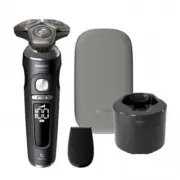
1 フィリップス シェーバーをお買い上げいただき、まことにありがとう ござ います。長 い 間ご 愛 用 いただくために、ご 使 用 前 にこの取 扱 説 明書をよくお読みのうえ、正しくお使いください。 また、お 読 み になった 後 は、お 使 い になる方 が い つでも見られる ところに必ず保管してください。 商品のご確認 商品をご確認ください。 ※改良の為、仕様を予告なく変更することがあります。 本体 プレミアムポーチ SP98xx/14 SP98xx/13 SP98xx/14SP98xx/16 トリマー 充電アダプタ クイッククリーン ポッドカートリッジ クイッククリーン ポッド S...
Page 3 - お買い上げのお客様へ; 初めてご使用になる際は、ご使用前に充電してください。; クイッククリーンポッド付きモデルお買い上げのお客様へ
2 お買い上げのお客様へ 初めてご使用になる際は、ご使用前に充電してください。 ●クイッククリーンポッドカートリッジに関して フィリップスの専用クイッククリーンポッドカートリッジをご使用ください。 フィリップスの専用クリーニング液(ボトルタイプ)を入れてご使用いただく ことはできません。 クイッククリーンポッド付きモデルお買い上げのお客様へ SP9840_JP_A6_cc2020_0330.indd 2 SP9840_JP_A6_cc2020_0330.indd 2 2023/03/30 17:23 2023/03/30 17:23
Page 4 - 目 次; LED
3 目 次 ● ● ● ● ● ● は じ め に ご 使 用 方 法 廃棄について 困 っ た と き 英 文 解 説 保 証 商品のご確認 1 ・ 2 目次 3 必ずお守りください 4 ~ 6 各部の名称 7 ・ 8 デジタル表示・ LED 表示について 9 ・ 1 0 充電のしかた 11 シェービングのしかた 12 ~ 14 トリマーの使いかた 15 お手入れ方法 16 ~ 18 クイッククリーンポッドの使いかた 19 ~ 21 刃の交換 22 保管のしかた 23 シェーバーを廃棄するとき 24 故障かな?と思ったら 25 ・ 26 Guidance in English 27 ...
Page 5 - 必ずお守り; 危険; 危 険
4 ●ここに示した注意事項は、安全に関する重要 な内容ですので、必ず守ってください。 ●誤った取扱いをしたときに想定される内容を 「危険」、 「警告」、 「注意」に区分けしています。 安 全 上 の ご 注 意 警 告 ●電源プラグは、根元まで確実に差し 込んでください。スムーズにコンセン トに 電 源プラグが 装 着できない 場 合、無理に押し込もうとしないでくだ さい。火災や感電の原因になります。 ●お手入れの際は必ず充電アダプタの電 源プラグをコンセントから抜いてくださ い。感電やけがをすることがあります。 ●充電アダプタを傷付けたり、電源コー ドを無理に曲げたり、引っ張ったり、ね じ...
Page 6 - 注 意; 警 告
5 注 意 ●電源コネクタ部や電源コネクタ受部、 電源プラグにピンやごみを付着させな いでください。感電・ショート・発火の 原因になります。 ●本製品や部品を食器洗浄機で洗わな いでください。故障や破損の原因にな ります。 ● 充 電アダプタから抜くときは、電 源 コード部を持たずに必ず先端の電源 アダプタ部を持って引き抜いてくださ い。感電やショートして発火すること があります。 ● 本製品を電子レンジや IH 調理器具 の近くに保 管しないでください。故 障や破損の原因になります。 ●充電時以外は、充電アダプタをコンセ ントから抜いてください。けがややけ ど、絶縁劣化による感電・漏電・火...
Page 7 - 使 用 上 の ご 注 意
6 使 用 上 の ご 注 意 1 . フィリップスシェーバーを初めてお使いの方は、剃りかたに慣れるまで 2 ~ 3 週間かかることがあります。 2 . 本体のお手入れ、水またはぬるま湯で行ってください。 60 ℃以上の熱湯では洗浄しないでください。 研磨パッドや研磨剤を含んだ洗剤またはエアダスターは使用しないでください。 3 . シェービングユニットの清掃や着脱は、必ず電源を OFF にしてから行ってください。 4 . 外刃は、薄く仕上げてありますので、刃部を強く押さえたり、硬いものにあてないよう、ていねいに扱っ てください。 5 . 切れ味が衰えてきたり、刃が破損した場合は、使用せず必ず新...
Page 8 - 各部の名称
7 クイッククリーン ポッドカートリッジ クイッククリーン ポッド パーソナル コンフォート 設定 各部の名称 本体 シェービング ユニット シェービング ユニットリリース ボタン デジタル表示 電源ボタン 電源コネクタ受部 トリマー SP9840_JP_A6_cc2020_0330.indd 7 SP9840_JP_A6_cc2020_0330.indd 7 2023/03/30 17:23 2023/03/30 17:23
Page 9 - シェービングユニット
8 プレミアムポーチ 充電アダプタ 充電アダプタ部 電源コネクタ部 電源プラグ部 ● シェービングユニット シェービングヘッド分解図 保持板 内刃 外刃 ( 替刃品番: SH91 ) シェービング ヘッドホルダー受部 シェービング ヘッドホルダー SP9840_JP_A6_cc2020_0330.indd 8 SP9840_JP_A6_cc2020_0330.indd 8 2023/03/30 17:23 2023/03/30 17:23
Page 10 - クリーニング表示; 充電完了表示; デジタル表示・; 表示について; 初めてお使いになるときや、長い間ご使用; 本体の主な表示
9 残量表示 充電残量はディスプレイ上に使用可能量( % )として表示されます。電 源の ON/OFF の際に数秒間点灯します。 充電表示 充電中は、本体の充電残量( % )とバッテリーマークの表示が点滅し ます。 充電催促表示 充電残量が少なくなると、バッテリーマークがオレンジ色に点滅しビ ープ音が鳴ります(電源を OFF にすると、バッテリーマークが数秒間 点滅し、ビープ音が鳴ります)。 クリーニング表示 シェービング後に電源を OFF にすると、クリーニングをうながすため にしずくマークが点滅します。表示されるタイミングは使用時間・状 況により異なります。お手入れ方法( P16 ~ 18...
Page 12 - 充電のしかた; 注意
11 充電のしかた 注意 ●長時間使用しない場合は、充電池が過放電や液漏れして使えなくなることがあ ります。 3 ~ 4 カ月に一度は充電してください。 ●本製品を 24 時間以上充電したままにしないでください。 注意 ●水場や浴室で充電をしないでく ださい。 ●専用の充電アダプタ以外での充 電はしないでください。 ●充電アダプタは、完全に乾いてい ることを確認してからコンセント に差してください。 ●濡れた手で充電アダプタを抜き 差ししないでください。 初めてお使いになるときや、長い間ご使用にならなかったとき、または充電残量が少なくなったときは、ご使 用前に充電してください。充電時間は約 1...
Page 13 - シェービングの; 肌が乾いた状態でのシェービングの; パーソナルコンフォート設定
12 注意 ●シェーバー本体は防水加工をしており、水場や浴室でも使用できますが、水や液 体の中に浸けないでください(故障の原因となります)。 ●ご使用前に刃に異常がないことを確認してください。 シェービングの しかた(ドライ) 肌が乾いた状態でのシェービングの しかたです。 ●モーターの始動時、微弱な振動がシェーバー本体に伝わりますが、問題はありません。●ほこりなどで肌が汚れている場合、ふきとってからご使用ください。●ご使用の前に外刃の破れや変形がないか確認してください (外刃に破れや変形があると肌を傷つける原因になります)。●ヒゲ剃り以外の目的(頭髪など)には、使用しないでください。●静止...
Page 15 - シェービングフォームやシェービング
14 シェービングの しかた(ウェット) シェービングフォームやシェービング ジェルを使ったシェービングのしかた です。剃った部分を実感しながら、なめ らかなシェービングができます。 [ 重要 ] シェービング後は、シェービングフォー ムやシェービングジェルがしっかりと洗 い流されているかを確認してください。 お手入れが不十分な場合、臭いが出る ばかりでなく、故障の原因にもなります。 ●モーターの始動時、微弱な振動がシェーバー本体に伝わりますが、問題はありません。●ご使用の前に外刃の破れや変形がないか確認してください (外刃に破れや変形があると肌を傷つける原因になります)。●ヒゲ剃り以外の目...
Page 16 - トリマーの使いかた
15 トリマーはヘアーライン、もみあげ、 ヒゲなどを整えるのに便利です。 ※トリマーは、回さ ずにまっすぐ引き 抜いてください。 ※トリマーの詰まりや損傷を防ぎ切れ味 を保つため、使 用 後 は 必ずぬるま湯 または水ですすぎ洗いをしてください ( P18 「トリマーのお手入れ方法」)。 ※ シェービングユニット は、回さずにまっすぐ 引き抜いてください。 ※ 電 源 が OFF になって いることを確 かめてく ださい。 1 シェービングユニットのはずしかた シェービングユニットを本体からはずし ます。 4 シェービングユニットのつけかた トリマーをはずし(図 1 )、シェービングユニ ット...
Page 17 - お手入れ方法; シェービングユニットのお手入れ方法
16 お手入れ方法 シェービングユニットのお手入れ方法 1 シェービングユニット表面 の汚れをぬるま湯で洗い流 します。 2 リ リ ー ス ボ タ ン を 押 し て、 シェービングユニットを開 きます。 3 シェービングヘッドホルダー 受 部 の汚 れをぬるま湯で 洗 い流します。 4 シェービングヘッドホルダーの 内側の汚れをぬるま湯で洗い 流します。 5 シェービングヘッドホルダー の水を切り、しっかり乾燥させ ます。 6 シェービングユニットを 閉じます。 ※研磨パッドや研磨剤を含んだ洗剤、またエアダスターは使用しないでください。 ※ ぬるま湯( 40 ℃前後)でのお手入れをおすすめ...
Page 18 - シェービングユニットのお手入れ方法(分解+水洗い)
17 ※ 1 カ月に 1 度、またはシェーバーの切れ味が落ちてきたら、シェービングヘッドを分解して水洗いすることをおす すめします。 シェービングユニットのお手入れ方法(分解+水洗い) 2 シェービングヘッドホルダー内側とシェー ビングヘッドホルダー受 部の汚れを水 で洗い流します。 3 内刃と外刃を取り外します。詳しい手 順 につ いて は、 「刃 の 交 換」 ( P22 )を ご参照ください。 ※ 内刃と外刃は 1 組になっているため、 一度に 2 組以上の内刃と外刃をクリー ニングしないでください。誤った外刃 に内刃を組み合わせてしまうと、最適 な性能に戻るまで数週間かかる場合 があり...
Page 19 - トリマーのお手入れ方法
18 ※詰まりや損傷を防ぎ切れ味を保つため、使用後は必ずトリマーをクリーニングしてください。 1 トリマーを取り付けた状態でシェーバーの電源を ON に し、ぬるま湯または水ですすぎ洗いをします。 ※トリマーはタオルやティッシュペーパーなどでふかないでください。 刃を傷めたり思わぬけがをすることがあります。 2 シェーバーの電源を OFF にし、トリマーを充分に乾燥させ てください。 トリマーのお手入れ方法 SP9840_JP_A6_cc2020_0330.indd 18 SP9840_JP_A6_cc2020_0330.indd 18 2023/03/30 17:23 2023/03/30...
Page 20 - クイッククリーンポッドの準備; 警告
19 クイッククリーンポッドの 使いかた 2 1 1 クイッククリーンポッドのキャップを回し て取り外します。 2 クイッククリーンポッドカートリッジのキャッ プを回して取り外します。 3 シールのつまみを持ち上げ、シールを端か ら引き上げてクイッククリーンポッドカート リッジから剥がします。 クイッククリーンポッドの準備 4 クイッククリーンポッドカートリッジのつま みの円状の部分を押して、つまみのツメを 外します。 5 クイッククリーンポッドカートリッジをクイッ ククリーンポッドに入れます。 6 クイッククリーンポッドのキャップを再度取 り付け、カチッと音がするまで時計回りに 回します。 ...
Page 21 - クイッククリーンポッドの使いかた
20 ※ シェービングフォームやシェービングジェルの使用後に、クイッククリーンポッドで洗浄をされる場合は、事前 にシェービングユニットをぬるま湯または水でしっかりと洗い流してください。 ※ クイッククリーンポッドには、専 用のクイッククリーンポッドカートリッジ 以 外は使 用しないでください。 専用のクイッククリーンポッドカートリッジに水を足されたり専用のクイッククリーンポッドカートリッジの代わ りに水や他の液を使用すると、故障の原因となりますのでお止めください。 ※ フィリップスの専用クイッククリーンポッドカートリッジをご使用ください。フィリップスの専用クリーニング液 (ボトルタイプ)を入れ...
Page 22 - クイッククリーンポッドカートリッジの交換
21 クイッククリーンポッドにクイッククリーンポッドカートリッジ 交 換 お 知らせ が 表 示されるか、以 下 の 表 に 示 す 交 換 時 期 が 来 たら 、 クイッククリーンポッドカートリッジを交換してください。 クイッククリーンポッドカートリッジの交換 使用頻度 使用回数 クイッククリーンポッド カートリッジの交換時期 毎日 約 30 回 月に 1 回 週に 2 ~ 3 回 約 20 回 2 カ月に 1 回 週に 1 回 約 13 回 3 カ月に 1 回 月に 1 回 約 3 回 3 カ月に 1 回 1 クイッククリーンポッドのキャップを回して 取り外します。 2 クイッククリーン...
Page 23 - 刃の交換; 替刃(
22 刃の交換 替刃( SH91 )の交換 ※シェービング性能を維持するために、刃は 2 年ごとに交換することをおすすめします。 ※交換する際は、必ずフィリップス社製の専用の替刃(品番: SH91 )とお取り替えください。 ※刃を交換する際は、電源を OFF にしてください。 1 2 2 シェービングヘッドホルダー裏側の保持 板を反時計回りに回して取り外します。 他の保持板も同様に外します。 3 シェービングヘッドホルダーから内刃と 外刃を取り外します。 4 新しい替刃をシェービングヘッドホルダー に取り付けます。 5 保持板をシェービングヘッドに再度取り 付け、時計回りに回します。 6 シェ...
Page 24 - シェーバーを保管する前にきちんと乾; 保管のしかた
23 ※シェーバーはプレミアムポーチに入れて保管してください。※室温 5 ℃~ 35 ℃の環境で保管してください。 ※直射日光の当たる場所には保管しないでください。※夏場、車の中には放置しないでください。 シェーバーを保管する前にきちんと乾 燥させてください。 保管のしかた SP9840_JP_A6_cc2020_0330.indd 23 SP9840_JP_A6_cc2020_0330.indd 23 2023/03/30 17:23 2023/03/30 17:23
Page 25 - リチウムイオン充電池のリサイクルについて; 充電池の取り外しかた
24 1 本 体よりシェービン グユニットを取り外し ます。 シェーバーを 廃棄するとき ※お客様による充電池の 修理交換はできません。 Li-ion リチウムイオン充電池のリサイクルについて 電源を ON にして、完全に動作しなくなるまで充電池を放電させてから、行ってください。 充電池の取り外しかた 3 ドライバ ー を 使 い 本 体 上 部 の ねじ 2 本をはずし、内側のカバーを取り外しま す。シェーバー本体のバックカバーをは ずし、モーターユニットを取り出します。 4 モーターユニットに ある 2 つのねじをドラ イバーではずします。 5 モーターユニット にある左 右 3 つず ...
Page 26 - 故障かな?と思ったら、; 充電しても使用時間が極端に短い; だんだん切れ味が悪くなった; シェーバー本体のモーターは回転しているが、内刃が回転しない; シェーバーの電源ボタンを押しても作動しない
25 故障かな? と思ったら 故障かな?と思ったら、 お調べください。 充電しても使用時間が極端に短い ▶シェーバーが完全に止まるまで作動させてから、もう一度充電してください。 それでも改善されないときは、充電池の寿命です。 だんだん切れ味が悪くなった ▶シェービングヘッド部が汚れていないか確認してください。▶シェービングヘッド部が損傷または摩耗していないか確認してください。 損傷または摩耗しているときは、シェービングヘッドを交換してください。 (替刃品番: SH91 ) ▶シェービングヘッドに長いヒゲがからまっていないか確認してください。▶ 専用クイッククリーンポッドカートリッジが汚れていな...
Page 27 - 充電できない
26 以上の点検により、正常な状態に戻らない場合は、 フィリップスサポートセンターにお問い合わせください。 充電できない ▶ シェーバー本体に充電アダプタのコードがきちんと差し込まれているか確認してください。 ▶ 充電アダプタの電源コードが断線している場合は新しい充電アダプタ(品番: HQ8505 )を お買い求めください。 クイッククリーンポッドを使用してもシェーバーがあまりきれいにならない ▶ シェーバー本体が正しくセットされているか確認してください。 ▶ クイッククリーンポッドカートリッジが使用されているか確認してください。 ▶ クイッククリーンポッドカートリッジが古くなっていないか確認...
Page 29 - English; Introduction; welcome; Important safety information
English Introduction Congratulations on your purchase and welcome to Philips! To fully benefit from the support that Philips offers, register your product at www.philips.com/ welcome . Please read this user manual, as it contains information about the features of this shaver as well as some tips to ...
Page 30 - Warning
English Warning - Keep the supply unit dry. - This shaver is waterproof. It is suitable for use in the bath or shower and for cleaning under the tap. For safety reasons, the shaver can therefore only be used without cord. - Do not modify the supply unit. - This appliance can be used by children aged...
Page 31 - Philips Quick Clean Pod Cartridge fluid
English - Water may drip from the socket at the bottom of the shaver when you rinse it. This is normal and not dangerous because all electronics are enclosed in a sealed power unit inside the shaver. - Only use original Philips accessories or consumables. Only use detachable supply unit HQ8505. - Ch...
Page 32 - The display; Charging
English The display Note: Remove any sticker or protective foil from the display before using the product. Charging When the shaver is charging, the battery charge indicator on the shaver flashes white. The battery charge is indicated by the battery charge percentage flashing on the display, which i...
Page 33 - Personal comfort settings
English Personal comfort settings The shaver has a feature that allows you to personalize your settings. Depending on your personal shaving needs, choose between three settings, from low to high: comfort, dynamic or efficiency. When you press the button on the left or right of the display, the segme...
Page 34 - Notification symbol; Overheating; Quick charge
English Notification symbol Overheating If the shaver overheats during charging, the notification symbol flashes. When this happens, the shaver automatically stops charging. Charging continues once the temperature of the shaver has decreased to the normal level after approx. 10 minutes. Blocked shav...
Page 35 - The display of the shaver indicates that the shaver is; Using the shaver; Always check the shaver and all accessories before; Switching the shaver on and off; The battery charge percentage lights up for a few; Shaving; Skin adaptation period; Your first shaves may not bring you the result you expect
English 2 Put the small plug in the shaver and put the supply unit in the wall socket. The display of the shaver indicates that the shaver is charging. 3 After charging, remove the supply unit from the wall socket and pull the small plug out of the shaver. Note: When the battery is full, the display...
Page 36 - new appliance, we advise you to shave regularly (at least; Shaving tips; For the best results on skin comfort, pre-trim your; Dry shaving; movements to catch all hairs growing in different; Wet shaving; For a more comfortable shave, you can also use this
English new shaving system. To allow your skin to adapt to this new appliance, we advise you to shave regularly (at least 3 times a week) and exclusively with this appliance for a period of 3 weeks. Shaving tips - For the best results on skin comfort, pre-trim your beard if you have not shaved for 3...
Page 37 - Using click-on attachments; Removing or attaching click-on attachments; Make sure the shaver is switched off.
English 3 Rinse the shaving unit under the tap to ensure that the shaving unit glides smoothly over your skin. 4 Switch on the shaver. 5 Move the shaving heads over your skin in circular movements to catch all hairs growing in different directions. Make sure each shaving head is fully in contact wit...
Page 38 - Using the precision trimmer attachment; Switch off the shaver and clean the attachment after; Travel lock; Activating the travel lock; Press the on/off button for 3 seconds to use the travel; Deactivating the travel lock; short sound. The shaver switches on and is now ready
English Using the precision trimmer attachment You can use the precision trimmer attachment to touch up your beard, sideburns and moustache. 1 Attach the attachment to the appliance (‘click’). 2 Switch on the shaver. 3 Hold the precision trimmer perpendicular to the skin and move it downwards while ...
Page 39 - Cleaning and maintenance; this may dent or damage the precision-made slotted; How do I use the Quick Clean Pod?; What does the icon on my Quick Clean Pod mean?; Icon; Becomes visible on the Quick; Preparing the Quick Clean Pod for use; Twist and remove the top of the Quick Clean Pod.
English Cleaning and maintenance Regular cleaning guarantees better shaving results.Never clean, remove or replace the shaving unit while the shaver is switched on.Do not apply pressure to shaving head guards.Do not touch shaving heads with hard objects as this may dent or damage the precision-made ...
Page 40 - Do not tilt the Quick Clean Pod to prevent leakage.; Using the Quick Clean Pod; Note: If you use the shaver with shaving foam, shaving
English 3 Lift the tab on the seal and pull it by the corner to remove the seal from the Quick Clean Pod Cartridge. 4 Press the small circular piece on the handle of the Quick Clean Pod Cartridge to break the snap hook on the handle. 5 Place the Quick Clean Pod Cartridge into the Quick Clean Pod. 6 ...
Page 41 - Always shake excess water off the shaver before you; Replacing the Quick Clean Pod Cartridge; Frequency of use
English Always shake excess water off the shaver before you place it in the Quick Clean Pod. 1 Place the shaver upside down into the Quick Clean Pod. The shaver automatically detects that it is in the Quick Clean Pod. 2 Switch on the shaver to start the cleaning program. Each cleaning program takes ...
Page 42 - Pour any remaining fluid down a drain and recycle; Scan the QR code to the left or visit; Thorough cleaning; Switch off the shaver.
English 2 Lift the Quick Clean Pod Cartridge out of the Quick Clean Pod by the handle. 3 Pour any remaining fluid down a drain and recycle the empty cartridge in accordance with local waste regulations. 4 Place a new Quick Clean Pod Cartridge into the Quick Clean Pod (see 'Preparing the Quick Clean ...
Page 43 - Turn the retaining ring counterclockwise and lift it off; Repeat this process for the other retaining rings.; at a time, since they are all matching sets. If you; You can also use the cleaning brush to remove; Shake off excess water.
English 4 Turn the retaining ring counterclockwise and lift it off the shaving head. Repeat this process for the other retaining rings. Place them aside in a safe place. 5 Remove the shaving heads from the shaving head holder. Each shaving head consists of a cutter and guard.Note: Do not clean more ...
Page 44 - Cleaning the trimmer attachment; Never dry the trimmer with a towel or tissue, as this; Replacement; Replacing the shaving heads; For maximum shaving performance, we advise you
English 11 Align the arrows on the retaining ring with the projections in the shaving head holder. Turn the ring clockwise until it clicks to indicate that the ring is fixed. 12 Attach the shaving head holder to the bottom part of the shaving unit (‘click’). Cleaning the trimmer attachment Never dry...
Page 45 - Replacement reminder
English Always replace the shaving heads with original Philips shaving heads (see 'Ordering accessories'). Replacement reminder The replacement reminder indicates that the shaving heads need to be replaced. The shaving unit symbol lights up continuously, the arrows flash white and you hear a beep wh...
Page 46 - Storage; Store the shaver in a safe and dry place, using the storage; Ordering accessories; To buy accessories or spare parts, visit; Recycling; Only remove the rechargeable battery when you
English Storage Store the shaver in a safe and dry place, using the storage pouch provided.Note: Always let the shaver dry completely before you store it in the pouch. Ordering accessories To buy accessories or spare parts, visit www.philips.com/parts-and-accessories or go to your Philips dealer. Yo...
Page 47 - Remove the click-on attachment from the appliance.
English the wall socket and that the battery is completely empty.Take any necessary safety precautions when you handle tools to open the shaver and when you dispose of the rechargeable battery. 1 Remove the click-on attachment from the appliance. 2 On top of the appliance insert a screwdriver betwee...
Page 48 - housing off the appliance.; Warranty and support; If you need information or support, please visit
English 4 Remove the two back black covers and slide the front housing off the appliance. 5 Unscrew the two screws at the top of the inner panel. 6 Place a screwdriver between the lips of the inner panel and bend them aside. Then remove the inner panel. 7 Lift out the printed circuit board with the ...
Page 49 - Warranty restrictions; Troubleshooting; to solve the problem with the information below, visit; Shaver; Problem; Press the on/off button for
English Warranty restrictions The shaving heads (cutters and guards) are not covered by the terms of the international warranty because they are subject to wear. Troubleshooting This chapter summarizes the most common problems you could encounter with the appliance. If you are unable to solve the pr...
Page 52 - 保証書と修理サービスについて
51 保証と アフターサービス 保 証 期 間 お買い上げ日から 2 年間 対 象 部 分 本体、充電アダプタ(シェービング ユニット、トリマー、クイッククリーン ポッド、クイッククリーンポッドカー トリッジ、プレミアムポーチを除く) 〈保証書・最終ページに付属〉 ● 保証書は、必ず「お買い上げ日・販売店名」等の記入 をお確かめのうえ、販売店から受け取っていただき 内容をよくお読みのあと大切に保管してください。 保証書と修理サービスについて (必ずお読みください) 【補修用性能部品の保有期間】 ● 補修用性能部品の保有期間は製造打ち切り後 6 年です。 ● 性能部品とは、その製品の機能を維持す...
Page 53 - ご使用の時、このような症状はありませんか?; 株式会社
52 品 番 SP9840/32 SP9841/32 ハ ン ド ル 品 番 SP9840 SP9841 替 刃 品 番 SH91 充 電 アダプタ品 番 HQ8505 本 体 寸 法 ( 高 さ×幅×奥 行 ) 169 × 60 × 69mm 本 体 質 量 約 187g 電 源 方 式 充電式 (専用充電アダプタ使用) 定 格 電 圧 AC100-240V 、 50/60Hz 充 電 時 間 約 1 時間 使 用 時 間 約 60 分 使 用 充 電 池 リチウムイオン充電池 (Li-ion) 消 費 電 力 ...
Page 55 - 無料修理規定; 〈無料修理規定〉
54 無料修理規定 キ リ ト リ 線 キ リ ト リ 線 〈無料修理規定〉 1. 取扱説明書、本体貼付ラベル等の注意書に従った正常な使用状態で保証期間内に故障した場合には、無料修理します。 2. 保証期間内に故障して無料修理をお受けになる場合には、フィリップスサポートセ ンターにお問い合わせください。 3. ご贈答品の修理に関するご相談は、フィリップスサポートセンターにお問い合わせください。 4. 保証期間内でも次の場合には有料修理になります。 ○ 1 使用上の誤り及び不当な修理や改造による故障及び損傷。 ○ 2 お買い上げ後の輸送、移動、落下等による故障及び損傷。 ○ 3 火災...
Page 56 - フィリップスサポートセンター; 製品の使用方法や修理に関するお問い合わせ; My Philips; 登録のご案内
フィリップス 電動シェーバー 保証書 C E R T I F I C A T E O F P U R C H A S E この保証書は、 「無料修理規定」記載内容で無料修理を行うことをお約束するものです。お買い上げの日 から下記期間中に故障が発生した場合は、フィリップスサポートセンターにお問い合わせください。 お客様にご記入いただいた個人情報(保証書の控え)は、株式会社フィリップス・ジャパンのホームページ http://www.philips.co.jp/ http://www.philips.co.jp/ に掲載されている「プライバシーに関する通知」に基づき適切に管理いた します。 ★ 保証...


 Philips 50PFL5907/F7
User Manual
Philips 50PFL5907/F7
User Manual
 Philips 32PFL4508/F7
User Manual
Philips 32PFL4508/F7
User Manual
 Philips 39PFL2908/F7
User Manual
Philips 39PFL2908/F7
User Manual
 Philips 32PFL5708/F7
User Manual
Philips 32PFL5708/F7
User Manual