Philips SE6553B/05 - Manuals
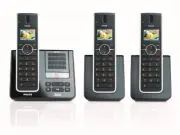
Philips SE6553B/05 – User Manual, Quick Guide in PDF format online.
Manuals:
User Manual Philips SE6553B/05


Summary
1 Table of contents 1 Important 5 1.1 Power requirements 5 1.2 Conformity 6 1.3 Using GAP standard compliance 6 1.4 Recycling and disposal 6 1.5 Electric, Magnetic and Electromagnetic Fields (“EMF”) 7 2 Your phone 8 2.1 What’s in the box 8 2.2 Overview of your phone 9 2.3 Display icons and Messages ...
2 Table of contents 5.7.3 Save a redial number into the phonebook 31 5.7.4 Delete a redial number 32 5.7.5 Delete all redial numbers 32 5.8 Call waiting 32 5.9 Using the Call log 32 5.9.1 Access the Call log 32 5.9.2 Save call list entry into the phonebook 33 5.9.3 Delete a call list entry 33 5.9.4 ...
3 Table of contents 8.3 Call Forward when Unanswered 48 8.3.1 Change Call Forward when Unanswered Activation Codes 49 8.3.2 Change Call Forward when Unanswered Deactivation Code 49 8.4 Voice Mail 50 8.4.1 Access Voice Mail 50 8.4.2 Set Voice Mail Number 50 8.5 Voice Mail 2 50 8.6 Information Service...
Quick Guide Philips SE6553B/05


Summary
What’s in the box Base station for SE650 OR Handset for SE650/SE655 Battery door SE655 with bracket 2 AAA rechargeable batteries Power supply Line cord* User manual Guarantee Quick Start Guide *You may find in the box the line adaptor delivered separately from the line cord. In this case, you have t...
1 Connect Connect the base station 2 Install Insert rechargeable batteries and charge 1. Place the base station in a central location near the telephone line socket and electricity socket. 2. Connect the line cord and the power cable to their corresponding connectors at the back of the base station....
3 Enjoy Make a call Dial the number (maximum 24 digits) and press t or l . ORPress t or l to take the line, and dial the number. Answer a call When the phone rings, press t or l . End a call To end a conversation, press h . Adjust earpiece or speaker volume During a call, scroll n to select from lev...
Philips Manuals
-
 Philips 50PFL5907/F7
User Manual
Philips 50PFL5907/F7
User Manual
-
Philips 50PFL5907/F7
Quick Guide
-
 Philips 32PFL4508/F7
User Manual
Philips 32PFL4508/F7
User Manual
-
Philips 32PFL4508/F7
Quick Guide
-
 Philips 39PFL2908/F7
User Manual
Philips 39PFL2908/F7
User Manual
-
Philips 39PFL2908/F7
Quick Guide
-
Philips 55PFL5907/F7
User Manual
-
Philips 55PFL5907/F7
Quick Guide
-
Philips 46PFL5907/F7
User Manual
-
Philips 46PFL5907/F7
Quick Guide
-
Philips 40PFL4908/F7
User Manual
-
Philips 40PFL4908/F7
Quick Guide
-
Philips 40PFL4708/F7
User Manual
-
Philips 40PFL4708/F7
Quick Guide
-
Philips 40PFL1708/F7
User Manual
-
Philips 29PFL4908/F7
User Manual
-
Philips 29PFL4908/F7
Quick Guide
-
Philips 42PFL5907/F7
User Manual
-
Philips 42PFL5907/F7
Quick Guide
-
 Philips 32PFL5708/F7
User Manual
Philips 32PFL5708/F7
User Manual