Page 3 - Contents; Important
3 EN Contents 1 Important 5 Safety and notice 5 Safety 5 Compliance 7 Care of the environment 7 Copyright 9 Warranty 10 2 Your portable DVD player 11 Introduction 11 What's in the box 11 Over view of the main unit 12 Over view of the remote control 14 3 Get started 16 Prepare 16 Mount the player in ...
Page 5 - Safety and notice
5 EN 1 Important Safety and notice Read and understand all instructions before you use this product. If damage is caused by failure to follow the instructions, the warranty does not apply. Safety Only use attachments/accessories specified by the manufacturer. The product shall not be exposed to drip...
Page 6 - Hearing safety
6 EN Modification of the product could result in hazardous radiation of EMC or other unsafe operation. Warning • Where the MAINS plug or an appliance coupler is used as the disconnect device, the disconnect device shall remain readily operable. Warning • Never remove the casing of this product. • Ne...
Page 7 - Compliance; Care of the environment
7 EN Compliance This product complies with the radio interference requirements of the European Community. This apparatus includes this label: Note • The type plate is located on the bottom of the product. Care of the environment Environmental information All unnecessar y packaging has been omitted. ...
Page 9 - Copyright
9 EN Copyright This item incorporates copy protection technology that is protected by U.S. patents and other intellectual proper ty rights of Rovi Corporation. Reverse engineering and disassembly are prohibited. Specifications are subject to change without notice. Trademarks are the proper ty of Kon...
Page 10 - Warranty
10 EN Warranty • Never attempt to repair the product, this could lead to the risk of injur y, damage to the product and will void your warranty. • Use the product and accessories only as intended by the manufacturer. The caution sign printed on the back of the product indicates risk of electric shoc...
Page 11 - Your portable DVD player; Introduction
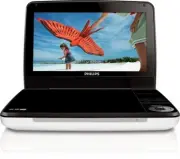
11 EN 2 Your portable DVD player Congratulations on your purchase, and welcome to Philips! To fully benefit from the suppor t that Philips offers, register your product at www.philips.com/welcome. Introduction Your por table DVD player plays digital video discs that conform to the universal DVD Vide...
Page 12 - Overview of the main unit
12 EN Overview of the main unit a • Turns on/off DVD player. SOURCE • Switches between DISC and USB. SETUP • Accesses or exits the setup menu. OPTIONS • Accesses options relating to the current activity or selection. • Accesses or exits the setup menu. STOP • Stops disc play. DISC MENU • For DVD, ac...
Page 14 - Overview of the remote control
14 EN Overview of the remote control a SOURCE • Switches between DISC and USB. b DISPLAY • Displays play information. c • Adjusts brightness of the screen backlight. j k l m n g i a b c d h OPTIONS SOURCE f e
Page 16 - Get started; Prepare; Charge power; Charge the battery
16 EN 3 Get started Caution • Use the controls only as stated in this user manual. • Always follow the instructions in this chapter in sequence. If you contact Philips, you will be asked for the model and serial number of your player. The model number and serial number are on the bottom of your play...
Page 17 - Charge through car adaptor
17 EN 2 Connect the supplied AC adaptor to the player and to the AC outlet. » The CHR indicator turns on (red). » When the batter y is fully charged, the CHR indicator turns off. Tip • You can also charge the batter y during play. • To maximize batter y life, recharge the batter y immediately once t...
Page 18 - Install remote control battery
18 EN Install remote control battery Caution • Risk of explosion! Keep batteries away from heat, sunshine or fire. Never discard batteries in fire. • Danger of explosion if batter y is incorrectly replaced. Replace only with the same or equivalent type. • Batteries contain chemical substances, they ...
Page 21 - Select OSD language
21 EN c Fasten the node. To release the DVD player from the headrest • Press the release button Switch on/off1 Press to switch on the player. » The indicator turns on (green). 2 To switch off the player, press . » The indicator turns off. Select OSD language You can choose a different language for t...
Page 23 - Play music or movies; Play options; Select audio language; Select subtitle language; Repeat a section
23 EN 4 Play music or movies Play discs1 Slide OPEN on the player. 2 Inser t the disc with label side facing up. 3 Push down to close the disc compar tment. » Play star ts automatically. If not, press / OK . • If a menu is displayed, select an item, then press / OK to star t play. • To pause, press ...
Page 24 - Zoom; Select audio mode; Rotate pictures; Adjust brightness of screen backlight; Connect additional equipment
24 EN Zoom For DVDs, VCDs and JPEG CDs, you can zoom in and out for video images or pictures. 1 Press ZOOM repeatedly to zoom in and out. 2 When the video image or picture is enlarged, press , , , to pan through it. Select audio mode When you play VCDs, you can select an audio mode. • Press AUDIO re...
Page 25 - Play from USB
25 EN Caution • Turn off your player before you connect it to any additional equipment. You can connect the player to a TV or an amplifier to enjoy DVDs. Match the color of the AV cables (the AV cable connected to TV is not supplied) with the jacks: • the yellow cable is for the yellow video jack • ...
Page 27 - Set the main unit
27 EN 5 Set the main unit To maximize your play experience, use SETUP to fine tune your settings. 1 Press SETUP . » The setup menu is displayed. 2 Use navigation keys to select an option and press / OK to confirm. [General][Language] Select on-screen display language [PBC settings] Set playback cont...
Page 28 - Product information
28 EN 6 Product information Note • Product information is subject to change without prior notice. Dimensions 239 x 39 x 178 mm Weight 1.0 kg AC power adaptor AY5808/05 or DSA-9PFB-09 FUK090100 Power supply Input: 100-240V~ 50/60HzOutput: DC 9V 1.0A Power consumption 11.5 W Operating temperature rang...
Page 29 - Troubleshooting
29 EN 7 Troubleshooting Warning • Risk of electric shock. Never remove the casing of the player. To keep the warranty valid, never tr y to repair the system yourself. If you encounter problems when using the player, check the following points before requesting ser vice. If the problem remains unsolv...