Page 3 - Contents; Specifications
1 EN Contents 1 Important 2 Safety and notice 2 Safety 2 Notice 3 Copyright 4 Compliance 4 Warranty 4 2 Your portable DVD player 5 What's in the box 5 Over view of the main unit 6 Over view of the remote control 7 3 Get started 9 Charge power 9 Install remote control batter y 9 Switch the player on ...
Page 4 - Important; Safety and notice; Hearing safety
2 EN 1 Important Safety and notice Read and understand all instructions before you use this product. If damage is caused by failure to follow the instructions, the warranty does not apply. Safety • Only use attachments/accessories specified by the manufacturer. • Use only power supplies listed in th...
Page 5 - Notice
3 EN To establish a safe volume level: • Set your volume control at a low setting. • Slowly increase the sound until you can hear it comfor tably and clearly, without distor tion. Listen for reasonable periods of time: • Prolonged exposure to sound, even at normally 'safe' levels, can also cause hea...
Page 6 - Warranty
4 EN Copyright This item incorporates copy protection technology that is protected by U.S. patents and other intellectual proper ty rights of Rovi Corporation. Reverse engineering and disassembly are prohibited. Recording and playback of material might require consent. See Copyright Act 1956 and The...
Page 8 - Overview of the main unit
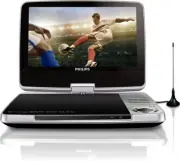
6 EN Overview of the main unit a Display panel b IR • Remote control sensor. c DC IN • Power supply socket. d OPEN • Open the disc compar tment. e CHR / • Charging indicator/Power indicator. f SOURCE • Switch between DVD, USB and TV. SETUP • Access or exit the setup menu. a bc d e g i h j k l m n o ...
Page 9 - Overview of the remote
7 EN STOP • Stop disc play. • Press and hold to exit the TV search menu. g / / / Navigate menu. ( CH+ ) / ( CH- ) • Switch to the next/previous channel. / • Search backward/forward at different speeds. / OK • Star t, pause or resume disc play. • Confirm an entr y or selection. h / • Skip to the prev...
Page 11 - Get started; Charge power; Charge through the AC power adaptor; Charge through car adaptor; Install remote control battery
9 EN 3 Get started Caution • Use the controls only as stated in this user manual. • Always follow the instructions in this chapter in sequence. If you contact Philips, you will be asked for the model and serial number of your player. The model number and serial number are on the bottom of your playe...
Page 12 - Play music or; Play options; Select audio language
10 EN Switch the player on or off1 To switch on the player, press POWER . » The indicator turns green. 2 To switch off the player, press and hold POWER for at least two seconds. Select the language for onscreen instructions You can choose a different language for the onscreen display text. 1 Press S...
Page 13 - number; Select a view angle
11 EN Select subtitle language For DVDs that contain two or more subtitle languages. 1 Press OPTIONS . » The option menu is displayed. 2 Select [Subtitles] and press navigation keys to select a subtitle. 3 Press / OK to confirm. Alternatively, • During disc play, press SUBTITLE repeatedly on the rem...
Page 14 - Play from USB; Connect additional
12 EN Rotate pictures For JPEG CDs only. While the JPEG is displayed: • Press to rotate counter-clockwise. • Press to rotate clockwise. • Press to flip up/down. • Press to flip left/right. Adjust brightness of screen backlight Note • You can adjusts brightness of the screen backlight to match lighti...
Page 15 - Watch TV; Connect TV antenna; Manual search; Manage channel
13 EN 5 Watch TV Note • Before you star t, ensure that you have connected the antenna to the player. • Make sure that you are in an area with sufficient DVB-T signal coverage. You can check the signal coverage with the TV broadcast authority of your countr y. Connect TV antenna To watch analog TV pr...
Page 16 - Use the electronic program; Adjust settings; General settings
14 EN View program information (DTV) To view brief information of the current program, press INFO ; to view detail information, press INFO twice. • To exit the program information page, press STOP or . Access teletext If the current channel has teletext, press TELETEXT to access. Tip • The program m...
Page 17 - Mount the player
15 EN [Manual search] Search channels manually. [DTTV Parental] Select parental options. [Country] Select specific countr y. [Time settings] Set time. [Version] Check the version information. 3 Press to go back to the previous menu. 4 Press SETUP to exit. Display settings1 Press DISPLAY . » The disp...
Page 18 - Specifications
16 EN 8 Specifications Note • Specifications are subject to change without notice Dimensions (W x H x D) 239 x 39 x 178 mm Weight 1.02 kg Power supply Model: AY5808/12 (Philips) Input: 100-240V~, 50/60Hz Output: 9V , 1A Power consumption 9 W Operating temperature range 0-45°C Laser wavelength 650 nm...
Page 19 - Troubleshooting
17 EN 9 Troubleshooting Warning • Never remove the casing of this apparatus. To keep the warranty valid, never tr y to repair the system yourself. If you encounter problems when using this apparatus, check the following points before requesting ser vice. If the problem remains unsolved, go to the Ph...