Page 2 - Contents; Safety and notice
3 EN Contents 1 Safety and notice 6 Safety 6 Compliance 9 Care of the environment 10 Copyright 11 2 Your portable DVD player 11 What's in the box 12 Over view of the main unit 12 Over view of the second screen 14 3 Get started 15 Prepare 15 Connect power 17 Switch on/off 17 Select OSD language 18 4 ...
Page 4 - *Product Safety Notification; Purchase
5 EN Register online at www.philips.com/welcome today to get the very most from your purchase. Visit our World Wide Web Site at http://www.philips.com/welcome Registering your model with PHILIPS makes you eligible for all of the valuable benefits listed below,so don't miss out. Register online at ww...
Page 5 - Safety; remove the covering.; Important Safety Instructions; Read these instructions.
6 EN 1 Safety and notice Read and understand all instructions before you use this product. If damage is caused by failure to follow the instructions, the warranty does not apply. Safety This 'bolt of lightning' indicates uninsulated material within the device may cause an electrical shock. For the s...
Page 6 - Only use attachments/accessories specified by the manufacturer.
7 EN d Follow all instructions. e Do not use this apparatus near water. f Clean only with dry cloth. g Do not block any ventilation openings. Install in accordance with the manufacturer's instructions. h Do not install near any heat sources such as radiators, heat registers, stoves, or other apparat...
Page 7 - Hearing safety; Listen at a moderate volume.
8 EN o Battery usage CAUTION – To prevent battery leakage which may result in bodily injury, property damage, or damage to the unit: • Install all batteries correctly, + and - as marked on the unit. • Do not mix old and new batteries. • Do not mix alkaline, standard (carbon-zinc), or rechargeable (n...
Page 8 - Compliance; Notice for the USA
9 EN • Be sure to use your equipment reasonably and take appropriate breaks. Be sure to observe the following guidelines when using your headphones. • Listen at reasonable volumes for reasonable periods of time. • Be careful not to adjust the volume as your hearing adapts. • Do not turn up the volum...
Page 9 - Care of the environment; Environmental information
10 EN Notice for Canada This Class B digital apparatus complies with Canadian ICES-003. This apparatus includes this label: Note • The type plate is located on the back of the product. Any changes or modifications made to this product that are not expressly approved by Philips Consumer Lifestyle may...
Page 10 - consequences on the environment and human health.; Copyright; supplies accordingly.; Your portable DVD player; Video CD
11 EN The correct disposal of these products helps prevent potentially negative consequences on the environment and human health. Please visit www.recycle.philips.com for additional information on a recycling center in your area. Caution • Removal of the built-in batter y invalidates the warranty an...
Page 11 - Overview of the main unit
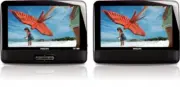
12 EN What's in the box Check and identify the contents of your package: • Main unit x 1 • Second screen x 1 • AC power adaptor x 1, ASUC12A-090080 (Philips) • Car adaptor x 1 • AV cable x 2 • Fastening strap x 2 • User Manual x 1 Overview of the main unit b c d e f a g h i j k l m PD9012M_9012P_701...
Page 12 - • Confirms an entr y or selection.
13 EN a ON/OFF • Turns on/off DVD player. b VOL +/- • Increases or decreases volume. c • Headphone jack. d AV OUT • Audio/video output jack. e DC IN • Power supply socket. f , , , • Navigates menus. , • Searches backward/forward at different speeds. / OK • Confirms an entr y or selection. • Star ts,...
Page 13 - Overview of the second screen; DC IN
14 EN • Accesses options relating to the current activity or selection. m AV MODE • Switches between PAL and NTSC mode. Overview of the second screen a DC IN • Power supply socket. b AV IN • Audio/video input jack. c • Headphone jack. d VOL -/+ • Decreases or increases volume. e BRIGHTNESS -/+ • Adj...
Page 14 - Get started; Write the numbers here:; Prepare; Mount the unit in your car; back of the front seat headrests.
15 EN 3 Get started Caution • Use the controls only as stated in this user manual. • Always follow the instructions in this chapter in sequence. If you contact Philips, you will be asked for the model and serial number of your player. The model number and serial number are on the bottom of your play...
Page 15 - Use a player as dual screen; the movies that play on the main unit.
16 EN Use a player as dual screen Connect the second screen to the main unit. You can watch on the second screen the movies that play on the main unit. Connect the supplied AV cable to • AV OUT on the main unit, • AV IN on the second screen. A AV IN PD9012M_9012P_7012P_37_UM_V2.0.indb 16 3/5/2013 9:...
Page 16 - Connect power; Connect power through the car adaptor
17 EN Connect power Connect power through the car adaptor A: main unit; B: second screen; C: car cigarette lighter Connect the car adaptor to: • DC IN on the main unit and the second screen, • the cigarette lighter socket in your car. Tip • At home, you can use the AC power adaptor with the player. ...
Page 17 - Select OSD language; Play discs; Play options; Select a subtitle language
18 EN 2 To switch off the player, slide the ON / OFF switch on the main unit to the OFF position. Select OSD language You can choose a different language for the on-screen display text. 1 Press SETUP . » The setup menu appears. 2 Select [General] > [Language] . 3 Press to select an option. 4 Pres...
Page 19 - Random play
20 EN • [Repeat 1] : repeat the current track • [Repeat all] : repeat all tracks on the disc • [Repeat Off] : switch off the repeat mode For MP3/CD/DivX • [Repeat 1] : repeat the current track • [Repeat Folder] : repeat all the tracks in current folder • [Off] : switch off the repeat mode 3 Select a...
Page 20 - Display play information; Select an audio mode; OPTIONS; Rotate pictures; Connect additional equipment; You can connect the player to a TV or an amplifier to enjoy DVDs.
21 EN Display play information You can view the play information during play on DVDs or VCDs. 1 Press OPTIONS . » The option menu is displayed. 2 Select [Display] and press / OK to confirm. » For DVDs, title number, chapter number and elapsed play time is displayed. For VCDs, track number and elapse...
Page 21 - Connect to a TV; the yellow cable is for the yellow video jack; Adjust settings; Set the main unit; To maximize your play experience, use
22 EN Connect to a TV Caution • Turn off your player before connecting to any additional equipment. Match the color of the AV cables (the AV cable connected to TV is not supplied) with the jacks: • the yellow cable is for the yellow video jack • the red/white cable is for the red/white audio jacks. ...
Page 23 - Product information
24 EN 6 Product information Note • Product information is subject to change without prior notice. Dimensions - Main unit- Second screen 200 x 155 x 39 mm200 x 155 x 21 mm Weight - Main unit- Second screen 0.7 kg0.4 kg Power supply Input: 100-240V 50/60Hz 0.3AOutput: DC 9V 0.8A Power consumption 9 W ...
Page 24 - Troubleshooting; No power
25 EN 7 Troubleshooting Warning • Risk of electric shock. Never remove the casing of the player. To keep the warranty valid, never tr y to repair the system yourself. If you encounter problems when using the player, check the following points before requesting ser vice. If the problem remains unsolv...
Page 27 - Meet Philips at the Internet
Specifications are subject to change without notice © 2013 Koninklijke Philips Electronics N.V. All rights reserved. PD7012P_9012P_9012M_37_UM_V2.0 P&F USA Inc. PO Box 2248 Alpharetta, GA 30023-2248 Phone 1 866 309 0845 Meet Philips at the Internet http://www.philips.com/welcome PD9012M_9012P_70...