Page 2 - Contents
1 EN Contents 1 Important 2 Help and suppor t 2 Safety 2 Care for your product 3 Care of the environment 3 Compliance 4 2 Your product 4 Main unit 4 Remote control 5 Connectors 6 3 Connect 6 Placement 6 Connect audio from TV and other devices 7 4 Use your product 8 Adjust the volume 8 Choose your so...
Page 3 - Important; Help and support
2 EN 1 Important Read and understand all instructions before you use your product. If damage is caused by failure to follow instructions, the warranty does not apply. Help and support For extensive online suppor t, visit www.philips.com/suppor t to: • download the user manual and the quick star t gu...
Page 4 - Care for your product
3 EN Risk of overheating! • Never install this product in a confined space. Always leave a space of at least four inches around the product for ventilation. Ensure cur tains or other objects never cover the ventilation slots on the product. Risk of contamination! • Do not mix batteries (old and new ...
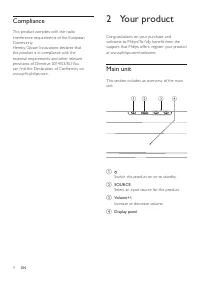
Page 5 - Compliance; Your product; Main unit
4 EN Compliance This product complies with the radio interference requirements of the European Community. Hereby, Gibson Innovations declares that this product is in compliance with the essential requirements and other relevant provisions of Directive 2014/53/EU. You can find the Declaration of Conf...
Page 6 - Remote control
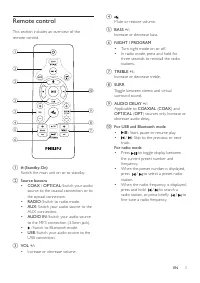
5 EN Remote control This section includes an over view of the remote control. a (Standby-On) Switch the main unit on or to standby. b Source buttons • COAX / OPTICAL : Switch your audio source to the coaxial connection, or to the optical connection. • RADIO : Switch to radio mode. • AUX : Switch you...
Page 7 - Connectors; Connect; Placement
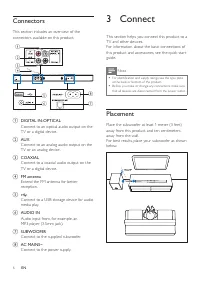
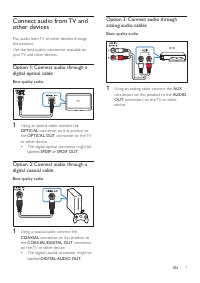
6 EN Connectors This section includes an over view of the connectors available on this product. a DIGITAL IN-OPTICAL Connect to an optical audio output on the TV or a digital device. b AUX Connect to an analog audio output on the TV or an analog device. c COAXIAL Connect to a coaxial audio output on...
Page 9 - Choose your sound; Surround sound mode; Night mode; MP3 player
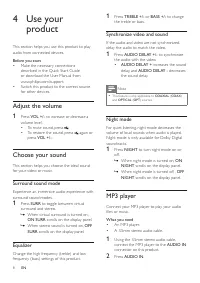
8 EN 4 Use your product This section helps you use this product to play audio from connected devices. Before you start • Make the necessar y connections described in the Quick Star t Guide or download the User Manual from www.philips.com/suppor t. • Switch this product to the correct source for othe...
Page 10 - USB storage devices; Play music via Bluetooth
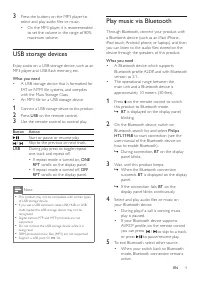
9 EN 3 Press the buttons on the MP3 player to select and play audio files or music. • On the MP3 player, it is recommended to set the volume in the range of 80% maximum volume. USB storage devices Enjoy audio on a USB storage device, such as an MP3 player and USB flash memor y, etc. What you need • ...
Page 11 - Auto standby; Auto install radio stations
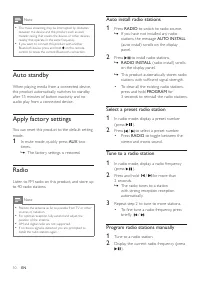
10 EN Note • The music streaming may be interrupted by obstacles between the device and this product, such as wall, metallic casing that covers the device, or other devices nearby that operate in the same frequency. • If you want to connect this product with another Bluetooth device, press and hold ...
Page 12 - Update software; Check software version
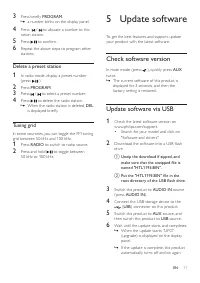
11 EN 3 Press briefly PROGRAM . » a number blinks on the display panel. 4 Press / to allocate a number to this ration station. 5 Press to confirm. 6 Repeat the above steps to program other stations. Delete a preset station 1 In radio mode, display a preset number (press ). 2 Press PROGRAM . 3 Press ...
Page 13 - Wall mount
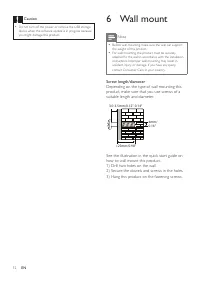
12 EN Caution • Do not turn off the power or remove the USB storage device when the software update is in progress because you might damage this product. 6 Wall mount Note • Before wall mounting, make sure the wall can suppor t the weight of this product. • For wall mounting, this product must be se...
Page 14 - Amplifier
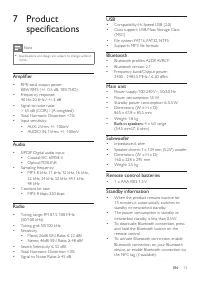
13 EN 7 Product specifications Note • Specifications and design are subject to change without notice. Amplifier • RMS total output power : 80W RMS (+/- 0.5 dB, 10% THD) • Frequency response: 40 Hz-20 kHz / +/-3 dB • Signal-to-noise ratio: > 65 dB (CCIR) / (A-weighted) • Total Harmonic Distor tion...
Page 15 - Troubleshooting
14 EN 8 Troubleshooting Warning • Risk of electric shock. Never remove the casing of the product. To keep the warranty valid, never tr y to repair the product yourself. If you have problems using this product, check the following points before you request ser vice. If you still have a problem, get s...