Page 2 - Contents
1 EN Contents 1 Important 2 Safety 2Notice 2 2 Your camcorder 4 Introduction 4What's in the box 4 Functional over view 5 3 Get started 7 Load the Micro SD card 7 Turn on 7 First-time setup 7 Charge the built-in batter y 8 4 Use your water and drop proof camcorder 9 Record video 9 Take pictures 9 Pla...
Page 3 - Important; Safety; Notice
2 EN 1 Important Safety a Read these instructions. b Keep these instructions. c Heed all warnings. d Follow all instructions. e Clean only with dry cloth. f Do not block any ventilation openings. Install in accordance with the manufacturer's instructions. g Do not install near any heat sources such ...
Page 5 - Introduction
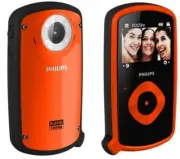
4 EN 2 Your camcorder Introduction With this portable camcorder, you can: take full HD (1080P), spor ts HD (720P with 60 FPS) or VGA movies take pictures take the camcorder underwater (up to 3 meters, 10 feet) take with you anywhere thanks to the rugged and drop-proof design (1.5-meter drop-proof) p...
Page 6 - Functional overview; l m
5 EN Functional overview a Built-in speaker b Display panel c mode. In play mode, play a selected video clip. d / Navigate left/right in a menu. Select a menu option. In play mode, turn to the previous/next picture/video clip. ( the scene selection window. ( the settings menu. e +/- Navigate up/down...
Page 8 - started; Load the Micro SD card
7 EN 3 Get started Load the Micro SD card 1 Unlock the fastener on the protective cover. 2 Flip open the protective cover. 3 Inser t a Micro SD card (not supplied) into the micro SD socket. Make sure that the the Micro SD card is not write-protected. Make sure that the metal contact of the card face...
Page 9 - Select a special effect; Charge the built-in battery
8 EN Tip See 'Use your camcorder - Adjust settings' for more settings. Select a special effect 1 to enter special effect setting. 2 Press +/- to select a special effect. 3 Press =# Or press to cancel and go back to Charge the built-in battery 1 ?#">protective cover at the bottom of the camcor...
Page 10 - Use your water; Record video; Take pictures; Play
9 EN 4 Use your water and drop proof camcorder Note This camcorder is designed to be drop-proof (1.5 meters, 5 feet) and water-proof (3 meters, 10 feet). You can take this camcorder 3 meters (10 feet) #"@happening underwater.You can also take it out with you on the beach, in the pool or anywhere...
Page 11 - Preview; Options during video play; Adjust volume level
10 EN Zoom in a picture 1 In play mode, press / to select a picture. 2 Press + to enter the edit window. 3 Press 4 Press + /-/ / to pan through the enlarged picture. To return to normal view, press . Trim a video clip Note &J+ Jbe edited (trimmed) on the camcorder. 1 In play mode, press / to sel...
Page 12 - Adjust settings
11 EN Adjust settings 1 . » A settings menu is displayed. 2 Press +/- to highlight an option. 3 Press / to select a setting. 4 Press Settings menu option Description [Flash] *> ] [On] , [Off] or [Auto] . [Resolution] Select a video resolution: [Full HD] (for best video quality), [Sports HD] ^"...
Page 13 - View video or pictures on TV; Install the camcorder software
12 EN 5 Use more of your camcorder View video or pictures on TV 1 ?#">protective cover at the bottom of the camcorder. 2 Connect an HDMI cable (not supplied) to: the HDMI socket on the camcorder (requiring a mini HDMI connector) the HDMI input socket on an HDTV » An inquir y box for output mo...
Page 16 - Frequently
15 EN 7 Frequently asked questions (FAQ) Why is there no response when I use the camcorder? * The camcorder is in power-off mode. Turn on the camcorder (see 'Get star ted' > 'Turn on'). * The built-in batter y may be drained. Charge the batter y (see 'Get star ted' > 'Charge the built-in batte...
Page 19 - get the very most from your purchase.; *Product Safety Notification
18 Register online at www.philips.com/welcome today to get the very most from your purchase. *Product Safety Notification *Additional Benefits By registering your product, you'll receive notification - directly from the manufacturer. Registering your product guarantees that you'll receive all of the p...