Philips AZ100B/12 - Manuals
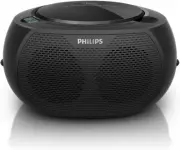
User Manual Philips AZ100B/12


Summary
2 EN 1 Important This 'bolt of lightning' indicates uninsulated material within the device may cause an electrical shock. For the safety of ever yone in your household, please do not remove the covering. The 'exclamation mark' calls attention to features for which you should read the enclosed litera...
3 EN 2 Your CD Soundmachine Congratulations on your purchase and welcome to Philips! To fully benefit from the suppor t that Philips offers, register your product at www. philips.com. Introduction With this unit, you can: • enjoy audio from discs and other external devices; • listen to radio station...
4 EN 3 Get started Always follow the instructions in this chapter in sequence. Install batteries Note • The batteries contain chemical substances, so they should be disposed of properly. 1 Open the batter y compar tment. 2 Inser t 6 x 1.5 V R14/UM2/C CELL batteries (not supplied) with correct polari...
Philips Manuals
-
 Philips 50PFL5907/F7
User Manual
Philips 50PFL5907/F7
User Manual
-
Philips 50PFL5907/F7
Quick Guide
-
 Philips 32PFL4508/F7
User Manual
Philips 32PFL4508/F7
User Manual
-
Philips 32PFL4508/F7
Quick Guide
-
 Philips 39PFL2908/F7
User Manual
Philips 39PFL2908/F7
User Manual
-
Philips 39PFL2908/F7
Quick Guide
-
Philips 55PFL5907/F7
User Manual
-
Philips 55PFL5907/F7
Quick Guide
-
Philips 46PFL5907/F7
User Manual
-
Philips 46PFL5907/F7
Quick Guide
-
Philips 40PFL4908/F7
User Manual
-
Philips 40PFL4908/F7
Quick Guide
-
Philips 40PFL4708/F7
User Manual
-
Philips 40PFL4708/F7
Quick Guide
-
Philips 40PFL1708/F7
User Manual
-
Philips 29PFL4908/F7
User Manual
-
Philips 29PFL4908/F7
Quick Guide
-
Philips 42PFL5907/F7
User Manual
-
Philips 42PFL5907/F7
Quick Guide
-
 Philips 32PFL5708/F7
User Manual
Philips 32PFL5708/F7
User Manual