Page 3 - Contents
1 EN Contents 1 Important 2 Safety 2 Notice 2 2 Your FM/DAB radio 4 Introduction 4 About DAB 4 What's in the box 4 Over view of the main unit 5 3 Get started 6 Prepare FM/DAB antenna 6 Connect power 6 Turn on 7 Adjust the volume level 7 4 Listen to radio 8 Listen to DAB radio 8 Listen to FM radio 9 ...
Page 4 - Important; Safety; Important Safety Instructions; Notice
2 EN 1 Important Safety Important Safety Instructions a Read these instructions. b Keep these instructions. c Heed all warnings. d Follow all instructions. e Do not use this apparatus near water. f Clean only with dry cloth. g Do not block any ventilation openings. Install in accordance with the man...
Page 6 - radio; Introduction
4 EN 2 Your FM/DAB radio Congratulations on your purchase, and welcome to Philips! To fully benefit from the suppor t that Philips offers, register your product at www.philips.com/welcome. Introduction With this unit, you can enjoy both FM radio and Digital Audio Broadcasting (DAB) radio. About DAB ...
Page 7 - Overview of the main unit
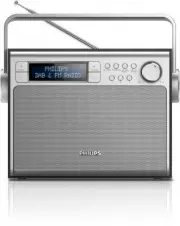
5 EN Overview of the main unit a PRESET +/- • Select a preset radio station b Display panel • Display the current status. c TUNING +/- • Tune to a FM station. • Navigate a DAB station list. • Navigate an FM/DAB menu. d SOURCE • Select a sound source: DAB or FM radio. e PROGRAM • Store radio stations...
Page 8 - Get started; Prepare FM/DAB antenna; Connect power
6 EN 3 Get started Caution • Use of controls or adjustments or performance of procedures other than herein may result in hazardous radiation exposure or other unsafe operation. Always follow the instructions in this chapter in sequence. If you contact Philips, you will be asked for the model and ser...
Page 9 - Option 2: Battery power; Turn on; Adjust the volume level
7 EN Option 2: Battery power Caution • Batteries (batter y pack or batteries installed) shall not be exposed to excessive heat such as sunshine, fire or the like. • Danger of explosion if batter y is incorrectly replaced. Replace only with the same equivalent type. • Do not mix batteries (old and ne...
Page 10 - Listen to radio; Listen to DAB radio; Tune to DAB radio stations; Store DAB radio stations; Store DAB radio stations manually; Select a preset DAB radio station
8 EN 4 Listen to radio Listen to DAB radio Tune to DAB radio stations Note • Make sure that the antenna is fulled extended. 1 Press SOURCE repeatedly to select DAB radio. » [Full SCAN] (full scan) is displayed. 2 Press SCAN / SELECT to star t full scan. » The unit stores all the DAB radio stations a...
Page 11 - Listen to FM radio; Tune to FM radio
9 EN Show DAB information • During DAB radio broadcast, press INFO / MENU repeatedly to scroll through the following information (if available): » Station name » Dynamic Label Segment (DLS) » Signal strength » Program type (PTY) » Ensemble Name » Channel and frequency » Signal error rate » Bit rate ...
Page 12 - Store FM radio stations manually; Select a preset FM radio station; Use system menu in FM/DAB; Reset all the settings
10 EN Store FM radio stations manually 1 Tune to an FM radio station. 2 Press PROGRAM to activate programming mode. 3 Press PRESET +/- repeatedly to select a preset number. 4 Press PROGRAM to confirm. 5 Repeat steps 1 - 4 to store more FM stations. Tip • At step 2, you can also press and hold preset...
Page 13 - Know the software version
11 EN Know the software version 1 Enter the system setting menu. 2 Press TUNING +/- until [SW version] (Software version) is displayed. 3 Press SCAN / SELECT to confirm. » The software version of the unit is displayed.
Page 14 - mplifier
12 EN 5 Product information Note • Product information is subject to change without prior notice. A mplifier Maximum Output Power 3 W Frequency Response 40 - 20000 Hz, ±3dB Tuner Tuning Range FM: 87.5 - 108MHz Tuning grid (FM) 50 KHz Sensitivity - Mono, 26dB S/N Ratio - Stereo, 46dB S/N Ratio < 2...
Page 15 - Troubleshooting
13 EN 6 Troubleshooting Warning • Never remove the casing of this apparatus. To keep the warranty valid, never tr y to repair the system yourself. If you encounter problems when using this apparatus, check the following points before requesting ser vice. If the problem remains unsolved, go to the Ph...