Page 2 - Contents; Important
2 EN Contents 1 Important 3 Impor tant safety instructions 3 2 Your Docking Speaker 4 Introduction 4 What's in the box 4 Over view of the main unit 5 3 Get started 6 Connect power 6 4 Play 6 Play from iPod/iPhone 6 Listen to the iPod/iPhone 6 Charge the iPod/iPhone 7 Play from an external audio devi...
Page 3 - Important safety instructions
3 EN 1 Important Important safety instructions a Read these instructions. b Keep these instructions. c Heed all warnings. d Follow all instructions. e Do not use this apparatus near water. f Clean only with dry cloth. g Do not block any ventilation openings. Install in accordance with the manufactur...
Page 4 - Introduction
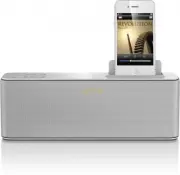
4 EN 2 Your Docking Speaker Congratulations on your purchase, and welcome to Philips! To fully benefit from the suppor t that Philips offers, register your product at www.philips.com/welcome. If you contact Philips, you will be asked for the model and serial number of this apparatus. The model numbe...
Page 5 - Overview of the main unit
5 EN Overview of the main unit a 12/24H • Choose clock display of 12H or 24H. b • Adjust brightness of the display panel. c VOLUME + / - • Adjust volume. d Dock for the iPod/iPhone e MP3-LINK • Connect an external audio device. f DC IN • Connect AC power. b a c f d e
Page 6 - Get started; Connect power; Play from iPod/iPhone; Compatible iPod/iPhone
6 EN 3 Get started Always follow the instructions in this chapter in sequence. Connect power Caution • Risk of product damage! Make sure that the power supply voltage matches the voltage printed on the bottom of the docking speaker. • Risk of electric shock! When you unplug the AC adaptor, always pu...
Page 7 - Other features; Adjust volume
7 EN To remove the iPod/iPhone: Pull the iPod/iPhone out of the dock. Charge the iPod/iPhone When the docking speaker is connected to power, the docked iPod/iPhone begins to charge automatically. Play from an external audio device Connect an MP3 link cable (not supplied) to: • the MP3 LINK socket at...
Page 8 - Specifications; Amplifier; Troubleshooting
8 EN 5 Specifications Amplifier Rated output Power 2 x 4 W RMS Signal to Noise Ratio > 62 dB General information AC Power Model: AS110-080- AA130 (Philips); Input: 100-240 V ~, 50/60Hz, 0.5A; Output: 8.0V 1.3A Operation Power Consumption 15 W Standby Power Consumption <1 W Dimensions - Main Un...
Page 9 - Notice
9 EN 7 Notice Any changes or modifications made to this device that are not expressly approved by Philips Consumer Lifestyle may void the user’s authority to operate the equipment. This Class B digital apparatus complies with Canadian ICES-003. This device complies with Industr y Canada license-exem...
Page 10 - get the very most from your purchase.; *Product Safety Notification; Return your Product Registration Card or register online at; Purchase
10 Register online at www.philips.com/welcome today to get the very most from your purchase. Visit our World Wide Web Site at http://www.philips.com/welcome Registering your model with PHILIPS makes you eligible for all of the valuable benefits listed below,so don't miss out. Register online at www....
Page 11 - PHILIPS LIMITED WARRANTY
11 PHILIPS LIMITED WARRANTY ONE (1) YEAR WARRANTY COVERAGE: PHILIPS warranty obligation is limited to the terms set forth below. WHO IS COVERED: Philips warrants the product to the original purchaser or the per- son receiving the product as a gift against defects in materials and workmanship as base...
Page 12 - Philips Consumer Lifestyle
Specifications are subject to change without notice © 2012 Koninklijke Philips Electronics N.V. All rights reserved. AD348_37_UM_V2.0 Philips Consumer Lifestyle A division of Philips Electronics North America Corporation P.O. Box 10313 Stamford, CT 06904 Phone: 1-888-PHILIPS (744-5477) Meet Philips ...