Philips AD340/05 - Manuals
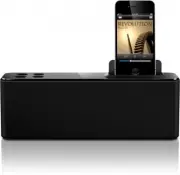
User Manual Philips AD340/05


Summary
1 EN Contents 1 Important 2 2 Your Docking Speaker 3 Introduction 3What's in the box 3 Over view of the main unit 4 3 Get started 5 Connect power 5 4 Play 5 Play from iPod/iPhone 5 Play from an external audio device 6 Charge the iPod/iPhone 6 7 General information 7 6 Troubleshooting 7 7 Notice 8
2 EN 1 Important Read these instructions. Heed all warnings. Follow all instructions. Do not use this apparatus near water. Do not block any ventilation openings. Install in accordance with the manufacturer's instructions. Do not install near any heat sources such as radiators, heat registers, stove...
3 EN 2 Your Docking Speaker Congratulations on your purchase, and %&()" suppor t that Philips offers, register your product at www.philips.com/welcome.If you contact Philips, you will be asked for the model and serial number of this apparatus. The model number and serial number are on the bo...
Quick Guide Philips AD340/05


Philips Manuals
-
 Philips 50PFL5907/F7
User Manual
Philips 50PFL5907/F7
User Manual
-
Philips 50PFL5907/F7
Quick Guide
-
 Philips 32PFL4508/F7
User Manual
Philips 32PFL4508/F7
User Manual
-
Philips 32PFL4508/F7
Quick Guide
-
 Philips 39PFL2908/F7
User Manual
Philips 39PFL2908/F7
User Manual
-
Philips 39PFL2908/F7
Quick Guide
-
Philips 55PFL5907/F7
User Manual
-
Philips 55PFL5907/F7
Quick Guide
-
Philips 46PFL5907/F7
User Manual
-
Philips 46PFL5907/F7
Quick Guide
-
Philips 40PFL4908/F7
User Manual
-
Philips 40PFL4908/F7
Quick Guide
-
Philips 40PFL4708/F7
User Manual
-
Philips 40PFL4708/F7
Quick Guide
-
Philips 40PFL1708/F7
User Manual
-
Philips 29PFL4908/F7
User Manual
-
Philips 29PFL4908/F7
Quick Guide
-
Philips 42PFL5907/F7
User Manual
-
Philips 42PFL5907/F7
Quick Guide
-
 Philips 32PFL5708/F7
User Manual
Philips 32PFL5708/F7
User Manual