Page 3 - IMPORTANT SAFEGUARDS; the wall or
IMPORTANT SAFEGUARDS 3 17. Before using this appliance, move it 10 to 15cm (4 to 6 inches) away from the wall or any object on the counter top. Remove any object that may have been placed on top of the appliance. Do not use on surfaces where heat may cause a problem. toaster oven. as they may creati...
Page 6 - CONSERVEZ CES INSTRUCTIONS
6 A. L’appareil est équipé d’un cordon d’alimentation court afin de réduire le risque d’emmêlement ou de trébuchement en raison d’un cordon trop long. B. Il existe des rallonges et celles-ci peuvent être utilisées à condition de faire preuve de prudence. C. Si une rallonge est utilisée, (1) les cara...
Page 7 - Features
Also serves as lighting 7 Ŗ In addition to the toaster function, its oven function allows you to bake cakes and tarts quickly and easily without preheating. Heats the inside of food efficiently. * The interior of the toaster oven is brighter than conventional products while the power is on. Ŗ Press ...
Page 8 - Please observe these precautions fully.; The symbols are classified and explained as follows.; CAUTION
Please observe these precautions fully. 8 The symbols are classified and explained as follows. This symbol indicates prohibition. . This symbol indicates requirement that must be followed. . Indicates serious injury or death. Indicates risk of jnjury or property damage. CAUTION Service center. oven ...
Page 9 - fe
CAUTION When unplugging the unit, pull by the power plug – not the cord. When the unit is not in use, unplug the power plug from the wall outlet. Deteriorating insulation may result in an electric shock and/or fire. This appliance is not intended to be operated by means of an external timer or separ...
Page 10 - Operation panel; Using the time
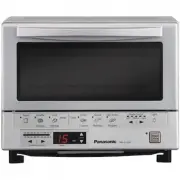
- 10 toward cord Operation panel Six automatic cooking keys Set the temperaturefor timer cooking Rough estimate, required cookingtime is displayed(common to auto/timer) Set time in one min.intervals after 10 min. Power on lamp Using automatic cooking key for cooking (See page 12.) Select the color o...
Page 11 - Accessory; Part; oven rack
Accessory 1 oven tray 11 Part Names and Handling Instructions Lighting (near-infrared ray heater serves also as lighting.) Ŗ Press the light button to turn on the near-infrared ray heater to brighten the interior of the toaster oven so that you can check the food. The heater will automatically turn ...
Page 12 - Cooking using automatic cooking keys; Preparations; How to set the color of browning (Using the shade control)
Cooking using automatic cooking keys (Operating procedure) Insert the power plug into the wall outlet.Put the food inside the toaster oven. Preparations 123 1 3 Press [Power off/on] (Red power lamp comes on.) Press any of the automatic cooking keys. Within 30 seconds, How to set the color of brownin...
Page 13 - Bread can be toasted to your desired color of browning.; Toast; Frozen bread can also be toasted to your desired color of browning.; Frozen Waffle; Rolls can be reheated without browning.; Reheat Roll; ki; Baking pizza up to; Frozen Pizza
How to place food inside Cooking note: Cooking note: Cooking note: Bread can be toasted to your desired color of browning. (1 – 4 slices) Toast If you want to toast, place it at the center of oven rack. How to place food inside Frozen bread can also be toasted to your desired color of browning. (1 –...
Page 17 - Points for cooking with timer
Parchment paper(cooking sheeting) Important Note 17 C o o ki n g u si n g t h e t im e r Cooking time Ŗ There is no need for preheating. Ŗ The standard time varies with the temperature, quality, quantity of food and material of the cooking tray. Adjust properly by watching how the food is heated. Ŗ ...
Page 18 - Remove the power plug and make sure the toaster oven is cold.; Cooking guide; Automatic cooking
Maintenance: Remove the power plug and make sure the toaster oven is cold. Cooking guide Automatic cooking Cooking results may vary. Adjust shade control to your individual preferences. Key Quantity Standard cooking time Note Recipes Oven tray Toast Frozen Chicken Nuggets Chicken Wings Frozen Pizza ...
Page 19 - Gooking
Troubleshooting If... The toaster oven cannot be turned onwhen the power button is pressed. Check to see if the power plug is securely inserted into the wall outlet. The automatic cooking function doesnot function properly. The plug has been disconnected. Ŗ Read “Cooking using automatic cooking keys...
Page 20 - Mesures de sécurité; Ce symbole indique une interdiction.
Mesures de sécurité Indique un risque de blessure sérieuse ou mortelle. Ce symbole indique une interdiction. Ce symbole indique une condition à respecter. Le tableau suivant indique le degré de risque dû à une manipulation incorrecte. Indique un risque de blessure ou de dommages matériels sil’appare...
Page 21 - ATTENTION
Ŗ Ne pas ouvrir la porte tant que les flammes ne sont pas éteintes. Si de l’air pénètre à l’intérieur du four grille-pain, la flamme sera avivée. Ŗ Ne pas verser d’eau sur le four grille-pain. (La vitre en verre éclaterait.) Ŗ Veillez à mettre le bouton d'alimentation sur arrêt lorsque vous partez. ...
Page 22 - Panneau de commandes; Cuisson à l’aide des touches de cuisson automatique (voir page 24)
Panneau de commandes Six touches de cuisson automatique Cuisson à l’aide des touches de cuisson automatique (voir page 24) Sélectionner la couleur de brunissage Régler la températurepour la cuisson avecminuterie La durée de cuisson nécessaireapproximative est affichée(commun à auto et minuterie) Rég...
Page 23 - Accessoire
Éclairage (l’élément chauffant à infrarouges proches sert également d’éclairage) Ŗ Appuyer sur la touche [Light] (d’éclairage) pour allumer l’élément chauffant à infrarouges proches afin d’éclairer l’intérieur du four grille-pain pour vérifier la cuisson des aliments. L’élément chauffant s’éteindra ...
Page 24 - Cuisson à l’aide des touches de cuisson automatique; Préparatifs; La cuisson est lancée et la durée moyenne de cuisson est affichée.; Après l’utilisation :
123 1 3 Light Medium Dark Min. 2 1 2 Ŗ Le voyant s'allume par intervalle à chaque fois que la touche est enfoncée. Ŗ Le brunissage varie en fonction du type et de la quantité de nourriture et de la taille (poids) de chaque morceau. Ŗ Une fois que le four grille-pain est réglé sur une intensité de br...
Page 25 - Waffle; Gaufres
Le Le Waffle Gaufres gaufres 25 [Light](pâle). [Dark] (foncé) [Light](pâle). [Light](pâle). [Light](pâle)
Page 26 - Réchauffer des aliments frits.
Lors de la cuisson d’une grande pizza, le côté prochede la porte risque de ne pas être suffisamment cuit.S’assurer de bien placer la pizza au fond du four. Durée moyenne de cuisson : 12 à 14 minutes. * La durée de cuisson peut varier en fonction du réglage de [Shade Control] ( l’intensité debrunissa...
Page 29 - Cuisson avec la mi
surveillant 29 Cuisson avec la mi nuterie 460 °F–500 °F 250 °F–285 °F ( ) ( )
Page 31 - Entretien
Ŗ La consommation électrique est d’environ 0,4 W lorsque la fiche est branchée mais sans que le four soit allumé au moyen de la touche d’alimentation. Si… Cause éventuelle et comment y remédier Impossible de mettre le four grille-pain en marche en appuyant sur la touche d’alimentation. La fonction d...
Page 32 - Panasonic Kitchen Appliance
32 Limited Warranty (ONLY FOR U.S.A. AND PUERTO RICO) Panasonic Consumer Marketing Company of North America,Division of Panasonic Corporation of North America One Panasonic Way, Secaucus, New Jersey 07094 Panasonic Kitchen Appliance Limited Warranty Limited Warranty Coverage (For USA and Puerto Rico...
Page 33 - EXCHANGE PROGRAM
33 Limited W arranty / EXCHANGE PROGRAM Panasonic Canada Inc. 5770 Ambler Drive, Mississauga, Ontario L4W 2T3 PANASONIC PRODUCT – LIMITED WARRANTY EXCHANGE PROGRAM Panasonic Canada Inc. warrants this product to be free from defects in material and workmanship under normaluse and for a period as stat...
Page 34 - PRODUIT PANASONIC – GARANTIE LIMITÉE; PROGRAMME DE REMPLACEMENT
34 Panasonic Canada Inc. 5770, Ambler Drive, Mississauga (Ontario) L4W 2T3 PRODUIT PANASONIC – GARANTIE LIMITÉE PROGRAMME DE REMPLACEMENT Panasonic Canada Inc. garantit que ce produit est exempt de défauts de matériaux et de main-d’œuvre dansun contexte d’utilisation normale pendant la période indiq...
Page 35 - Memo
Page 36 - Panasonic Consumer Electronics Company
Printed in China © Panasonic Manufacturing (Xiamen) Co.,Ltd. 2012 BZ51-1751 PMX0912K10912 Imprimé en Chine Panasonic Consumer Electronics Company Panasonic Canada Inc. Division of Panasonic Corporationof North America One Panasonic Way, Secaucus, New Jersey 07094www.panasonic.com 5770 Ambler Drive,M...