Page 2 - Table of contents
2 Features ............................................................................................................................. 3 Getting to know your product Components ........................................................................................................................ ...
Page 3 - Welcome...; to your TV7400 2.4GHz Amplified Wireless TV Headset; Features
3 *Need some help? Call 02 4574 8888 or go to www.oricom.com.au Features Welcome… to your TV7400 2.4GHz Amplified Wireless TV Headset The Oricom Wireless TV Headset is an audio amplification system specifically designed for people with hearing difficulties. The Oricom Wireless TV Headset can be used...
Page 4 - An initial
4 *Need some help? Call 02 4574 8888 or go to www.oricom.com.au Features Need help? If you have any problems setting up or using your TV7400 TV headset, please find answers to Frequently Asked Questions, available at oricom.com.au WARNINGS: • Never attempt to recharge conventional dry cells.• Batter...
Page 5 - Getting to know your product; Components
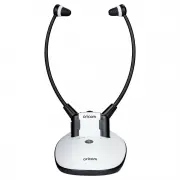
5 *Need some help? Call 02 4574 8888 or go to www.oricom.com.au Getting to know your product Getting to know your product Components (A1) TV Headset Receiver(A2) Charging Cradle and Transmitter(A3) Power Supply(A4) Optical Cable(A5) Audio Cable (both ends with 3.5mm stereo plug) (A6) RCA Adapter Cab...
Page 6 - Function identification: headset receiver; Function identification: Headset receiver; FRONT
6 *Need some help? Call 02 4574 8888 or go to www.oricom.com.au Function identification: headset receiver Function identification: Headset receiver FRONT REAR (B1) Earbuds(B2) Volume Control(B3) Power/Signal LED Indicator(B4) Mute Button for Verbal Communications(B5) Microphone(B6) Pair Button for F...
Page 7 - Function identification: transmitter
7 *Need some help? Call 02 4574 8888 or go to www.oricom.com.au Function identification: transmitter Function identification: transmitter (C8) (C9) (C10) (C11) FRONT REAR (C1) Charging Pins(C2) Tone Adjustment(C3) LED Indicator: Battery Charge (Red = charging, Green = fully charged)(C4) LED Indicato...
Page 8 - Charging the Battery
8 *Need some help? Call 02 4574 8888 or go to www.oricom.com.au Charging the Battery 1. The signal LED Indicator on the Headset Receiver will blink slowly when the battery level is low. At this stage there are about 20 minutes of operating time before the Headset will switch off. Recharge the batter...
Page 9 - Installation; Transmitter
9 *Need some help? Call 02 4574 8888 or go to www.oricom.com.au Installation Installation Transmitter (D1) Connect the Power Supply to the DC IN Socket located on the Charge Cradle rear panel. (D2) Connect the Power Supply to mains power outlet (100-240V~50/60Hz). (D3) Connect one end of the Optical...
Page 10 - NOT PROVIdEd; Headset receiver
10 *Need some help? Call 02 4574 8888 or go to www.oricom.com.au (D5) Accessories (6.3mm and SCART Adaptor) in above drawing are NOT PROVIdEd in the pack components. (D6) If your Audio Source does not have an optical socket, then use one of the following Adapters that connects to the Audio In of the...
Page 11 - Operation; Initial Operation
11 *Need some help? Call 02 4574 8888 or go to www.oricom.com.au Operation Operation Initial Operation 1. Make sure the TV7400 is plugged into the mains supply. 2. Place the TV Headset in the Charging Cradle for at least three hours to allow it to fully charge. • Make sure the TV Headset is switched...
Page 12 - Improving Sound by Switching Channels; Note: Make sure the battery is fully charged before first use.
12 *Need some help? Call 02 4574 8888 or go to www.oricom.com.au Improving Sound by Switching Channels Note: Make sure the battery is fully charged before first use. Charge the battery for about 3 hours before first use. RF Transmission of the Transmitter will automatically switch OFF in approximate...
Page 15 - Technical specifications / Troubleshooting; Technical specifications; Troubleshooting
15 *Need some help? Call 02 4574 8888 or go to www.oricom.com.au Technical specifications / Troubleshooting Technical specifications Battery operating Time Up to 6 Hours Range Up to 25 meters (open area) Frequency response 30 Hz – 10K Hz Signal-to-noise ratio >65 dB distortion <2% Headset weig...
Page 16 - distortion; Cleaning & Maintenance; dO NOT
16 *Need some help? Call 02 4574 8888 or go to www.oricom.com.au Cleaning & Maintenance • Check whether the Headset volume level is set too low. Adjust the volume to a suitable level. • If the sound is not clear and distorted, change the frequency Channel selection on the back of the Charge Crad...
Page 18 - How to make a claim under your Express Warranty in Australia
18 No change to the conditions of this Express Warranty is valid unless it is made in writing and signed by an authorised representative of Oricom. Oricom will not be liable under this Express Warranty, and to the extent permitted by law will not be liable for any defect, loss, damage or injury aris...
Page 19 - Important Information; Repair Notice
19 Please note that this Express Warranty excludes expenses incurred by you in returning any faulty product to us. You must arrange and pay any expenses incurred (including postage, delivery, freight, transportation or insurance of the product) to return the faulty product to us, however, we will ar...
Page 20 - ORICOM CUSTOMER SUPPORT; Oricom Support - Australia
ORICOM CUSTOMER SUPPORT Oricom have a trained and dedicated team of Customer Support Representatives, each with the knowledge and resources to assist in answering your questions quickly and efficiently. Oricom Support - Australia For all product enquiries, troubleshooting or to discuss the range of ...