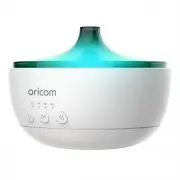
Page 2 - Setting up your Nursery Calm; cover from diffuser base.
2. Setting up your Nursery Calm Place the Nursery Calm on a flat, even surface, remove the top cover from diffuser base. Fill the water tank with clean, cool water up to MAX line. To create an aroma scent, add a few drops of essential oil (not included) to dilute with the water in the tank. Replace ...
Page 3 - Using the Product; Turn On the Nursery Calm; humidifier and night light.; Important for Bluetooth:
3. Using the Product 3.1 Turn On the Nursery Calm Press button to turn on the Nursery Calm. 3.2 Set Timer You can set a timer to schedule the working hours of the Nursery Calm. Press button to turn on the timer and select 1h / 3h / 6h or switch off both aroma diffuser / humidifier and night light. 3...
Page 4 - Water must never be filled over 200 ML (MAX)
4. Troubleshooting Problem Possible Cause Solution Unit will not turn on There is not enough water in the Water Tank. The AC adaptor is not connected to a power supply. Add water to the tank; Carefully disconnect the AC adaptor from the DC Socket and the power supply, check the cables, then reconnec...
Page 5 - General Information
6. General Information Express Warranty (Australia) This Express Warranty is provided by Oricom International Pty Ltd ABN 46 086 116 369, Unit 1, 4 Sovereign Place, South Windsor NSW 2756, herein after referred to as “Oricom”. Oricom warrants that the product is free from defects in materials or wor...
Page 6 - How to make a claim under your Express Warranty in Australia; instructions on how to return the product for warranty service.
whichever is longer. During the Express Warranty Period, Oricom will where possible repair and if not replace the faulty product or part thereof. All component parts removed under this Express Warranty become the property of Oricom. In the unlikely event that your Oricom product has a recurring fail...
Page 7 - Important Information - Repair Notice
Please note that if a Customer Support Team member advises that your product does not qualify for return, this warranty does not apply to your product. Products that are authorised to be returned to Oricom in Australia must include all of the following:• A completed Return Authorisation form • A cop...
Page 8 - Oricom Customer Support; Oricom Support - Australia
All rights reserved Printed in China Version 4.0 Ref: 2022-02-10 Oricom Customer Support Oricom have a trained and dedicated team of Customer Support Representatives, each with the knowledge and resources to assist in answering your questions quickly and efficiently. Oricom Support - Australia For a...