Page 2 - After Sales Support; Welcome
2 After Sales Support 1300 886 649 | tempo.org/support Welcome Congratulations on choosing to buy a ONIX ® product. All products brought to you by ONIX ® are manufactured to the highest standards of performance and safety and, as part of our philosophy of customer service and satisfaction, this prod...
Page 3 - Contents
After Sales Support 1300 886 649 | tempo.org/support 3 Contents 02 Welcome 04 Warranty Details 05 General Safety Instructions 09 Unpacking 10 Product Overview 12 Installation 16 Getting Started 18 Instructions 21 FAQs and Troubleshooting 23 Other Useful Information 27 Repair and Refurbished Goods or...
Page 4 - General Safety Instructions; Electrical safety and cord handling; WARNING
4 After Sales Support 1300 886 649 | tempo.org/support General Safety Instructions Electrical safety and cord handling • Voltage: Before connecting and turning on the appliance, ensure the electrical voltage and circuit frequency correspond to those indicated on the rating label. • Power supply syst...
Page 6 - Installation
6 After Sales Support 1300 886 649 | tempo.org/support General Safety Instructions (Cont.) – underwire bras (damage to the appliance can result if metal reinforcements come loose during the washing cycle) – clothes that have any residues of flammable materials, as this may result in fire or explosio...
Page 7 - Cleaning and maintenance
After Sales Support 1300 886 649 | tempo.org/support 7 General Safety Instructions (Cont.) • Water connection: Connect the washing machine to the water mains using new hose sets. Do not reuse old hose sets. The required water pressure is 0.03 MPa (min.) to 0.85 MPa (max.). • Ventilation openings: Do...
Page 8 - Unpacking
8 After Sales Support 1300 886 649 | tempo.org/support Unpacking Unpacking • This product has been packaged to protect it against transportation damage. Keep the original packaging carton in a safe place. It will help prevent any damage if the product needs to be transported in the future. In the ev...
Page 9 - Product Overview; Scope of delivery; Front view
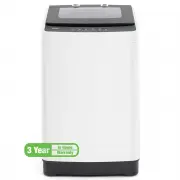
After Sales Support 1300 886 649 | tempo.org/support 9 Product Overview Scope of delivery Front view (Fig. 2) Parts list 1 Lid with viewing window 2 Control panel 3 Housing 4 Water inlet connections 5 Adjustable foot (1) 1 2 3 5 4 NOTE: Due to continued product improvement, images and illustrations ...
Page 10 - Interior view; Accessories; Rear view
10 After Sales Support 1300 886 649 | tempo.org/support Product Overview (Cont.) Interior view (Fig. 3) Accessories (not shown) 1 Cold water supply hose * 1 Hot water supply hose * 1 Drain hose with support (elbow) 1 Bottom cover and 2 screws Documentation (not shown) Instruction manual Quick start ...
Page 11 - Levelling the washer
After Sales Support 1300 886 649 | tempo.org/support 11 Levelling the washer • Install the washer on a stable and level surface, in a dry location, out of sunlight.• Open the lid and look inside the tub. It should be level in the centre of the housing. Use a spirit level to check and ensure the mach...
Page 12 - Connecting the water inlet hoses
12 After Sales Support 1300 886 649 | tempo.org/support Installation (Cont.) Connecting the water inlet hoses The water inlet hoses are supplied separately (in bags inside the washing tub) and need to be installed to your hot and cold water taps following the instructions below.• Check and ensure th...
Page 13 - Installing the drain hose
After Sales Support 1300 886 649 | tempo.org/support 13 Installation (Cont.) Installing the drain hose The drain hose is supplied separately (in a bag inside the washing tub) and needs to be installed following the instructions below. • Pinching the two bands of the clamp on the drain hose, connect ...
Page 14 - Electrical connection; Power supply system; Electrical installation advice
14 After Sales Support 1300 886 649 | tempo.org/support WARNING! This appliance must be earthed. In the event of a malfunction or breakdown, earthing will reduce the risk of an electric shock by providing a path of least resistance for the electric current. This appliance is equipped with a cord hav...
Page 15 - Getting Started
After Sales Support 1300 886 649 | tempo.org/support 15 Getting Started Control panel operation (Fig. 14) 1 POWER Press this button to turn on the power to the machine, or to set it to standby.After powering on, if you do not press the START button within 5 minutes, the machine will automatically po...
Page 16 - Before you start washing; Pretreatment of laundry
16 After Sales Support 1300 886 649 | tempo.org/support Getting Started (Cont.) Before you start washing At the end of the installation process, please check the following points to ensure everything will work properly when you want to start washing.• Is the washer stable and level? A spirit level w...
Page 17 - Instructions; Table 1: Wash programs guide; Wash programs
After Sales Support 1300 886 649 | tempo.org/support 17 Instructions Table 1: Wash programs guide Program Suitable items Number of rinses * Total program time (min) Water temperature Fuzzy # Normally soiled clothing and other items 2 42 Warm Bulky Heavily soiled clothing, large, bulky items 3 57 Hot...
Page 18 - Detergent recommendations; Table 2: Water levels guide
18 After Sales Support 1300 886 649 | tempo.org/support Detergent recommendations We suggest you use low-sudsing detergent in the amounts recommended on the detergent packaging. Alternatively, use the detergent amounts listed in Table 2, above. CAUTION: Do not overfill detergent! Too little detergen...
Page 20 - FAQs and Troubleshooting; Common non-fault phenomena
20 After Sales Support 1300 886 649 | tempo.org/support FAQs and Troubleshooting Not all unusual incidents you may encounter with your washing machine are faults, or cause for concern. Check in the list below what issues may arise and why. Also check in the table on the following page for solutions ...
Page 21 - Table 3: Troubleshooting guide
After Sales Support 1300 886 649 | tempo.org/support 21 Table 3: Troubleshooting guide Type of problem Indicators flashing Where to check The washer does not work at all. None • Check the POWER and START/PAUSE buttons. • Check whether the power plug is securely plugged in. • Check whether a power fa...
Page 22 - Other Useful Information; Cleaning and care; Cleaning the washing machine
22 After Sales Support 1300 886 649 | tempo.org/support Other Useful Information IMPORTANT! If you frequently wash with cold water only, you will need to clean the inside of your washing machine regularly (every three months), especially if you use a fabric softener. Liquid detergents can cause dete...
Page 24 - Service, repair and spare parts
24 After Sales Support 1300 886 649 | tempo.org/support Other Useful Information (Cont.) Pump strainer maintenance We recommend you clean the pump strainer regularly (at least once a month) to avoid blockages created by excess lint, fluff or items such as bobby pins or coins.Proceed as follows:1. Di...
Page 25 - Table 4: Specifications and technical parameters; Compliance
After Sales Support 1300 886 649 | tempo.org/support 25 Other Useful Information (Cont.) Table 4: Specifications and technical parameters Model ON-TLW7W Dimensions 597 mm x 593 mm x 930 mm Capacity (max. weight of dry wash load) 7 kgWeight 32.5 kg Power 220–240 V~, 50 Hz Rated input power 420 W Requ...
Page 26 - This page has been left blank intentionally.
26 After Sales Support 1300 886 649 | tempo.org/support This page has been left blank intentionally.
Page 28 - Warranty returns; Should you for any reason need to return this product for; Product does not work?; If you encounter problems with this product, or if it fails to
28 After Sales Support 1300 886 649 | tempo.org/support Warranty returns Should you for any reason need to return this product for a warranty claim, make sure to include all accessories with the product. Product does not work? If you encounter problems with this product, or if it fails to perform to...