Page 4 - Overview
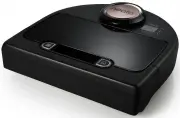
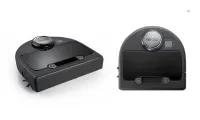
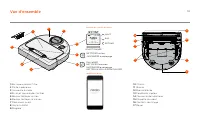
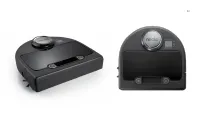
4 6 5 9 2 7 3 1 8 1 Dirt Bin and Filter 2 Top 3 Laser Cover 4 Display & Touch Controls 5 Clean Spot Button 6 Clean House Button 7 Front Bumper 8 Status Lights 9 Handle 10 Brush Guard 11 Brush 12 Side Brush 13 Drop Sensor Window 14 Battery Door 15 Robot Label 16 Charging Contacts 17 Wheels Overvi...
Page 5 - Wednesday; Turbo
3 Robot Control Panel Robot Status Lights The lights around the and buttons are used to indicate Battery Status and Error Conditions. Robot Home Screen - Robot status bar Wi-Fi Status Robot Wi-Fi Off Robot Wi-Fi On Blinking - Connecting to home Wi-Fi Blinking -Connecting to Neato server Solid – Conn...
Page 6 - IMPORTANT ITEMS; In; MANUAL; Clean, the only active sensors are; Tips
IMPORTANT ITEMS Keep your robot away from liquids and wet areas. Move or cover pet bowls and plant trays. Clear the area of small items like toys and clothing. Tie up wires, curtains and other low-hanging items. Thick carpet on top stair may affect the robot’s navigation system (top stair with low-p...
Page 7 - Preparation and Set Up; IMPORTANT; Remove Films and Stickers; Set Up Charge Base
5 Preparation and Set Up IMPORTANT Remove all protective films and shipping material from the robot and charge base. If they are not removed, Neato will not operate correctly. Plug the power cord securely into the charge base. Adjust the length of the cord by wrapping it as shown. IMPORTANT Open the...
Page 8 - NOTE; Find your language using buttons.; to choose a language.; SELECT; choose your language.; Charge Robot; Dansk
Place the rounded side of your Neato robot against the metal charging contacts on the charge base. NOTE The robot wakes up in two steps1) The Lights turn on in about 5 seconds and2) The LCD turns on about 15 seconds later. Before using for the first time, charge your Neato robot fully until both rob...
Page 9 - Using your robot with the Neato app; The benefits of using the Neato app are:
7 Using your robot with the Neato app The benefits of using the Neato app are: Easy access and control, wherever you are • Pause cleaning, set up a schedule, change cleaning modes all in the palm of your hand. Start your robot cleaning when you are not home • Select CLEAN House and your robot will c...
Page 10 - Setting up your robot with the Neato app
NOTE Before you begin, here’s what you will need: • Your home Wi-Fi name and password • Fully charged robot The Neato app can run on multiple devices in a household. Just download the Neato app to other devices and sign in to the same My Neato account using the username and password used to setup th...
Page 11 - Set Day and Time; Robot setup without the Neato app; Schedule; Schedule; Language
9 You may use your Neato robot without Wi-Fi or Neato app, but you will be missing out on extra convenience and functionality. Follow these steps for setup without Wi-Fi: Turn Wi-Fi Off If the robot screen is off, press to wake up Neato. Set Day and Time Day and Time must be set before you can sched...
Page 12 - Using your Neato robot with the robot control panel; Press or to; • Resume Cleaning; Start Cleaning; CLEAN House; Resume Cleaning
10 Using your Neato robot with the robot control panel Pause, Stop, Return to Start Press or to Pause Cleaning. When ready to continue, press to make your selection on the robot screen to: • Resume Cleaning • Stop Cleaning • Return to Start or Base If the robot screen is off, press to wake up your N...
Page 15 - Maintaining your Neato robot; Sensors; Use the cleaning tool comb to clean the filter.; Brushes
13 Maintaining your Neato robot IMPORTANT Your robot needs regular maintenance to operate reliably. This means checking/cleaning the brushes and emptying the dirt bin after every use or as needed, depending on your environment. Failure to do this may cause problems with your robot and impact your ro...
Page 21 - Mercredi
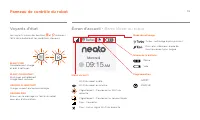
19 Panneau de contrôle du robot Voyants d’état Les voyants autour des boutons et indiquent l'état de la batterie et les conditions d'erreurs. Écran d'accueil - Barre d'état du robot Statut du Wi-Fi Wi-Fi du robot arrêté Wi-Fi du robot en marche Clignotement - Connexion au Wi-Fi du domicile Clignotem...
Page 22 - POINTS IMPORTANTS; nettoyage MANUEL; Conseils; Points et conseils importants
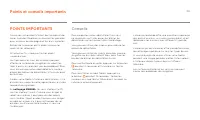
POINTS IMPORTANTS Conservez votre robot à l'écart des liquides et des zones humides. Déplacez ou couvrez les gamelles pour animaux de compagnie et les bacs à plantes. Retirez de la zone les petits objets comme les jouets et les vêtements. Attachez les fils, rideaux et autres objets suspendus bas. Le...
Page 23 - Préparation et installation; BAISSEZ; Mettre l'interrupteur en marche; Installer la base de charge
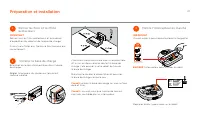
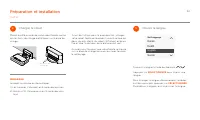
21 Préparation et installation IMPORTANT Retirez tous les films protecteurs et le matériel d'expédition du robot et de la base de charge. Si vous ne le faites pas, Neato ne fonctionnera pas correctement. Branchez le cordon d'alimentation dans la base de charge. Réglez la longueur du cordon en l'enro...
Page 24 - REMARQUE; SÉLECTIONNER; Charger le robot
Placez le côté arrondi de votre robot Neato contre les contacts de charge métalliques sur la base de charge. REMARQUE Le robot se rallume en deux étapes. 1) Les lumières s'allument en 5 secondes environ. 2) L'écran LCD s'allume environ 15 secondes plus tard. Avant de l'utiliser pour la première fois...
Page 25 - Utilisation de votre robot avec l'application Neato; Avantages de l'utilisation de l'application Neato
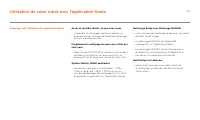
23 Utilisation de votre robot avec l'application Neato Avantages de l'utilisation de l'application Neato Accès et contrôle faciles, où que vous soyez • Suspendre le nettoyage, mettre en place une programmation, changer de mode de nettoyage : tout est à portée de main. Programmez le nettoyage lorsque...
Page 26 - Configuration de votre robot avec l'application Neato
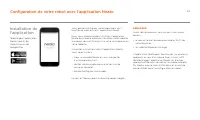
REMARQUE Avant de commencer, voici ce dont vous aurez besoin : • le nom et le mot de passe du réseau Wi-Fi de votre domicile ; • un robot entièrement chargé. L'application Neato peut fonctionner sur plusieurs appareils au sein d'un même foyer. Il vous suffit de télécharger l'application Neato sur d'...
Page 27 - Régler le jour et l'heure; pour accéder; Menu principal; Configuration de votre robot sans l'application Neato; Programmation; Programmation; Langue
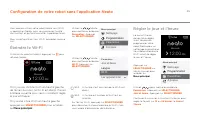
25 Vous pouvez utiliser votre robot Neato sans Wi-Fi ni application Neato, mais vous passeriez à côté d'un confort et de fonctionnalités supplémentaires. Pour la configuration sans Wi-Fi, procédez comme suit : Éteindre le Wi-Fi Si l'écran du robot est éteint, appuyez sur pour rallumer Neato. Régler ...
Page 28 - Suspendre le; • Reprendre nettoyage; Nettoyer; Reprendre nettoyage
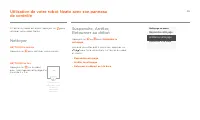
26 Utilisation de votre robot Neato avec son panneau de contrôle Suspendre, Arrêter, Retourner au début Appuyez sur ou pour Suspendre le nettoyage . Lorsque vous êtes prêt à continuer, appuyez sur pour faire votre choix sur l’écran du robot et choisir : • Reprendre nettoyage • Arrêter le nettoyage •...
Page 29 - Modes de nettoyage
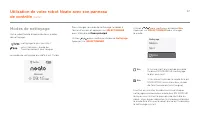
Eco Si la case n'est pas cochée le mode Turbo est EN MARCHE (nettoyage le plus puissant) Eco Si la case est cochée, le mode Eco est EN MARCHE (plus silencieux, durée de fonctionnement plus longue). Une fois en marche, le robot continue chaque nettoyage commencé en mode Eco EN MARCHE lorsque vous uti...
Page 30 - Programmer le nettoyage; Nettoyage
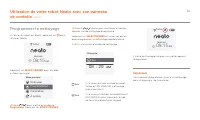
Utilisation de votre robot Neato avec son panneau de contrôle (suite) Programmer le nettoyage Si l'écran du robot est éteint, appuyez sur pour rallumer Neato. Appuyez sur SÉLECTIONNER pour accéder au Menu principal. Utilisez pour mettre en évidence Programmer Appuyez sur SÉLECTIONNER . Utilisez la d...
Page 31 - Entretien de votre robot Neato; Capteurs
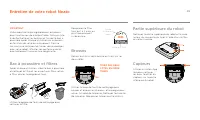
29 Entretien de votre robot Neato IMPORTANT Votre robot doit être régulièrement entretenu pour fonctionner de manière fiable. Cela consiste à vérifier/nettoyer les brosses et à vider le bac à poussière après chaque utilisation ou au besoin, en fonction de votre environnement. Dans le cas contraire, ...
Page 36 - Descripción general
4 6 5 9 2 7 3 1 8 1 Contenedor de suciedad y filtros 2 Parte superior 3 Cubierta láser 4 Controles de monitor y contacto 5 Botón Limpiar área 6 Botón Limpiar casa 7 Parachoques frontal 8 Indicadores de estado 9 Asa 10 Protector de las escobillas 11 Escobilla 12 Escobilla lateral 13 Ventana de sensor...
Page 37 - Turbo - el limpiador más potente; Miércoles
35 Panel de control del robot Indicadores de estado Las luces al lado de los botones y indican el estado de la batería y los errores. Pantalla de inicio del robot - Barra de estado del robot Estado Wi-Fi Robot Wi-Fi Off Robot Wi-Fi On Intermitente - Conectar al Wi-Fi de casa Intermitente - Conectar ...
Page 38 - ASPECTOS IMPORTANTES; limpieza; MANUAL, los únicos sensores; Consejos
ASPECTOS IMPORTANTES Mantenga el robot alejado de líquidos y áreas húmedas. Mueva o cubra los platos de las mascotas y las bandejas de las plantas.Ordene las habitaciones y quite objetos pequeños como juguetes y ropa.Ate cables, cortinas y otros elementos que cuelguen.Una moqueta gruesa en lo alto d...
Page 39 - Preparación y conexión; IMPORTANTE; Quitar las películas y pegatinas; Preparar la base de carga
37 Preparación y conexión IMPORTANTE Quite todas las películas protectoras y material de transporte y cargue la base. Si no las quita, Neato no funcionará correctamente. Conecte el cable de alimentación de forma segura en la base de carga. Ajuste la longitud del cable enrollándolo como se muestra. I...
Page 40 - para elegir un idioma.; SELECCIONAR; idioma y después elija su idioma.; Cargar robot
Coloque el lado redondo del Neato en los contactos metálicos de la base de carga. NOTA: El robot se activa en dos pasos1) Las luces se encienden en unos 5 segundos y2) La LCD se enciende unos 15 segundos después. Antes de utilizar Neato por primera vez, cargue su robot Neato al completo hasta que la...
Page 41 - Use su robot con la app de Neato; Los beneficios de usar la app de Neato son:
39 Use su robot con la app de Neato Los beneficios de usar la app de Neato son: Fácil acceso y control en cualquier lugar • Detenga la limpieza, fije un horario y cambie los modos de limpieza fácilmente y sin demora. Haga que su robot comience a limpiar cuando no esté en casa • Seleccione LIMPIAR ca...
Page 42 - Conecte su robot con la app de Neato
NOTA: Esto es lo que necesitará antes de empezar: • El nombre y la contraseña del Wi-Fi de casa • El robot completamente cargado La app de Neato puede funcionar en varios dispositivos a la vez dentro del hogar. Simplemente, descargue la app de Neato en otros dispositivos e inicie sesión en la misma ...
Page 43 - Ajustar día y hora; menú; para ir; menú principal; Conecte su robot sin la app de Neato; Acerca de; Día y hora
41 Puede usar su robot Neato sin Wi-Fi ni app, pero perderá la comodidad y funcionalidad extra. Siga estos pasos para configurarlo sin Wi-Fi. Apagar el Wi-Fi Si la pantalla del robot está apagada, pulse el botón para activar a Neato. Ajustar día y hora Se debe ajustar el día y la hora para poder pro...
Page 44 - Use su robot Neato a través del panel de control; Pulse o para; parar la limpieza; Cuando esté listo para continuar, pulse; • Reanudar limpieza; Iniciar la limpieza; LIMPIAR casa; Reanudar limpieza
42 Use su robot Neato a través del panel de control Parar, detener, volver a empezar Pulse o para parar la limpieza . Cuando esté listo para continuar, pulse para hacer su selección en la pantalla del robot para: • Reanudar limpieza • Detener limpieza • Volver a empezar o a la base Si la pantalla de...
Page 46 - Programar la limpieza; Programación
Use su robot Neato a través del panel de control (continuación) Eco Si la casilla no está marcada, significa que el modo Turbo está encendido – el limpiador más potente. Eco Si la casilla está marcada significa que el modo Eco está encendido, más silencioso y de rendimiento más largo. Programar la l...
Page 47 - Mantenimiento de su robot Neato; Sensores; Use la escobilla limpiadora para limpiar el filtro.; Escobillas
45 Mantenimiento de su robot Neato IMPORTANTE El robot necesita un mantenimiento regular para funcionar correctamente. Esto significa que hay que comprobar / limpiar las escobillas y vaciar el contenedor de suciedad después de cada limpieza o cuando lo necesite, según la situación. Si esto no se cum...