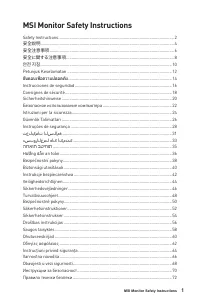
Page 2 - Contents
2 Contents Contents Getting Started .............................................................................................................. 3 Package Contents ................................................................................................... 3Installing the Monitor Stand .......
Page 3 - Getting Started; Package Contents
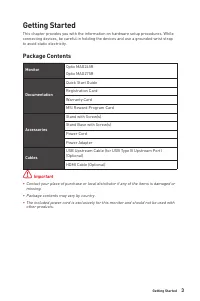
3 Getting Started Getting Started This chapter provides you with the information on hardware setup procedures. While connecting devices, be careful in holding the devices and use a grounded wrist strap to avoid static electricity. Package Contents Monitor Optix MAG245R Optix MAG275R Documentation Qu...
Page 4 - Installing the Monitor Stand
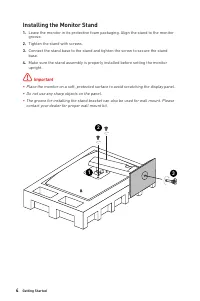
4 Getting Started Installing the Monitor Stand 1. Leave the monitor in its protective foam packaging. Align the stand to the monitor groove. 2. Tighten the stand with screws. 3. Connect the stand base to the stand and tighten the screw to secure the stand base. 4. Make sure the stand assembly is pro...
Page 5 - Adjusting the Monitor
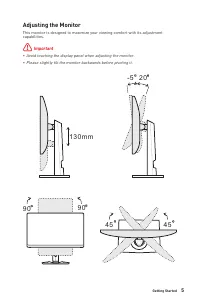
5 Getting Started Adjusting the Monitor This monitor is designed to maximize your viewing comfort with its adjustment capabilities. ⚠ Important ∙ Avoid touching the display panel when adjusting the monitor. ∙ Please slightly tilt the monitor backwards before pivoting it. 130mm -5 O 20 O 45 O 90 O 90...
Page 6 - Monitor Overview
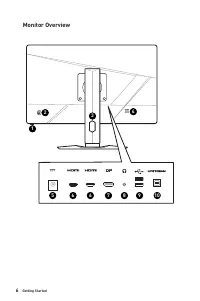
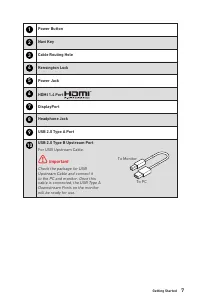
6 Getting Started Monitor Overview 2 3 4 5 6 7 8 1 6 9 10
Page 8 - Connecting the Monitor to PC
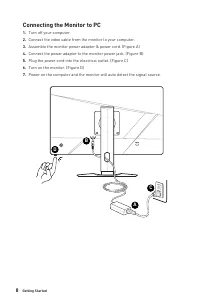
8 Getting Started Connecting the Monitor to PC 1. Turn off your computer. 2. Connect the video cable from the monitor to your computer. 3. Assemble the monitor power adapter & power cord. (Figure A) 4. Connect the power adapter to the monitor power jack. (Figure B) 5. Plug the power cord into th...
Page 9 - OSD Setup; Navi Key
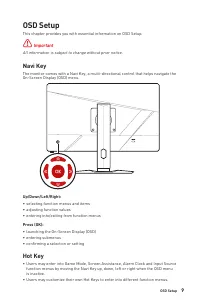
9 OSD Setup OSD Setup This chapter provides you with essential information on OSD Setup. ⚠ Important All information is subject to change without prior notice. Navi Key The monitor comes with a Navi Key, a multi-directional control that helps navigate the On-Screen Display (OSD) menu. Up/Down/Left/R...
Page 10 - OSD Menus; Gaming
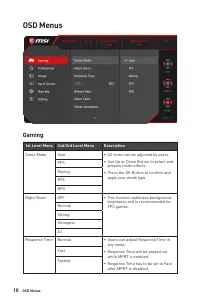
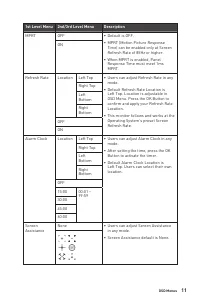
10 OSD Menus OSD Menus Gaming 1st Level Menu 2nd/3rd Level Menu Description Game Mode User ∙ All items can be adjusted by users. ∙ Use Up or Down Button to select and preview mode effects. ∙ Press the OK Button to confirm and apply your mode type. FPSRacingRTSRPG Night Vision OFF ∙ This function opt...
Page 12 - Professional
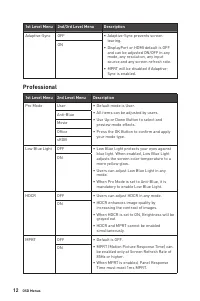
12 OSD Menus 1st Level Menu 2nd/3rd Level Menu Description Adaptive-Sync OFF ∙ Adaptive-Sync prevents screen tearing. ∙ DisplayPort or HDMI default is OFF and can be adjusted ON/OFF in any mode, any resolution, any input source and any screen refresh rate. ∙ MPRT will be disabled if Adaptive- Sync i...
Page 13 - Image
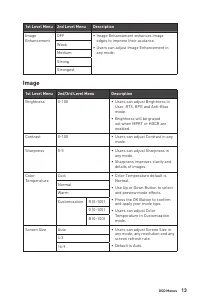
13 OSD Menus 1st Level Menu 2nd Level Menu Description Image Enhancement OFF ∙ Image Enhancement enhances image edges to improve their acutance. ∙ Users can adjust Image Enhancement in any mode. WeakMediumStrongStrongest Image 1st Level Menu 2nd/3rd Level Menu Description Brightness 0-100 ∙ Users ca...
Page 14 - Input Source
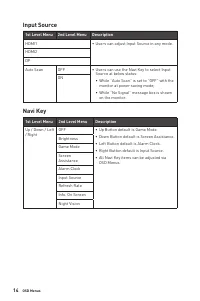
14 OSD Menus Input Source 1st Level Menu 2nd Level Menu Description HDMI1 ∙ Users can adjust Input Source in any mode. HDMI2 DPAuto Scan OFF ∙ Users can use the Navi Key to select Input Source at below status: • While “Auto Scan” is set to “OFF” with the monitor at power saving mode; • While “No Sig...
Page 15 - Setting
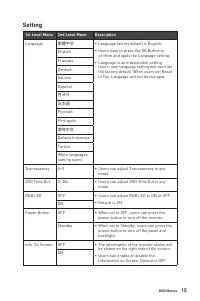
15 OSD Menus Setting 1st Level Menu 2nd Level Menu Description Language 繁體中文 ∙ Language factory default is English. ∙ Users have to press the OK Button to confirm and apply the Language setting. ∙ Language is an independent setting. Users’ own language setting will override the factory default. When...
Page 17 - Specifications
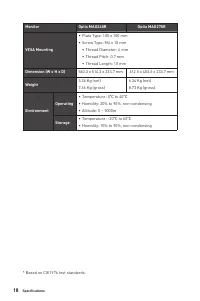
17 Specifications Specifications Monitor Optix MAG245R Optix MAG275R Size 23.8 inch 27 inch Panel Type IPS Resolution 1920 x 1080 @144Hz Aspect Ratio 16:9 Brightness (nits) 250 (typ.) Contrast Ratio 1000:1 Refresh Rate 144Hz Response Time 1ms (MPRT) Input Interface ∙ HDMI 1.4 Port x2 ∙ DisplayPort x...
Page 19 - Preset Display Modes
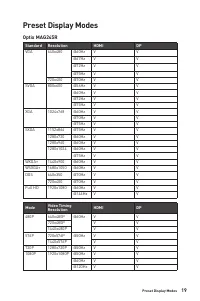
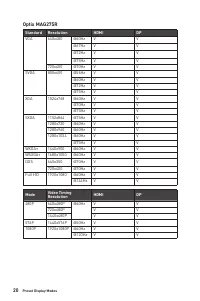
19 Preset Display Modes Preset Display Modes Optix MAG245R Standard Resolution HDMI DP VGA 640x480 @60Hz V V @67Hz V V @72Hz V V @75Hz V V 720x400 @70Hz V V SVGA 800x600 @56Hz V V @60Hz V V @72Hz V V @75Hz V V XGA 1024x768 @60Hz V V @70Hz V V @75Hz V V SXGA 1152x864 @75Hz V V 1280x720 @60Hz V V 1280...
Page 21 - Troubleshooting; The power LED is off.
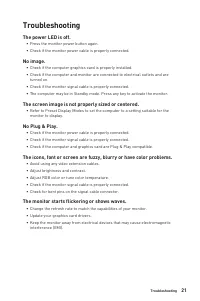
21 Troubleshooting Troubleshooting The power LED is off. • Press the monitor power button again. • Check if the monitor power cable is properly connected. No image. • Check if the computer graphics card is properly installed. • Check if the computer and monitor are connected to electrical outlets an...
Page 22 - Safety Instructions; Power
22 Safety Instructions Safety Instructions ∙ Read the safety instructions carefully and thoroughly. ∙ All cautions and warnings on the device or User Guide should be noted. ∙ Refer servicing to qualified personnel only. Power ∙ Make sure that the power voltage is within its safety range and has been...
Page 23 - Environment
23 Safety Instructions California, USA: The button cell battery may contain perchlorate material and requires special handling when recycled or disposed of in California. For further information please visit: https://dtsc.ca.gov/perchlorate/ Environment ∙ To reduce the possibility of heat-related in...
Page 24 - TÜV Rheinland Certification; TÜV Rheinland Low Blue Light Certification
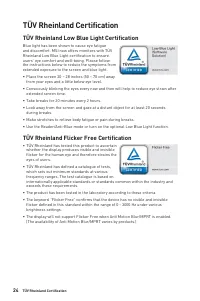
24 TÜV Rheinland Certification TÜV Rheinland Certification TÜV Rheinland Low Blue Light Certification Blue light has been shown to cause eye fatigue and discomfort. MSI now offers monitors with TÜV Rheinland Low Blue Light certification to ensure users’ eye comfort and well-being. Please follow the ...
Page 25 - Regulatory Notices; CE Conformity
25 Regulatory Notices Regulatory Notices CE Conformity This device complies with the requirements set out in the Council Directive on the Approximation of the Laws of the Member States relating to Electromagnetic Compatibility (2014/30/EU), Low-voltage Directive (2014/35/EU), ErP Directive (2009/125...
Page 26 - WEEE Statement; Chemical Substances Information; Japan JIS C 0950 Material Declaration; Ukraine Restriction of Hazardous Substances; Vietnam RoHS
26 Regulatory Notices WEEE Statement Under the European Union (“EU”) Directive on Waste Electrical and Electronic Equipment, Directive 2012/19/EU, products of “electrical and electronic equipment” cannot be discarded as municipal waste anymore and manufacturers of covered electronic equipment will b...
Page 27 - Green Product Features
27 Regulatory Notices Green Product Features ∙ Reduced energy consumption during use and stand-by ∙ Limited use of substances harmful to the environment and health ∙ Easily dismantled and recycled ∙ Reduced use of natural resources by encouraging recycling ∙ Extended product lifetime through easy up...