Page 3 - IMPORTANT SAFETY INSTRUCTIONS; TO REDUCE THE RISK OF FIRE, ELECTRIC SHOCK,
1 1 2 IMPORTANT SAFETY INSTRUCTIONS IMPORTANT SAFETY INSTRUCTIONS When using an basic precautions should always be followed, including the following: READ ALL INSTRUCTIONS BEFORE USING (THIS APPLIANCE) WARNING: TO REDUCE THE RISK OF FIRE, ELECTRIC SHOCK, DAMAGE, OR INJURY: 1. To protect against elec...
Page 4 - OVERVIEW
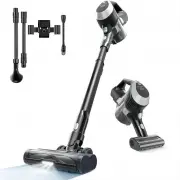
2 3 Vacuum Main Body Extend Tube Electric Floor Brush 2-in-1 Crevice Tool Electric Sofa Brush Charging Wall Mount Adapter Pet Brush Hose Battery Pack TC1-Mate TC1-Pro 3 4 Name Model Vacuum Main Body Extend Tube Electric Floor Brush 2-in-1 CreviceTool Electric Sofa Brush Charging Wall Mount Adapter P...
Page 5 - SPECIFICATIONS; Disposal; ASSEMBLY
SPECIFICATIONS 5 4 5 6 NameModelAdapter Input VoltageAdapter Output Voltage Vacuum Cleaner 100V~240V 50/60Hz 31V 0.5A TC1 Series The chemical substances contained in the built-in lithium-ion battery of this product will pollute the environment. Before scrapping the product, the battery must be remov...
Page 6 - OPERATING INSTRUCTIONS
6 1 2 7 8 OPERATING INSTRUCTIONS Charging Instruction CAUTION: It is important to fully charge your machine before using it for the first time and after every use. Charging Wall Mount To charge the machine, place it directly on the charging wall mount after every use. Plug the adapter into a wall ou...
Page 7 - Crevice Tool Instruction; Indicator Light Instruction
6 Normal Operation: After power on, if the machine is running normally, the number in the middle of the screen displays the remaining usage time (percentage), and the corresponding suction icon is always on. Indicator Troubleshooting: 1. “Brushroll Jam Indicator” — Check for and clear out blockage i...
Page 8 - Charging Wall Mount Instruction; Accessories Usage Guide
Charging Wall Mount Instruction Using screws to connect the two sides to the main board. 6 1 11 12 OPERATING INSTRUCTIONS Accessories Usage Guide Floor Brush: suitable for carpets, floors, and other flat, horizontal surfaces. Sofa Brush: suitable for surface dust, pet hair, mites, etc., on soft surf...
Page 9 - CLEANING AND MAINTENANCE; Clean the Dust Cup
6 7 2 3 2 3 4 13 14 OPERATING INSTRUCTIONS Plug the adapter into the wall socket and connect it to the charging port on the charging base. Charging the vacuum or storage the vacuum and accessories. Please storage accessories on charging wall mount as illustrated below. CLEANING AND MAINTENANCE Clean...
Page 10 - Cleaning the Filter Device
7 4 15 16 ≥60℃ CLEANING AND MAINTENANCE Cleaning the Filter Device 1 Press the dust cup release button and remove the dust cup. 2 After taking out the dust cup, take out the pre-filter and filter sponge . 6 Reinstall the dust cup, first step to align the bottom part then push the top part until hear...
Page 11 - Clean the Floor Brush
7 17 18 CAUTION: When the "Brushroll Jam Indicator" " " on the LED screen flashes until the screen is off, while the LED light on the floor brush is off and the floor brush stops rotating, it means that the floor brush is blocked. Check the floor brush and clear the blockage...
Page 12 - CLEANING A CLOG; Cleaning a Clog; TROUBLESHOOTING
9 8 Troubleshooting CAUTION: Low suction or vacuum failure caused by overheating may be due to a clog in the vacuum. Please check and clear clogs in the dust cup, mesh shell, pre-motor filter, post-motor filter, metal tube, and floor brush. 1 2 3 4 19 20 CLEANING A CLOG Check and rinse the filter an...
Page 13 - WARRANTY; CUSTOMER CARE; WARRANTY SERVICE
10 21 22 WARRANTY CUSTOMER CARE The 1-year Limited Warranty is valid for Products. If your machine is used correctly according to the instruction manual and there is a quality failure during the warranty period, we will provide you with free warranty service once you contact us. *If service parts ar...