Page 2 - Index
Index Warning .................................................................................................. 1Contents ............................................................................................... 2Quick Start .......................................................................
Page 3 - Canadian Department of Communications Compliance Statement; FCC Information; WARNING
1 Canadian Department of Communications Compliance Statement DOC: This Class B digital apparatus meets all requirements of the Canadian Interference- Causing Equipment Regulations. C-UL: Bears the C-UL Mark and is in compliance with Canadian Safety Regulations according to C.S.A. 22.2 #950. FCC Info...
Page 4 - monitor box* should contain the; with tilt/swivel base; Contents
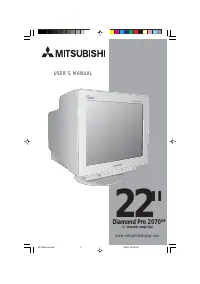
2 Your new Diamond Pro 2070 SB monitor box* should contain the following: • Diamond Pro 2070 SB with tilt/swivel base • Power Cord• Signal Cable (D-Sub to D-Sub) • USB Cable• User’s Manual Contents Power Cord User ’s Manual * Remember to save your original box and packing material to transport or sh...
Page 5 - Quick Start; NOTE: To obtain the Diamond Pro 2070
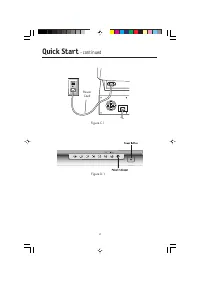
3 Quick Start To attach the Diamond Pro monitor to your system, follow theseinstructions: 1. Turn off the power to your computer.2. If necessary, install the graphics card into your system. For more information, refer to the graphics card installation manual. 3. For the PC: Connect the 15-pin mini D...
Page 6 - –continued
4 Quick Start –continued Figure D.1 Power Cord Figure C.1
Page 7 - OSM; Brightness/Contrast Controls; Controls
5 OSM ™ (On-Screen Manager) control buttons on the front of the monitor function as follows: Main Menu Sub-Menu EXIT Exits the OSM menu. Exits to the OSM controls main menu. Note : Deactivates the OSM menu and activates the OSM menu when the OSM is turned off. CONTROL Moves the highlighted Moves the...
Page 8 - Size and Position Controls; Tools 1
6 Controls –continued Size and Position Controls Auto Adjust: Automatically adjust the horizontal and vertical size and position settings for the applicable timing signal. NOTE: Auto Adjust is unavailable with no image signal or narrow size of image signal input. Left/Right: Moves the image horizont...
Page 9 - Tools 2
7 Linearity: This selection allows you to adjust the spacing of the area on the screen. The purpose of this control is to ensure that a one-inch circle is a true one-inch circle whereverit is on the screen. The best way to determine the vertical linearity is as follows: • Draw equally spaced horizon...
Page 10 - RESET; Indicates the current mode and frequency setting of the monitor.
8 Factory Preset: Selecting Factory Preset allows you a reset most OSM ™ control settings back to the factory settings. A warning statement will appear to confirmthat you do want to reset ALL settings. Individual settings can be reset by high-lighting the control to be reset and pressing the RESET b...
Page 11 - Safety Precautions and Maintenance; FOR OPTIMUM PERFORMANCE, PLEASE NOTE THE; Recommended Use; CAUTION
9 Safety Precautions and Maintenance FOR OPTIMUM PERFORMANCE, PLEASE NOTE THE FOLLOWING WHEN SETTING UP AND USING THE DIAMOND PRO COLOR MONITORS: • DO NOT OPEN THE MONITOR. There are no user serviceable parts inside and opening or removing covers may expose you to dangerous shock hazards or otherris...
Page 13 - and may produce eye fatigue due to insufficient contrast
11 Recommended Use –continued • Use the preset Color Setting and Sides Left/Right controls• Use non-interlaced signals with a vertical refresh rate between 75-160Hz• Do not use primary color blue on a dark background, as it is difficult to see and may produce eye fatigue due to insufficient contrast...
Page 14 - Specifications; Monitor; Notes
12 Specifications Monitor Diamond Pro 2070 SB Notes Specifications Monitor Picture Tube Diagonal: 22 inch/55 cm 90 ° deflection, 0.24 mm grille pitch, Viewable Image Size: 20 inch/508 mm medium short persistence phosphor, Radius: 50000 mm aperture grille CRT, G-WARAS coating Input Signal Video: ANAL...
Page 15 - Features
13 Features Flat Aperture Grille CRT: Delivers an unparalleled viewing experience with a virtually flat image, eliminating distortion and reducing glare so that what you see on-screen is what you get on your printed output. The striped phosphor alignment of the CRT delivers superior vertical definit...
Page 16 - sustains the brightness and screen color levels consistently; Self-powered hub with 1 upstream port and 4 downstream ports.
14 Features –continued Constant Brightness: sustains the brightness and screen color levels consistently over the normal life of the monitor. SB (Super Brightness) Mode: Provides the screen brightness suitable for the screen images displayed. Super Bright Mode OFF: for text based images (normal use)...
Page 18 - Attention message displayed
16 Troubleshooting –continued Attention message displayed • Check the inputted signal. NOTE:The attention message may display when power on the Diamond Pro monitor. In case that the attention message disappear after in a little while, there is no problem at the inputted signal. Self check function •...
Page 19 - INFORMATION
17 References • BBS (978) 742-8706 NEC-Mitsubishi Electronics Display of America Remote Bulletin Board System isan electronic service accessible with your system and a modem. Communica-tion parameters are: 300/1200/2400/9600/14.4k/28.8k/33.6k bps, noparity, 8-data bits, 1 stop bit • Customer Service...
Page 20 - Limited Warranty
18 Limited Warranty NEC-Mitsubishi Electronics Display of America, Inc. (hereinafter “NMD-A”) warrants thisProduct to be free from defects in material and workmanship and, subject to the conditions setforth below, agrees to repair or replace (at NMD-A’s sole option) any part of the enclosed unitwhic...
Page 21 - Black Front Model
19 TCO’95 Diamond Pro 2070 SB Black Front Model Congratulations! You have just purchased a TCO’95 approved andlabeled product! Your choice has provided you with a product developedfor professional use. Your purchase has also contributed to reducing theburden on the environment and also, to the furth...
Page 22 - CFCs
20 TCO’95 –continued reproductive damage in fisheating birds and mammals, due to the bio-accumulative*processes. Flame retardants have been found in human blood and researchers fear thatdisturbances in foetus development may occur.TCO’95 demand requires that plastic components weighing more than 25 ...
Page 23 - Silver Front Model; Why do we have environmentally labelled computers?
21 TCO’99 Diamond Pro 2070 SB Silver Front Model Congratulations! You have just purchased a TCO’99 approved andlabeled product! Your choice has provided you with a product devel-oped for professional use. Your purchase has also contributed toreducing the burden on the environment and also to the fur...
Page 25 - Declaration of the Manufacturer; and marked with
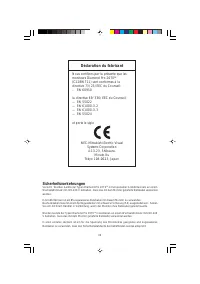
23 Declaration of the Manufacturer We hereby certify that the color monitorsDiamond Pro 2070 SB (C22BW711) is in compliance with Council Directive 73/23/EEC:– EN 60950 Council Directive 89/336/EEC:— EN 55022— EN 61000-3-2— EN 61000-3-3— EN 55024 and marked with NEC-Mitsubishi Electric Visual Systems...
Page 27 - Informations FCC; AVERTISSEMENT
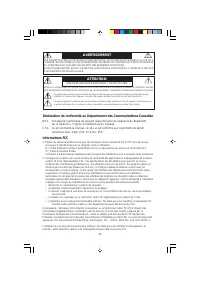
25 Déclaration de conformité au Département des Communications Canadien DOC : Cet appareil numérique de classe B respecte toutes les exigences du Règlement sur le matériel à l'origine d'interférences du Canada. C-UL : Ce produit porte la marque «C-UL» et est conforme aux règlements de sûreté canadie...
Page 28 - Contenu; La boîte* de votre nouveau moniteur Diamond Pro 2070; • Moniteur Diamond Pro 2070; avec socle inclinable/rotatif
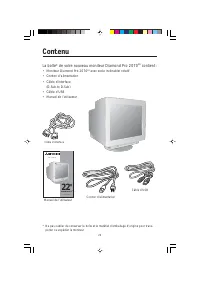
26 Contenu Manuel de l’utilisateur * Ne pas oublier de conserver la boîte et le matériel d’emballage d’origine pour trans- porter ou expédier le moniteur. Cordon d’alimentation La boîte* de votre nouveau moniteur Diamond Pro 2070 SB contient : • Moniteur Diamond Pro 2070 SB avec socle inclinable/rot...
Page 29 - Mise en marche rapide
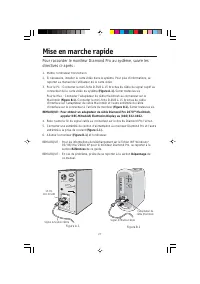
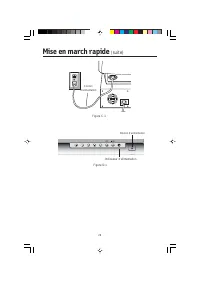
27 Mise en marche rapide Pour raccorder le moniteur Diamond Pro au système, suivre lesdirectives ci-après : 1. Mettre l'ordinateur hors tension.2. Si nécessaire, installer la carte vidéo dans le système. Pour plus d'informations, se reporter au manuel de l’utilisateur de la carte vidéo. 3. Pour le P...
Page 30 - Mise en march rapide
28 Mise en march rapide (suite) Cordon d’alimentation Figure D.1 Figure C.1 Bouton d’alimentation Indicateur d’alimentation
Page 31 - Commandes; Les touches de commandes OSM; (Gestionnaire à l’écran) à l’avant du moniteur; Commandes de luminosité/contraste
29 Commandes Les touches de commandes OSM MC (Gestionnaire à l’écran) à l’avant du moniteur fonctionnent comme suit : Menu principal Sous-menu. EXIT Quitte le menu OSM Quitte les commandes OSM. menu principal Remarque : Désactive le menu OSM et active le menu OSM lorsque l’OSM est éteint. CONTROL Dé...
Page 32 - Commandes de format et de position
30 Commandes (suite) utilisation de la commande Degauss . Luminosité Constante: Maintient la luminosité et la qualité de couleur de l’écran d’une façon constante durant la période de vie normale du moniteur. La fonction de la luminosité constante nécessite une durée de préchauffage du moniteur de 30...
Page 33 - Outils 2
31 Commandes (suite) peut être plus prononcé avec certaines applications. Pour réduire le motif Moiré, réglez lesvaleurs Horizontal et/ou Vertical à l’aide des boutons CONTROL –/+. Convergence : Aligne les trois couleurs (R, V, B) pour composer une seule couleur (blanc). Cette commande a pour but d’...
Page 34 - Information
32 Commandes (suite) Système IPM MC : Activé : Le système IPM fonctionne normalement et toutes les étapes de sauvegarde d’énergie sont utilisées. Désactivé : Réinitialisation du mode arrêt. Remarque : Pour les systèmes standard et les cartes graphiques, laisser les réglages d’usine sur ENABLE. Remar...
Page 35 - Usage recommandé; Consignes de sécurité et d’entretien; POUR UN FONCTIONNEMENT OPTIMAL, PRIÈRE DE NOTER
33 Usage recommandé Consignes de sécurité et d’entretien POUR UN FONCTIONNEMENT OPTIMAL, PRIÈRE DE NOTER CE QUI SUIT POUR LE RÉGLAGE ET L'UTILISATION DU MONITEUR COULEUR DIAMOND PRO : • NE PAS OUVRIR LE MONITEUR. Aucune pièce intérieure ne nécessite l'intervention de l'utilisateur, et l'ouverture ou...
Page 36 - MÉNAGEMENT
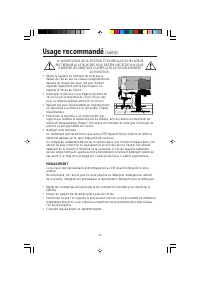
34 LA MODIFICATION DE LA POSITION ET DU RÉGLAGE DU MONITEUR PEUT RÉDUIRE LA FATIGUE DES YEUX, DES ÉPAULES ET DE LA NUQUE. OBSERVER LES DIRECTIVES CI-APRÈS LORS DU POSITIONNEMENT DU MONITEUR : Usage recommandé (suite) • Régler la hauteur du moniteur de sorte que ledessus de l'écran soit au niveau ou ...
Page 37 - Ergonomie
35 Usage recommandé (suite) Ergonomie Pour optimiser les avantages ergonomiques, observez les directives suivantes :• Régler la luminosité jusqu’à ce que la trame de fond disparaisse.• Ne pas placer la commande de contrate à son réglage maximum.• Utiliser les commandes de format et position préprogr...
Page 38 - Fiche technique
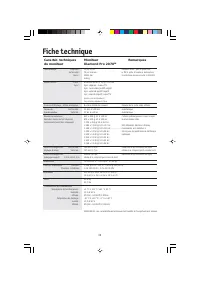
36 Fiche technique Caractér. techniques Moniteur Remarques du moniteur Diamond Pro 2070 SB Tube cathodique Diagonale : 22 po/55 cm Déflexion de 90°, pas de grille 0,24, Surface utile : 20 po/508 mm le TRC à grille d’ouverture, luminophore Rayon : 50000 mm à persistance moyenne-courte, G-WARAS coatin...
Page 39 - Fonctions
37 Fonctions TRC à grille d’ouverture plate : Assure une qualité de visualisation inégalée avec une image quasi-plate, éliminant la distorsion et réduisant les reflets de sorte que ce que vous voyez à l’ecran est identique à ce qui est imprimé sur paper. L’alignement luminophore strié su TRC fournit...
Page 40 - Dépannage
38 Dépannage Pas d'image • La carte vidéo doit être complètement introduite dans son logement.• La touche d'alimentation et le commutateur d'alimentation de l'ordinateu doivent être en position ON (Marche). • Le câble d’interface doit être bien connecté à la carte vidéo/l'ordinateur.• Vérifier si le...
Page 42 - Opérations Européennes:
40 Références • BBS (978) 742-8706 Le système de babillard électronique NEC-Mitsubishi Electronics Display of America, Inc. est un service électronique accessible avec votre système et unmodem. Les paramètres de communication sont : 300/1200/2400/9600/1,4 k/28,8 k/33,6 k bps, pas de parité, 8 bits d...
Page 43 - Garantie limitée
41 Garantie limitée NEC-Mitsubishi Electronics Display of America, Inc. (ci-après «NMD-A») garantit que ce produit est exempt de vice de fabrication et de main-d’oeuvre et, selon les conditions énoncées ci-dessous, accepte de réparer ou remplacer, à sa discrétion, toute pièce de l’appareil concerné ...
Page 44 - Modèle frontal de couleur noir
42 TCO’95 Diamond Pro 2070 SB Modèle frontal de couleur noir Félicitations! Vous avez acheté un produit qui répond à la directive TCO’95.En choisissant ce produit conçu pour une utilisation professionnelle, vouscontribuez aussi à la réduction des effets nuisibles sur l’environnement et aussiau dével...
Page 45 - Hydrocarbures chlorofluorés
43 de substances ignifuges. Ces dernières s’apparentent à un autre groupe de toxinesenvironnementales, les PCB, qui sont suspectés de provoquer les mêmes effets néfastes, dont lamodification de la reproduction chez les oiseaux piscivores et les mammifères, attribuable auxprocessus biocumulatifs*. La...
Page 46 - Modèle frontal de couleur argent
44 TCO’99 Diamond Pro 2070 SB Modèle frontal de couleur argent Félicitations! Vous avez acheté un produit qui répond à la directive TCO’99. En choisissant ce produit conçu pour une utilisation professionnelle, vous contribuez aussi à la réduction des effets nuisibles sur l’environnement et aussi au ...
Page 48 - Sicherheitsvorkehrungen; Déclaration du fabricant; et porte le sigle
46 Sicherheitsvorkehrungen Vorsicht: Werden Geräte der Typen Diamond Pro 2070 SB in Europa(außer Großbritannien) an einem Wechselstromnetz mit 220-240 V betrieben, muss das mit dem Monitor gelieferte Netzkabel verwendetwerden. In Großbritannien ist ein BS-zugelassenes Netzkabel mit diesem Monitor zu...
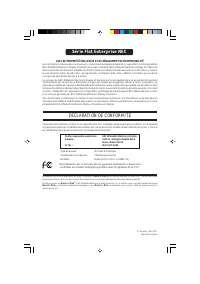
Page 49 - DÉCLARATION DE CONFORMITÉ; Série Flat Enterprise NEC
AVIS DE PROPRIÉTÉ ENCLUSIVE ET DE DÉGAGEMENT DE RESPONSIBILITÉ Les informations contenues dans ce document, y compris tous les designs et matériel s'y rapportant, sont la propriété deNEC-Mitsubishi Electronics Display of America et/ou ses concédants. NEC-Mitsubishi Electronics Display of America ser...
Page 50 - DECLARATION OF CONFORMITY; NEC Flat Enterprises Series
PROPRIETARY NOTICE AND LIABILITY DISCLAIMER The information disclosed in this document, including all designs and related materials, is the valuable property ofNEC-Mitsubishi Electronics Display of America and/or its licensors, as appropriate, reserve all patent, copyright andother proprietary right...






 Mitsubishi PKA-A18GA
User Manual
Mitsubishi PKA-A18GA
User Manual
 Mitsubishi PCA-A42GA1
User Manual
Mitsubishi PCA-A42GA1
User Manual
 Mitsubishi MSZ-FH18NA
User Manual
Mitsubishi MSZ-FH18NA
User Manual
 Mitsubishi MSZ-D36NA
User Manual
Mitsubishi MSZ-D36NA
User Manual
 Mitsubishi WD-82742
User Manual
Mitsubishi WD-82742
User Manual
 Mitsubishi MSZ-FE09NA
User Manual
Mitsubishi MSZ-FE09NA
User Manual
 Mitsubishi LT-46164
User Manual
Mitsubishi LT-46164
User Manual
 Mitsubishi MSY-D36NA-8
User Manual
Mitsubishi MSY-D36NA-8
User Manual
 Mitsubishi MSY-A15NA-1
User Manual
Mitsubishi MSY-A15NA-1
User Manual
 Mitsubishi WD-73638
User Manual
Mitsubishi WD-73638
User Manual